Last updated: May 11, 2026
Quick Answer: Base44 is an AI-powered no-code app builder that turns plain-text prompts into functional web applications in minutes. It’s best suited for prototyping, MVPs, and simple internal tools, especially for solo builders and non-technical users on a budget. It is not yet reliable enough for production-scale or team-based projects.
Key Takeaways
- Base44 lets you describe an app idea in natural language, and its AI generates a working application with a database, UI, and basic logic [1].
- The platform offers a free tier, making it one of the most affordable entry points for AI app building in 2026 [8].
- It excels at rapid prototyping and MVPs but struggles with advanced logic, scalability, and production reliability [10].
- Competitors like Lovable (starting at $21/month) and Zite ($15/month annual) offer stronger options for production-ready apps and team collaboration.
- A known risk: AI-driven updates can sometimes break working apps without user consent [3].
- Base44 is a strong starting tool, but most users will need additional platforms as their app matures.

What Is Base44 and How Does It Work?
Base44 is a no-code platform that uses AI “superagents” to build web applications from simple text prompts. You describe what you want — say, a task management app with user login and a dashboard — and Base44 generates the app structure, database, and interface automatically [1].
The core workflow looks like this:
- Write a prompt describing your app idea in plain English.
- AI generates the app, including pages, data models, and basic workflows.
- Refine the output using a visual editor or follow-up prompts.
- Deploy directly from the platform.
Base44 calls this approach “vibe coding,” where the AI interprets your intent rather than requiring you to specify exact technical details [1]. Product Hunt reviewers have noted that the AI interaction feels smooth, with quick edits and a built-in database that simplifies the process compared to tools like Lovable or Bolt.
Common mistake: Treating Base44 like a traditional app builder. It works best when you give it clear, specific prompts rather than vague descriptions. “Build me a CRM” will produce a generic result. “Build a CRM for a freelance photographer that tracks client bookings, sends invoice reminders, and shows a monthly revenue chart” gives the AI much more to work with.
Who Should Use Base44 (and Who Shouldn’t)?
Base44 fits a specific profile well, and falls short for others.
Choose Base44 if you are:
- A solo founder or indie maker testing an app idea quickly
- A non-technical person who needs a simple internal tool (inventory tracker, booking form, dashboard)
- A student or hobbyist exploring app development without writing code
- Budget-conscious — the free tier lets you test before committing money [8]
Don’t choose Base44 if you:
- Need a production app serving thousands of users — it lacks the reliability and scale for that [10]
- Work on a team that needs collaboration features, version control, or role-based access
- Require advanced business logic, complex integrations, or compliance certifications like SOC 2
- Want to export your code to GitHub or host it independently
The WaveSpeed Blog’s assessment (January 2026) sums it up well: Base44 is “absolutely worth trying” for prototypes and simple tools, but treat it as one piece of your toolkit rather than a complete solution.
If you’re exploring the broader no-code space, our review of the best no-coding website design platforms for 2026 covers additional options worth considering.
How Does Base44 Compare to Other No-Code App Builders?
This is the question most people researching Base44 actually want answered. Here’s a direct comparison with its closest competitors:
| Feature | Base44 | Lovable | Zite | Bolt |
|---|---|---|---|---|
| Starting price | Free tier available | $21/month | $15/month (annual) | Free tier available |
| Pricing model | Credit-based | Subscription | Subscription (no per-seat) | Credit-based |
| Best for | Prototypes, MVPs | Full-stack apps | Production apps | Quick prototypes |
| Code export | No | Yes (GitHub) | Limited | Yes |
| Database | Built-in | Supabase integration | Multi-source | Built-in |
| Team features | Minimal | Moderate | Strong | Minimal |
| SOC 2 compliance | No | No | Yes | No |
| AI prompt building | Yes | Yes | Yes | Yes |
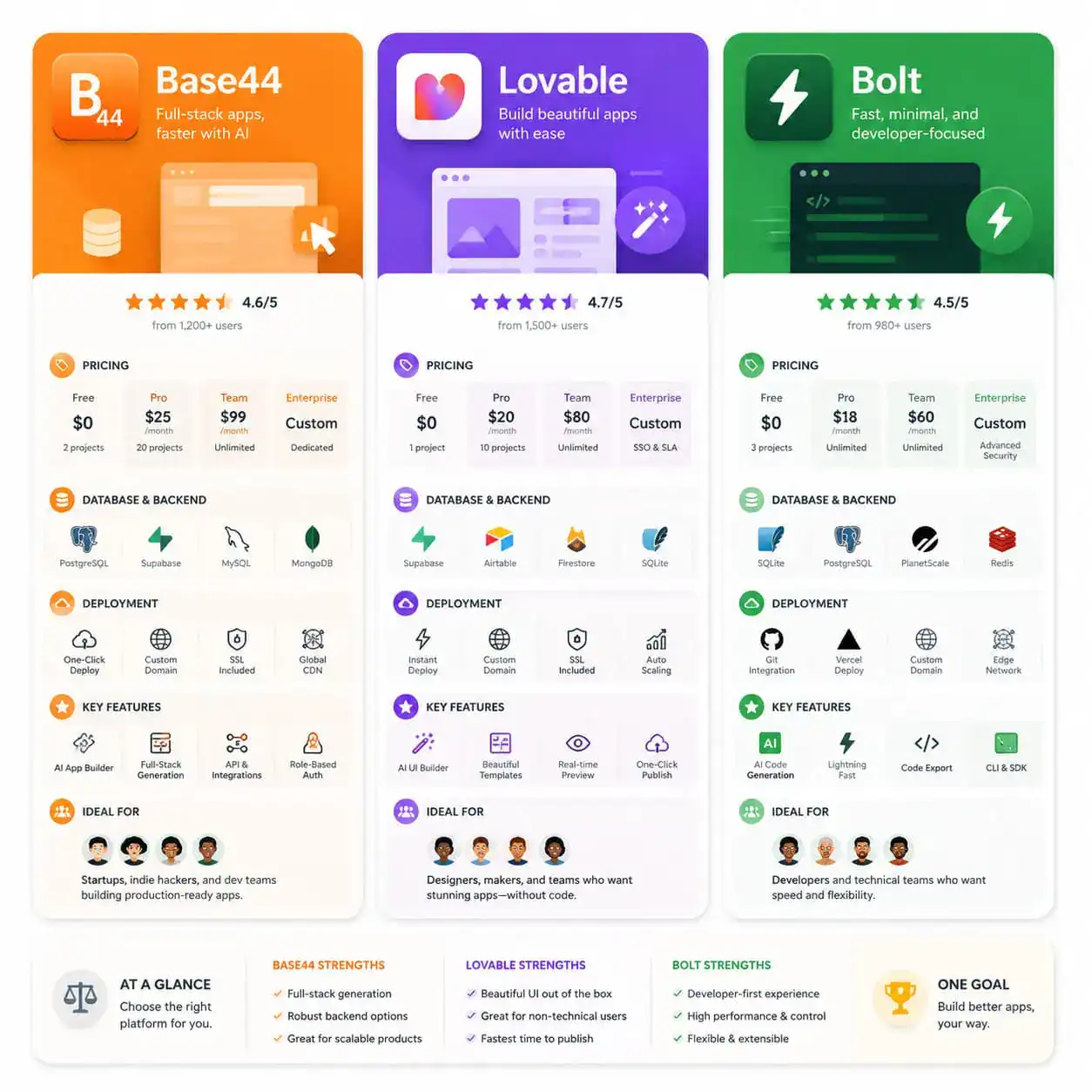
Decision rules:
- Choose Base44 if you want the cheapest way to test an idea and don’t need production reliability.
- Choose Lovable if you want to eventually hand off to a developer — GitHub export and Supabase integration make that transition smoother.
- Choose Zite if you need a production-ready app with compliance requirements and team collaboration, and you’re willing to pay $15/month.
- Choose Bolt if you want quick prototyping with the option to export and self-host.
Marc Andrews’ pricing analysis positions Base44 as the “cheapest AI app builder worth using in 2026,” which holds true for its intended use case [8]. But cheap doesn’t mean best for every situation.
For those building websites rather than apps, our guide to drag-and-drop website builders covers platforms better suited to that goal.
What Can You Actually Build with Base44?
Base44 handles simple to moderately complex web applications well. Based on user reviews and tutorials, here are realistic use cases:
- Internal dashboards — track metrics, visualize data, manage simple workflows
- CRUD apps — create, read, update, delete records (inventory, contacts, tasks)
- Simple booking systems — appointment scheduling with basic form logic
- Landing pages with data collection — forms connected to a built-in database
- Prototype demos — functional mockups to show investors or stakeholders
Edge case to watch: One Reddit user on r/Base44 reported that the AI sometimes applies unrequested “updates” to working apps, which can break functionality [3]. This is a significant concern if you’re relying on Base44 for anything beyond throwaway prototypes. Save versions frequently and test after any AI interaction.
If you’re interested in using AI for broader content and site creation, our piece on AI website creators explores how similar technology applies to website building.
Step-by-Step: How to Build Your First App in Base44
Here’s a practical walkthrough based on available tutorials and the platform’s documented workflow [6][9]:

Step 1: Sign up and access the free tier
Create an account at base44.com. The free tier gives you enough credits to build and test a basic app without paying anything [8].
Step 2: Write a detailed prompt
Be specific. Instead of “make me a to-do app,” try: “Create a task management app with three priority levels (high, medium, low), due dates, a dashboard showing overdue tasks, and the ability to assign tasks to team members by email.”
Step 3: Review the generated app
Base44’s AI will produce an app with pages, a database schema, and basic UI. Review each component. The built-in database is one of its strongest features — it auto-creates tables and relationships based on your prompt.
Step 4: Refine with follow-up prompts or the visual editor
You can type additional instructions like “add a search bar to the task list” or “change the color scheme to dark mode.” You can also use the visual editor for manual adjustments.
Step 5: Test thoroughly
Click through every feature. Check edge cases (what happens with empty fields, duplicate entries, etc.). This is where most AI-generated apps need the most human attention.
Step 6: Deploy
Base44 handles hosting. Your app gets a URL you can share. For simple internal tools or demos, this is usually sufficient.
Pro tip: Treat your first app as a learning exercise. The more you understand how Base44 interprets prompts, the better your second and third apps will be.
For teams working with design tools before building, our guide on Figma to code plugins explains how to bridge the design-to-development gap.
What Are the Biggest Limitations and Risks?
Being honest about limitations helps you make a better decision. Here are the main concerns raised by reviewers and users:
- Production reliability is weak. Zite’s 2026 review specifically criticizes Base44 for lacking the stability needed for apps serving real users at scale [10].
- AI can break things. The unrequested update issue reported on Reddit is a real risk for anyone depending on app stability [3].
- No code export. Unlike Lovable, you can’t take your code and host it elsewhere. You’re locked into Base44’s infrastructure.
- Limited team features. There’s no meaningful collaboration workflow, making it unsuitable for teams larger than one or two people [10].
- Credit-based pricing can surprise you. Heavy iteration burns through credits faster than you might expect. Monitor your usage.
- Complex logic hits a wall. Conditional workflows, multi-step automations, and advanced API integrations are either limited or unavailable.
These aren’t dealbreakers for the right use case. But if you go in expecting a full development platform, you’ll be disappointed.
If you’re exploring AI-powered tools more broadly, our guide to AI-powered content generation tools covers how AI is changing content workflows alongside app development.
How Much Does Base44 Cost in 2026?
Base44 uses a credit-based pricing model with a free tier for testing [8]. Here’s what to know:
- Free tier: Available and functional enough to build a basic app. Good for evaluation.
- Paid plans: Credit-based, meaning you pay for AI generations and iterations rather than a flat monthly fee.
- Cost positioning: Marc Andrews’ analysis calls it the cheapest AI app builder worth using in 2026, which holds up against Lovable ($21/month) and Zite ($15/month annual) [8].
When credits work in your favor: If you build a simple app and don’t iterate heavily, you’ll spend very little. When credits work against you: If you’re constantly refining, testing new prompts, and rebuilding, costs add up quickly.
For budget-conscious builders also looking at website solutions, check our no-code category for more affordable tools and strategies.
FAQ
Can I build a mobile app with Base44? Base44 primarily generates web applications. The output is browser-based and can be accessed on mobile devices, but it doesn’t produce native iOS or Android apps.
Is Base44 free to use? Yes, there’s a free tier that provides enough credits to build and test a basic application [8]. Paid plans are available for heavier usage.
Can I export my Base44 app’s source code? No. Unlike Lovable, which offers GitHub export, Base44 keeps your app within its platform. This is a significant consideration for long-term projects.
Is Base44 good for building production apps? Not yet. Multiple reviewers note it lacks the reliability, scalability, and advanced features needed for production use [10]. It’s best for prototypes and MVPs.
How does Base44 handle databases? Base44 includes a built-in database that auto-generates tables and relationships based on your prompt. This is one of its strongest features for simple data management [1].
Can a team collaborate on Base44? Team collaboration features are minimal. Base44 is designed primarily for individual users [10].
What happens if the AI breaks my app? This has been reported by users [3]. Save versions frequently and test after any AI-assisted changes. There’s no robust version control system built in.
How does Base44 compare to Bubble? Bubble is a more mature no-code platform with deeper customization, plugin ecosystems, and production readiness. Base44 is faster for initial creation but far more limited in scope.
Do I need any coding knowledge to use Base44? No. The entire platform is designed for non-technical users who describe what they want in plain language [6][9].
Conclusion
Base44 fills a specific and valuable niche in 2026: it’s the fastest, cheapest way to turn an app idea into something functional. For solo builders testing concepts, creating internal tools, or building quick demos, it delivers real value — especially with its free tier.
But go in with clear expectations. This is a prototyping tool, not a production platform. The lack of code export, limited team features, and documented reliability issues mean you’ll likely outgrow it if your app gains traction.
Your next steps:
- Sign up for the free tier at base44.com and build a test app to evaluate the platform firsthand.
- Write three different prompts for the same app idea to see how prompt quality affects output.
- Compare the result against what you’d get from Lovable or Zite if your project needs production readiness.
- Bookmark our no-code platform reviews to stay current as these tools evolve rapidly.
Base44 won’t replace a development team. But it might save you weeks of work figuring out whether your idea is worth building in the first place — and that alone makes it worth trying.
References
[1] base44 – https://base44.com [3] Is Base44 A Good Ai App Builder – https://www.reddit.com/r/Base44/comments/1o1yo2e/is_base44_a_good_ai_app_builder/ [6] Watch – https://www.youtube.com/watch?v=RVcu03w4wnE [8] Base44 Pricing 2026 Cheapest Ai App Builder Worth Using – https://marcandrews.com/base44-pricing-2026-cheapest-ai-app-builder-worth-using/ [9] Watch – https://www.youtube.com/watch?v=_SLMRmbKssI [10] Base44 Review – https://www.zite.com/blog/base44-review