Last updated: May 11, 2026
Quick Answer: The Base44 Builder Plan is a $40/month AI-powered app development tier that gives solo developers and small teams the tools to build, deploy, and scale functional web applications without writing traditional code. It sits between the free tier and enterprise options, offering custom domains, GitHub integration, backend support, and enough credits for serious projects. For most builders moving beyond prototypes, it’s the tier where Base44 becomes a real development tool rather than a toy.
Key Takeaways
- The Builder Plan costs $40/month and is designed for solo developers and small teams building production-ready apps [5].
- It unlocks custom domains, GitHub integration, and backend data-syncing capabilities not available on the free tier [4].
- Credits do not roll over month to month, so plan your build cycles carefully.
- Base44’s AI-driven prompting can generate functional apps quickly, but reliability drops during heavy iteration; direct code edits often fix issues faster than re-prompting.
- Alternatives like Bolt.new (~$25/month), Replit ($20–35/user/month), and Lovable serve different needs depending on your priorities around code export, scalability, and pricing structure.
- The platform added mobile app publishing support as of February 2026 [10].
- Performance can degrade around 200 concurrent users, making it better suited for MVPs and early-stage products than high-traffic production apps.
What Is the Base44 Builder Plan and Who Is It For?
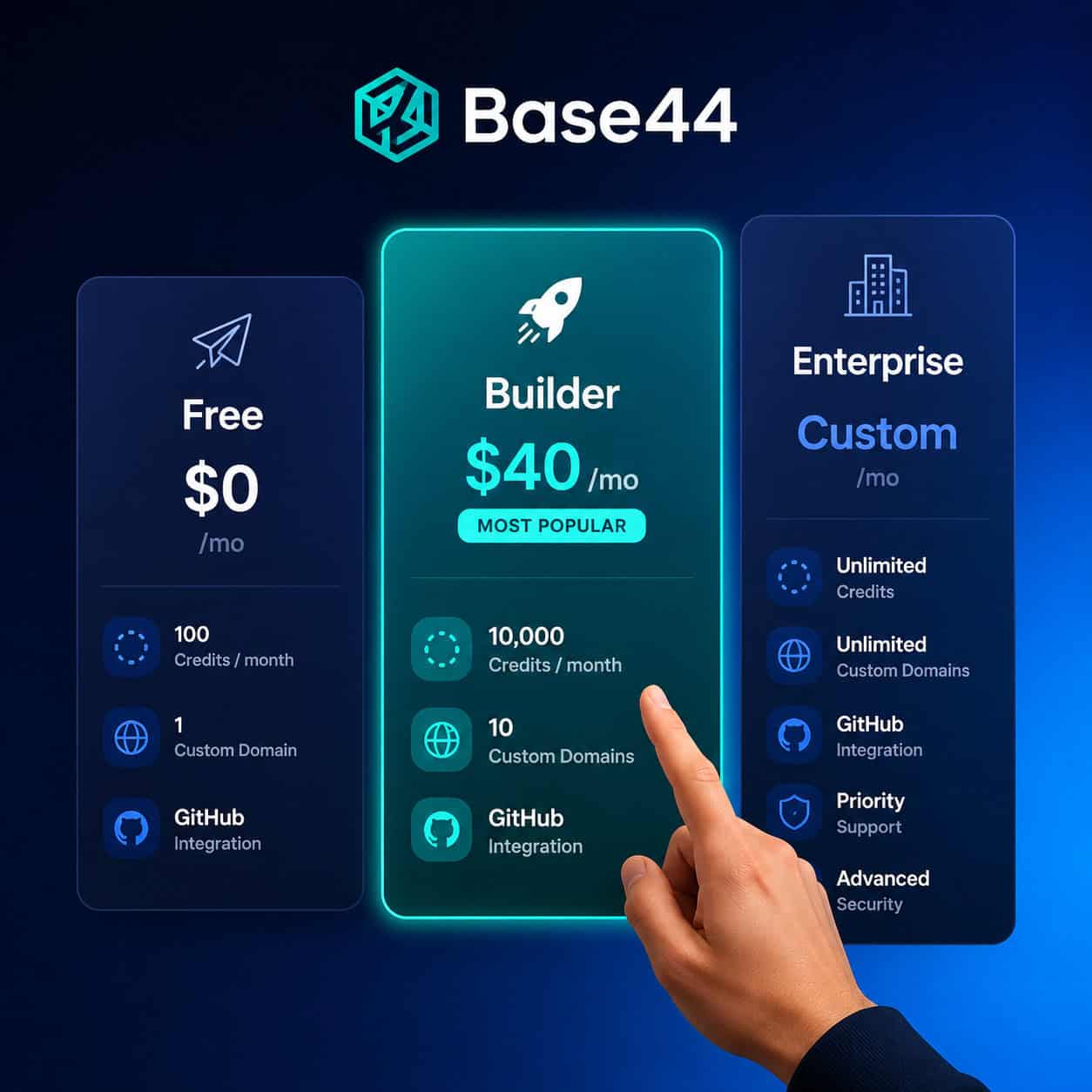
The Base44 Builder Plan is the mid-tier subscription on Base44’s AI app-building platform, priced at $40 per month [1][2]. It’s the first tier that treats you like a serious developer rather than someone just experimenting.
Choose the Builder Plan if you:
- Are a solo developer or freelancer building client-facing MVPs
- Need custom domain support and GitHub connectivity
- Want backend functionality for data-heavy apps (user accounts, databases, API connections)
- Plan to monetize your app (Stripe integration is supported) [4]
Skip it if you:
- Only need a simple landing page or portfolio (the free tier handles that)
- Require enterprise-grade compliance, team collaboration, or dedicated support (you’ll need a higher tier)
- Expect to serve hundreds of concurrent users in production (scalability has documented limits)
PCMag noted in March 2026 that Base44’s intelligent infrastructure significantly reduces deployment times, and the Builder Plan is where that capability becomes practical for professional outputs [9]. A May 2026 YouTube review reinforced this, calling the Builder Plan’s backend support “essential for data-syncing apps” and recommending it over lower tiers for most users [4].
If you’re exploring no-code platforms more broadly, our review of the best drag-and-drop website builders covers several alternatives worth considering alongside Base44.
What Features Does the Builder Plan Include?
The Builder Plan bridges the gap between free experimentation and full-scale enterprise development. Here’s what you get at the $40/month price point [1][5]:
| Feature | Free Tier | Builder Plan ($40/mo) | Enterprise |
|---|---|---|---|
| AI app generation | Limited | Full access | Full access |
| Custom domains | No | Yes | Yes |
| GitHub integration | No | Yes | Yes |
| Backend/database support | Basic | Advanced | Advanced |
| Mobile app publishing | No | Yes | Yes |
| Monthly credits | Minimal | Moderate allocation | Higher/custom |
| Priority support | No | No | Yes |
| Team collaboration | No | Limited | Full |
Key details worth noting:
- Custom domains let you deploy apps under your own URL, which is essential for client work and any app you plan to charge users for.
- GitHub integration means you can export and version-control your code, reducing lock-in concerns.
- Backend support includes database management and API connections, making it possible to build apps that actually store and process data [7][8].
- Mobile app publishing, added in February 2026, lets you push apps to mobile platforms directly from the Builder Plan [10].
For those interested in how AI tools are changing the broader development landscape, our guide on AI-powered content generation tools explores similar themes in content creation.
How Do You Get Started With the Base44 Builder Plan?
Getting started is straightforward. Base44’s quick start guide [8] walks through the basics, but here’s the practical sequence:
- Sign up at base44.com and select the Builder Plan from the pricing page [1].
- Describe your app in plain language. Base44’s AI generates the initial structure, UI, and backend based on your prompt.
- Refine through iteration. Adjust the generated output by modifying prompts or editing code directly.
- Connect your domain. Link a custom domain for professional deployment.
- Set up integrations. Add Stripe for payments, connect APIs, or link to external databases as needed.
- Test and deploy. Use Base44’s preview tools to test, then publish.
Common mistake: Many new users try to build their entire app in one massive prompt. This rarely works well. Break your project into modules (authentication, dashboard, payment flow) and build each one separately. The AI handles focused, specific requests much better than sprawling ones.
A May 2026 tutorial demonstrated building a one-page AI resume app (SnapCV) using Base44 prompts with Stripe integration, showing that revenue-generating tools are well within the Builder Plan’s capabilities [4].
What Are the Most Common Problems and How Do You Fix Them?
No platform is perfect. Here are the issues Builder Plan users report most often, along with practical fixes:

App freezing or unresponsive behavior Reddit users reported in May 2026 that the app builder sometimes freezes mid-session [3]. The most common causes are unstable internet connections and insufficient remaining credits. Check your credit balance first, then verify your connection. If the problem persists, clear your browser cache and try again.
Iteration reliability drops A January 2026 Zite review found that while Base44 excels at rapid prototyping, reliability decreases during heavy iteration cycles. The fix: when re-prompting creates more problems than it solves, switch to direct code edits. The GitHub integration on the Builder Plan makes this practical.
Credit management Credits don’t roll over between months. If you’re working on a large project, plan your build sprints to align with your billing cycle. Starting a complex build on the 28th of the month means you’ll burn through credits that reset in a few days.
Scalability ceiling Performance reportedly degrades around 200 concurrent users. For MVP testing and early traction, this is usually fine. But if you’re expecting rapid growth, plan your migration path early. Code export via GitHub helps here.
Decision rule: If your app needs to handle more than 200 simultaneous users within the first few months, start with a platform that offers better scalability (like Replit or Bubble) rather than migrating later.
For related insights on building professional sites without traditional coding, see our piece on AI website creators.
How Does the Builder Plan Compare to Alternatives?
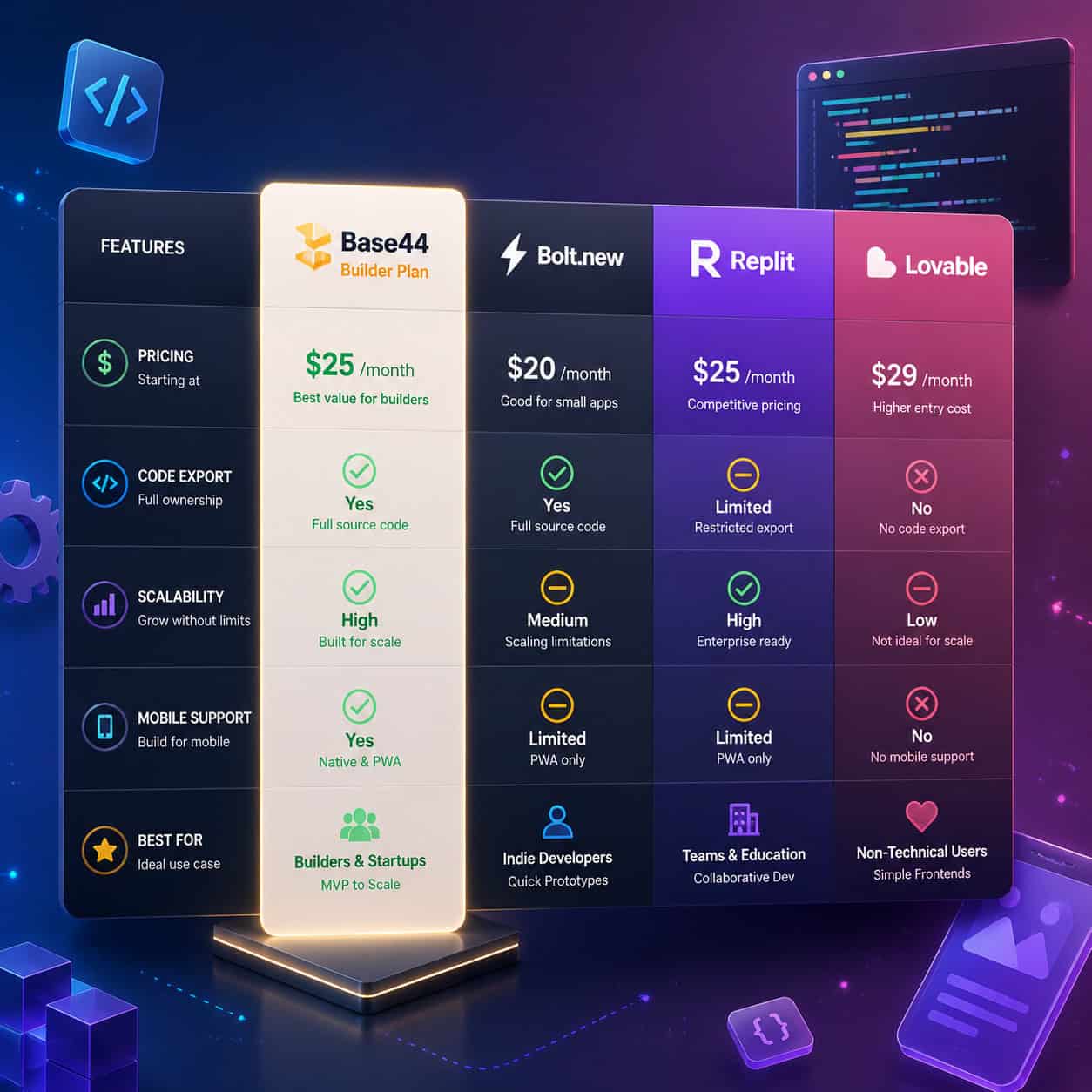
This is where maximizing construction efficiency with the Base44 Builder Plan requires honest context. Base44 isn’t the only option, and it’s not always the best one.
| Platform | Price | Best For | Code Export | Scalability | Key Trade-off |
|---|---|---|---|---|---|
| Base44 Builder | $40/mo | Fast AI-generated MVPs | Yes (GitHub) | Limited (~200 users) | Credit limits, no rollover |
| Bolt.new | ~$25/mo | Browser-based full-stack | Yes | Moderate | Less AI generation depth |
| Replit | $20–35/user/mo | Collaborative coding | Full | Good | Usage-based billing surprises |
| Lovable | Varies | AI app building | Partial | Moderate | Newer ecosystem |
| Bubble | $29–119/mo | Complex no-code apps | No | Strong | Steeper learning curve |
| Softr | Flat pricing | Business apps from data | Limited | Good | Less customization |
Choose Base44 Builder if you want the fastest path from idea to working app and you’re comfortable with credit-based billing.
Choose Replit if you want more control over your code and need collaboration features for a team.
Choose Bubble if you’re building something complex that needs to scale beyond MVP stage without migrating platforms.
Choose Softr if predictable pricing matters more than deep customization. Softr’s flat pricing model avoids the credit and rollover issues that Base44 users sometimes find frustrating.
Our guide to no-coding website design platforms covers several of these tools in more detail.
Is the Builder Plan Worth $40/Month in 2026?
For solo developers building MVPs, client projects, or revenue-generating side apps, the Builder Plan offers strong value at $40/month [5][6]. The AI generation speed alone can save dozens of hours compared to building from scratch, and the custom domain plus GitHub integration make it viable for professional work.
That said, the value depends on how you use it:
- High value: You build 1–3 focused apps per month, deploy them with custom domains, and use Stripe to monetize. The $40 pays for itself quickly.
- Moderate value: You’re experimenting with ideas and need backend support. The Builder Plan works, but watch your credits.
- Low value: You’re building one simple site and don’t need backend features. The free tier or a cheaper alternative like Bolt.new might serve you better.
The credit system is the biggest friction point. Unlike Softr’s flat pricing or Replit’s usage-based model, Base44’s credits expire monthly with no rollover. If you have an inconsistent build schedule, you’ll waste credits some months and run short others.
For those also working on design systems alongside their app builds, our comprehensive guide to Figma UI kits can help streamline the design side of your workflow.
Tips for Maximizing Construction Efficiency With the Base44 Builder Plan
Here are concrete practices that experienced Builder Plan users follow:
- Write modular prompts. Build features one at a time. “Create a user authentication system with email login and password reset” works better than “build me a full SaaS app.”
- Edit code directly when iteration fails. After 2–3 re-prompts that don’t fix an issue, switch to manual code editing via GitHub.
- Align build sprints with billing cycles. Start major projects right after your credits refresh.
- Use the preview environment extensively. Test before deploying to your custom domain.
- Plan for migration early. If your app gains traction, have a plan for moving to a more scalable infrastructure. GitHub export makes this feasible.
- Track your credit usage weekly. There’s no rollover, so knowing where you stand prevents mid-project surprises.
If you’re also looking to improve your content workflow alongside app development, our practical guide to AI-powered content optimization offers complementary strategies.
Frequently Asked Questions
What does the Base44 Builder Plan cost? $40 per month, billed monthly. There’s no annual discount currently listed on the pricing page [1][2].
Can I export my code from the Builder Plan? Yes. GitHub integration is included, allowing you to export and version-control your application code [5][6].
Do credits roll over to the next month? No. Unused credits expire at the end of each billing cycle.
Is the Builder Plan good for production apps? It works well for MVPs and early-stage products. Performance may degrade around 200 concurrent users, so plan accordingly for scaling.
Can I connect a custom domain? Yes. Custom domain support is a key feature that distinguishes the Builder Plan from the free tier [5].
Does Base44 support mobile app publishing? Yes, as of February 2026. Mobile app publishing was added to the Builder Plan [10].
How does Base44 compare to Bubble? Base44 is faster for initial generation thanks to AI prompting. Bubble offers more mature scaling and a deeper feature set for complex applications but has a steeper learning curve.
Can I integrate payment processing? Yes. Stripe integration is supported, enabling you to build and monetize apps directly from the Builder Plan [4].
What happens if the builder freezes? Check your credit balance and internet connection first. Clear browser cache if the issue persists. Reddit users have confirmed these steps resolve most freezing issues [3].
Is the Builder Plan enough for freelance client work? For most freelance projects involving MVPs and small-to-medium web apps, yes. The custom domain and GitHub features make client delivery professional [5].
Conclusion
The Base44 Builder Plan occupies a practical middle ground for solo developers and small teams who need more than a prototype but aren’t ready for enterprise-level tooling. At $40/month, it delivers genuine value when used intentionally: modular prompts, strategic credit management, and knowing when to edit code directly instead of re-prompting.
Your next steps:
- Evaluate whether your project needs backend support and custom domains. If not, start with the free tier.
- If the Builder Plan fits, sign up at the start of a billing cycle and build in focused sprints.
- Set up GitHub integration immediately so you always have an export path.
- Monitor your credit usage weekly and plan major builds around your refresh date.
- If you outgrow the platform’s scalability limits, use your exported code to migrate to a more robust infrastructure.
The Builder Plan won’t replace a full development team or handle enterprise-scale traffic. But for getting a working, monetizable app from idea to deployment in days rather than months, it’s one of the most efficient tools available in 2026.
References
[1] Pricing – https://base44.com/pricing [2] How Much Does Base44 Cost – https://base44.com/blog/how-much-does-base44-cost [3] Is Base44 Worth It – https://www.reddit.com/r/Base44/comments/1r0pftl/is_base44_worth_it/ [4] Watch – https://www.youtube.com/watch?v=hWiYcEyRVe8 [5] Base44 Pricing – https://www.nocode.mba/articles/base44-pricing [6] Is Base44s 40 Builder Plan Enough To Fully Export – https://www.reddit.com/r/Base44/comments/1pman1p/is_base44s_40_builder_plan_enough_to_fully_export/ [7] Base44 App Development Guide – https://emvigotech.com/blog/base44-app-development-guide/ [8] Quick Start Guide – https://docs.base44.com/Getting-Started/Quick-start-guide [9] How Base44 Makes Building A Website As Easy As Writing An Email – https://www.pcmag.com/articles/how-base44-makes-building-a-website-as-easy-as-writing-an-email [10] base44 – https://base44.com