
Last updated: May 11, 2026
Quick Answer
Base44 is an AI-powered app builder that lets non-technical users create full-stack web and mobile applications by describing what they want in plain English. It generates frontend interfaces, backend logic, databases, and authentication in minutes rather than months. Acquired by Wix, Base44 hit $100M in annual recurring revenue within nine months and has become one of the fastest-growing no-code AI platforms in 2026 [1][8].
Key Takeaways
- Base44 turns English descriptions into working apps. No coding knowledge required. You type what you want, and the AI builds it [8].
- Full-stack generation is included. The platform creates UI, databases, APIs, authentication, and business logic together, not just a frontend [6].
- It reached $100M ARR in nine months after Wix acquired it, signaling strong market demand for AI app building.
- GPT-5.5 and Opus 4.7 models were added in April 2026 for better reasoning and handling of complex app logic [9].
- New integrations like the Instagram Business connector expand what apps can do out of the box [9].
- Credit-based pricing means you pay based on usage, with a recently redesigned system for clearer cost tracking [2].
- Alternatives exist (Bubble, Vercel v0, Replit, Lovable), but Base44 stands out for complete stack generation from natural language.
- Best suited for: MVPs, internal tools, solo founders, small business apps, and rapid prototyping.
- Not ideal for: Highly custom enterprise software with complex compliance requirements or apps needing pixel-perfect design control from day one.
What Is Base44 and How Does It Revolutionize App Development?
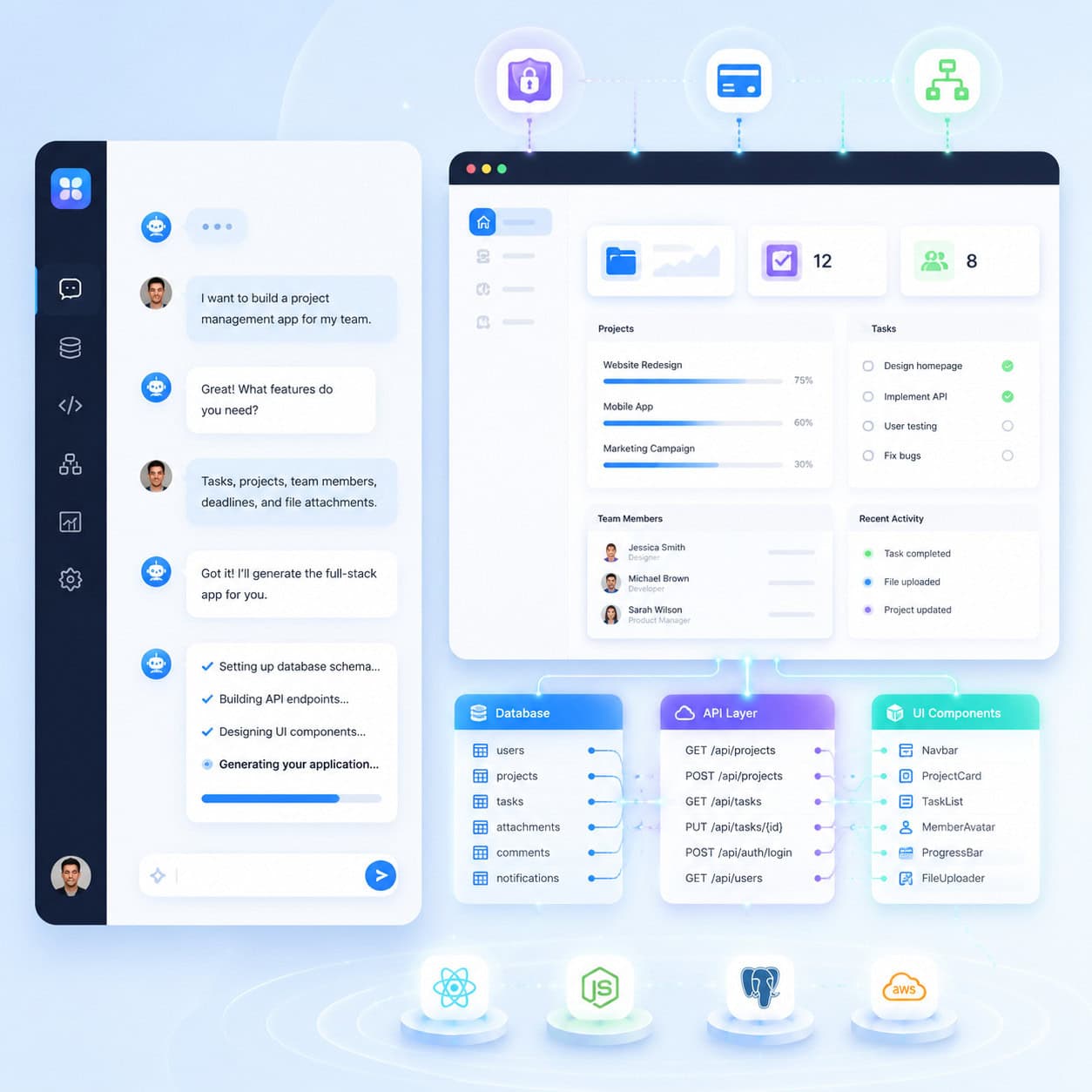
Base44 is an AI app builder that generates complete applications from natural language prompts. You describe your app in a chat interface, and Base44 produces a working application with a user interface, database, backend logic, and deployment, all without writing a single line of code [1][6].
The platform works through what PCMag calls “vibe-coding,” a term for building software by describing what you want rather than how to build it [8]. This approach is part of a broader shift in 2026 where AI handles the technical translation between human intent and working software.
Here’s what makes Base44 different from older no-code tools:
- Traditional no-code (like Bubble or Wix Editor) gives you drag-and-drop builders. You still need to understand app architecture, data models, and workflow logic.
- Base44’s approach handles architecture decisions for you. Describe “I need a fitness tracker that logs workouts and shows weekly progress,” and it builds the data model, UI, and logic automatically [5].
- Chat-based iteration lets you refine your app by telling the AI what to change, much like giving feedback to a developer [6].
If you’re exploring other ways AI is changing how we build for the web, our guide on AI website creators that build professional sites without code covers the broader landscape.
Common mistake: Treating Base44 like a simple website builder. It’s designed for applications with logic, data, and user interactions, not static marketing pages.
Who Should Use Base44 (and Who Shouldn’t)?
Base44 works best for people who have a clear idea of what their app should do but lack the technical skills or budget to hire developers. It’s a strong fit for non-technical founders, small business owners, marketers building internal tools, and anyone who needs a working prototype fast [6][8].
Choose Base44 if you:
- Need an MVP or proof of concept in days, not months
- Want to test a business idea before investing in custom development
- Are building internal tools (CRM, inventory tracker, scheduling app)
- Have a limited budget and can’t hire a development team
- Want to automate workflows that connect to services like Instagram or other APIs [9]
Look elsewhere if you:
- Need enterprise-grade compliance (HIPAA, SOC 2) with full audit trails
- Require pixel-perfect custom UI that matches an exact Figma design (for that, consider Figma-to-code plugins)
- Are building performance-critical applications (real-time gaming, high-frequency trading)
- Want full control over your codebase from day one (though Base44 does offer GitHub integration)
Edge case: If you’re a developer, Base44 can still save time for prototyping. The GitHub integration means you can export and customize the generated code later, making it useful as a starting point rather than a final product.

How Does Base44 Compare to Other No-Code and AI App Builders?
Base44’s main advantage is full-stack generation from natural language, but it’s not the only option. Here’s how it stacks up against the most common alternatives in 2026:
| Feature | Base44 | Bubble | Vercel v0 | Replit | Lovable |
|---|---|---|---|---|---|
| Input method | Natural language chat | Visual drag-and-drop | Text prompts | Code + AI assist | Natural language |
| Full-stack generation | Yes (UI + backend + DB) | Manual setup required | Frontend only | Full-stack with coding | Yes |
| Best for | Non-technical creators | Complex app logic | Frontend prototypes | Developers | Quick MVPs |
| Learning curve | Very low | Moderate to high | Low (frontend only) | Moderate | Low |
| Code export | Yes (GitHub) | Limited | Yes | Yes | Limited |
| Pricing model | Credit-based | Subscription | Free tier + paid | Subscription | Credit-based |
Decision rule: Choose Base44 if you want the fastest path from idea to working full-stack app without touching code. Choose Bubble if you need mature plugin ecosystem and complex workflows you can visually control. Choose Vercel v0 if you only need frontend components. Choose Replit if you’re comfortable writing some code and want AI assistance.
For a broader comparison of platforms, our review of the best no-coding website design software for 2026 covers additional options.
What Can You Actually Build with Base44?
The range of applications is broader than most people expect. Base44 generates complete applications with databases, user authentication, payment processing, and third-party integrations [1][6].
Proven use cases include:
- Fitness and health trackers with workout logging, progress charts, and mobile-ready interfaces [5]
- Customer management tools (lightweight CRMs) for small businesses
- Content scheduling apps using the new Instagram Business connector for publishing and automation [9]
- Inventory management systems with real-time tracking
- Booking and appointment schedulers with user accounts and notifications
- Internal dashboards that pull data from multiple sources
Base44 also includes Superagents and templates that provide pre-built starting points for common app types. These templates aren’t just UI mockups; they include working backend logic you can customize through chat [1].
What it struggles with: Apps requiring complex real-time collaboration (like a Google Docs competitor), apps with heavy media processing, or anything needing custom hardware integration. These still require traditional development.
If you’re interested in how AI tools are changing content workflows beyond app building, check out our guide to AI-powered content generation tools.
How Base44 AI Empowers Non-Technical Creators: A Step-by-Step Look
Building an app on Base44 follows a conversational workflow. Here’s what the process actually looks like:

Step 1: Describe Your App
Open the Base44 chat interface and write a plain English description. Be specific about what the app should do, who uses it, and what data it needs to track. For example: “Build me a project management tool where teams can create tasks, assign them to members, set deadlines, and track completion status” [8].
Step 2: Review the Generated App
Base44 produces a working application with UI screens, a database schema, and backend logic. You can immediately interact with it, click through screens, add test data, and see how it behaves [6].
Step 3: Iterate Through Chat
Tell the AI what to change. “Add a priority field to tasks,” “Make the dashboard show overdue items first,” or “Add email notifications when a task is assigned.” Each instruction refines the app without starting over [6][7].
Step 4: Connect Integrations
Add third-party services. The Instagram Business connector (launched April 2026) is one example, but Base44 supports various API connections for extending functionality [9].
Step 5: Deploy
Launch your app. Base44 handles hosting and provides mobile-ready output. Apps work on both desktop and mobile browsers without separate development [5].
Pro tip from experienced users: Break complex apps into phases. Build the core functionality first, test it, then add features incrementally. Trying to describe an entire complex system in one prompt often produces worse results than building iteratively [7].
For those who prefer starting with visual wireframes before building, our guide to designing mobile wireframes in Figma can help you plan your app’s structure first.
What Are the Costs and Credit System?
Base44 uses a credit-based pricing model. Each AI interaction, from generating app components to making changes, consumes credits. The April 2026 update redesigned the credits dashboard to show clearer breakdowns of message credits and integration credit consumption per app [2][9].
Key pricing considerations:
- Free tier allows you to explore and build basic apps
- Paid plans provide more credits for heavier usage
- Credit consumption varies based on complexity; simple UI changes cost less than generating new backend logic
- Integration credits are separate from message credits, so connecting third-party services has its own cost
Common mistake: Running out of credits mid-project because you didn’t plan for iteration. Most real apps require 3-5x more refinement prompts than the initial generation. Budget your credits accordingly [10][2].
What AI Models Power Base44 in 2026?
Base44 recently added two significant AI models that improve app generation quality:
- GPT-5.5 (added April 24, 2026): Handles complex reasoning and multi-step planning. This model is better at understanding nuanced app requirements and generating appropriate data relationships [9].
- Opus 4.7 (released April 16, 2026): Optimized for intricate logic and edge cases. If your app has complex conditional workflows or unusual business rules, this model handles them more reliably [9].
These model upgrades mean that apps built in 2026 are significantly more capable than what Base44 could produce even six months ago. The AI better understands context, maintains consistency across an app’s components, and handles more sophisticated requirements.
For more on how AI is being applied across web development and design workflows, explore our AI-powered content optimization guide and our no-code category for related tools and strategies.
Conclusion
Base44 represents a genuine shift in who can build software. By translating plain English into full-stack applications, it removes the biggest barrier between having an app idea and launching one. The platform isn’t perfect for every use case — enterprise compliance, pixel-perfect design, and high-performance computing still need traditional development. But for MVPs, internal tools, and small business applications, it’s among the most capable options available in 2026.
Your next steps:
- Try Base44’s free tier at base44.com with a simple app idea to see how the chat-based workflow feels [1].
- Start small. Build a single-feature app first, then expand. This produces better results and helps you learn the platform’s strengths.
- Plan your credit budget before starting a serious project. Map out your core features and estimate 3-5 iterations per feature.
- Explore templates and Superagents for common app types. Starting from a template and customizing is often faster than building from scratch.
- Consider your long-term needs. If you’ll eventually need custom code, use the GitHub export feature to maintain flexibility.
FAQ
Is Base44 free to use? Base44 offers a free tier for basic app building and exploration. Paid plans provide additional credits for more complex projects and heavier usage [1][2].
Do I need any coding knowledge to use Base44? No. The entire workflow is based on describing what you want in plain English. The AI handles all code generation, database setup, and deployment [8][6].
Can Base44 apps work on mobile devices? Yes. Base44 generates mobile-ready applications that work in mobile browsers. A dedicated Android app is also available on Google Play [4][5].
How long does it take to build an app on Base44? Simple apps can be built in minutes. More complex applications with multiple features and integrations typically take hours to a few days of iterative refinement [5][10].
Can I export my code from Base44? Yes. Base44 offers GitHub integration, allowing you to export generated code for further customization or migration to your own infrastructure.
What happened with the Wix acquisition? Wix acquired Base44, and the platform reached $100M in annual recurring revenue within nine months of the acquisition. This backs Wix’s expansion into business software beyond websites.
How does Base44 compare to Bubble? Bubble is a mature visual no-code platform with a steeper learning curve but more granular control. Base44 is faster for getting started and requires no understanding of app architecture, but offers less fine-tuned control over complex workflows.
What integrations does Base44 support? Base44 supports various API connections including the recently launched Instagram Business connector for reading posts, publishing content, and automating social media workflows [9].
Is Base44 suitable for enterprise applications? For internal tools and departmental apps, yes. For customer-facing enterprise software with strict compliance requirements, you’ll likely need traditional development or a more mature enterprise platform.
What AI models does Base44 use? As of April 2026, Base44 uses GPT-5.5 for complex reasoning and Opus 4.7 for intricate logic handling, alongside its core generation models [9].
References
[1] Base44 – https://base44.com [2] Is Base44 A Good AI App Builder – https://www.reddit.com/r/Base44/comments/1o1yo2e/is_base44_a_good_ai_app_builder/ [4] Details – https://play.google.com/store/apps/details?id=com.base44.android&hl=en_US [5] Watch – https://www.youtube.com/watch?v=qYpKhAaaeV4 [6] What Is Base44 AI App Builder And How Does It Work – https://www.certifiedcode.us/resources/article/what-is-base44-ai-app-builder-and-how-does-it-work [7] What I Learned Building A Real App With Real – https://www.reddit.com/r/Base44/comments/1sfm3cd/what_i_learned_building_a_real_app_with_real/ [8] The Power Of Plain English Build Professional Apps With Base44 – https://www.pcmag.com/articles/the-power-of-plain-english-build-professional-apps-with-base44 [9] Changelog – https://docs.base44.com/Getting-started/changelog [10] Watch – https://www.youtube.com/watch?v=_SLMRmbKssI