Last updated: May 10, 2026
Quick Answer: Replit Core costs $20/month (or $18/month billed annually) as of February 2026 and includes AI Agent access, 4 vCPUs, 8 GB RAM, up to 5 collaborators, and a monthly allotment of AI credits. It’s the best-value paid tier for solo developers and small teams who want to build full apps in the browser, but usage-based credit overages can push your actual bill significantly higher if you’re not careful [1][2].
Key Takeaways
Core dropped from $25 to $20/month in February 2026 when Replit introduced the new Pro plan [6].
Annual billing saves you roughly 10%, bringing Core down to $18/month [1].
You get $20–$25 worth of monthly AI Agent credits included, but overages are charged per use [2].
Core now includes up to 5 collaborators and unlimited workspaces, features previously locked behind the Teams plan [6].
Compute resources: 4 vCPUs and 8 GB RAM, boostable to 16 vCPUs and 16 GB RAM [5].
Replit uses a subscription + credits model — the flat fee covers base access, but AI Agent runs, storage, and bandwidth consume credits that can exceed your allotment [4].
For comparison, GitHub Codespaces costs roughly $28.80/month for equivalent compute, making Core about 31% cheaper at base price [5].
Hidden costs in storage, bandwidth, and extended AI sessions are the most common surprise on developer bills [3][7].
What Is Replit Core and Who Is It For?
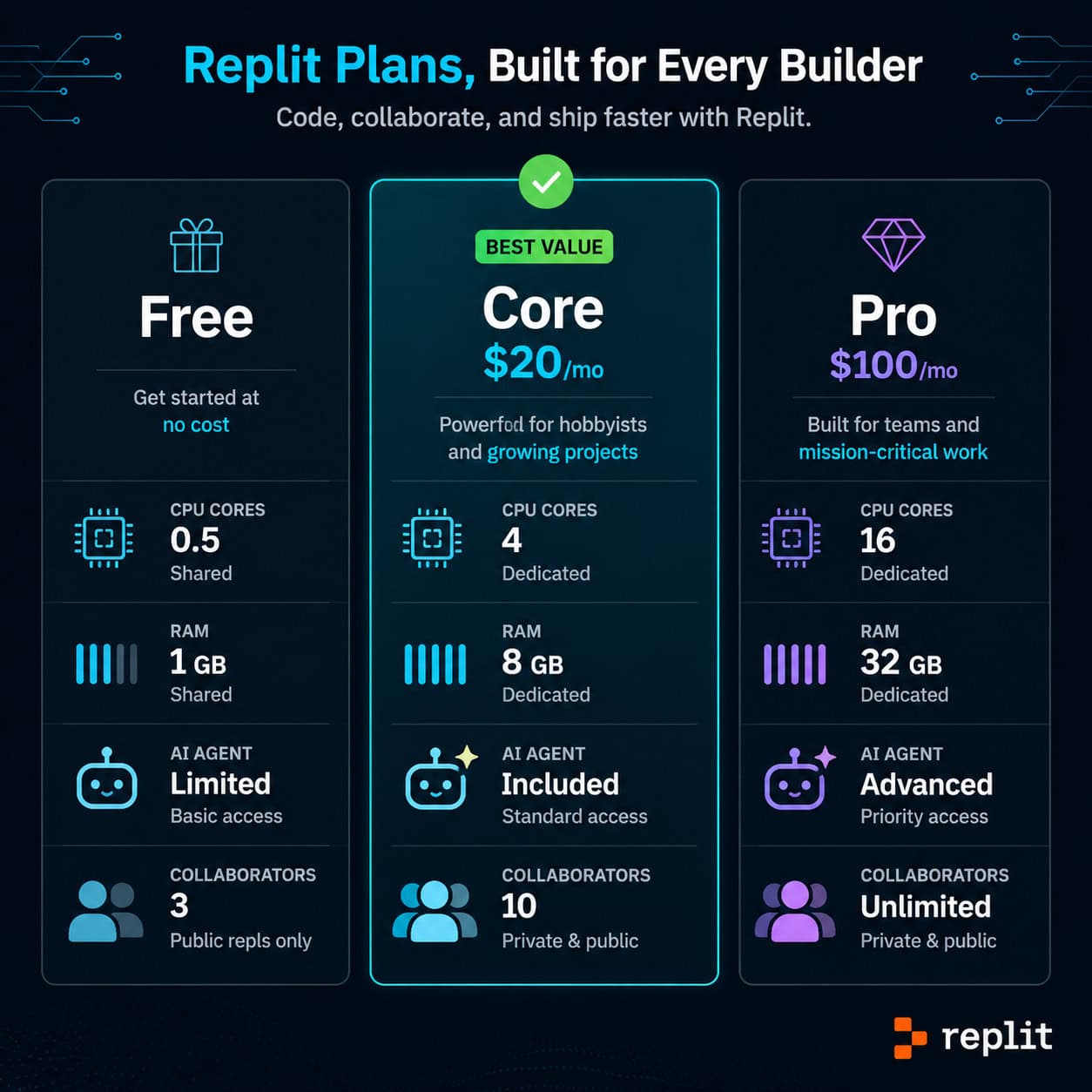
Replit Core is the mid-tier paid plan on Replit’s cloud development platform. It sits between the Free plan (limited compute, restricted AI access) and the new Pro plan ($100/month for teams up to 15) [1][6].
Core is designed for solo developers and freelancers who want full access to Replit’s AI Agent — the tool that can autonomously build, debug, and deploy applications from natural language prompts. If you’re prototyping apps, building MVPs, or learning to code with AI assistance, Core is the entry point to serious work on the platform.
Choose Core if:
You’re a solo developer or work with a small group (up to 5 people)
You want AI Agent access without the $100/month Pro price tag
Your projects need more than 0.5 vCPUs (the Free tier limit)
Skip Core if:
You only need a quick sandbox for frontend experiments (Free tier or CodeSandbox may suffice)
You need 15+ collaborators or enterprise features (look at Pro)
You primarily do local development and don’t need a cloud IDE
How Much Does Replit Core Actually Cost in 2026?
The base subscription is $20/month or $18/month on annual billing [1][2]. But the subscription fee is only part of the picture.
Replit operates on a subscription + usage-based credits model that was updated in April 2026 [4]. Your monthly fee includes a credits allotment (estimated at $20–$25 worth), and these credits get consumed by:
AI Agent sessions (the biggest consumer for most users)
Compute time beyond your base allocation
Storage over the included limit
Outbound bandwidth for deployed apps
When your included credits run out, Replit charges overages automatically. According to analysis from CheckThat.ai, these overages can multiply your monthly cost by 3–5x if you’re running heavy AI Agent sessions or deploying apps with real traffic [5]. One Reddit user reported spending $700 in a single month due to unchecked Agent usage and deployment costs [7].
Common mistake: Assuming the $20/month is a flat cap. It’s not. Think of it more like a cell phone plan with a data limit — you pay the base, then pay extra if you go over.
What Features Does the Core Plan Include?
Here’s what you get with Replit Core as of 2026:
FeatureFree PlanCore ($20/mo)Pro ($100/mo)vCPUs0.54 (boostable to 16)8 (boostable to 32)RAM512 MB8 GB (boostable to 16 GB)16 GB (boostable to 64 GB)AI Agent AccessLimitedFullFull + Turbo ModeMonthly CreditsNone~$20–$25 worth~$100+ worth + rolloverCollaborators1Up to 5Up to 15WorkspacesLimitedUnlimitedUnlimitedDeploymentsBasicFullFull + priorityCredit RolloverN/ANoYes
Sources: [1][2][5][6]
A few things stand out. The credit rollover on Pro but not Core means unused Core credits disappear each month. And Turbo Mode — which gives AI Agent faster processing — is Pro-exclusive [6].
For developers exploring AI-powered content generation tools, Replit’s Agent represents a different approach: instead of generating text, it generates working software.

How Does Replit Core Pricing Compare to Alternatives?
This is where the Replit Core pricing picture gets interesting. The $20/month base looks competitive, but the total cost depends heavily on how you work.
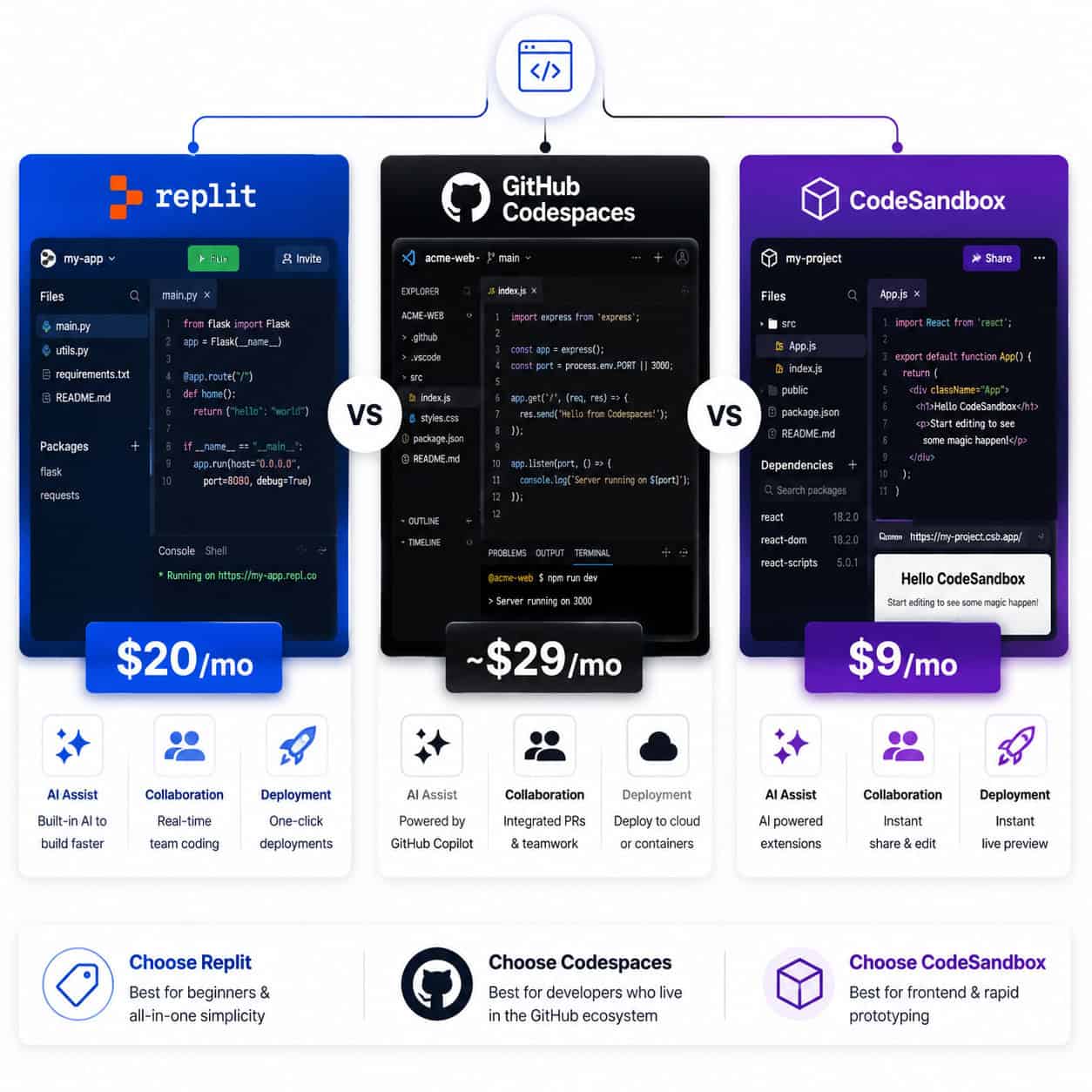
PlatformBase PriceCompute (4-core equiv.)AI FeaturesBest ForReplit Core$20/moIncludedFull AI AgentFull-stack AI-assisted buildsGitHub CodespacesUsage-based~$28.80/mo (4-core, 8hr/day)GitHub Copilot ($10/mo extra)Developers already in GitHub ecosystemCodeSandbox$9/user/mo20 VM hours freeLimitedWeb prototyping, frontend workStackBlitzContact salesBrowser-based (no VM)None built-inInstant frontend sandboxes
Estimates based on published pricing pages and analysis from [5]
Key comparison points:
vs. GitHub Codespaces: Codespaces charges $0.18/hour for a 2-core machine. Light users (under 2 hours/day) pay less than Core’s flat $20. Heavy users (8+ hours/day on 4-core) pay roughly $60/month, making Core cheaper for sustained work [5].
vs. CodeSandbox: At $9/month, CodeSandbox is cheaper but lacks the depth of Replit’s AI Agent. If you’re building full applications autonomously, CodeSandbox isn’t a direct substitute.
vs. local development: Free, obviously. But you lose cloud collaboration, instant deployment, and AI Agent access.
If you’re evaluating no-code website design platforms, Replit occupies a unique middle ground — it’s code-based but AI-assisted, making it accessible to people who aren’t traditional programmers.
How to Control Costs and Avoid Surprise Bills
The biggest complaint about Replit Core pricing isn’t the base fee — it’s the unpredictable overages [2][7]. Here’s how to keep your bill manageable:
Monitor your credit usage daily. Replit shows credit consumption in your account dashboard. Check it like you’d check a bank balance.
Set spending limits. Replit allows you to cap overage spending. Set this immediately after subscribing.
Be intentional with AI Agent sessions. Each Agent run consumes credits. Avoid running the Agent repeatedly on vague prompts — write clear, specific instructions to reduce iterations.
Optimize deployments. Deployed apps consume bandwidth and compute credits. If you’re just testing, use preview mode instead of full deployment.
Choose annual billing. The $18/month annual rate saves $24/year compared to monthly billing [1].
Edge case: If you’re deploying a public-facing app that gets unexpected traffic, your bandwidth credits can drain fast. Consider moving production apps to dedicated hosting (like a VPS or Vercel) and using Replit for development only.
For developers also working with design-to-code workflows, tools like Figma to code plugins can reduce the number of AI Agent iterations you need, saving credits.
Is Replit Core Worth It for Solo Developers?
For solo developers building full-stack applications with AI assistance, Core at $20/month represents strong value — if you stay within your credit allotment [2][4].
The Superblocks analysis from March 2026 called Core “the best value for solo developers” in the cloud IDE space, and I agree with that assessment for a specific type of user: someone who builds 2–4 projects per month, uses AI Agent for scaffolding and debugging, and doesn’t deploy high-traffic production apps on Replit itself [2].
Where it breaks down:
Heavy AI users who run dozens of Agent sessions daily will blow through credits fast
Teams larger than 5 need Pro at $100/month
Budget-conscious learners may find the Free tier sufficient for basic coding practice
Replit’s recognition as Google Cloud’s 2026 AI Tooling Partner of the Year signals that the platform is investing heavily in its AI capabilities. For developers who want to stay on the leading edge of AI-assisted development, the Core plan provides access to those tools at a reasonable entry price.
If you’re building websites and want to complement your Replit workflow with design tools, our guide on AI website creation without code covers adjacent platforms worth knowing.
What Changed With the February 2026 Pricing Update?
Replit made three significant changes on February 20–25, 2026 [6]:
Core price dropped from $25 to $20/month (monthly) and from $22 to $18/month (annual)
The Teams plan was replaced by Pro at $100/month, adding features like credit rollover, Turbo Mode, and up to 15 collaborators
Core gained collaboration features — up to 5 collaborators and unlimited workspaces, previously Teams-only
Existing Teams users were automatically upgraded to Pro at no extra cost starting March 3, 2026 [6]. Since then, no major pricing changes have occurred — the most recent platform updates (April 2026) were feature additions like Plaid integration and minor UI fixes [8].
Frequently Asked Questions
How much does Replit Core cost per month?
$20/month on monthly billing, or $18/month if you pay annually. This is the base subscription — AI credit overages can increase your total bill [1].
Is there a free trial for Replit Core?
Replit offers a Free tier with limited compute and AI access, which effectively serves as a trial. There’s no time-limited free trial of Core specifically [1].
What’s the difference between Core and Pro?
Core is $20/month for individuals (up to 5 collaborators). Pro is $100/month for teams (up to 15 collaborators) with credit rollover, Turbo Mode for AI Agent, and higher compute limits [6].
Can I get a refund if I don’t use all my credits?
Core credits do not roll over month to month. Unused credits expire. Pro plan credits do roll over [6].
Why is my Replit bill higher than $20?
You’ve exceeded your included credit allotment. AI Agent sessions, compute boosts, storage, and deployment bandwidth all consume credits beyond the base subscription [3][7].
Is Replit Core cheaper than GitHub Codespaces?
For developers working 4+ hours daily on 4-core machines, yes — Core’s flat $20 beats Codespaces’ usage-based pricing, which would cost roughly $28.80/month or more [5].
Can I use Replit Core for production apps?
You can deploy apps from Core, but bandwidth costs scale with traffic. For high-traffic production apps, consider dedicated hosting and use Replit for development [4].
Does Replit Core include AI Agent access?
Yes, full AI Agent access is included. The Free tier has limited Agent access [1][4].
How do I cancel Replit Core?
You can cancel from your account settings. Your plan remains active until the end of the billing period [1].
Is Replit good for beginners?
The Free tier is excellent for beginners. Core makes sense once you need more compute power or want full AI Agent access for building real projects. Our overview of AI-powered content optimization covers how AI tools in general can accelerate learning curves.
Conclusion
Replit Core at $20/month is a genuinely competitive entry point for AI-assisted cloud development in 2026. The base price undercuts GitHub Codespaces for sustained use, and the AI Agent access alone justifies the cost for developers who actively build with it.
But go in with your eyes open. The subscription + credits model means your actual monthly spend depends on how you use the platform. Set spending limits on day one, monitor your credit consumption, and be strategic about when you invoke the AI Agent.
Your next steps:
Start with the Free tier to test whether Replit fits your workflow
Upgrade to Core when you hit compute or AI limits
Set an overage spending cap immediately after upgrading
Track your credit usage for the first month before committing to annual billing
Move production deployments to dedicated hosting to avoid bandwidth surprises
For developers exploring the broader ecosystem of AI-powered design and development tools, Replit Core represents one piece of an increasingly AI-driven toolkit.
References
[1] Pricing – https://replit.com/pricing
[2] Replit Pricing – https://www.superblocks.com/blog/replit-pricing
[3] Replit Pricing – https://www.nocode.mba/articles/replit-pricing
[4] Replit Ai Pricing Guide – https://flexprice.io/blog/replit-ai-pricing-guide
[5] Pricing – https://checkthat.ai/brands/replit/pricing
[6] Pro Plan – https://blog.replit.com/pro-plan
[7] Ive Spent 700 This Month On Replitheres Why I – https://www.reddit.com/r/replit/comments/1reua1i/ive_spent_700_this_month_on_replitheres_why_i/
[8] Changelog – https://docs.replit.com/updates/2026/05/08/changelog
Meta Title: Replit Core Pricing Explained: Full Developer Guide for 2026
Meta Description: Replit Core costs $20/mo in 2026. Learn what’s included, hidden credit costs, comparisons to GitHub Codespaces, and tips to control your bill.
Tags: Replit Core pricing, Replit AI Agent, cloud IDE comparison, Replit vs GitHub Codespaces, Replit Pro plan, AI-assisted development, Replit credits, online code editor, developer tools pricing, Replit 2026, usage-based pricing, browser IDE