Last updated: June 3, 2026
Quick Answer: Higgsfield AI Cinema Studio is an AI-powered filmmaking platform that lets creators generate cinematic video content — from storyboarding to final render — using text prompts and AI models trained on film production principles. It’s designed for filmmakers who want to produce high-quality visual content without the traditional overhead of large crews, physical sets, and multi-million-dollar budgets.
Key Takeaways
- Higgsfield AI Cinema Studio uses generative AI models to produce film-quality video from text and image inputs, reducing production timelines from months to days.
- The platform handles multiple production stages including storyboarding, scene generation, character consistency, and post-production effects.
- Indie filmmakers and small studios stand to benefit the most, though larger studios are exploring it for pre-visualization and concept work.
- Pricing details remain limited, but the platform operates on a tiered subscription model with usage-based credits for rendering.
- AI film production has real limitations: inconsistent physics, difficulty with nuanced emotional performances, and potential intellectual property concerns.
- Competitors exist (Runway, Pika, Sora), but Higgsfield differentiates through its cinema-specific workflow and character consistency features.
- Filmmakers still need strong creative direction skills — AI handles execution, not vision.
What Exactly Does Higgsfield AI Cinema Studio Do?
Higgsfield AI Cinema Studio is a generative AI platform built specifically for cinematic video production. Unlike general-purpose video AI tools, it focuses on the full filmmaking pipeline: script interpretation, visual storyboarding, scene generation, character consistency across shots, and post-production refinement.
The platform works primarily through text-to-video and image-to-video generation. You describe a scene — “a detective walks through a rain-soaked alley at night, neon signs reflecting on wet pavement” — and the AI renders it as a cinematic clip. What sets Higgsfield apart from simpler tools is its emphasis on:
- Shot continuity: Maintaining consistent characters, lighting, and environments across multiple scenes
- Cinematic language: Understanding film grammar like close-ups, tracking shots, and depth of field
- Style transfer: Applying specific visual aesthetics (noir, documentary, blockbuster) to generated content
- Iterative refinement: Letting directors adjust framing, mood, and pacing without starting from scratch
I first encountered Higgsfield’s output at a digital media showcase in late 2025. A short film created almost entirely on the platform had the visual polish of something with a real budget behind it. It wasn’t perfect — you could spot AI artifacts if you looked closely — but the gap between AI-generated and traditionally produced content had narrowed dramatically.
How Is AI Changing Movie Production Compared to Traditional Methods?
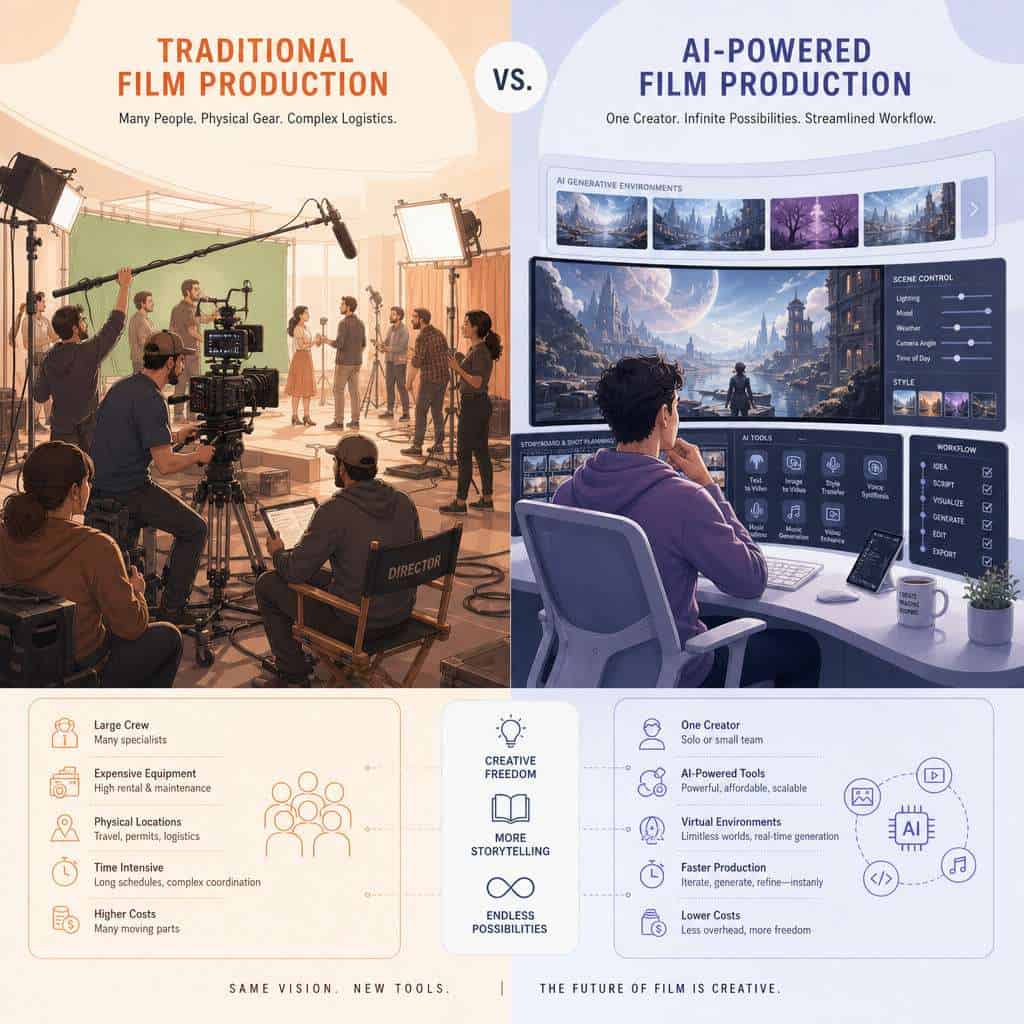
AI filmmaking compresses what used to require dozens of specialists and weeks of work into a process one person can manage in hours. Traditional film production involves location scouting, set construction, hiring actors, coordinating crews, and extensive post-production. AI platforms like Higgsfield collapse many of these stages.

Here’s a practical comparison:
| Production Stage | Traditional Method | Higgsfield AI Approach |
|---|---|---|
| Pre-production | Weeks of planning, casting, location scouting | Text prompts generate storyboards and concept art in minutes |
| Set design | Physical construction or green screen rental | AI-generated environments from descriptions |
| Filming | Camera crews, lighting teams, multiple takes | AI renders scenes based on director’s text/image input |
| Post-production | Weeks of editing, VFX, color grading | Built-in AI tools for color, effects, and editing |
| Timeline | 3-18 months for a short film | Days to weeks depending on complexity |
| Crew size | 10-100+ people | 1-5 people |
This doesn’t mean AI replaces traditional filmmaking entirely. Live-action performances, practical effects, and the collaborative energy of a real set still matter. But for projects where budget and time are the primary constrAInts, AI production tools offer a genuine alternative.
For creators already exploring AI-powered content generation tools, Higgsfield represents the next logical step — moving from static content to full cinematic video.
How Much Does It Cost to Use Higgsfield’s AI Film Technology?
Higgsfield operates on a tiered subscription model, though exact pricing fluctuates as the platform evolves. Based on available information as of early 2026, the structure generally includes a free trial tier with limited rendering credits, a pro tier aimed at independent creators, and an enterprise tier for studios.
Key cost considerations:
- Rendering credits: Each scene generation consumes credits based on resolution, length, and complexity. Higher-quality outputs cost more.
- Subscription tiers: Monthly plans typically range from free (very limited) to several hundred dollars for professional use. Enterprise pricing is custom.
- Hidden costs: You’ll still need a capable computer for previewing and editing, plus potentially additional software for final assembly and sound design.
Common mistake: New users often burn through rendering credits quickly by generating high-resolution final outputs before refining their prompts. Start with lower-resolution drafts to nail down your creative direction, then render the final version at full quality.
Compared to traditional production costs — where even a modest short film can run tens of thousands of dollars — AI cinema tools represent a significant cost reduction. But “cheap” is relative. A serious project on Higgsfield still requires investment in time, creative skill, and subscription fees.
What Kind of Problems Do Filmmakers Solve with Higgsfield’s AI Tools?
Higgsfield addresses three core pain points: budget constraints, time pressure, and the visualization gap between a filmmaker’s imagination and what they can actually produce.
Specific use cases include:
- Pre-visualization: Directors use the platform to generate visual mockups of scenes before committing to expensive live-action shoots
- Concept pitching: Indie filmmakers create polished proof-of-concept videos to attract investors or crowdfunding support
- Music videos and commercials: Quick-turnaround projects where visual impact matters more than photorealism
- Educational and documentary content: Generating historical recreations or scientific visualizations
- Rapid prototyping: Testing narrative ideas visually before writing a full screenplay
A filmmaker I spoke with at a 2025 industry event described using Higgsfield to create a 3-minute pitch video for a sci-fi feature. The pitch would have cost an estimated $15,000 to produce traditionally. With Higgsfield, she produced it in a weekend for the cost of her monthly subscription. The pitch secured a development meeting with a production company.
If you’re interested in how AI tools are reshaping creative workflows more broadly, our coverage of AI design tools provides useful context.
What Does the Workflow Look Like from Script to Final Film?
The Higgsfield workflow follows a structured pipeline: script input, storyboard generation, scene-by-scene rendering, refinement, and final assembly. Each stage involves human creative decisions guided by AI execution.

Step-by-step process:
- Script or scene description: Write your screenplay or scene descriptions in natural language. The AI parses narrative elements, character descriptions, and mood.
- Storyboard generation: The platform produces visual storyboard frames based on your script. You can adjust composition, framing, and character positioning.
- Style and tone selection: Choose a visual style — cinematic noir, bright comedy, gritty documentary, etc. You can also upload reference images.
- Scene rendering: The AI generates video clips for each scene. Initial renders are typically lower resolution for faster iteration.
- Character locking: Once you’re satisfied with character designs, you lock them for consistency across all scenes.
- Refinement passes: Adjust lighting, camera angles, pacing, and transitions. This is where directorial skill matters most.
- Final render: Export high-resolution clips for assembly in your preferred editing software.
- Post-production: Add sound design, music, dialogue (recorded separately or AI-generated), and final color grading.
Edge case: For dialogue-heavy scenes, you’ll likely need to record or synthesize voice performances separately. Higgsfield’s strength is visual generation, not audio production.
Who Is This Technology Best For — Indie Filmmakers or Big Studios?
Indie filmmakers and small production teams benefit the most from Higgsfield in 2026. Large studios use similar AI tools primarily for pre-visualization and concept development, not final output.
Choose Higgsfield if you are:
- An independent filmmaker with a strong creative vision but limited budget
- A content creator producing short-form narrative video
- A marketing team creating cinematic ad content without agency budgets
- A film student learning visual storytelling
- A screenwriter who wants to visualize scripts for pitching
It’s less ideal if you:
- Need photorealistic human performances for feature-length drama
- Require precise control over every frame at broadcast quality
- Work in a union production environment with specific labor requirements
The sweet spot right now is creators who understand film language and can direct AI effectively. Having a background in cinematography, editing, or visual storytelling makes a significant difference in output quality. The tool amplifies skill — it doesn’t replace it.
For those building creative careers around AI tools, understanding AI development platforms and their capabilities provides a competitive edge.
Can Higgsfield’s AI Handle Complex Film Genres Like Sci-Fi or Period Dramas?
Yes, but with caveats. Sci-fi is actually one of Higgsfield’s strongest genres because audiences are more forgiving of stylized or slightly unrealistic visuals in fantastical settings. Period dramas are harder because viewers have strong expectations about historical accuracy in costumes, architecture, and lighting.
Genre performance breakdown:
- Sci-fi and fantasy: Strong. AI excels at generating alien landscapes, futuristic cities, and stylized action sequences.
- Horror: Good. Atmospheric lighting, unsettling environments, and creature design work well.
- Period drama: Mixed. General aesthetics are achievable, but fine details (accurate 18th-century button styles, specific architectural periods) require heavy prompt engineering and reference images.
- Contemporary drama: Challenging. The closer you get to everyday reality, the more obvious AI artifacts become.
- Animation-style: Excellent. Stylized, non-photorealistic approaches hide AI limitations effectively.
What Equipment or Skills Do I Need to Work with Their AI Cinema Platform?
You need a modern computer with a stable internet connection, basic familiarity with filmmaking concepts, and strong prompt-writing skills. No specialized hardware is required because rendering happens on Higgsfield’s cloud infrastructure.
Minimum requirements:
- A computer capable of running a modern web browser (most rendering is cloud-based)
- Reliable broadband internet for uploading references and downloading rendered clips
- Video editing software (DaVinci Resolve, Premiere Pro, or similar) for final assembly
- Understanding of basic film concepts: shot types, lighting, pacing, narrative structure
Skills that dramatically improve results:
- Cinematography knowledge (how to describe shots precisely)
- Color theory and visual storytelling
- Prompt engineering — being specific and iterative with text descriptions
- Basic editing and post-production skills
Those exploring AI-powered creative tools might also benefit from understanding AI video generation for content makers, which covers complementary technology.
What Are Common Mistakes Filmmakers Make When First Using AI Production Tech?
The biggest mistake is treating AI cinema tools like a magic button. Typing “make me a great movie” produces generic, uninspired output. Quality still depends on the specificity and creativity of your direction.
Top mistakes to avoid:
- Vague prompts: “A man walks down a street” gives you nothing interesting. “A tired detective in a rumpled trench coat limps down a rain-slicked Tokyo backstreet at 2 AM, neon kanji signs reflecting in puddles, shot from a low angle” gives you cinema.
- Skipping iteration: Expecting the first render to be final. Plan for 3-5 refinement passes per scene.
- Ignoring continuity: Not locking character designs early, leading to inconsistent appearances across scenes.
- Over-relying on AI for everything: Sound design, music, and voice performance still need human attention or specialized tools.
- Rendering at max quality too early: Wasting credits on high-res outputs before the creative direction is solid.
Are There Limitations to AI-Generated Film Content?
AI-generated film content has significant limitations that every filmmaker should understand before committing to this workflow.
Current limitations include:
- Physics inconsistencies: Objects sometimes behave unrealistically — water flows wrong, fabric moves oddly, gravity seems off
- Emotional subtlety: AI struggles with nuanced facial expressions and complex human performances
- Temporal coherence: Longer scenes can drift in visual consistency
- Text and signage: AI-generated text within scenes is often garbled or nonsensical
- Hands and fine details: A persistent challenge across all generative AI video tools
- Audio: Higgsfield focuses on visuals; audio production requires separate tools and workflows
These limitations are improving rapidly, but in 2026, AI cinema tools work best for projects where stylization is acceptable and where human performances aren’t the primary focus.
How Does Higgsfield Protect Creative Rights in AI Film Production?
Higgsfield’s stated policy grants users ownership of content they generate on the platform, though the specifics of their terms of service should be reviewed carefully before commercial use.
Key considerations for creators:
- Output ownership: Users generally retain rights to content they create, similar to how you own a photo you take with a camera
- Training data concerns: Like all generative AI, questions exist about what data trained the models and whether generated content could inadvertently reproduce copyrighted material
- Commercial use: Most paid tiers include commercial licensing rights, but verify this for your specific plan
- Watermarking: Free tier outputs may include watermarks; paid tiers typically don’t
For creators concerned about platform safety and data protection, reviewing Higgsfield’s privacy policy and terms of service before uploading proprietary creative materials is essential.
Are There Other AI Film Production Companies Like Higgsfield?
Yes. Several companies compete in the AI video generation space, each with different strengths.
| Platform | Primary Strength | Best For |
|---|---|---|
| Higgsfield AI | Cinema-specific workflow, character consistency | Narrative filmmaking |
| Runway (Gen-3/4) | Versatile video generation, strong editing tools | General creative video |
| Pika | Quick, stylized video generation | Social media and short-form content |
| OpenAI Sora | High-fidelity video from text | Broad creative applications |
| Stability AI (Stable Video) | Open-source flexibility | Developers and technical users |
Decision rule: Choose Higgsfield if your priority is narrative filmmaking with consistent characters across scenes. Choose Runway if you need a more general-purpose video editing and generation tool. Choose Pika for fast, social-media-friendly clips.
Exploring AI art generation tools can also help you understand the broader ecosystem of creative AI platforms.
FAQ
Can I make a feature-length film entirely with Higgsfield AI? Technically possible, but not practical in 2026. The platform works best for short films, scenes, and proof-of-concept videos. Feature-length projects would require extensive manual assembly and face consistency challenges over longer runtimes.
Do I need to know how to code to use Higgsfield? No. The platform uses a visual interface with text-based prompts. No programming knowledge is required.
How long does it take to render a single scene? Rendering time varies by complexity and resolution, but most scenes take between a few minutes and an hour on Higgsfield’s cloud servers.
Can I upload my own actors’ likenesses? Some AI cinema platforms allow reference image uploads for character creation. Check Higgsfield’s current terms regarding likeness rights and consent requirements before using real people’s images.
Is AI-generated film content eligible for film festival submission? This depends on the festival. Some festivals now have AI-specific categories, while others require disclosure of AI involvement. A growing number accept AI-assisted content alongside traditional submissions.
Will AI filmmaking replace human directors and crews? Not in the foreseeable future. AI tools change the production process but still require human creative direction, storytelling ability, and editorial judgment. The role shifts from managing physical production to directing AI systems.
Can I combine AI-generated footage with live-action footage? Yes. Many filmmakers use Higgsfield for backgrounds, effects, and establishing shots while filming actors live. This hybrid approach often produces the most convincing results.
What file formats does Higgsfield export? Standard video formats (MP4, MOV) at various resolutions, compatible with major editing software like DaVinci Resolve, Premiere Pro, and Final Cut Pro.
Is there a community or support forum for Higgsfield users? Most AI cinema platforms maintain Discord communities and knowledge bases. These communities are valuable for learning prompt techniques and troubleshooting.
How does Higgsfield handle music and sound effects? It doesn’t — at least not as a core feature. Sound design requires separate tools. Some filmmakers pair Higgsfield with AI audio generation platforms for a fully AI-assisted pipeline.
Related Higgsfield guides: read the Higgsfield AI productivity guide and explore Higgsfield character swap technology.
Conclusion
Inside Higgsfield AI Cinema Studio, the future of film production is already taking shape — imperfect but genuinely useful. The platform won’t replace traditional filmmaking, but it gives creators with limited resources the ability to produce visual content that would have been impossible without significant budgets just a few years ago.
Your next steps:
- Try the free tier to understand the platform’s capabilities and limitations before committing financially.
- Invest in learning prompt engineering for video — this skill determines 80% of your output quality.
- Start with a short project (2-3 minutes) to learn the workflow before attempting anything ambitious.
- Build a hybrid approach — combine AI-generated visuals with live-action elements, recorded dialogue, and professional sound design for the best results.
- Stay current with platform updates, as AI video generation capabilities are improving on a monthly basis in 2026.
The filmmakers who thrive with these tools won’t be the ones who treat AI as a replacement for creativity. They’ll be the ones who use it as an amplifier — bringing stories to screen that would otherwise never leave the page. If you’re exploring how AI tools are reshaping creative and productivity workflows, Higgsfield is one of the most compelling examples of what’s possible right now.
Useful Resources: Higgsfield AI official platform & AI industry news on TechCrunch