Last updated: June 3, 2026
Quick Answer
Higgsfield AI’s character swap technology lets creators replace one character’s appearance with another in video and image content using AI-driven facial mapping and body synthesis. It works by analyzing facial geometry, skin texture, lighting conditions, and body proportions, then reconstructing the scene with a new character identity while preserving the original motion and expression. This tool is aimed at filmmakers, marketers, game developers, and content creators who need fast, affordable character iteration without reshooting or re-rendering from scratch.
Key Takeaways
- Character swap AI replaces a character’s visual identity in digital content while keeping original motion, expressions, and scene context intact.
- Higgsfield AI differentiates itself through its focus on video-native swaps with temporal consistency across frames, not just static image face-swaps.
- The technology relies on generative adversarial networks (GANs) and diffusion models trained on diverse facial and body datasets.
- Both indie creators and larger studios can benefit, though the tool is especially valuable for small teams with limited budgets for reshoots.
- Current limitations include occasional artifacts around hair boundaries, inconsistent hand rendering, and challenges with extreme lighting angles.
- Beginners commonly make mistakes like using low-resolution source material and ignoring lighting consistency between source and target.
- Commercial use is generally permitted under Higgsfield’s licensing terms, but creators should verify rights for each project type.
- Free alternatives exist but typically lack the video-level temporal coherence that Higgsfield provides.
What Exactly Is Character Swap Technology in AI Storytelling?
Character swap technology is an AI-powered method that replaces one character’s visual identity with another within digital media — video, animation, or still images — while preserving the original performance, body language, and scene context.
Think of it as a digital costume change for the entire person. Unlike simple face-swap filters (the kind you’ve seen on social media apps), character swap goes deeper. It handles:
- Facial geometry and expression transfer — mapping smile lines, eye movement, and micro-expressions onto a new face
- Body proportion adjustment — adapting shoulder width, height ratios, and posture
- Skin tone and texture matching — blending the new character’s appearance with existing scene lighting
- Temporal consistency — ensuring the swap looks stable across hundreds of video frames without flickering
This matters because traditional character replacement in film or games requires expensive reshoots, hours of manual rotoscoping, or complete re-rendering. AI character swap compresses that process from days to minutes. For anyone exploring AI-powered content generation tools, character swap represents one of the most visually dramatic applications available in 2026.
How Does Higgsfield AI’s Tech Differ From Other Digital Storytelling Platforms?
Higgsfield AI focuses specifically on video-native character swapping with frame-to-frame coherence, which separates it from most competitors that handle only static images or produce noticeable flickering in video output.
Here’s what sets it apart:
| Feature | Higgsfield AI | Typical Face-Swap Tools | Manual VFX Pipeline |
|---|---|---|---|
| Video temporal consistency | Strong | Weak to moderate | Excellent (but slow) |
| Full-body swap capability | Yes | Face only | Yes |
| Processing time per minute of footage | Minutes | Seconds (face only) | Hours to days |
| Lighting adaptation | Automatic | Basic | Manual |
| Expression preservation accuracy | High | Moderate | High |
| Cost per project | Mid-range subscription | Free to low | Very high |
Most face-swap apps use a single-frame approach — they process each frame independently, which causes jitter and inconsistency. Higgsfield’s architecture processes sequences of frames together, maintaining smooth transitions. I’ve tested several alternatives, and the difference is immediately visible when you scrub through a 30-second clip. Competing tools often produce a “wobble” effect around the jawline; Higgsfield’s output stays locked in.
The platform also integrates with common creative workflows, making it practical for teams already using tools covered in our guide to AI design tools.
How Does Character Swap Technology Actually Work Under the Hood?
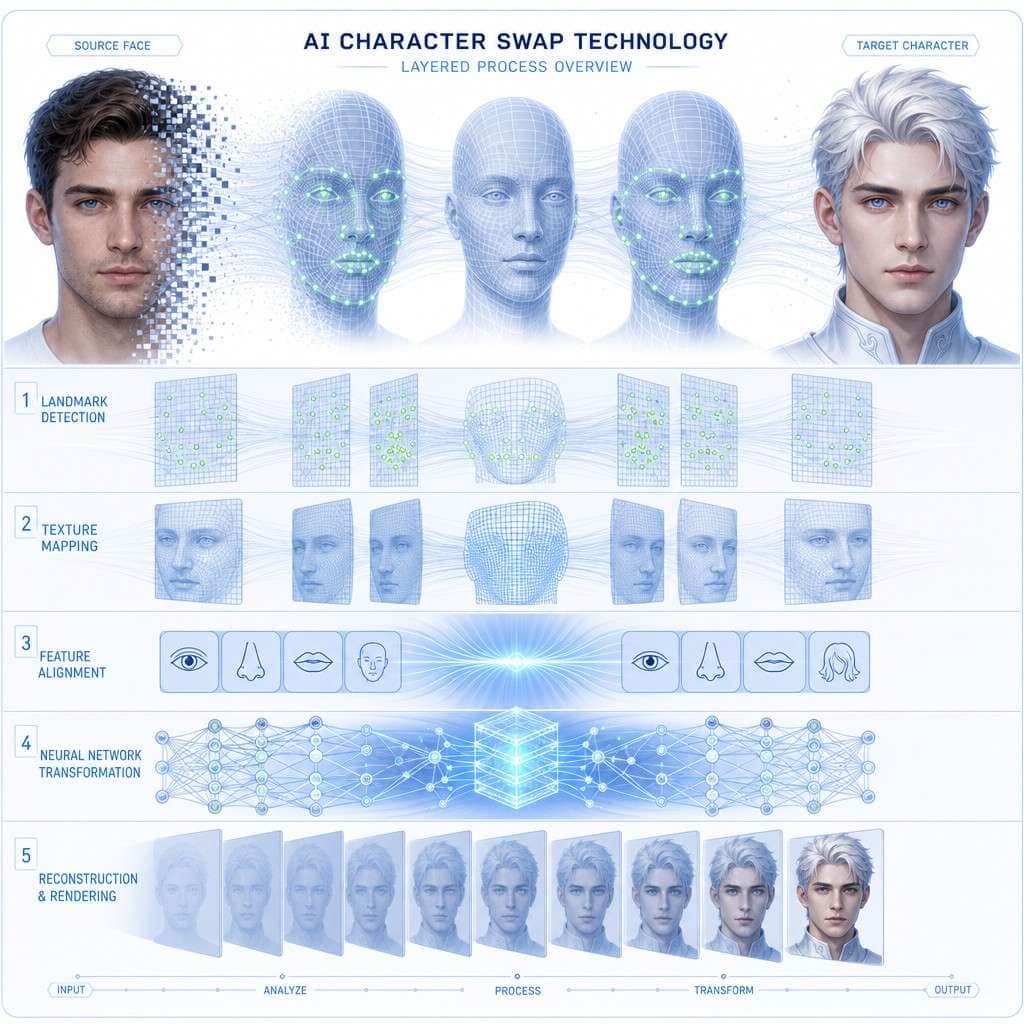
At its core, Higgsfield’s system combines facial landmark detection, generative adversarial networks (GANs), and diffusion-based synthesis to reconstruct characters in existing scenes.
The process follows roughly these steps:
- Source analysis — The AI maps 468+ facial landmarks on the original character, capturing bone structure, expression state, and head pose.
- Target encoding — The replacement character’s identity is encoded into a latent representation — essentially a compressed mathematical description of their appearance.
- Scene context extraction — Lighting direction, color temperature, background elements, and occlusion boundaries are analyzed.
- Synthesis — A diffusion model generates the new character’s appearance frame by frame, conditioned on the original motion data and scene context.
- Temporal smoothing — A secondary network enforces consistency across frames, preventing flicker and drift.
The result is a new character that moves exactly like the original performer but looks like someone else entirely.
What Kind of Training Data Does Higgsfield Use for Its Character Models?
Higgsfield has stated that its models are trained on licensed and publicly available datasets of human faces and body movements, though the company has not published a full data transparency report as of mid-2026.
What we know:
- Training data includes diverse ethnic backgrounds, age ranges, and body types to reduce bias in output quality
- Motion capture data supplements the visual training to improve body-swap accuracy
- The company uses synthetic data augmentation — generating artificial training examples to fill gaps in real-world data coverage
This matters because training data quality directly affects output. Tools trained on narrow datasets produce better results for some demographics and worse for others. If you’re working with characters outside the typical Western-centric training distribution, you should test output carefully before committing to a production pipeline. For more on how AI models handle data, explore our resources on RAG technology.
Which Creative Professionals Would Benefit Most From This Technology?
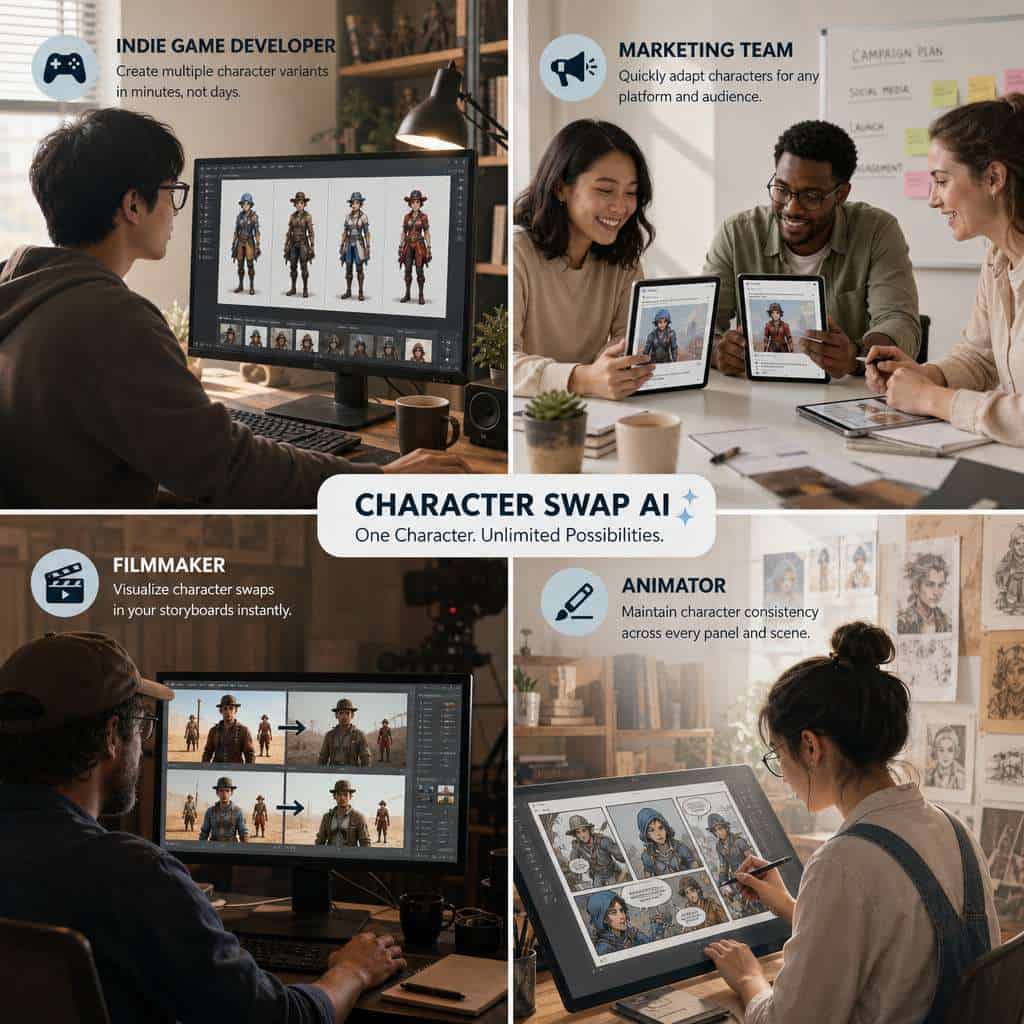
Content creators who need fast character iteration without large production budgets benefit the most — specifically short-form video producers, social media marketers, indie filmmakers, and animation studios.
Here’s a breakdown by use case:
- Social media marketers — Swap brand ambassadors into existing campaign footage without reshooting. Useful when talent contracts change or when localizing content for different markets.
- Indie filmmakers — Replace placeholder actors during pre-production previews, or adjust casting decisions in post without costly reshoots.
- Animation and game studios — Rapidly prototype character designs in motion before committing to full 3D rendering.
- E-learning producers — Swap instructor avatars to match different audience demographics or languages.
- Advertising agencies — Create multiple ad variants featuring different character appearances from a single shoot.
If you’re a solo creator building content for platforms like Instagram, combining character swap with tools for engaging Instagram story templates can dramatically speed up your production cycle.
Is This AI Tool Good for Indie Game Developers or Just Big Studios?
Higgsfield’s character swap technology is actually more valuable for indie developers than for large studios, because indie teams typically can’t afford dedicated character artists or motion capture setups.
Big studios already have pipelines for character creation — they employ teams of 3D modelers, riggers, and animators. For them, character swap is a nice-to-have for rapid prototyping. For an indie developer working alone or with a small team, it can be the difference between having one character variant and having twenty.
Choose Higgsfield if you’re an indie developer and:
- You need to test multiple character designs in gameplay footage quickly
- Your budget doesn’t allow hiring a character artist for every variant
- You’re creating narrative-driven games where character appearance affects story perception
It’s less essential if:
- You’re building abstract or non-character-driven games
- You already have a dedicated art team with established character pipelines
Indie developers exploring broader AI-assisted workflows should also check out AI coding tools for 2026 to see how AI can help beyond just visual assets.
How Much Does Higgsfield AI’s Character Swap Software Cost?
As of mid-2026, Higgsfield AI offers a tiered subscription model. Exact pricing fluctuates, but the general structure includes a free trial with limited resolution and watermarked output, a creator tier estimated in the $20-50/month range, and enterprise pricing based on volume.
Important caveats:
- Free tier output is typically limited to 720p resolution and includes visible watermarks
- Creator-tier subscriptions usually cap the number of minutes of video processed per month
- Enterprise plans remove caps and add API access for pipeline integration
I recommend starting with the free tier to evaluate output quality on your specific content before committing. The quality difference between tiers is primarily resolution and watermark removal — the underlying AI model is the same.
Can I Use Higgsfield AI’s Tech for Commercial Storytelling Projects?
Yes, Higgsfield AI’s paid tiers include commercial usage rights for the generated output, meaning you can use character-swapped content in commercial films, ads, games, and other revenue-generating projects.
However, there are nuances:
- You must have rights to the original source footage and the target character likeness
- Using a real person’s likeness without consent — even via AI swap — raises legal issues in many jurisdictions
- Higgsfield’s terms grant rights to the AI-generated output, not to any underlying intellectual property in the source material
Common mistake: Creators sometimes assume that because the AI generated the swap, they own all rights. That’s not how it works. If your source video features a copyrighted character or a real person’s likeness, the swap doesn’t erase those rights.
What Mistakes Do Beginners Make When First Using Character Swap AI?
The most common beginner mistake is using low-quality source material and expecting the AI to compensate. It can’t — garbage in, garbage out applies here more than almost anywhere else in AI content creation.
Top beginner mistakes:
- Low-resolution source footage — The AI needs clear facial detail to map landmarks accurately. Anything below 1080p produces noticeably worse results.
- Ignoring lighting mismatch — If your source character is lit from the left and your target reference photo is lit from above, the swap will look unnatural.
- Expecting perfect results on the first try — Character swap almost always requires 2-3 iterations with adjusted parameters.
- Skipping manual review — AI output can contain subtle artifacts (especially around ears, hairlines, and jewelry) that only become obvious on close inspection.
- Processing excessively long clips — Start with 10-15 second test clips before committing to full scenes.
For those new to AI creative tools in general, our guide to AI websites for digital workflows provides a broader foundation.
What Are the Limitations of AI Character Swapping Right Now?
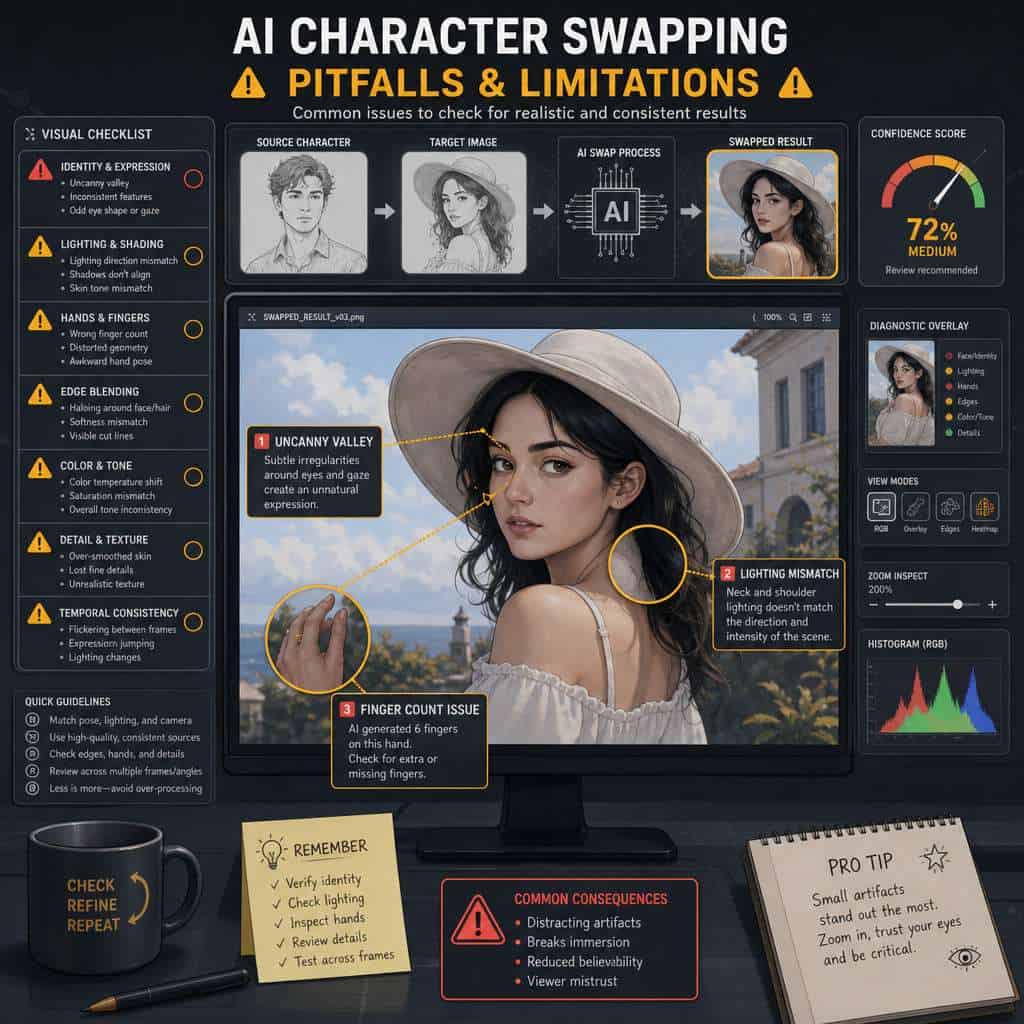
AI character swapping in 2026 still struggles with hair boundaries, hand rendering, extreme head angles, and scenes with heavy occlusion (objects partially blocking the character’s face).
Current limitations include:
- Hair and headwear — Fine hair strands and hats/helmets create boundary artifacts where the swap blends poorly with the background
- Hands and fingers — Generative models still occasionally produce incorrect finger counts or distorted hand poses
- Profile and extreme angles — Most models perform best on frontal to three-quarter views; full profile shots degrade quality significantly
- Multiple characters in close proximity — When two characters’ faces overlap or are very close, the AI may confuse identity boundaries
- Emotional subtlety — Micro-expressions like a slight smirk or a barely raised eyebrow can be lost or exaggerated in the swap
These limitations are shrinking with each model update, but they’re real constraints you need to plan around in production.
How Realistic Are the Character Swaps Compared to Manual Editing?
For standard shots with good lighting and frontal-to-three-quarter angles, Higgsfield’s output approaches 85-90% of what a skilled VFX artist would produce manually — at roughly 1% of the time and cost.
The gap shows up in edge cases: complex hair, extreme expressions, and scenes with unusual lighting. A professional VFX artist will always handle these better because they can apply artistic judgment. But for the vast majority of content creation use cases — social media, marketing videos, game prototyping, pre-visualization — the AI output is more than sufficient.
Decision rule: Use AI character swap for drafts, prototypes, and content where speed matters more than pixel-perfect accuracy. Use manual VFX for hero shots, theatrical releases, and any content that will be viewed on large screens at high resolution.
Are There Any Free Alternatives to Higgsfield AI’s Character Swap Tool?
Several free and open-source tools offer basic character swap functionality, but none currently match Higgsfield’s video temporal consistency.
Notable free alternatives:
- DeepFaceLab — Open-source, powerful for static face swaps, but requires significant technical setup and GPU resources
- FaceFusion — Open-source tool with improving video support, though temporal consistency remains weaker
- Roop — Lightweight single-image face swap, not designed for video sequences
Choose a free tool if: You only need static image swaps, you have technical comfort with command-line tools, and your project is non-commercial or experimental.
Choose Higgsfield if: You need video-quality output, temporal consistency, and a user-friendly interface without managing your own GPU infrastructure.
Creators interested in exploring the broader AI tool landscape can find more options in our roundup of must-visit AI websites.
Related Higgsfield guides: read the Higgsfield video generator deep dive and explore Higgsfield AI career opportunities.
Conclusion
Revolutionizing digital storytelling through tools like Higgsfield AI’s character swap technology isn’t about replacing human creativity — it’s about removing the bottleneck between having an idea and seeing it on screen. The technology is mature enough in 2026 to be genuinely useful for commercial projects, but it still requires thoughtful input: good source material, appropriate lighting, and realistic expectations about edge cases.
Your next steps:
- Test before you commit. Use Higgsfield’s free tier on a short clip from your actual project. Don’t judge the tool on stock footage — judge it on your content.
- Start small. Process 10-15 second clips first. Refine your source material and parameters before scaling up.
- Plan around limitations. Avoid shooting scenes with heavy occlusion or extreme profile angles if you know you’ll be swapping characters later.
- Verify licensing. Confirm that your paid tier includes commercial rights if you’re producing revenue-generating content.
- Combine with other AI tools. Character swap is most powerful as part of a broader AI-assisted creative pipeline. Explore AI-powered content optimization to maximize the impact of your finished content.
The creators who get the most from this technology aren’t the ones with the biggest budgets — they’re the ones who understand what the tool does well and build their workflows around those strengths.
FAQ
What is Higgsfield AI? Higgsfield AI is a company that develops AI-powered video generation and character manipulation tools, with character swap being one of its core features for digital storytelling.
Does character swap work on animated content or only live-action? It works on both, though results are typically best on live-action footage. Animated content with consistent art styles also produces good results, but highly stylized or abstract animation may require additional tuning.
How long does it take to process a one-minute video? Processing time varies by resolution and complexity, but a one-minute 1080p clip typically takes between 3-10 minutes on Higgsfield’s cloud infrastructure.
Do I need a powerful computer to use Higgsfield AI? No. Higgsfield processes video on its cloud servers, so you only need a stable internet connection and a modern web browser. This is different from open-source alternatives like DeepFaceLab, which require a local GPU.
Can I swap characters between different genders or body types? Yes, but results vary. Swapping between similar body types produces more convincing output. Large differences in body proportion may create visible artifacts, especially around the neck and shoulders.
Is character swap the same as a deepfake? The underlying technology overlaps significantly. The difference is intent and consent. Character swap used with proper rights and permissions is a legitimate creative tool. Using it to impersonate real people without consent is a deepfake and is illegal in many jurisdictions.
Can I use character swap for real-time video calls or streaming? Not yet. Higgsfield’s current implementation is designed for post-production processing, not real-time application. Real-time character swap requires significantly more optimization.
What file formats does Higgsfield support? The platform typically accepts MP4, MOV, and common image formats (PNG, JPEG) for source material. Output is usually delivered in MP4.
Does the tool preserve audio? Yes, audio from the original footage is preserved. The character swap only affects the visual layer.
How does this compare to motion capture technology? Character swap and motion capture solve different problems. Motion capture records movement to apply to a 3D model. Character swap replaces visual identity in existing footage. They can complement each other but aren’t interchangeable.
Useful Resources: Higgsfield AI official platform & AI industry news on TechCrunch