Last updated: May 22, 2026
Quick Answer: HeyGen is an AI video platform that creates photorealistic digital clones (avatars) of real people from short webcam recordings, then generates studio-quality videos of those clones speaking in up to 175 languages. Its latest Avatar V engine, launched in April 2026, builds a full digital twin from just 15 seconds of footage, solving previous problems with identity drift and unnatural expressions [5]. For marketers, trainers, and content creators who need video at scale without repeated filming, HeyGen is one of the most capable tools available in 2026.
Key Takeaways
- 15-second setup: Avatar V creates a photorealistic clone from a single 15-second webcam recording [5]
- 175 languages: AI avatars can speak and lip-sync in 175 languages with natural-sounding accents [5]
- Interactive video: Business and Enterprise plans include quizzes, branching paths, and CTA buttons inside videos [1]
- 4K upscaling: Any video can be enhanced to 4K resolution at up to 120 fps using built-in Topaz integration [1]
- Brand consistency: Brand Systems auto-extract logos, fonts, and colors from a URL and apply them across all video templates [1]
- Cinematic shots: Seedance 2.0 integration moves beyond static talking heads to dynamic camera movements around your avatar [8]
- Pricing starts free: A free tier exists, with paid plans scaling from Creator to Business to Enterprise [7]
- Best for: Marketing teams, L&D departments, e-commerce brands, and solo creators who need frequent video output
- Not ideal for: Highly physical demonstrations, live-action storytelling, or content requiring real emotional spontaneity
What Exactly Is HeyGen and How Does AI Video Cloning Work?
HeyGen is a cloud-based platform that uses generative AI to produce videos featuring digital avatars that look and sound like real people. The core technology works by capturing a person’s facial geometry, micro-expressions, and voice characteristics, then reconstructing those traits in a controllable 3D model.
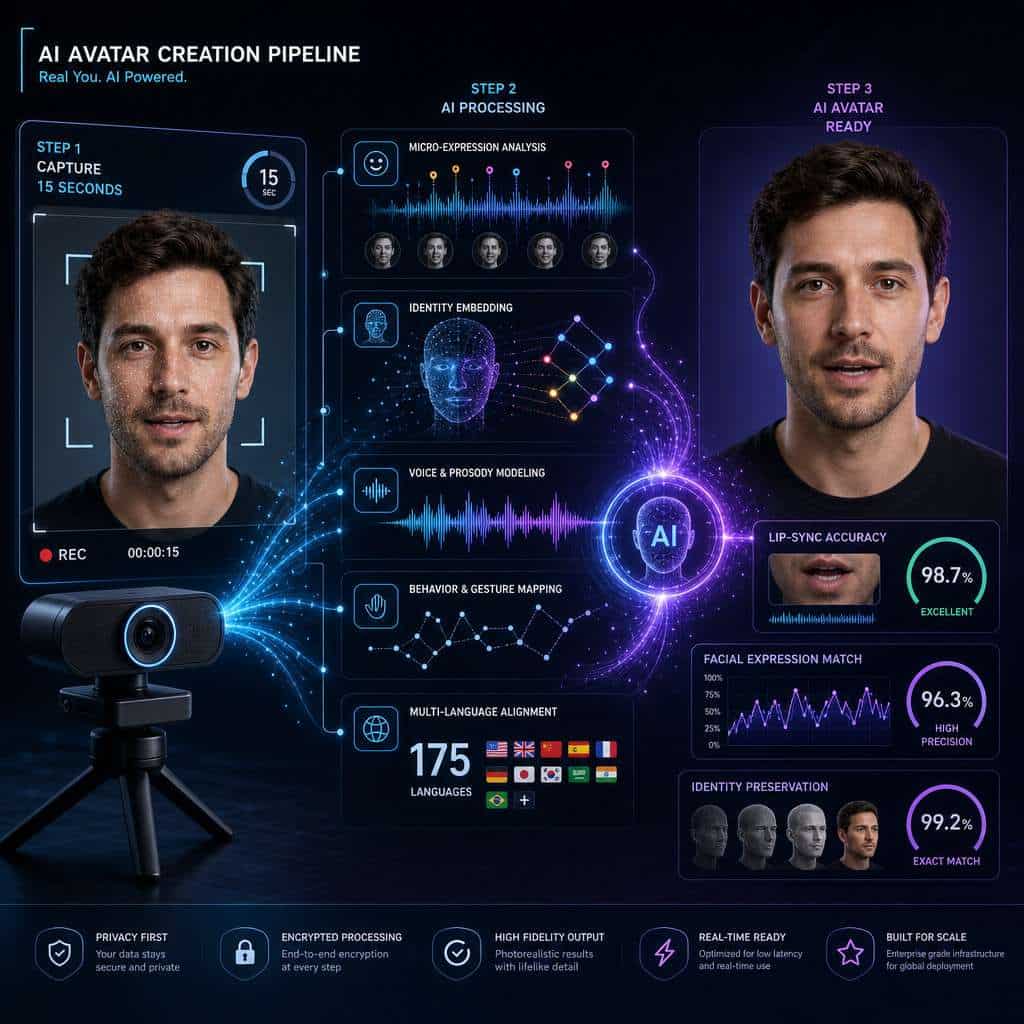
Here’s the simplified process:
- Record: You film yourself on a webcam for about 15 seconds
- Process: HeyGen’s Avatar V engine builds what it calls a “temporally grounded identity embedding,” which is essentially a mathematical map of your face, gestures, and expression patterns [5]
- Generate: You type or paste a script, choose a language, and the system produces a video of your digital twin delivering that script with matched lip movements
- Export: Download the finished video or share it directly
The April 2026 Avatar V launch was a major leap. According to Crypto.news, the new engine specifically addresses “identity drift,” the problem where an AI avatar’s face subtly changes across longer clips, different outfits, or different scenes [5]. HeyGen describes Avatar V as its “most advanced AI avatar model,” emphasizing identity consistency as the foundation for all avatar features going forward [1].
How Much Does HeyGen Cost Compared to Other AI Video Tools?
HeyGen uses a credit-based pricing model with four tiers. The free plan gives you limited credits to test the platform, while paid plans unlock more minutes, higher resolution, and advanced features like interactive video and API access [7].
| Plan | Approximate Monthly Cost | Key Inclusions |
|---|---|---|
| Free | $0 | Limited credits, watermarked output, basic avatars |
| Creator | ~$29/month | More credits, 1080p export, custom avatars |
| Business | ~$89/month | Interactive video, Brand Systems, priority rendering |
| Enterprise | Custom pricing | API access, dedicated support, advanced security |
Pricing based on publicly available information as of early 2026 [7] [10]. Check HeyGen’s website for current rates, as these may change.
Compared to Synthesia, which starts around $29/month for its Starter plan, HeyGen’s entry pricing is similar. The real differences emerge in features: HeyGen’s Seedance 2.0 cinematic shots [8] and interactive video capabilities [1] aren’t matched by most competitors at the same price point. For teams already using AI-powered content generation tools, HeyGen fits naturally into an existing AI workflow.
Choose HeyGen if you need multilingual video at scale with interactive elements. Choose a competitor if you primarily need simple talking-head videos and want a larger stock avatar library.
Can I Use HeyGen to Make Professional Marketing Videos?
Yes, and this is arguably HeyGen’s strongest use case. The March 2026 release introduced Brand Systems, which let you paste your website URL to automatically extract your logo, fonts, and brand colors, then apply them consistently across all templates and AI Studio projects [1].
For marketing teams, this means:
- Product demos featuring your AI clone explaining features in multiple languages
- Social media content produced daily without scheduling film crews
- Personalized outreach where each prospect sees a video addressed to them by name
- Interactive landing page videos with embedded CTAs and branching paths [1]
I’ve seen marketing teams cut their video production timeline from two weeks to two hours using tools like HeyGen. The quality gap between AI-generated and traditionally filmed content has narrowed significantly in 2026, especially with 4K upscaling now available through HeyGen’s Topaz Starlight Precise 2.5 integration [1].
If you’re building marketing assets alongside video, tools like Canva’s AI design assistant pair well with HeyGen for creating cohesive campaign materials.
Common mistake: Using a generic stock avatar instead of creating a custom clone. Audiences respond better to a consistent, recognizable face that represents your brand.
What Are the Limitations of HeyGen’s AI Avatar Technology?
HeyGen is impressive, but it has clear boundaries. Understanding these will save you time and frustration.
- Physical demonstrations: If your video requires hands-on product manipulation, cooking, or physical movement beyond the upper body, AI avatars can’t deliver
- Emotional range: While Avatar V handles micro-expressions well [5], deeply emotional performances (crying, laughing hard, showing genuine surprise) still look artificial
- Real-time interaction: HeyGen produces pre-rendered video, not live avatars for video calls (though their Video Agent feature is moving in this direction)
- Uncanny valley risk: Some viewers, especially in B2C contexts, may feel uncomfortable watching synthetic media, even if they can’t pinpoint why
- Credit consumption: High-quality outputs, especially 4K upscaled videos at 120 fps, consume credits quickly [1]
- Internet dependency: Everything runs in the cloud, so you need a stable connection and can’t work offline
Per a 2026 review by BigVU, HeyGen excels at scripted, professional content but falls short when you need authentic spontaneity or complex physical staging [6].
Is HeyGen Legal and Ethical for Creating Synthetic Media?
Using HeyGen to create an avatar of yourself or someone who has given explicit consent is legal in most jurisdictions. The ethical and legal risks emerge when consent is absent or when synthetic media is used to deceive.
Key ethical guidelines:
- Always get written consent before cloning someone else’s likeness
- Disclose synthetic media when required by platform policies (YouTube, Meta, and TikTok all have AI disclosure requirements as of 2026)
- Don’t impersonate public figures, competitors, or anyone without permission
- Follow industry regulations in sectors like healthcare, finance, and education where AI-generated content may face additional scrutiny
HeyGen itself requires consent verification when you create a custom avatar, but enforcement ultimately depends on users being honest during the upload process. Several U.S. states and EU regulations now specifically address deepfake and synthetic media creation, so check your local laws.
Which Industries Benefit Most from HeyGen’s Video Cloning?
E-learning, marketing, e-commerce, and corporate trAIning see the highest ROI from AI video cloning because they require high video volume with consistent messaging across audiences and languages.
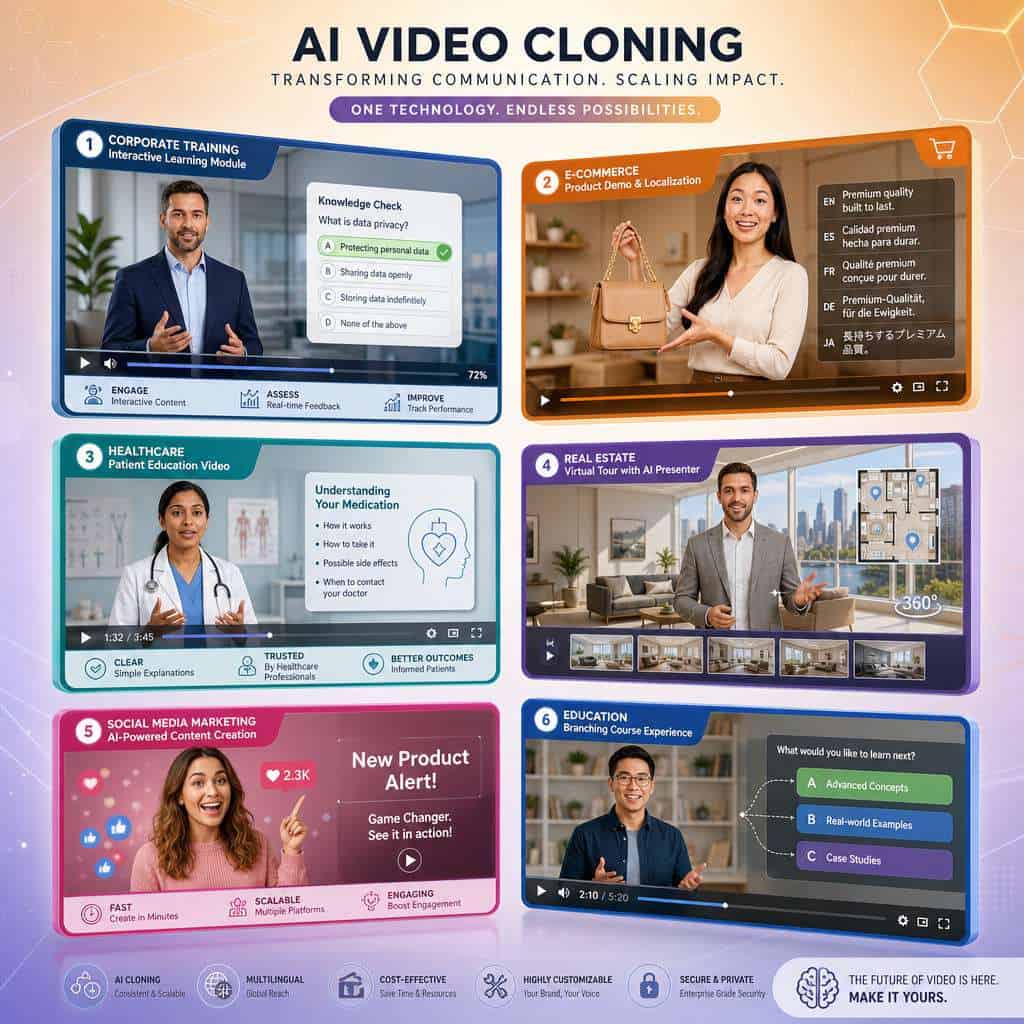
Top industries and use cases:
- Corporate L&D: Onboarding videos, compliance training, and interactive modules with SCORM export [1]
- E-commerce: Product explainers in dozens of languages for global storefronts
- Real estate: Property walkthrough narrations without scheduling on-site filming
- Healthcare: Patient education videos translated into community languages
- SaaS/Tech: Feature announcement videos, customer success stories, and support tutorials
- Education: Course content with multilingual instructors
The interactive video features released in March 2026, including in-video quizzes and branching paths, are particularly valuable for training departments [1]. These turn passive viewing into active learning without requiring separate authoring tools.
For businesses building their online presence alongside video content, combining HeyGen with no-code website builders creates a fast, affordable digital presence.
What Languages and Accents Can HeyGen’s AI Avatars Speak?
HeyGen’s Avatar V supports 175 languages with localized lip-sync [5]. This isn’t just text-to-speech dubbing; the avatar’s mouth movements adjust to match the phonetics of each language, which is a significant technical achievement.
Popular supported languages include English (multiple accents), Spanish, Mandarin, Hindi, Arabic, French, German, Japanese, Korean, Portuguese, and many more. The system handles tonal languages like Mandarin and Vietnamese, though accuracy can vary with highly regional dialects.
Tip: For best results with non-English content, have a native speaker review the script before generation. AI translation is good but occasionally misses cultural nuance or idiomatic expressions.
How Accurate Are HeyGen’s Lip-Sync and Facial Expressions?
Avatar V’s lip-sync accuracy is the best HeyGen has produced. The “temporally grounded identity embedding” preserves an individual’s micro-expressions and gesture transitions across videos, meaning your clone doesn’t just move its mouth correctly but also raises eyebrows, tilts its head, and shifts gaze in ways that match your natural patterns [5].
That said, accuracy varies by context:
- English scripts: Very high accuracy, especially with clear, well-paced scripts
- Other languages: Good but occasionally noticeable mismatches on complex consonant clusters
- Long-form content: Avatar V specifically addresses the drift problem that plagued earlier versions [5], but very long videos (10+ minutes) may still show subtle inconsistencies
- Cinematic shots: The Seedance 2.0 integration adds dynamic camera movement, which actually helps mask minor imperfections by keeping the viewer’s eye moving [8]
Can I Customize My AI Avatar’s Appearance in HeyGen?
Yes. You can create a custom avatar from your own likeness, and HeyGen offers some control over appearance. You can change outfits, backgrounds, and scenes. The Brand Systems feature ensures your avatar appears in brand-consistent settings [1].
However, you cannot dramatically alter your clone’s facial features, body type, or age. The avatar is meant to be a faithful representation of the person recorded. If you need a completely fictional character, HeyGen also offers stock avatars with various appearances, though these lack the personal touch of a custom clone.
For visual assets beyond video, graphic design tools for social media can help you create matching thumbnails and promotional graphics.
How Does HeyGen Compare to Synthesia and Other AI Video Platforms?
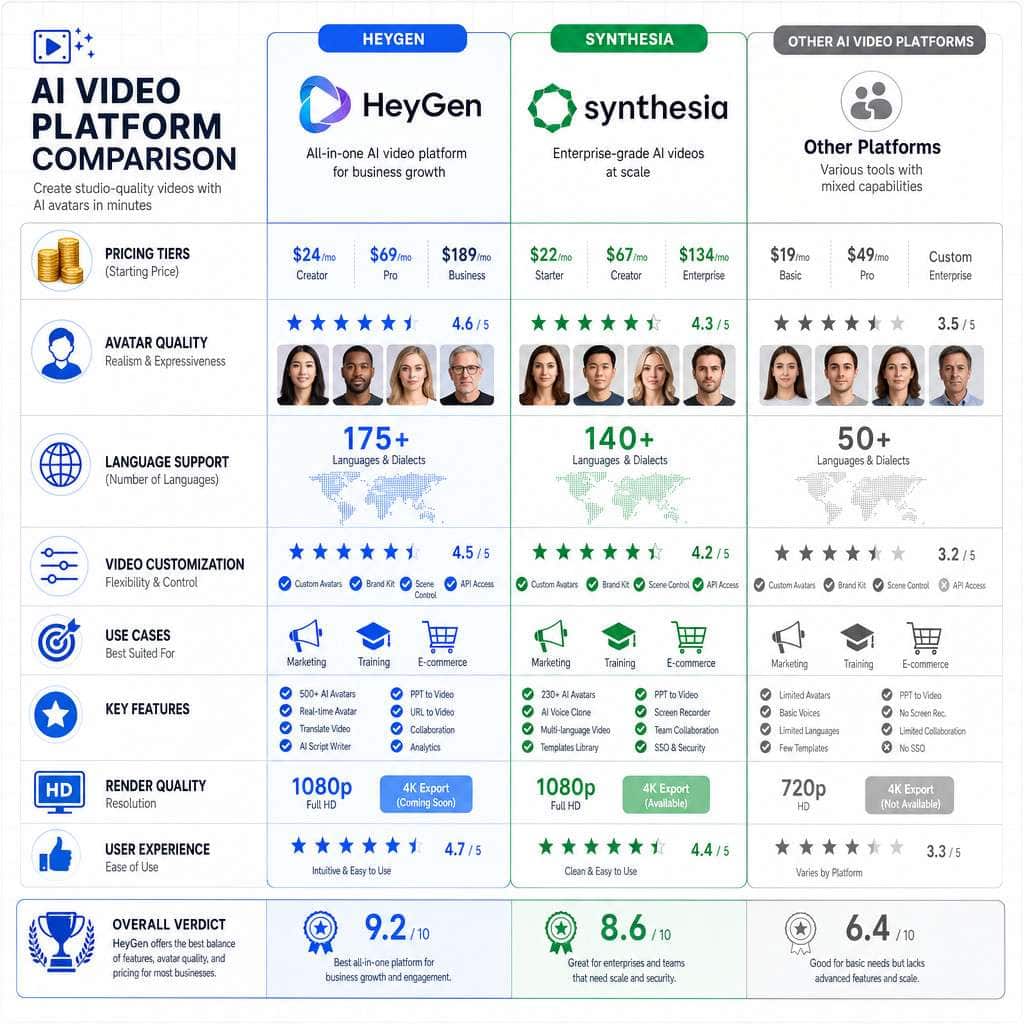
HeyGen and Synthesia are the two dominant platforms in 2026, but they serve slightly different strengths.
| Feature | HeyGen | Synthesia | D-ID |
|---|---|---|---|
| Custom avatar from webcam | 15-second recording [5] | Requires longer recording | Photo-based |
| Languages | 175 [5] | ~140 | ~30+ |
| Interactive video | Yes (quizzes, branching) [1] | Limited | No |
| Cinematic camera movement | Yes (Seedance 2.0) [8] | No | No |
| 4K upscaling | Yes [1] | No | No |
| Brand Systems | Auto-extract from URL [1] | Manual setup | No |
| Starting price | ~$29/month [7] | ~$29/month | ~$24/month |
| Best for | Marketing + training | Enterprise training | Quick social clips |
Choose HeyGen if you want the most advanced avatar realism, multilingual support, and interactive features. Choose Synthesia if your primary need is enterprise-scale training with strong compliance features. Choose D-ID if you need quick, low-cost social media clips.
What Kind of Video Content Can’t Be Created with HeyGen?
HeyGen can’t produce every type of video. Here’s what falls outside its capabilities:
- Live-action scenes with multiple people interacting physically
- Full-body movement like dancing, sports, or physical product demonstrations
- Real-time live streaming with audience interaction
- Authentic testimonials where genuine emotion matters more than polish
- Complex narrative filmmaking with multiple camera angles and scene transitions (though Seedance 2.0 is pushing this boundary [8])
- User-generated content style videos that intentionally look unpolished and authentic
If your content strategy requires these formats, traditional video production or simpler tools remain necessary. For content planning and AI-powered content optimization, combining HeyGen with other tools in your stack gives you the best coverage.
What Are Common Mistakes People Make When Using AI Video Cloning?
Most failures with HeyGen aren’t technical; they’re strategic. Here are the mistakes I see most often:
- Poor recording quality: Filming your 15-second clip in bad lighting or with background noise degrades the avatar permanently
- Over-length scripts: AI avatars work best in 1-3 minute segments, not 20-minute lectures
- Ignoring disclosure: Not labeling AI-generated content where platforms require it, risking account penalties
- Using stock avatars for brand content: Your audience can tell, and it undermines trust
- Skipping script review: Feeding unedited, rambling scripts produces awkward pacing
- Neglecting the audio: HeyGen’s voice cloning is good, but pairing it with background music and sound design makes a huge difference
- Not testing across languages: A script that works in English may sound unnatural when directly translated
Is HeyGen Good for Beginners or Just for Video Professionals?
HeyGen is designed for non-technical users. The interface is template-driven: you pick a template, choose or create an avatar, paste your script, and hit generate. No video editing experience is required.
That said, professionals get more out of it. Experienced video creators can leverage the API, customize Brand Systems [1], build interactive training flows [1], and integrate HeyGen into larger production pipelines. If you’re just starting with digital content creation, you might also explore AI website builders to host your video content.
Bottom line: Beginners can produce usable videos within 30 minutes of signing up. Professionals can build sophisticated, multi-language video operations at scale.
Conclusion
HeyGen’s AI Clone technology in 2026 represents a genuine shift in how video content gets made. The Avatar V engine’s 15-second setup, 175-language support, and identity consistency solve real problems for teams that need video at volume [5]. Combined with interactive features, Brand Systems, and 4K upscaling from the March 2026 release [1], the platform covers most professional video needs short of live-action production.
Your next steps:
- Try the free tier to test avatar quality with your own likeness
- Record your 15-second clip in good lighting with a clean background
- Start with one use case (e.g., a product demo or training video) before scaling
- Review output with native speakers if producing multilingual content
- Combine with your existing tools like Canva for design and your CMS for distribution
AI video cloning isn’t replacing human creativity. It’s removing the production bottleneck so your ideas reach audiences faster, in more languages, and at a fraction of traditional costs.
FAQ
How long does it take to create a video with HeyGen? A simple 1-minute video typically renders in 5-10 minutes after you submit your script. Longer videos and 4K upscaling take more time.
Is my face data safe with HeyGen? HeyGen stores your avatar data on their servers. Review their privacy policy and data processing agreements, especially if you’re in the EU under GDPR.
Can I use HeyGen videos on YouTube and social media? Yes. You own the output videos on paid plans. Follow each platform’s AI disclosure requirements when posting.
Does HeyGen work on mobile? You can record your avatar clip on mobile, but the editing and generation workflow is best on desktop browsers.
Can I clone someone else’s voice with HeyGen? Yes, but only with their explicit consent. HeyGen requires consent verification during the voice cloning process.
What video formats does HeyGen export? MP4 is the standard export format, with resolution options up to 4K on supported plans [1].
How many custom avatars can I create? This depends on your plan tier. Creator plans allow a limited number, while Business and Enterprise plans offer more slots [7].
Does HeyGen offer an API for developers? Yes, API access is available on Business and Enterprise plans for integrating avatar video generation into custom applications [1].
Can I edit a video after it’s generated? You can regenerate with a revised script, but there’s no frame-by-frame editor within HeyGen. Export to a traditional editor for fine-tuning.
What happens if I cancel my subscription? You keep videos you’ve already exported, but you lose access to generate new content and your custom avatars may become inaccessible.
References
[1] Product Updates – https://www.heygen.com/blog/category/product-updates [5] Latest AI HeyGen Avatar V Clones Faces in 15 Seconds – https://crypto.news/latest-ai-heygen-avatar-v-clones-faces-in-15-seconds/ [6] HeyGen 2026 Tested: 4 Things It Does Well, 3 Reasons to Pick Something Else – https://bigvu.tv/blog/heygen-2026-tested-4-things-does-well-3-reasons-pick-something-else/ [7] HeyGen Pricing 2026: Free vs Creator vs Business – https://flowith.io/blog/heygen-pricing-2026-free-vs-creator-vs-business/ [8] Facebook – https://www.facebook.com/francisablola/videos/this-is-so-wild-heygen-personal-ai-clone-avatars-seedance-20-the-most-advanced-c/26802776456007041/ [10] HeyGen Pricing – https://www.photonpay.com/hk/blog/article/heygen-pricing?lang=en