Last updated: May 11, 2026
Quick Answer: Base44 is a data encoding scheme that uses a 44-character alphabet to convert binary data into text. It was designed specifically for QR code alphanumeric mode, where it packs more data per QR module than Base64 or Base32 [6]. If you work with QR codes, IoT payloads, or any context where data density matters in a constrained character set, Base44 is worth understanding.
Key Takeaways
- Base44 encoding maps binary data to a 44-character alphabet optimized for QR code alphanumeric mode [6].
- It achieves better data density than Base64 when the output must stay within QR-compatible characters.
- The encoding process groups input bytes, performs modular arithmetic with base 44, and maps results to allowed characters.
- Base44 is not a general-purpose replacement for Base64. It solves a specific problem in constrained environments.
- Decoding reverses the process: characters are mapped back to numeric values, then reconstructed into original bytes.
- The Base44 AI app builder platform shares the name but is a completely different product (an AI no-code tool) [6].
- Security researchers found vulnerabilities in the Base44 AI platform in 2025, but these are unrelated to the encoding algorithm itself.
- Common alternatives include Base64 [4], Base32, and Base85, each with different trade-offs in size, character set, and compatibility.
What Is Base44 Encoding and Why Does It Exist?

Base44 encoding is a binary-to-text scheme that converts raw data into a string using exactly 44 characters from the QR code alphanumeric character set [6]. That character set includes uppercase letters A–Z, digits 0–9, and a handful of symbols (space, $, %, *, +, -, ., /, :).
The reason Base44 exists is practical. QR codes support multiple data modes: numeric, alphanumeric, byte, and kanji. Alphanumeric mode is more efficient than byte mode because it encodes 2 characters per 11 bits instead of 1 character per 8 bits. If you encode binary data as Base64 first, the lowercase letters and special characters in Base64 force the QR code into byte mode, wasting capacity [6].
Base44 solves this by restricting its output to characters that QR alphanumeric mode accepts. The result: you fit more original data into fewer QR modules.
Choose Base44 if: Your output must be a QR code and you need maximum data density in alphanumeric mode. Skip Base44 if: You’re encoding data for URLs, email, or general web transport. Base64 is the standard there [4].
How Does Base44 Encoding Work Step by Step?
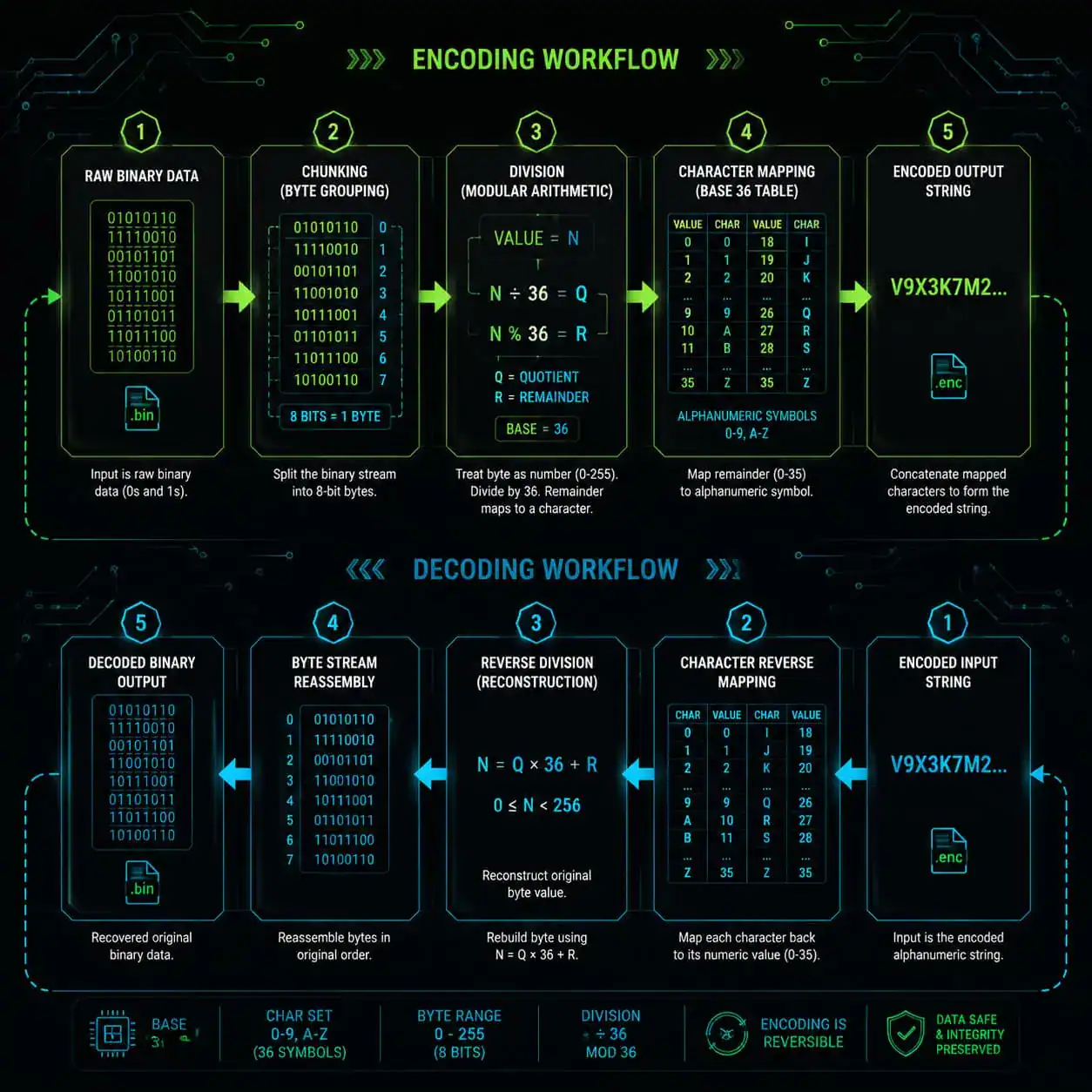
Base44 encoding follows a straightforward mathematical process. Here’s how it works:
- Group input bytes. Take the raw binary data and split it into chunks (typically 2 bytes at a time).
- Convert to an integer. Treat each chunk as a single number. For a 2-byte chunk, this gives a value between 0 and 65,535.
- Divide by 44 repeatedly. Use modular arithmetic (similar to how you’d convert a decimal number to a different base). Each division produces a remainder between 0 and 43.
- Map remainders to characters. Each remainder maps to one of the 44 allowed characters in the alphabet [2].
- Concatenate the output. The mapped characters form the encoded string.
Decoding reverses these steps: each character maps back to its numeric value (0–43), the values are combined using base-44 positional math, and the resulting integer is split back into the original bytes.
A quick example
Suppose you have two bytes: 0x48 and 0x65 (the ASCII codes for “He”). As a 16-bit integer, that’s 18,533. Dividing repeatedly by 44 gives a sequence of remainders, each mapping to a character in the Base44 alphabet. The decoder reverses this to recover 18,533, then splits it back into 0x48 and 0x65.
Common mistake: Forgetting to handle padding for odd-length input. When the input has an odd number of bytes, the last single byte must be encoded separately with fewer output characters. Implementations that skip this step produce corrupted output on odd-length data.
How Does Base44 Compare to Base64 and Other Encoding Schemes?
This is where understanding trade-offs matters. No single encoding is best for every situation.
| Feature | Base44 | Base64 | Base32 | Base85 |
|---|---|---|---|---|
| Character set size | 44 | 64 | 32 | 85 |
| Primary use case | QR alphanumeric mode | Web, email, APIs | Case-insensitive contexts | Binary-in-text (PDF, Git) |
| Output size overhead | ~36% (in QR context, net gain) | ~33% | ~60% | ~25% |
| QR alphanumeric compatible | Yes | No (lowercase letters) | Partially | No |
| Widely supported in libraries | Limited | Extremely broad [4][9] | Moderate | Moderate |
Base64 remains the most common encoding for web applications, APIs, and email attachments [5]. It’s supported in virtually every programming language and framework. If you’re building a WordPress plugin or working with web design tools, Base64 is almost certainly what you’ll encounter.
Base44’s advantage is narrow but significant: when your encoded data must go into a QR code, it lets the QR generator use alphanumeric mode, which is roughly 40% more space-efficient than byte mode [6]. That means smaller QR codes or more data in the same physical size.
Edge case: Base85 (also called Ascii85) has even better density than Base64, but its character set includes characters that cause problems in XML, JSON, and URLs. It’s mainly used in PostScript and PDF internals.
Who Should Use Base44 Encoding in 2026?
Base44 is a specialized tool, not a general-purpose one [6]. Here’s who benefits:
- QR code developers building systems that embed structured data (URLs, JSON payloads, authentication tokens) in QR codes and need to maximize capacity.
- IoT engineers working with devices that communicate via QR codes or similarly constrained channels.
- Mobile app developers who generate or scan QR codes and want to squeeze more data into each code without increasing physical size.
If you’re working on web performance optimization or SEO improvements, Base44 likely isn’t relevant to your workflow. Stick with Base64 for image embedding, data URIs, and API payloads.
What About the Base44 AI Platform? Clearing Up the Confusion

A major source of confusion in 2026: “Base44” is also the name of an AI-powered no-code app builder [6]. The two are completely unrelated.
The Base44 AI platform lets users describe an application in plain language and generates working code. As Base44 CEO Maor Shlomo stated in May 2026: “Everyone wants an agent that does real work… With Base44, you simply describe what you want your agent to do and it starts working for you immediately” [6].
The platform offers plans starting at $20/month and supports integrations with services like Gmail and Stripe. However, reviews from May 2026 note limitations including a dual-credit system that can get expensive during iterative development, and limited mobile app support [10].
Security note: In 2025, researchers from Wiz and Imperva identified authentication flaws and stored XSS vulnerabilities in the Base44 AI platform. These were patched, but they highlight the importance of security auditing for any AI-generated application. If you’re exploring AI-powered development tools, factor in security review as a required step.
Competitors in this space include Rocket.new (which supports full-stack mobile apps via Flutter), Lovable, and Bolt.new [10]. For those interested in no-code approaches, our guide to no-coding website platforms covers the broader landscape.
How Do You Implement Base44 Encoding and Decoding?
Practical implementation is straightforward. Here’s a simplified pseudocode approach:
Encoding
<code>define ALPHABET = "0123456789ABCDEFGHIJKLMNOPQRSTUVWXYZ $%*+-./:"

function encode(bytes):
    output = ""
    for each pair of bytes (b1, b2):
        value = b1 * 256 + b2
        for i in range(3):
            output += ALPHABET[value % 44]
            value = value / 44 (integer division)
    handle last byte if odd length
    return output
</code>
Decoding
<code>function decode(encoded_string):
    bytes = []
    for each group of 3 characters:
        value = 0
        for i in reverse(range(3)):
            value = value * 44 + index_of(char[i], ALPHABET)
        bytes.append(value / 256)
        bytes.append(value % 256)
    handle final group if shorter
    return bytes
</code>
Reference implementations exist on GitHub, including the qr-base44 project [2]. For production use, look for libraries in your language that handle edge cases like padding and input validation.
Common mistake: Using a Base44 alphabet that doesn’t exactly match the QR alphanumeric character set. Even one wrong character forces the QR encoder into byte mode, eliminating the entire benefit.
What Are the Limitations and Risks of Base44?
Every encoding scheme has trade-offs:
- Limited library support. Unlike Base64, which has native support in most languages [9], Base44 libraries are rare and less battle-tested.
- Niche applicability. Outside QR codes, Base44 offers no advantage over Base64 or Base85.
- No encryption. Encoding is not encryption. Base44 (like Base64) provides zero security. Anyone can decode the data [5].
- Debugging difficulty. Because Base44 is uncommon, team members may not recognize it, making debugging harder.
If you’re building applications that handle sensitive data, pair any encoding with proper encryption. For teams working on content optimization or web development workflows, understanding this distinction between encoding and encryption is essential.
Conclusion
Base44 encoding fills a specific gap: maximizing data density in QR code alphanumeric mode. It’s not a replacement for Base64 in general computing, but when you need to pack the most data into a QR code, it’s the right tool.
Your next steps:
- Determine your use case. If you’re working with QR codes and need more capacity, evaluate Base44. For everything else, Base64 remains the standard [4].
- Find a tested library. Check the
qr-base44GitHub repository [2] or equivalent in your language. Don’t roll your own implementation without thorough testing. - Don’t confuse encoding with security. Base44 is transparent to anyone who knows the alphabet. Add encryption if the data is sensitive.
- Test edge cases. Odd-length inputs, empty strings, and binary data with null bytes are where implementations commonly break.
- Stay aware of the naming confusion. When searching for “Base44” resources, filter carefully between the encoding scheme and the AI app builder platform.
FAQ
What is Base44 encoding used for? Base44 encoding is primarily used to encode binary data for QR code alphanumeric mode, where it achieves better data density than Base64 because all output characters are QR-alphanumeric compatible [6].
Is Base44 better than Base64? Only in the specific context of QR code alphanumeric mode. For web APIs, email, and general data transport, Base64 is more widely supported and practical [4].
Is Base44 encoding secure? No. Like all encoding schemes, Base44 is fully reversible and provides no confidentiality. It’s a data representation format, not an encryption method [5].
Can I use Base44 for URLs? Technically yes, but there’s no advantage. Base64url (a URL-safe variant of Base64) is the established standard for URL-embedded data [4].
What characters does Base44 use? The 44-character alphabet includes: 0–9, A–Z, space, $, %, *, +, -, ., /, and : [2][6].
Is the Base44 AI platform related to Base44 encoding? No. The Base44 AI platform is a no-code app builder that happens to share the name. The encoding scheme predates the platform [6].
How much overhead does Base44 add? Approximately 36% size increase for the encoded output. However, because QR alphanumeric mode is more efficient than byte mode, the net QR code size is typically smaller than using Base64 [6].
Where can I find Base44 libraries?
The qr-base44 project on GitHub provides a reference implementation [2]. Libraries exist for several languages but are far less common than Base64 libraries.
What’s the difference between Base32, Base44, Base64, and Base85? Each uses a different character set size, creating different trade-offs between output size and character compatibility. Base32 is most restrictive, Base85 is most compact, and Base44 is optimized specifically for QR codes.
Can Base44 handle any type of data? Yes. Like Base64, it can encode any binary data. The input doesn’t need to be text.
References
[2] Qr Base44 – https://github.com/kookyleo/qr-base44 [4] Base64 – https://en.wikipedia.org/wiki/Base64 [5] Guide Encode Decoded Base64 – https://www.sentinelone.com/blog/guide-encode-decoded-base64/ [6] Decoding Base44 The Ai The Encoding And The Red Herring – https://skywork.ai/blog/decoding-base44-the-ai-the-encoding-and-the-red-herring/ [9] Base64 – https://commons.apache.org/proper/commons-codec/apidocs/org/apache/commons/codec/binary/Base64.html [10] Base44 Review – https://www.zite.com/blog/base44-review