
Last updated: May 11, 2026
Quick Answer
Base44 is a specialized binary-to-text encoding scheme that uses a 44-character alphabet designed specifically for QR code alphanumeric mode. It encodes 2 bytes into 3 characters, achieving better data density than Base64 when the output is destined for a QR code. Base44 is not a general-purpose encoding—it solves a narrow but important problem: packing more binary data into QR codes without triggering the less efficient byte mode [6].
Key Takeaways
- Base44 uses the character set
0123456789ABCDEFGHIJKLMNOPQRSTUVWXYZ$%*+-./:which fits within QR alphanumeric mode [1][6] - It encodes 2 bytes into 3 characters and 1 byte into 2 characters [2]
- Base44 avoids forcing QR scanners into byte mode, which Base64 requires due to lowercase letters and
=padding [6] - Theoretical information density is approximately 1.48 bits per character vs. Base64’s 1.33 bits per character in QR context [2]
- Base44 is not a replacement for Base64 in general computing (email, APIs, web tokens outside QR)
- Available implementations include the Rust crate
qr-base44and the Python libraryjwt-eddsa-base44[2][6] - Best suited for: QR-encoded certificates, health passes, compact JWT tokens, and any scenario where data must fit QR alphanumeric constraints
What Is Base44 and Why Does It Exist?

Base44 encoding exists because of a specific inefficiency in how QR codes handle Base64-encoded data. QR codes support multiple data modes: numeric, alphanumeric, byte, and kanji. Alphanumeric mode is significantly more compact than byte mode for the same payload size [6].
The problem: Base64 uses lowercase letters (a-z) and the = padding character, neither of which belong to the QR alphanumeric character set. When you embed Base64 text in a QR code, the scanner must switch to byte mode, which stores only 8 bits per character instead of the 5.5 bits per character available in alphanumeric mode [4][6].
Base44 solves this by restricting its alphabet to exactly the characters QR alphanumeric mode supports (minus the space character, which causes issues in many implementations). The result is what one analysis called “clever engineering pragmatism”—a purpose-built encoding for a specific optimization problem [6].
Choose Base44 if:
- Your encoded output will be displayed as a QR code
- You need to maximize data density within QR constraints
- You’re working with JWT tokens, certificates, or compact payloads for mobile scanning
Don’t choose Base44 if:
- You need general binary-to-text encoding for APIs, email, or file storage
- Interoperability with existing systems expecting Base64 is required
- Your toolchain doesn’t support it (library availability is limited)
How Does Base44 Encoding Work Step by Step?
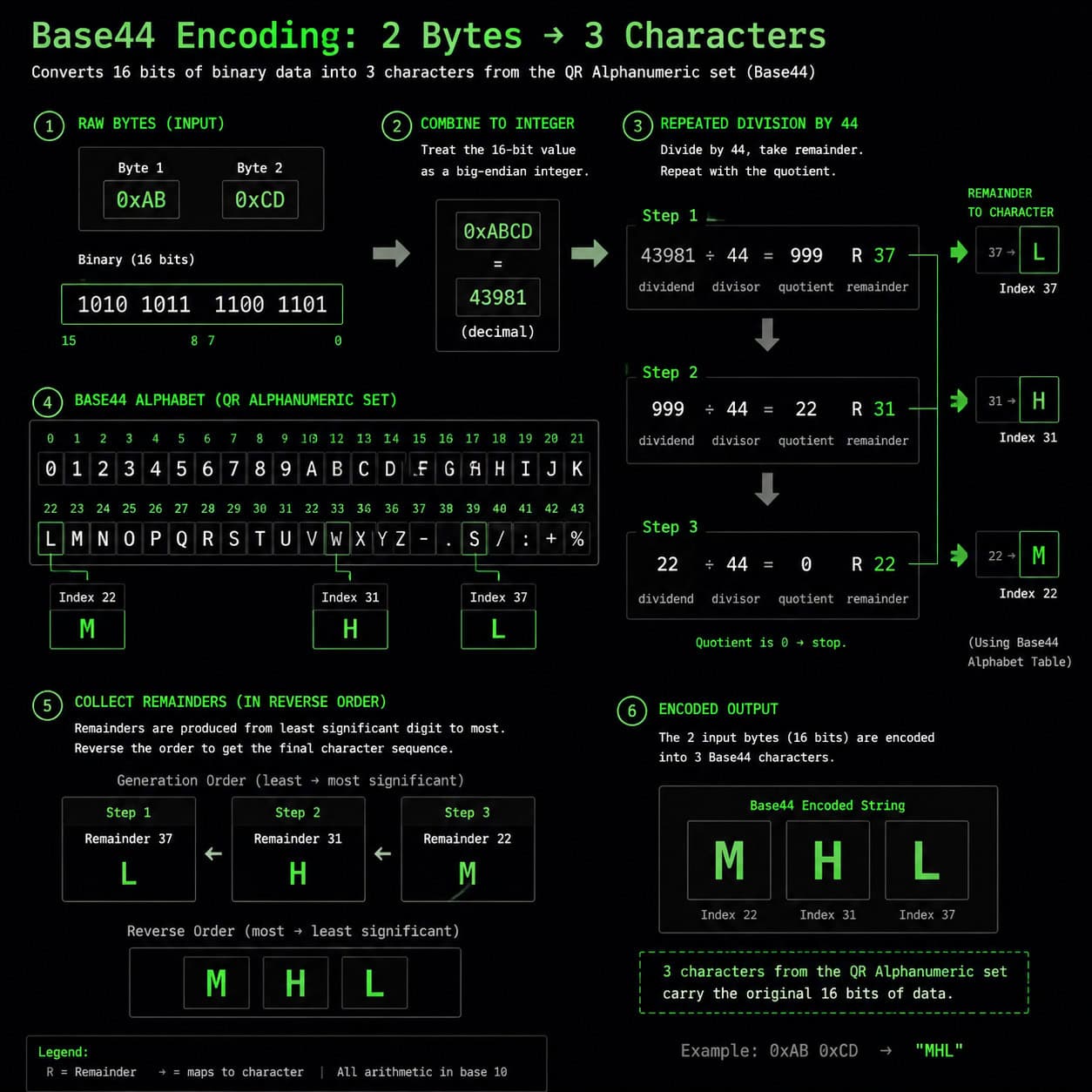
Base44 converts binary data into printable characters using modular arithmetic with a base of 44. Here’s the process broken down:
Encoding Process
- Group input bytes in pairs. Take 2 bytes at a time from the input data.
- Convert to integer. Treat the 2-byte pair as a single 16-bit unsigned integer (value range: 0–65,535).
- Divide by 44 repeatedly. Perform successive division by 44, collecting remainders:
- First remainder = character 1
- Second remainder = character 2
- Quotient = character 3
- Map remainders to characters. Each remainder (0–43) maps to a character in the alphabet:
0123456789ABCDEFGHIJKLMNOPQRSTUVWXYZ$%*+-./:[2] - Handle odd bytes. If the input has an odd number of bytes, the final single byte (0–255) encodes to 2 characters using the same division method.
Decoding Process
Decoding reverses the steps: take 3 characters, convert each to its index value (0–43), compute c1 + c2*44 + c3*44², then split the result back into 2 bytes [2].
Common mistake: Confusing Base44 (the encoding scheme) with Base44.com (an AI app builder platform). These are entirely unrelated—the naming overlap causes frequent confusion in search results [6][7].
How Does Base44 Compare to Base64 and Other Encodings?
Base44 is not competing with Base64 for general use. They solve different problems. Here’s a direct comparison:
| Feature | Base44 | Base64 | Base32 | Base85 |
|---|---|---|---|---|
| Character set size | 44 | 64 | 32 | 85 |
| Bytes → chars ratio | 2→3 | 3→4 | 5→8 | 4→5 |
| Size overhead | ~50% | ~33% | ~60% | ~25% |
| QR alphanumeric compatible | Yes | No | Partially | No |
| General-purpose use | No | Yes | Yes | Limited |
| Library availability | Low | Universal | High | Medium |
| URL-safe by default | Yes | No (needs variant) | Yes | No |
Sources: [4][6][2]
Key insight: The “50% overhead” figure for Base44 looks worse than Base64’s 33% in isolation. But when you factor in QR mode efficiency, Base44-encoded data in alphanumeric mode actually produces smaller QR codes than Base64-encoded data in byte mode [6]. The QR encoding layer compensates for the higher character count.
For developers working on AI-powered content tools or web applications that generate QR codes, understanding this tradeoff matters when choosing an encoding strategy.
What Are the Best Use Cases for Base44?
Base44 shines in a narrow set of scenarios. Here are the primary applications:
1. QR-encoded digital certificates and health passes During the COVID-19 pandemic, several digital health certificate systems explored or adopted Base44-style encoding to maximize the data that could fit in a single QR code without increasing its physical size [6].
2. JWT tokens in QR codes
The jwt-eddsa-base44 Python library specifically addresses encoding signed tokens for QR display. A JWT that would normally require a large QR code in byte mode fits in a smaller, faster-scanning code using Base44 [6].
3. Compact URL payloads Since Base44’s character set is URL-safe, it works for encoding binary data in URL parameters without additional percent-encoding—useful when those URLs will also appear as QR codes.
4. IoT device provisioning Small QR codes printed on hardware labels can carry more configuration data when Base44 is used instead of Base64.
If you’re building web applications that handle data encoding, our guide on no-coding website design platforms covers tools that may integrate with QR generation workflows.
How Do You Implement Base44 in Your Projects?

Implementation depends on your language and use case. Here are the current options:
Available Libraries (as of 2026)
- Rust:
qr-base44crate by kookyleo [2] - Python:
jwt-eddsa-base44for JWT-specific workflows [6] - JavaScript: No widely-adopted standalone library; most implementations are custom
Rolling Your Own (Python Example)
<code class="language-python">CHARSET = "0123456789ABCDEFGHIJKLMNOPQRSTUVWXYZ$%*+-./:  "

def encode_base44(data: bytes) -> str:
    result = []
    for i in range(0, len(data), 2):
        if i + 1 < len(data):
            value = data[i] * 256 + data[i + 1]
            result.append(CHARSET[value % 44])
            result.append(CHARSET[(value // 44) % 44])
            result.append(CHARSET[value // (44 * 44)])
        else:
            value = data[i]
            result.append(CHARSET[value % 44])
            result.append(CHARSET[value // 44])
    return ''.join(result)
</code>
Edge case: When the 2-byte integer value exceeds 44² (1,936) but is less than 44³ (85,184), the third character index can exceed 43 if you don’t cap the input at 65,535. Always validate that input pairs don’t overflow the expected range.
For developers working with WordPress plugin development, adding Base44 encoding to a QR code generator plugin requires careful handling of PHP’s integer types.
What Are the Limitations and Risks of Base44?
No encoding scheme is without tradeoffs. Base44 has several:
Limitations:
- Extremely limited library ecosystem compared to Base64
- No RFC or formal standard—implementations may vary slightly
- Higher character overhead than Base64 for non-QR use cases
- Not supported by any major framework’s standard library
- Debugging is harder because fewer online tools decode Base44
Security considerations:
- Base44 is encoding, not encryption—it provides zero confidentiality
- A recent security analysis of the Base44 platform (the AI app builder, not the encoding) revealed critical vulnerabilities including exposed sensitive data [10]. While unrelated to the encoding algorithm, this highlights the importance of not confusing the two
Common mistakes when implementing Base44:
- Using the full 45-character QR alphanumeric set (including space) when your transport layer doesn’t handle spaces well
- Assuming Base44 provides compression—it doesn’t; it always increases data size
- Mixing Base44 with Base64 in the same system without clear labeling
Teams working on SEO optimization should note that Base44-encoded URLs are search-engine friendly since they contain only alphanumeric characters and common symbols.
When Should You Choose Base44 Over Alternatives?
Use this decision framework:
- Choose Base64 when you need universal compatibility, broad library support, or are encoding data for APIs, email, or storage [4][5]
- Choose Base44 when your encoded output will be rendered as a QR code and you need maximum data density in alphanumeric mode [6]
- Choose Base32 when you need case-insensitive encoding (e.g., DNS names, file systems) but don’t care about QR optimization
- Choose Base85 when you need minimal overhead and your transport supports the full printable ASCII range
For web designers using tools like Webflow or Framer, Base44 becomes relevant when building pages that dynamically generate QR codes containing encoded user data or configuration payloads.
FAQ
Is Base44 the same as Base44.com? No. Base44.com is an AI application builder platform [7]. Base44 encoding is a binary-to-text scheme for QR codes. The name overlap causes frequent confusion [6].
Does Base44 compress data? No. Base44 always produces output larger than the input (approximately 50% larger). It’s an encoding, not a compression algorithm.
Is Base44 standardized in an RFC? No. Unlike Base64 (RFC 4648) or Base32, Base44 has no formal IETF standard. Implementations follow informal specifications from library documentation [2].
Can I use Base44 for email attachments? You shouldn’t. Base64 is the universal standard for MIME encoding. Base44 would not be recognized by email clients [4].
How much data can Base44 fit in a QR code? A version 40 QR code (largest standard size) holds 4,296 alphanumeric characters. With Base44’s 3-chars-per-2-bytes ratio, that’s approximately 2,864 bytes of binary data.
Is Base44 URL-safe? Yes. All characters in the Base44 alphabet are valid in URLs without percent-encoding, making it suitable for URL parameters [2][6].
What programming languages support Base44?
Rust (via qr-base44) and Python (via jwt-eddsa-base44) have known libraries. Most other languages require custom implementation [2][6].
Does Base44 work with all QR code generators? Yes, as long as you feed the encoded string to the generator and it detects alphanumeric mode automatically. Most modern QR libraries auto-detect the optimal mode.
Conclusion
Mastering Base44 encoding comes down to understanding its specific niche: maximizing binary data density within QR code alphanumeric constraints. It’s not a general-purpose tool, and it won’t replace Base64 in your API layer or email system.
Your next steps:
- Evaluate whether your use case involves QR codes carrying binary data (certificates, tokens, configuration)
- If yes, test Base44 encoding against Base64 by comparing the resulting QR code sizes at the same error correction level
- Choose an existing library (
qr-base44for Rust,jwt-eddsa-base44for Python) or implement the algorithm yourself using the encoding logic above - Always label Base44-encoded data clearly in your system to prevent confusion with Base64
For broader web development workflows that might incorporate QR generation, explore our guides on AI-powered content optimization and efficient web design practices.
References
[1] base64encode – https://www.base64encode.org [2] Qr Base44 – https://github.com/kookyleo/qr-base44 [4] Base64 – https://en.wikipedia.org/wiki/Base64 [5] Guide Encode Decoded Base64 – https://www.sentinelone.com/blog/guide-encode-decoded-base64/ [6] Decoding Base44 The Ai The Encoding And The Red Herring – https://skywork.ai/blog/decoding-base44-the-ai-the-encoding-and-the-red-herring/ [7] Base44 Ai App Builder – https://base44.com/blog/base44-ai-app-builder [10] Critical Flaws In Base44 Exposed Sensitive Data And Allowed Account Takeovers – https://www.imperva.com/blog/critical-flaws-in-base44-exposed-sensitive-data-and-allowed-account-takeovers/