Last updated: May 22, 2026
Quick Answer
HeyGen Face Swap is a cloud-based AI tool that lets you replace faces in video content using a single photo, producing realistic AI avatars with synchronized lip movement and natural expressions. It runs entirely in your browser — no special hardware or video editing skills required. As of 2026, it’s positioned as a standalone app within HeyGen’s platform, starting at roughly $29/month for individual creators [7]. The tool is best suited for marketing videos, explainers, training content, and social media — not for dubbing existing footage or real-time video calls.
Key Takeaways
- HeyGen Face Swap works in-browser: upload a source image, select a target, and the AI handles facial mapping, expression transfer, and lip sync automatically [5].
- Pricing starts at about $29/month (Creator tier) for unlimited 1080p avatar videos [7].
- The April 2026 Seedance 2.0 integration significantly improved realism, full-body motion, and lip-sync accuracy for longer videos [3].
- HeyGen supports 175+ languages and accents, making it strong for multilingual content [7].
- U.S. deepfake legislation is tightening fast — every state has introduced some form of sexual deepfake law by February 2026, and HeyGen requires written consent for face swaps.
- Best use cases: YouTube content, product demos, training videos, and personalized marketing at scale.
- Not ideal for: real-time video, full post-production dubbing pipelines, or replacing professional actors in cinematic work [10].
- Competitors include Synthesia (corporate training focus), D-ID (interactive/conversational), and DeepFaceLive (open-source, local processing).
What Exactly Is HeyGen Face Swap and How Does It Work?
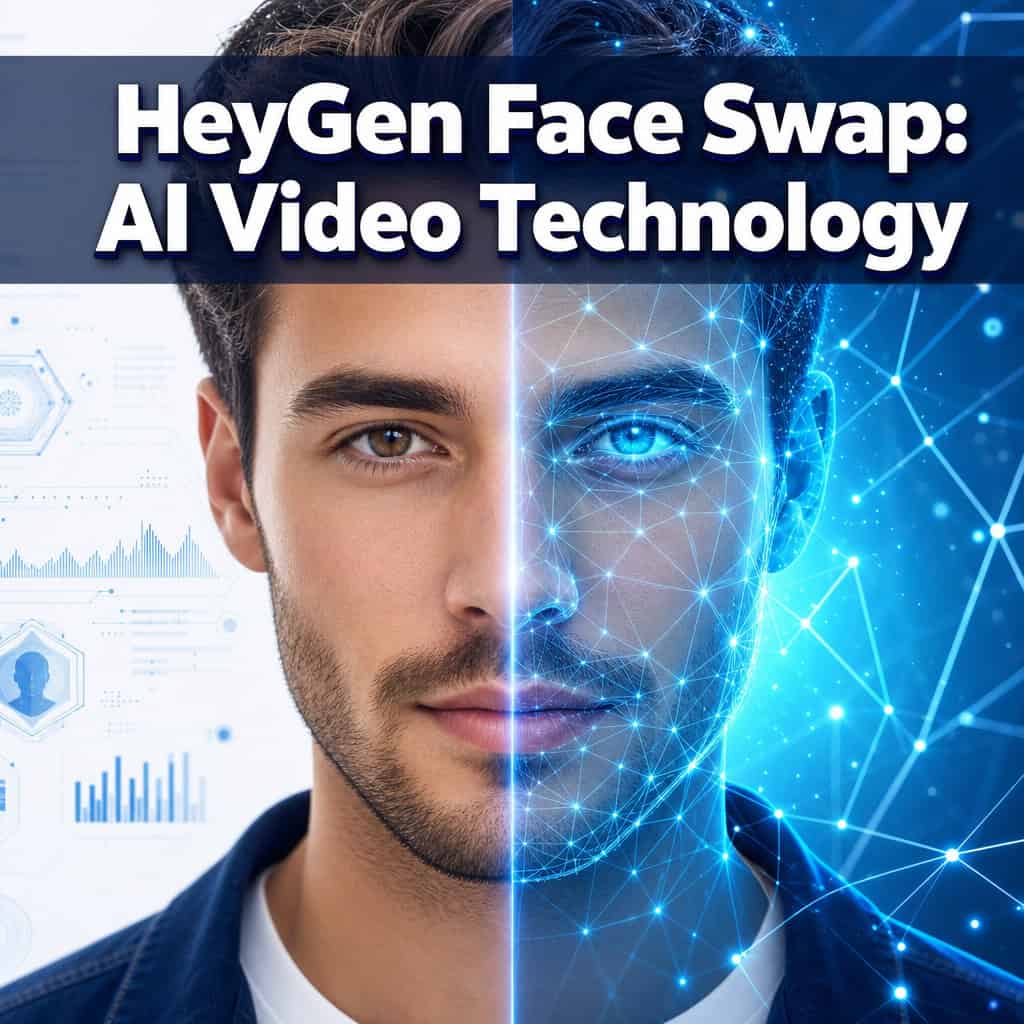
HeyGen Face Swap is an AI-powered feature that maps one person’s face onto a video avatar, producing a realistic synthetic presenter that speaks, emotes, and moves naturally. It’s now a standalone app inside HeyGen’s platform (Apps → All Apps → Face Swap) rather than a buried sub-feature [5].
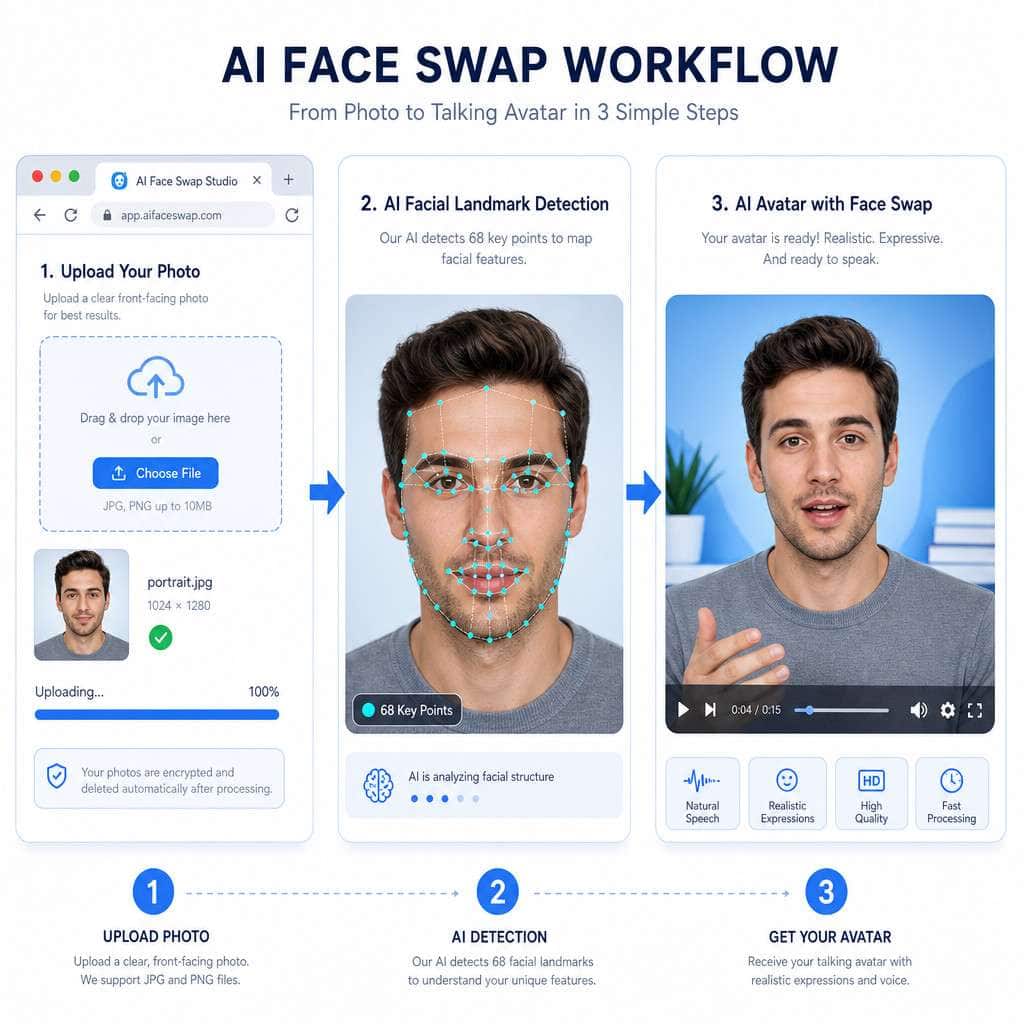
Here’s the actual workflow:
- Upload a source image — a clear, front-facing photo of the person whose face you want to use.
- Select or upload target video/avatar — choose from HeyGen’s stock avatars or upload your own footage.
- Click “Process” — the AI detects facial landmarks (typically 68+ key points), maps the source face onto the target, and generates a real-time preview.
- Save as avatar — once satisfied, save the result and use it directly in HeyGen’s AI Studio to create full videos with scripts, voiceovers, and scenes [5].
The January 2026 rebuild of the avatar creation flow reduced this to a “get started in seconds” experience, and the April 2026 Seedance 2.0 integration added improved full-body motion and longer video support [3]. The face swap itself uses deep neural networks trained on facial geometry, skin texture, lighting conditions, and micro-expressions. It’s not a simple Photoshop overlay — the AI reconstructs the face in 3D space for each frame.
Common mistake: Using a low-resolution or side-angle source photo. The AI needs clear frontal features with even lighting. Blurry selfies or group photo crops produce noticeably worse results.
How Much Does HeyGen Cost Compared to Other AI Video Tools?
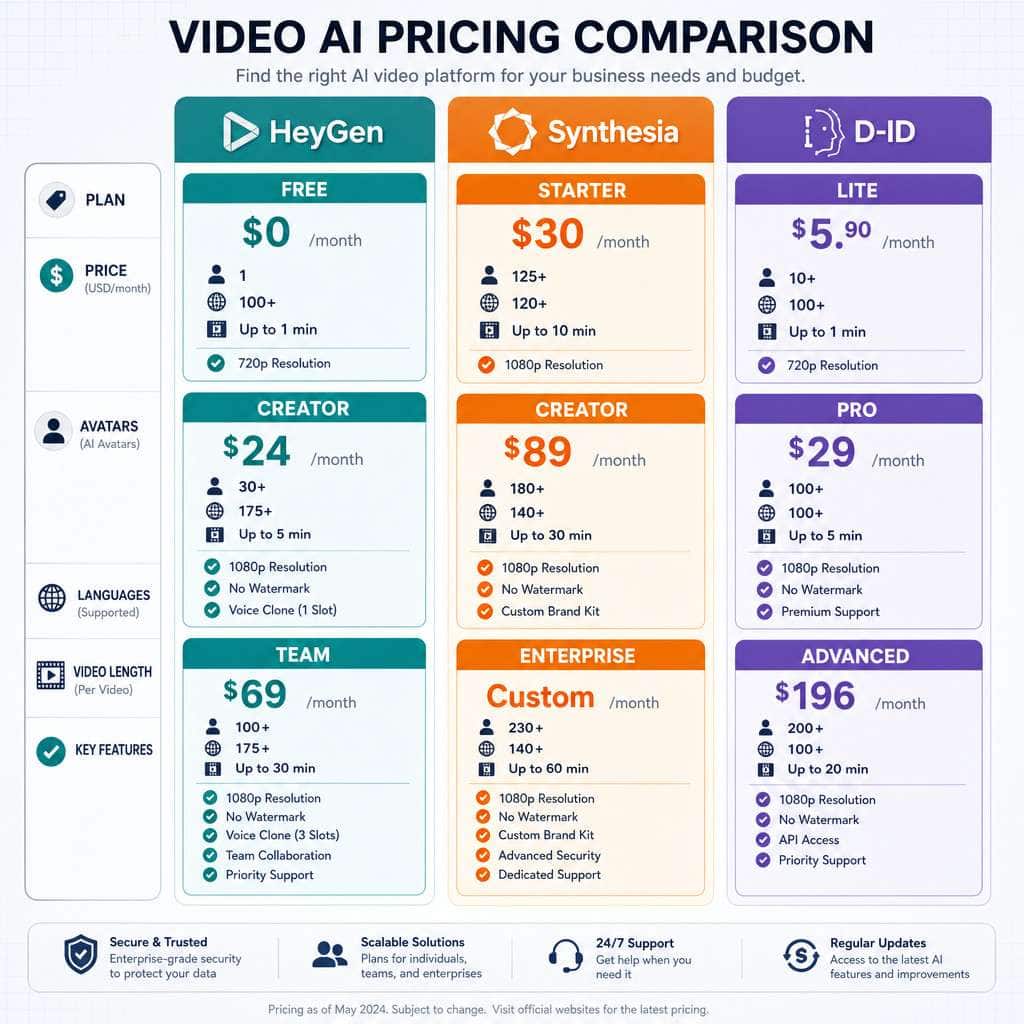
HeyGen’s Creator plan costs approximately $29/month and includes unlimited 1080p AI avatar videos, which makes it competitive for individual creators [7]. Enterprise pricing is custom.
| Feature | HeyGen (Creator) | Synthesia (Starter) | D-ID (Pro) |
|---|---|---|---|
| Monthly cost | ~$29 | ~$29 | ~$25 |
| Video resolution | 1080p | 1080p | 1080p |
| Custom avatars | Yes (face swap) | Yes (studio capture) | Yes (photo-based) |
| Languages | 175+ | 140+ | 30+ |
| Best for | YouTube, marketing, social | Corporate training | Interactive/conversational |
| API access | Yes (higher tiers) | Yes (higher tiers) | Yes |
Sources: BIGVU 2026 review [7], GeckoDub 2026 analysis [10].
Decision rule: Choose HeyGen if you’re a solo creator or small marketing team that needs fast, engaging avatar videos. Choose Synthesia if you’re an enterprise buyer prioritizing stability and compliance for internal training. Choose D-ID if you need interactive, conversational video experiences via API.
For more context on AI tools that can complement your video workflow, check out our comprehensive guide to AI-powered content generation tools.
Can I Use HeyGen Face Swap for YouTube and Social Media Content?
Yes — and this is arguably HeyGen’s strongest use case. Independent creator comparisons in 2026 consistently rank HeyGen as the top choice for YouTube, marketing, and social media content because of its faster creation flow and more engaging, creator-friendly style.
Specific social media applications include:
- YouTube explainer videos with a consistent AI presenter (no camera setup needed)
- TikTok and Instagram Reels using short-form avatar clips
- LinkedIn thought leadership videos personalized with your face
- Product demos where you need multilingual versions fast
- Personalized outreach videos at scale for sales teams
The March 2026 update added Brand Systems, which let you standardize fonts, colors, and avatar styles across all videos — useful if you’re producing content for a brand that needs visual consistency.
If you’re building a broader social media strategy, our guide on graphic design for social media marketing covers the visual design side that pairs well with AI video.
Edge case: Platform policies matter. YouTube requires disclosure of synthetic media in some contexts. TikTok has its own AI content labeling rules. Always check current platform terms before publishing AI-generated face content.
What Are the Best Alternatives to HeyGen for AI Video Generation?
The main alternatives are Synthesia, D-ID, DeepFaceLive, and ElevenLabs (for voice-focused workflows). Each serves a different primary audience [10].
- Synthesia — Best for corporate training and enterprise. More rigid creation flow, but stronger compliance features and SOC 2 certification. Better if your legal team needs to sign off.
- D-ID — Best for interactive, conversational AI video. Their February 2026 positioning emphasizes API integration and multi-channel experiences rather than static talking-head content.
- DeepFaceLive — Open-source, runs locally. Best for technical users who want full control and don’t mind setting up their own hardware. No subscription cost, but requires a capable GPU.
- ElevenLabs — Primarily a voice AI platform, but increasingly overlapping with video generation. Better if voice quality is your top priority.
Choose HeyGen if you want the fastest path from script to finished video with a face-swapped avatar, especially for marketing and social content. Avoid HeyGen if you need real-time face swapping for live streams (DeepFaceLive is better) or full dubbing of existing long-form footage [10].
Is HeyGen Legal and Ethical for Content Creation?
HeyGen is legal to use for content creation, but the legal landscape around AI face swap technology is evolving rapidly, and you bear responsibility for how you use it.
Key legal facts as of 2026:
- Every U.S. state has introduced some form of sexual deepfake legislation by February 2026.
- The 2025 Take It Down Act requires platforms to remove AI-generated non-consensual sexual content, with emerging bills that may extend liability to AI platforms themselves.
- HeyGen publishes official guidance requiring written consent from anyone whose face is used, clear AI labeling on output, and compliance with local laws [1].
What HeyGen does right: The platform requires identity verification for custom avatars and provides consent workflow tools. This is a proactive approach to staying aligned with tightening regulations.
What you must do:
- Get written consent from anyone whose likeness you use
- Label AI-generated content as synthetic where required by platform or jurisdiction
- Never create non-consensual intimate imagery (this is now a federal crime in the U.S.)
- Check local laws — the EU AI Act, for example, has its own disclosure requirements
For guidance on keeping your content strategy compliant and optimized, see our practical guide to AI-powered content optimization.

What Kind of Videos Can I Realistically Make with HeyGen?
HeyGen excels at scripted, avatar-led content where a synthetic presenter delivers information to camera. It’s not a general-purpose video editor or a cinematic production tool [10].
Works well for:
- Marketing and product explainer videos
- Employee onboarding and training modules
- Personalized sales outreach at scale
- Multilingual versions of the same video
- Social media content (YouTube, TikTok, LinkedIn, Instagram)
- Internal communications and company updates
Doesn’t work well for:
- Live streaming or real-time face swapping
- Full post-production dubbing of existing films or documentaries
- Content requiring complex physical interactions or stunts
- Cinematic-quality productions where uncanny valley is unacceptable
The April 2026 update improved things significantly — Seedance 2.0 enables longer videos with better full-body motion [3] — but the output still reads as “very good AI” rather than “indistinguishable from real footage” in most cases.
What Are Common Mistakes People Make When Using AI Face Swap Technology?
The biggest mistake is treating AI face swap as a “set and forget” tool without quality control. Here are the most frequent errors I see:
- Poor source photos — Low resolution, bad lighting, or extreme angles cause the AI to produce artifacts around the jawline and hairline.
- Skipping consent — Using someone’s face without permission. This isn’t just unethical; it’s increasingly illegal.
- No AI disclosure — Failing to label content as AI-generated, which violates platform policies and emerging regulations.
- Expecting perfection on the first try — AI face swap works best when you iterate. Test with different source photos and avatar combinations.
- Ignoring audio quality — A perfect face swap paired with a robotic voice ruins the illusion. Spend time on voice selection and script pacing.
- Over-relying on AI for brand-critical content — For high-stakes presentations or investor communications, consider whether synthetic video is the right choice for your audience.
If you’re producing visual content alongside your videos, our guide to AI graphic design tools can help maintain quality across formats.
What Computer Specs Do I Need to Run HeyGen Smoothly?
HeyGen is entirely cloud-based, so you don’t need a powerful computer. All AI processing happens on HeyGen’s servers. You need:
- A modern web browser (Chrome, Edge, Firefox)
- A stable internet connection (at least 10 Mbps recommended for smooth previews)
- Enough local storage to download finished videos
That’s it. There’s no GPU requirement, no software installation, and no minimum RAM threshold. This is one of HeyGen’s practical advantages over local tools like DeepFaceLive, which requires a dedicated NVIDIA GPU with at least 6GB VRAM.
Can HeyGen Handle Multiple Languages and Accents?
Yes. HeyGen supports over 175 languages and accents, which is one of its strongest differentiators [7]. The lip-sync technology adjusts mouth movements to match the phonetics of each language, so a face-swapped avatar speaking Mandarin will have different mouth shapes than the same avatar speaking Portuguese.
This makes HeyGen particularly valuable for:
- Global marketing teams producing localized ad content
- E-learning platforms serving multilingual audiences
- SaaS companies creating product tours in multiple languages
The March 2026 Brand Systems update makes it easier to produce these multilingual variants at scale while keeping visual branding consistent.
Are There Privacy Risks with Using AI Face Swap Tools?
Yes, and they’re worth taking seriously. When you upload a face to any cloud-based AI platform, you’re sharing biometric data. Key risks include:
- Data retention — Understand how long the platform stores your facial data and whether it’s used to train models.
- Third-party access — Review the terms of service for data sharing with partners or advertisers.
- Account security — If your HeyGen account is compromised, someone could create videos using your saved avatars.
- Regulatory exposure — GDPR, CCPA, and similar frameworks classify facial data as sensitive personal information with strict handling requirements.
HeyGen’s consent and identity verification requirements help mitigate some of these risks, but they don’t eliminate them. If you’re handling face data for employees or clients, consult with your legal team about data processing agreements.
Who Should Use HeyGen — and Who Probably Shouldn’t?
Good fit:
- Solo creators and small marketing teams who need video content without a studio
- Companies producing training or onboarding content at scale
- Agencies managing multilingual campaigns for global clients
- Sales teams creating personalized outreach videos
Not a good fit:
- Filmmakers or production studios needing cinematic-quality output
- Anyone needing real-time face swapping for live video
- Organizations in heavily regulated industries (healthcare, finance) where synthetic media may create compliance issues
- Users who need full dubbing of existing long-form content [10]
For those building websites to showcase AI-generated video content, our roundup of no-code website design platforms can help you get a portfolio site up quickly.
How Accurate Is HeyGen’s Facial Mapping and Lip Sync?
As of the April 2026 Seedance 2.0 integration, HeyGen’s facial mapping and lip sync are among the best in the consumer/prosumer tier [3]. The system handles:
- Facial landmark detection across 68+ points
- Expression transfer including eyebrow raises, smiles, and subtle micro-expressions
- Lip sync adjusted per language phonetics
- Lighting adaptation that matches the source face to the target video’s lighting conditions
The 4K enhancement added in March 2026 also improves output sharpness. That said, close-up shots with extreme head turns or rapid movement can still produce visible artifacts, especially around the hairline and ear boundaries. For most use cases — talking-head videos, explainers, social content — the quality is more than sufficient.
What Are the Technical Limitations of HeyGen Face Swap?
No AI face swap tool is perfect. Here are HeyGen’s current limitations:
- No real-time processing — Everything is rendered server-side, so there’s a processing delay.
- Single-face focus — The tool works best with one face per frame. Multi-person scenes are less reliable.
- Accessory handling — Glasses, hats, and face masks can confuse the facial mapping.
- Extreme angles — Profile views and dramatic head tilts reduce quality.
- Video length — While Seedance 2.0 improved longer video support [3], very long single-take videos may still show quality degradation.
- Uncanny valley — At close inspection, especially in 4K, trained eyes can still spot AI-generated faces. This gap is narrowing but hasn’t closed.
For creators working on visual design elements to pair with their AI videos, Canva’s AI design tools offer a complementary workflow for thumbnails, overlays, and social graphics.
Conclusion
HeyGen Face Swap has matured from a novelty feature into a practical production tool for creators, marketers, and businesses who need video content without traditional filming setups. The 2026 updates — especially Seedance 2.0 and Brand Systems — have meaningfully improved quality and workflow efficiency [3].
Your next steps:
- Try the free tier — Test HeyGen’s face swap with a clear, high-resolution headshot to see if the output quality meets your needs [5].
- Plan your consent workflow — Before scaling, establish a process for getting and documenting written consent for every face you use.
- Start with one use case — Pick your highest-impact video type (product demo, training module, or social content) and build a template before expanding.
- Label everything — Add AI disclosure to all published content. It’s good practice now and will likely be legally required soon.
- Compare before committing — Test Synthesia and D-ID alongside HeyGen to confirm which platform best fits your specific workflow and audience.
The technology is accessible, the pricing is reasonable, and the quality is good enough for most professional applications. The real differentiator in 2026 isn’t the tool itself — it’s how thoughtfully and ethically you use it.
FAQ
How long does it take to create a face-swapped video in HeyGen? A short video (under 2 minutes) typically processes in 5–15 minutes depending on server load. The January 2026 workflow rebuild reduced setup time to seconds for avatar creation.
Can I use HeyGen Face Swap for free? HeyGen offers a free tier with limited credits. You can test the face swap feature, but producing videos at scale requires a paid plan starting at approximately $29/month [7].
Does HeyGen watermark free-tier videos? Yes, free-tier outputs include a HeyGen watermark. Paid plans remove it.
Can I use a celebrity’s face with HeyGen? No. HeyGen requires written consent and identity verification for custom face swaps. Using a celebrity’s face without permission violates HeyGen’s terms and likely violates publicity rights laws [1].
Is HeyGen better than Synthesia? It depends on your use case. HeyGen is better for YouTube, marketing, and social media content. Synthesia is stronger for corporate training and enterprise deployments with stricter compliance needs [10].
Does HeyGen work on mobile devices? HeyGen is browser-based and accessible on mobile, but the creation experience is optimized for desktop. Editing on a phone is possible but less practical.
How many languages does HeyGen support? Over 175 languages and accents, with lip-sync adjusted to match each language’s phonetics [7].
Can HeyGen clone my voice too? Yes. HeyGen offers voice cloning alongside face swap, allowing you to create an avatar that looks and sounds like you. Voice cloning has its own consent requirements.
What happens to my facial data after I upload it? Review HeyGen’s privacy policy for current data retention details. As a general rule, treat any biometric data upload as sensitive and ensure it aligns with your organization’s data handling policies.
Is AI face swap content allowed on YouTube? YouTube requires creators to disclose when content is AI-generated or altered, especially if it could be mistaken for real footage. Check YouTube’s current synthetic media policy before publishing.
References
[1] Face Swap Video – https://www.heygen.com/tool/face-swap-video [3] HeyGen April 2026 Release – https://www.heygen.com/blog/heygen-april-2026-release [5] AI Face Swap – https://www.heygen.com/apps/ai-face-swap [7] HeyGen AI Avatar Video Generator Complete Review 2026 Best AI Video Generation Tool – https://bigvu.tv/blog/heygen-ai-avatar-video-generator-complete-review-2026-best-ai-video-generation-tool/ [10] HeyGen Pricing Features Alternatives – https://blog.geckodub.com/heygen-pricing-features-alternatives