Last updated: May 7, 2026
Quick Answer: N8N is an open-source, node-based workflow automation platform that lets you build end-to-end YouTube Shorts pipelines — from AI script generation to automatic video upload — without writing complex code. By connecting nodes for AI content tools, video rendering services, and the YouTube API, you can produce and publish Shorts on autopilot. This guide walks through every step, from platform basics to a fully working automation workflow.
Key Takeaways
- N8N supports over 200 integrations, including OpenAI, YouTube, and ElevenLabs, making it well-suited for Shorts automation pipelines [2]
- The platform combines a visual drag-and-drop canvas with native JavaScript support inside Function nodes, so both beginners and developers can use it [1]
- You can self-host N8N for free or use the cloud plan, giving you full control over data and costs [2]
- A complete Shorts automation workflow typically includes five node types: trigger, script generator, text-to-speech, video renderer, and uploader
- Free community templates for YouTube Shorts automation are available in the N8N template library [7]
- Built-in error handling, visual logs, and manual run mode let you test and debug workflows before going live [2]
- N8N scales horizontally with queue-based execution, so your workflow won’t break under high volume [1]
- Pairing N8N with AI content tools can dramatically cut the time spent on repetitive content production tasks

What Is N8N and Why Use It for Shorts Automation?
N8N is an open-source workflow automation platform built on a node-based architecture, where every step in a process is a visual node connected by data flows [1]. For YouTube Shorts creators and content teams, it removes the manual bottleneck of scripting, recording narration, assembling video, and uploading — all tasks that can be handed off to an automated pipeline.
Why N8N specifically?
- Open-source and self-hostable: Unlike Zapier or Make, you can run N8N on your own server, keeping costs predictable and data private [2]
- Code when you need it: Native JavaScript inside Function nodes means you’re not locked into a no-code box when logic gets complex [1]
- AI-native integrations: Built-in connectors for OpenAI, Hugging Face, Cohere, and ElevenLabs mean your AI pipeline lives in one place [2]
- Free templates: The N8N community has published ready-made Shorts automation templates you can import and adapt [7]
💡 Choose N8N if you want long-term cost control, need custom logic, or plan to scale beyond a few hundred workflow runs per month. Stick with simpler tools like Zapier if you only need basic two-step automations and prefer a fully managed service.
Common mistake: Many beginners try to build a Shorts automation in a single massive node chain on day one. Start with three nodes (trigger → script → log), confirm each step works, then layer in video and upload nodes.
How Does N8N’s Node System Work for Automation Workflows?
Each N8N workflow is a canvas of nodes — discrete units that receive input data, do something with it, and pass output to the next node [1]. For Shorts automation, you’re essentially building a small assembly line.
Core node types you’ll use:
| Node Type | Role in Shorts Workflow | Example |
|---|---|---|
| Trigger | Starts the workflow | Schedule, Webhook, RSS Feed |
| AI/LLM | Generates script or captions | OpenAI GPT-4o node |
| HTTP Request | Calls external APIs | ElevenLabs TTS API |
| Function | Custom JavaScript logic | Format timestamps, clean text |
| Storage | Saves files temporarily | Google Drive, S3 |
| Upload | Posts the final video | YouTube node |
How data moves between nodes:
N8N passes data as JSON objects between nodes. Each node can read fields from the previous node’s output using expressions like {{ $json.script_text }}. This makes it straightforward to chain an AI-generated script directly into a text-to-speech call without manual copy-paste.
The platform also supports queue-based asynchronous execution, which means long-running tasks like video rendering won’t time out or block other workflows [1]. For teams running multiple Shorts channels, this is a meaningful advantage over tools that process workflows synchronously.
For teams already managing content across platforms, pairing N8N with tools covered in our guide on how to auto-share WordPress blog posts to social media can extend your automation reach beyond video.
What Does a Complete N8N Shorts Automation Pipeline Look Like?
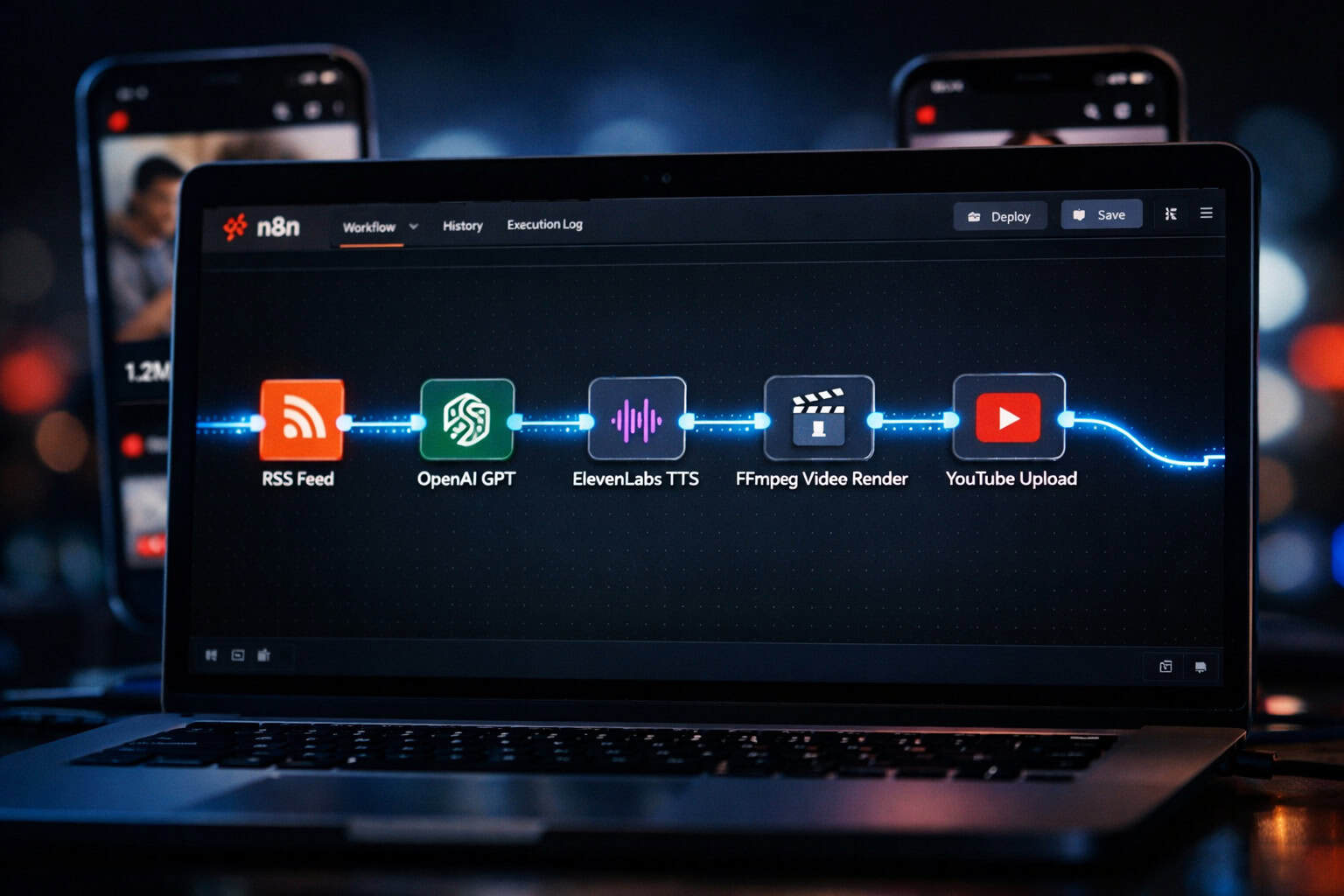
A production-ready Shorts automation workflow has five stages: trigger, script generation, audio synthesis, video assembly, and upload [7][8]. Here’s how each stage connects.

Stage 1: Trigger Node
Set a Schedule Trigger to fire daily, or use an RSS Feed node to trigger a new Short whenever a topic source (news feed, blog, trending keyword list) publishes new content. This is what makes the pipeline truly hands-free.
Stage 2: Script Generation (OpenAI Node)
Connect an OpenAI node and pass a prompt like:
“Write a 45-second YouTube Shorts script about [topic]. Use a hook in the first 3 seconds. Keep sentences short. End with a call to action.”
The node returns the script as a JSON field you can reference downstream.
Stage 3: Text-to-Speech (HTTP Request Node)
Call the ElevenLabs API (or a similar TTS service) via an HTTP Request node, passing the script text as the request body. The response is an audio file URL or binary audio data. Store this in Google Drive or an S3 bucket using a storage node.
Stage 4: Video Assembly
This is the most variable stage. Options include:
- Creatomate API (HTTP Request node): Pass your audio file and a background video template; receive a rendered MP4
- Shotstack API: Similar approach with more template flexibility
- FFmpeg on a self-hosted server: Full control, zero per-render cost, but requires server setup
Stage 5: YouTube Upload Node
N8N’s native YouTube node handles OAuth authentication and accepts video file URL, title, description, tags, and privacy settings as inputs. Map these fields from earlier nodes — for example, use the AI-generated script’s first sentence as the video title.
Edge case: YouTube’s API has daily upload quotas. If you’re running high-volume automation, monitor your API quota in Google Cloud Console and implement a wait/retry node to avoid failed uploads.
For more on AI-powered content pipelines, see our comprehensive guide to AI-powered content generation tools.
How Do You Set Up N8N for the First Time?
Getting N8N running takes under 30 minutes whether you choose cloud or self-hosted [2].
Option A: N8N Cloud (Fastest Start)
- Go to n8n.io and sign up for a free trial
- Your workspace is ready immediately — no server configuration
- Connect your first credential (e.g., OpenAI API key) under Settings > Credentials
Option B: Self-Hosted with Docker (Recommended for Production)
<code class="language-bash">docker run -it --rm
  --name n8n
  -p 5678:5678
  -v ~/.n8n:/home/node/.n8n
  n8nio/n8n
</code>
Then open http://localhost:5678 in your browser. For a public-facing instance (needed for webhooks), deploy to a VPS like DigitalOcean or Railway and add a domain with SSL.
Self-hosted vs. cloud — choose based on:
- Self-hosted: You handle data compliance, want zero per-execution cost, and have basic server comfort
- Cloud: You want managed uptime, automatic updates, and faster setup without DevOps work
N8N also supports Git-based version control and role-based access, so teams can collaborate on workflow development without overwriting each other’s changes [2]. This matters once your Shorts operation grows beyond one person.
What Are the Best Practices for Mastering Workflow Efficiency: A Complete Guide to N8N Shorts Automation?
Efficient N8N Shorts workflows share a few consistent design principles. Following these from the start saves significant debugging time later.
1. Test each node in isolation first
Use N8N’s manual run mode to execute a single node with sample data before wiring up the full chain [2]. This pinpoints exactly which node is misbehaving when something breaks.
2. Use sticky notes for documentation
N8N’s canvas supports sticky note nodes. Add a note explaining what each section does. Future you (and teammates) will thank present you.
3. Build error handling into every workflow
Add an Error Trigger node that catches failures and sends a Slack or email alert. Without this, a failed upload disappears silently and you lose a day’s content.
4. Store credentials centrally
Never hardcode API keys inside Function nodes. Use N8N’s built-in credential manager so keys are encrypted and reusable across workflows [2].
5. Use sub-workflows for reusable logic
If your script-generation prompt is used across three different Shorts channels, build it as a standalone workflow and call it via the Execute Workflow node. This is N8N’s equivalent of a reusable function.
6. Monitor execution logs regularly
N8N’s visual execution logs show every node’s input and output for each run [2]. Review these weekly to catch drift — for example, an AI model returning longer scripts than your video template can handle.
📌 Pull quote: “The difference between a fragile automation and a reliable one is almost always error handling and logging — not the core logic.”
For teams also managing design and content workflows, our guide on supercharging your design process with Figma AI workflow automation covers complementary automation strategies.
How Does N8N Compare to Zapier and Make for Shorts Automation?
N8N, Zapier, and Make all automate multi-step workflows, but they differ significantly in flexibility, cost structure, and suitability for Shorts pipelines [1].
| Feature | N8N | Zapier | Make |
|---|---|---|---|
| Pricing model | Free self-hosted; cloud from ~$20/mo | Per-task pricing (gets expensive fast) | Per-operation pricing |
| Custom code | Yes (JavaScript in Function nodes) | Very limited | Limited (no native JS) |
| AI integrations | Native (OpenAI, HuggingFace, Cohere) | Via Zapier AI (limited) | Via HTTP modules |
| Self-hosting | Yes | No | No |
| Shorts templates | Community templates available [7] | Few video-specific templates | Some video templates |
| Error handling | Built-in, visual | Basic | Moderate |
| Learning curve | Moderate | Low | Moderate |
Choose N8N if: You need custom JavaScript logic, want to self-host for cost or compliance, or are building a complex multi-branch Shorts pipeline.
Choose Zapier if: You need the simplest possible setup and are running fewer than 100 workflow executions per month.
Choose Make if: You want a visual interface closer to Zapier’s simplicity but with more steps than Zapier’s free tier allows.
For Shorts automation specifically, N8N wins on flexibility and long-term cost — especially once you add AI nodes, which can generate significant API call volume [1][2].
What Are Common Mistakes When Building N8N Shorts Workflows?
Even experienced automation builders run into the same set of problems with Shorts pipelines. Here are the ones worth knowing before you start.
Mistake 1: Skipping the video rendering step
Some builders assume they can upload a static image with audio as a “Short.” YouTube’s algorithm treats these differently from true vertical video. Use a proper video rendering API or FFmpeg to produce an MP4 with the correct 9:16 aspect ratio.
Mistake 2: Ignoring rate limits
OpenAI, ElevenLabs, and YouTube all have rate limits. Build Wait nodes between API calls when running batch workflows. A 1–2 second delay between calls is usually enough to avoid 429 errors.
Mistake 3: Hardcoding topic prompts
If your OpenAI prompt is static, every Short sounds the same. Feed dynamic topic inputs — from an RSS node, a Google Sheets row, or a trending topics API — to keep content varied.
Mistake 4: Not validating AI output
AI models occasionally return malformed text, empty responses, or content that violates platform policies. Add an IF node after the OpenAI node to check that the script field is non-empty and within character limits before proceeding.
Mistake 5: Running production workflows without a staging version
Keep a duplicate “test” version of your workflow that posts to an unlisted YouTube channel. Validate new changes there before pushing to your main channel.
For broader automation strategies relevant to content teams, see our automation resources archive for additional workflow guides.
How Can You Scale a Mastering Workflow Efficiency: A Complete Guide to N8N Shorts Automation Setup?
Scaling an N8N Shorts operation means handling more channels, higher publishing frequency, or more complex content — without proportionally increasing manual effort.
Horizontal scaling with multiple N8N instances
N8N supports queue-based execution across multiple worker instances [1]. For high-volume operations (50+ Shorts per day), deploy a main N8N instance as the workflow orchestrator and separate worker instances that handle the heavy rendering and upload tasks.
Multi-channel management
Use a Google Sheets or Airtable node as your channel configuration source. Each row stores a channel’s API credentials, niche topic list, and posting schedule. A single workflow reads this sheet and dynamically routes content to the right channel.
Content variety at scale
As volume increases, AI-generated scripts can start to feel repetitive. Solve this by:
- Rotating between 3–5 different prompt templates
- Injecting trending search terms from a Google Trends API call
- Using a “style randomizer” Function node that varies tone (educational, humorous, listicle) per run
Cost management at scale
At high volume, OpenAI API costs and video rendering API costs become significant. Estimate costs before scaling:
- GPT-4o: roughly $0.005 per 1K output tokens (check OpenAI’s current pricing)
- ElevenLabs: varies by plan and character count
- Creatomate/Shotstack: per-render pricing — compare against self-hosted FFmpeg at your expected volume
For teams also managing WordPress-based content alongside their Shorts operation, our guide on advanced WordPress strategies for power users in 2026 covers complementary automation approaches.
What Resources Are Available for Learning N8N Shorts Automation?
Getting up to speed on N8N Shorts automation doesn’t require paid courses. The best resources are free and practical.
Official resources:
- N8N documentation — The advanced AI intro tutorial at docs.n8n.io walks through building your first AI workflow step by step [4]
- N8N blog — Regular posts on new integrations, workflow patterns, and community use cases [3]
- N8N template library — Search “YouTube Shorts” to find importable workflow templates [7]
Community video tutorials:
- Step-by-step beginner guides for building AI automations in N8N are available on YouTube, including Shorts-specific workflows [8]
- Tutorials covering viral Shorts generation and automated posting using N8N AI workflows [7][10]
Practical starting point:
- Complete the official N8N AI intro tutorial [4]
- Import a Shorts automation template from the community library [7]
- Replace the template’s placeholder credentials with your own API keys
- Run it in manual mode and inspect each node’s output
- Schedule it and monitor the first 5–10 runs before leaving it fully unattended
For teams pairing Shorts automation with broader AI content strategies, our AI-powered content optimization guide covers how to measure and improve AI-generated content performance.
FAQ: N8N Shorts Automation
Q: Do I need coding skills to use N8N for Shorts automation? No. Most Shorts workflows can be built entirely with N8N’s visual nodes and pre-built integrations. JavaScript knowledge helps for edge cases but isn’t required to get started [1].
Q: Is N8N free to use? The self-hosted version is free and open-source. N8N’s cloud plans start at around $20/month. For most solo creators, self-hosting on a $5–10/month VPS keeps costs minimal [2].
Q: How many Shorts can I produce per day with N8N automation? This depends on your API rate limits and video rendering service, not N8N itself. Most setups can handle 5–20 Shorts per day per channel without hitting limits. Higher volumes require rate-limiting nodes and API plan upgrades.
Q: Can N8N post directly to YouTube Shorts (not regular YouTube videos)? Yes. YouTube treats videos under 60 seconds with a 9:16 aspect ratio as Shorts automatically. Use N8N’s YouTube node to upload a correctly formatted MP4 and YouTube classifies it as a Short.
Q: What happens if a node fails mid-workflow? N8N logs the failure with full input/output data for that node [2]. If you’ve set up an Error Trigger node, you’ll receive an alert. The workflow stops at the failed node and doesn’t proceed to upload a broken video.
Q: Are there pre-built N8N templates for Shorts automation? Yes. The N8N community template library includes YouTube Shorts automation workflows you can import directly [7]. Search “YouTube Shorts” or “AI video” in the template library.
Q: Can I run multiple Shorts channels from one N8N instance? Yes. Use a Google Sheets or Airtable node as a channel configuration table. Each row holds a channel’s credentials and topic list. A single workflow loops through rows and produces content for each channel.
Q: How do I handle AI-generated content that violates YouTube’s policies? Add a moderation step using OpenAI’s moderation API endpoint after script generation. If the moderation score exceeds your threshold, route the workflow to a “skip and log” branch instead of proceeding to video creation.
Q: What’s the minimum server spec for self-hosting N8N? N8N runs comfortably on a 1 vCPU / 1 GB RAM VPS for low-to-medium volume workflows. For high-volume Shorts automation (50+ runs/day), use 2 vCPU / 2 GB RAM with a separate worker instance [1].
Q: Can N8N integrate with AI image generators for Shorts backgrounds? Yes. Use an HTTP Request node to call DALL-E, Stable Diffusion, or Midjourney APIs. Pass the generated image URL to your video rendering node as the background asset.
Conclusion: Your Next Steps for N8N Shorts Automation
Mastering workflow efficiency with a complete N8N Shorts automation setup is genuinely achievable in a weekend for anyone willing to follow a structured approach. The platform’s combination of visual workflow design, native AI integrations, and self-hosting flexibility makes it the most practical choice for creators and teams who want to scale short-form video without scaling their workload proportionally.
Actionable next steps:
- Set up N8N today — start with the cloud trial or a Docker install on a local machine
- Complete the official AI intro tutorial at docs.n8n.io to learn node fundamentals [4]
- Import a Shorts template from the N8N community library and run it with your own API keys [7]
- Build your first 5-node pipeline using the stage planner above — trigger, script, TTS, video, upload
- Add error handling before you schedule anything to run automatically
- Monitor the first 10 runs manually, then let the workflow run on its own schedule
The goal isn’t to remove creativity from content production. It’s to remove the repetitive execution work so you can focus on strategy, quality, and growth. N8N gives you the infrastructure to do exactly that.
References
[1] N8n Workflow Automation Guide – https://www.digitalocean.com/community/conceptual-articles/n8n-workflow-automation-guide [2] N8n Guide – https://hatchworks.com/blog/ai-agents/n8n-guide/ [3] blog.n8n – https://blog.n8n.io [4] Intro Tutorial – https://docs.n8n.io/advanced-ai/intro-tutorial/ [7] Watch (YouTube Shorts automation template tutorial) – https://www.youtube.com/watch?v=vipW-X7xZFc [8] Watch (Beginner N8N AI automation tutorial) – https://www.youtube.com/watch?v=Fy1UCBcgF2o [10] Watch (Viral Shorts generation with N8N) – https://www.youtube.com/watch?v=QMjSIHzHhSo