Last updated: May 30, 2026
Quick Answer
ElevenLabs Audio Tags are bracketed text instructions (like [excited], [whispers], or [laughs]) embedded directly into a script that tell the Eleven v3 model how to speak rather than what to say. They give creators fine-grained control over emotion, pacing, and non-verbal reactions without touching audio settings or hiring voice actors. As of 2026, tags work across 70+ languages and are supported in both the web interface and the API, making them the primary way to direct AI voice performances on the platform [1][10].
Key Takeaways
Audio Tags are performance directions, not spoken words. The model reads
[sarcastic]as an instruction, not as text to vocalize [1].Tags cover emotion, pacing, non-verbal sounds, and even sound effects like
[gunshot]or[door slam][1].They work with Eleven v3 only and are available on all pricing tiers, including the free plan (within its usage limits) [10].
Multiple tags can appear in a single sentence, and they can be stacked for layered effects [1][9].
ElevenLabs supports 70+ languages and accents, and tags function across all of them [7].
The assistive technology community considers tags a meaningful advancement for AAC (augmentative and alternative communication) users [5].
A concurrency limit of 5 TTS streams can support roughly 100 simultaneous character voiceovers, enabling multi-agent and real-time applications [10].
Tags require no coding or audio engineering skills to use. If you can type brackets, you can direct a voice [8].
Common mistakes include overloading scripts with too many tags and using non-auditory descriptions that the model can’t interpret [9].
What Exactly Are ElevenLabs Audio Tags and How Do They Work?
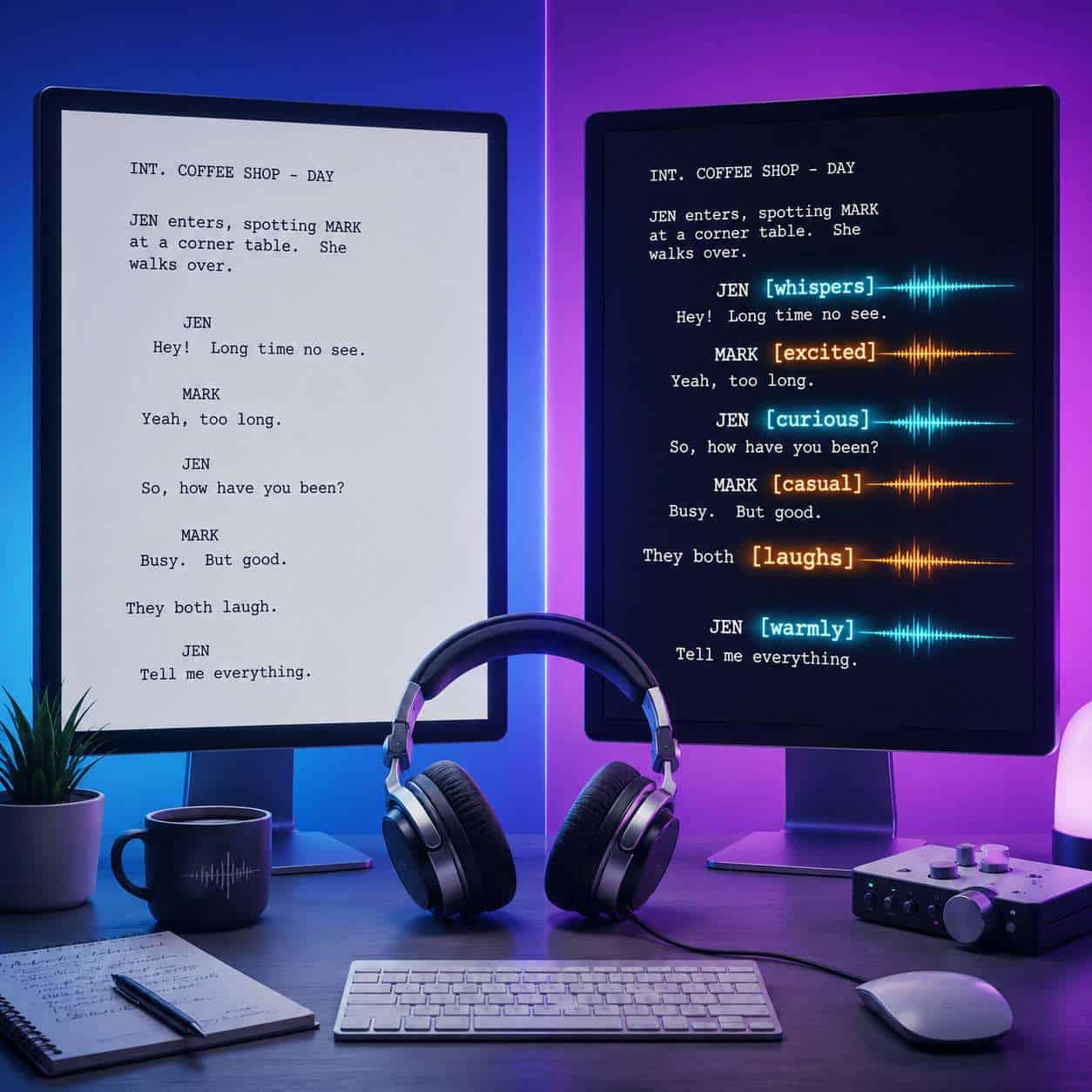
Audio Tags are plain-text markers enclosed in square brackets that you insert into any script processed by the Eleven v3 text-to-speech model. The model treats these markers as stage directions rather than dialogue, adjusting its vocal delivery accordingly [1].
Here’s a simple example:
<code>[whispers] I think someone is watching us. [normal voice] Anyway, let's keep moving.
</code>
The v3 model reads [whispers] and drops to a hushed tone, then returns to a standard delivery when it hits [normal voice]. No audio editing required.
How tags are interpreted:
The model uses context from the tag and the surrounding text to shape delivery [9].
Tags must “describe something auditory but only for the voice,” according to ElevenLabs’ official best practices [9].
You can combine tags:
[excited, fast-paced] We just hit a million subscribers!Tags work at any point in a script, including mid-sentence.
Common tags documented by third-party cheat sheets and ElevenLabs itself include [laughs], [sighs], [sarcastic], [curious], [excited], [crying], [pause], [awe], and [dramatic tone] [1][9]. The system is flexible enough that you can write custom descriptors like [speaking through tears] or [lighthearted and playful], and the model will attempt to interpret them.
This represents a conceptual shift from earlier TTS approaches. With v2, ElevenLabs focused on clarity and lifelike speech. With v3 and Audio Tags, the focus moved to performance and emotional control [7]. As one technical analysis put it, tags let users “craft a performance, not just narration” [7].
How Much Does It Cost to Generate Custom Voice Tags with ElevenLabs?
Audio Tags are a built-in feature of the Eleven v3 model and don’t carry a separate fee. You pay for character usage on your ElevenLabs plan, and tags consume characters just like regular text does [10].
ElevenLabs offers several pricing tiers (as of 2026):
PlanMonthly PriceCharacter QuotaAudio Tags AccessFree$0~10,000 charactersYes (v3 only)Starter$530,000 charactersYesCreator$22100,000 charactersYesPro$99500,000 charactersYesScale$3302,000,000 charactersYes
Note: Pricing and quotas are approximate and may change. Check the ElevenLabs website for current details.
The key cost consideration is that tags themselves count toward your character limit. A script heavy with tags like [whispers], [excited], and [pause] will use more characters than a plain script. For most projects, this overhead is minor, but it’s worth tracking if you’re on the Free or Starter tier.
If you’re exploring other AI tools for content creation, our comprehensive guide to AI-powered content generation tools covers the broader landscape.
Can I Use ElevenLabs Voice Tags for YouTube or Podcast Intros?
Yes, and this is one of the most popular use cases. Creators use Audio Tags to produce branded intros, outros, and mid-roll segments with consistent emotional tone and pacing.
Practical examples for creators:
YouTube intro:
[energetic, upbeat] Hey everyone, welcome back to the channel! [normal] Today we're breaking down something really interesting.Podcast intro:
[calm, warm] You're listening to Deep Focus, a podcast about productivity and mindfulness. [pause] Let's get started.Mid-roll transition:
[whispers] But here's the thing nobody talks about... [normal, building excitement] it changes everything.
Artlist’s 2026 creator guide specifically highlights tags as a way to produce “cinematic” voiceovers for video content, noting that creators can adjust pacing and emotional intensity comparable to directing a human voice actor. For creators who produce content regularly, this means you can generate consistent, professional-sounding voice work without booking studio time.
If you’re building a content brand across platforms, you might also find value in our guide on how to master graphic design for social media marketing success.
What Are the Main Differences Between ElevenLabs and Other AI Voice Platforms?
ElevenLabs’ Audio Tags are the primary differentiator. Most competing platforms offer emotion or style presets (a dropdown menu with options like “happy” or “sad”), but they don’t allow inline, natural-language performance direction within the script itself [7].
FeatureElevenLabs (v3)Typical CompetitorsInline emotion controlAudio Tags (free-form text)Preset emotion slidersMid-sentence tone shiftsYesRarely supportedNon-verbal sounds[laughs], [sighs], etc.Usually separate SFXLanguage support70+ languagesVaries (often 20-40)Voice cloningYes (with consent verification)Some platforms offer thisReal-time concurrency5 streams / ~100 charactersVaries widelyCustom tag vocabularyOpen-ended descriptorsFixed presets only
The open-ended nature of tags is what sets them apart. Instead of choosing from a menu, you describe the performance you want in plain language. This makes the system more flexible but also means results can vary depending on how well you phrase your directions [9].

What Languages and Accents Can ElevenLabs Audio Tags Support?
ElevenLabs v3 supports over 70 languages and a wide range of accents, and Audio Tags function across all of them [7][10]. You can even use accent-specific tags like [strong Russian accent] or [soft Southern drawl] to modify delivery within a given language [8].
This multilingual support is particularly useful for:
Localized marketing content across multiple regions
Multilingual audiobooks or educational materials
Global customer service voice agents
One important note: tag effectiveness can vary by language. Tags written in English (like [excited]) tend to work reliably even when the surrounding script is in another language, but results may differ for less common language-tag combinations. ElevenLabs’ documentation recommends testing with your specific language and voice pairing [9].
Is ElevenLabs Voice Technology Good for Professional Voiceover Work?
For many professional applications, yes. Audio Tags bring ElevenLabs closer to the level of directed human performance, which is why the platform is increasingly used in commercial video production, e-learning, and corporate presentations.
Where it works well:
Explainer videos and product demos
E-learning narration with varied emotional delivery
Audiobook production (especially for indie authors)
Corporate training materials
Prototype voiceovers for advertising
Where human voice actors still have an edge:
High-end commercial spots requiring nuanced improvisation
Performances requiring physical vocal techniques (specific singing styles, extreme character voices)
Projects where brand guidelines require a specific, identifiable human voice
The Artlist 2026 guide positions tags as enabling “nuanced voiceovers without hiring actors,” but the reality is more nuanced. For mid-tier professional work, tags deliver strong results. For premium, brand-defining voice work, most agencies still prefer human talent, sometimes using AI-generated drafts for pre-production.
Are There Any Limitations or Ethical Concerns with AI-Generated Voices?
There are real limitations and legitimate ethical questions that users should consider.
Technical limitations:
Tags must describe auditory qualities. Directions like
[looking sad]won’t work because they describe a visual, not a sound [9].Very complex or contradictory tags (e.g.,
[angry but also calm and whispering loudly]) can produce unpredictable results.The concurrency limit of 5 simultaneous TTS streams means large-scale real-time applications need careful architecture [10].
Ethical concerns:
Voice cloning consent: ElevenLabs requires consent verification for voice cloning, but enforcement depends on the honor system to some degree.
Deepfake potential: Realistic AI voices can be misused for fraud, impersonation, or misinformation.
Impact on voice actors: The technology raises questions about displacement of professional voice talent.
Accessibility vs. misuse: While tags are a genuine benefit for AAC users [5], the same technology can be used to create deceptive audio.
ElevenLabs has implemented safety measures including voice verification and usage policies, but the broader ethical conversation around AI voice technology is ongoing. If you’re working with AI tools in content production, our AI-powered content optimization guide covers responsible practices.
How Accurate Are ElevenLabs Audio Tags for Different Voice Types and Tones?
Accuracy varies by tag type, voice selection, and context. Simple, well-defined tags like [whispers], [excited], and [laughs] produce reliable results across most voices. More abstract or subjective tags like [nostalgic] or [bittersweet] can be hit-or-miss [9].
Tips for better accuracy:
Use concrete, auditory descriptions rather than abstract emotions
Test tags with your chosen voice before committing to a full script
Combine a general emotion tag with a specific delivery instruction:
[sad, slow pace, soft voice]Place tags immediately before the text they should affect
Refer to the official best practices documentation for guidance [9]
ElevenLabs’ documentation explicitly states that tags should “describe something auditory but only for the voice” [9]. This is the single most important rule for getting consistent results.
What Kind of Projects Are ElevenLabs Audio Tags Best Suited For?
Audio Tags are best suited for projects that need varied emotional delivery across a script and where hiring voice talent for every iteration isn’t practical.
Ideal project types:
Gaming dialogue: Multi-character conversations with distinct emotional arcs [6]
Audiobooks: Chapter-length narration with shifting moods and character voices
Marketing videos: Product demos, social media ads, explainer content
Podcasts: Intro/outro segments, AI-hosted shows, narrative podcasts
Interactive applications: Chatbots, virtual assistants, and IVR systems
AAC devices: Giving users expressive control over their synthesized voice [5]
E-learning: Training modules that need engaging, varied narration
Less ideal for:
Live musical performances or singing
Ultra-short clips where setup overhead exceeds benefit
Projects requiring a legally verified human voice for compliance reasons
For gaming and interactive content specifically, the multi-character dialogue capabilities with tags make it possible to generate distinct character performances from a single workflow [6]. Developers building these experiences might also benefit from understanding how AI tools integrate into broader web workflows.
Can I Clone My Own Voice Using ElevenLabs Technology?
Yes. ElevenLabs offers voice cloning that works with Audio Tags. You upload voice samples, the platform creates a digital model of your voice, and you can then use tags to direct that cloned voice’s emotional delivery.
This is particularly powerful for:
Content creators who want their own voice in videos without recording every take
Business owners who need consistent branded voice content at scale
AAC users who want to preserve their own voice identity [5]
ElevenLabs requires consent verification for voice cloning. You must confirm that you have the right to clone the voice being submitted. The quality of the clone depends heavily on the quality and quantity of your uploaded samples.
What Technical Skills Do I Need to Use ElevenLabs Audio Tags?
None beyond basic typing. If you can write a sentence and add brackets around a word, you can use Audio Tags [8].
Using tags in the web interface:
Go to the ElevenLabs text-to-speech tool
Select the Eleven v3 model [10]
Choose a voice
Type your script with tags:
[cheerful] Good morning! Today's going to be a great day.Click generate
Using tags via the API:
Tags are included directly in the text string sent to the API endpoint
No special parameters needed; the v3 model interprets brackets automatically
Developer platforms like n8n have published workflow templates for automated tag-based generation
For developers building automated pipelines, tags function as an API-level tool for programmatic voice personalization. You can dynamically insert tags based on content type, user preferences, or contextual triggers. If you’re interested in automation workflows, check out our guide to AI-powered website automation.
Are ElevenLabs Audio Tags Better for Gaming Content or Business Presentations?
Both work well, but the strengths differ. Gaming content benefits more from the emotional range and character differentiation that tags enable. Business presentations benefit from the consistency and professional tone control.
Choose tags for gaming if you need:
Multiple character voices with distinct personalities
Dynamic emotional shifts during dialogue [6]
Non-verbal reactions like
[laughs],[gasps], or[sighs]Sound effects integrated into character speech
Choose tags for business if you need:
Consistent, warm, professional narration
Emphasis on specific words or phrases:
[emphasize] quarterly revenue [normal] grew by twelve percentMultilingual versions of the same presentation
Rapid iteration on scripts without re-recording
What Are Common Mistakes People Make When First Using AI Voice Generation?
The most frequent mistake is overloading a script with tags, which can make the output sound choppy or unnatural [9].
Other common mistakes:
Using visual descriptions instead of auditory ones.
[smiling]doesn’t work because smiling is visual. Use[warm, friendly]instead [9].Contradictory tags.
[calm] [screaming]will confuse the model.Not testing before full production. Always generate a short sample first.
Ignoring the voice-tag pairing. Some voices respond better to certain tags than others. A voice designed for narration may not handle
[aggressive rap style]well.Forgetting that tags consume characters. On limited plans, heavy tag use eats into your quota faster.
Skipping the official best practices. ElevenLabs’ documentation includes specific guidance on tag placement and phrasing that saves trial-and-error time [9].
Expecting perfection on the first try. Like directing a human actor, getting the right AI performance often takes a few iterations.
For broader content creation best practices, our guide to AI-powered content generation covers workflow strategies that apply here too.
Frequently Asked Questions
Are Audio Tags available on the free ElevenLabs plan?
Yes. Audio Tags work with the Eleven v3 model, which is accessible on all plans including the free tier, subject to character limits [10].
Do Audio Tags work with voice cloning?
Yes. Once you’ve cloned a voice, you can use any Audio Tag to direct its emotional delivery and pacing.
Can I use Audio Tags in real-time applications?
Yes, but with constraints. ElevenLabs supports up to 5 concurrent TTS streams, which can handle approximately 100 simultaneous character voiceovers [10].
What happens if I use a tag the model doesn’t understand?
The model will attempt to interpret it. If the tag is too vague or non-auditory, it may be ignored or produce unexpected results. Stick to auditory descriptions for best results [9].
Do Audio Tags work in all 70+ supported languages?
Tags function across all supported languages, though effectiveness may vary. English-language tags generally work even when the script is in another language [7].
Can Audio Tags produce sound effects?
Yes. Tags like [gunshot], [door slam], or [thunder] can generate sound effects within the voice output, though results vary in quality [1].
Are there copyright issues with AI-generated voice content?
Copyright law around AI-generated audio is still evolving. ElevenLabs’ terms of service grant users rights to generated content on paid plans, but legal specifics vary by jurisdiction.
How do Audio Tags differ from SSML?
SSML (Speech Synthesis Markup Language) uses XML-style tags for technical speech parameters like pitch and rate. Audio Tags use natural language descriptions for emotional and performance direction, making them more intuitive but less precise for technical adjustments [1].
Can I use multiple tags in one sentence?
Yes. You can stack tags or place them at different points within a sentence for varied delivery [1].
Do tags affect generation speed?
Minimally. Tags add slight processing overhead, but the difference is negligible for most use cases.
Is there an official list of supported tags?
ElevenLabs hasn’t published a fixed list because the system accepts open-ended descriptions. However, their documentation and community resources provide commonly used tags that produce reliable results [2][9].
Conclusion
ElevenLabs Audio Tags represent a genuine shift in how people interact with text-to-speech technology. By moving from preset emotion sliders to inline, natural-language performance direction, tags make AI voice generation feel more like directing an actor than configuring software.
Your next steps:
Start small. Create a free ElevenLabs account and experiment with basic tags like
[whispers],[excited], and[pause]on short scripts.Read the official best practices [9] before scaling up. The “describe something auditory” rule will save you hours of trial and error.
Test voice-tag combinations. Not every voice responds identically to every tag. Find pairings that work for your specific use case.
Build templates. If you produce recurring content (weekly podcast intros, product update videos), create script templates with your preferred tags baked in.
Stay informed. ElevenLabs updates its models and tag capabilities regularly. The feature set in 2026 is already broader than what launched with v3, and it continues to expand.
Whether you’re a solo creator producing YouTube content, a developer building voice-enabled applications, or an AAC user seeking more expressive communication, Audio Tags lower the barrier between what you want to say and how you want it to sound.
References
[1] V3 Audiotags – https://elevenlabs.io/blog/v3-audiotags
[2] List Of V3 Audio Tags – https://www.reddit.com/r/ElevenLabs/comments/1l8k45e/list_of_v3_audio_tags/
[5] Elevenlabs Audio Tags In Aac – https://spokenaac.com/blog/elevenlabs-audio-tags-in-aac/
[6] Eleven V3 Audio Tags Bringing Multi Character Dialogue To Life – https://elevenlabs.io/blog/eleven-v3-audio-tags-bringing-multi-character-dialogue-to-life
[7] Elevenlabs V3 Next Gen Ai Voices Features Use Cases Pricing 2025 – https://tech-now.io/en/blogs/elevenlabs-v3-next-gen-ai-voices-features-use-cases-pricing-2025
[8] Watch – https://www.youtube.com/watch?v=4yWjbqnQtuc
[9] Best Practices – https://elevenlabs.io/docs/overview/capabilities/text-to-speech/best-practices
[10] Models – https://elevenlabs.io/docs/overview/models