Last updated: June 9, 2026
Quick Answer: ChatGPT is an AI language model built by OpenAI that generates human-like text responses based on prompts you type. It can write, summarize, brainstorm, code, and analyze in seconds. Whether you are a student, freelancer, or enterprise professional, this guide covers everything you need to use it well — from getting started to avoiding the most common mistakes.
Key Takeaways
- ChatGPT uses a large language model (LLM) trained on massive text datasets to predict and generate relevant responses.
- The free tier (GPT-3.5-level access) is available to anyone with an account; ChatGPT Plus costs $20/month as of 2026 and unlocks GPT-4o.
- Better prompts produce dramatically better outputs — specificity, context, and role-framing are the three most important variables.
- ChatGPT can help with coding, writing, research summaries, email drafting, and creative brainstorming, but it cannot browse the live web in all configurations and can produce confident-sounding errors.
- It is not a replacement for expert judgment in legal, medical, or financial contexts.
- Industries seeing the highest productivity gains include marketing, software development, education, and customer support.
- Confidential data should never be pasted into ChatGPT unless your organization has an enterprise privacy agreement with OpenAI.
What Exactly Is ChatGPT and How Does It Work
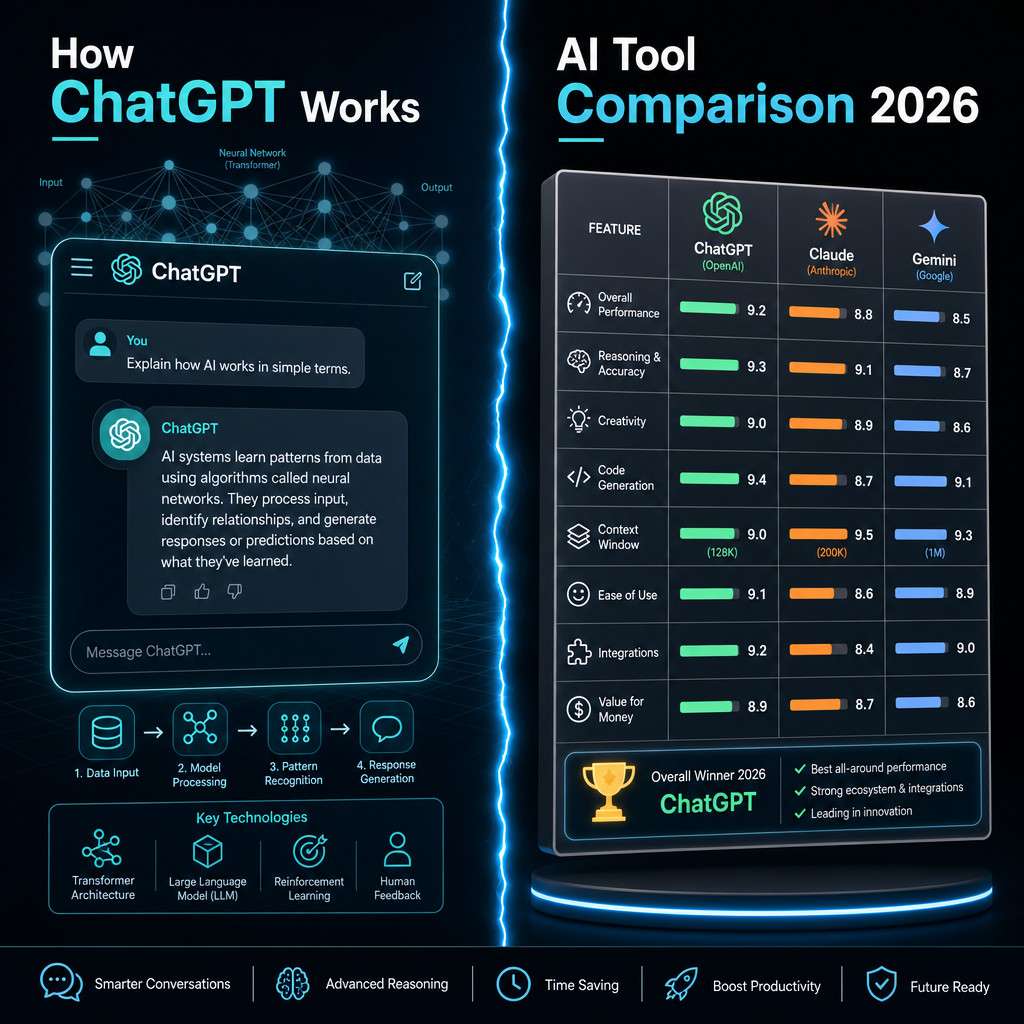
ChatGPT is a conversational AI tool built on OpenAI’s GPT (Generative Pre-trained Transformer) architecture. It works by predicting the most contextually appropriate next word — or sequence of words — based on the input you provide and the patterns it learned during training on a large corpus of text.
Here is a simplified breakdown of the process:
- You type a prompt (a question, instruction, or piece of text).
- The model tokenizes your input and processes it through billions of weighted parameters.
- It generates a response word by word, choosing each token based on probability and context.
- The result appears as a natural-language reply in the chat interface.
The model does not “think” the way humans do. It has no memory between sessions by default, no real-world awareness, and no ability to verify facts against a live database unless a web-browsing tool is explicitly enabled. Understanding this prevents a lot of frustration.
ChatGPT vs. Other AI Tools Like Claude or Gemini — Which Is Better
No single AI tool is universally best. The right choice depends on your specific use case, workflow, and budget.
| Tool | Best For | Strengths | Weaknesses |
|---|---|---|---|
| ChatGPT (GPT-4o) | General productivity, coding, writing | Broad capability, plugin ecosystem, API access | Can hallucinate; data privacy concerns on free tier |
| Claude (Anthropic) | Long documents, nuanced writing | Handles very long context windows well | Fewer integrations than ChatGPT |
| Gemini (Google) | Research with Google integration | Live web access, Google Workspace sync | Inconsistent creative output |
| Copilot (Microsoft) | Office 365 users | Deep Word/Excel integration | Limited outside Microsoft ecosystem |
Choose ChatGPT if you want the broadest range of third-party integrations, a mature API, and strong coding support. Choose Claude if you regularly work with long contracts, reports, or books. Choose Gemini if your workflow is Google-centric and you need real-time web data.
For a broader look at the AI tool landscape, our comprehensive guide to AI-powered content generation tools covers additional platforms worth evaluating.
How Much Does ChatGPT Cost for Professionals and Businesses
ChatGPT’s pricing in 2026 follows a tiered model:
- Free tier: Access to GPT-3.5-level responses, limited to standard features. No cost.
- ChatGPT Plus: $20/month per user. Includes GPT-4o, faster responses, and priority access during peak hours.
- ChatGPT Team: $25–$30/month per user (billed annually). Adds a shared workspace, admin controls, and a higher usage cap.
- ChatGPT Enterprise: Custom pricing. Includes data privacy guarantees, no training on your inputs, SSO, and dedicated support.
- API access: Priced per token. Developers building custom apps pay based on usage volume.
For most solo professionals, Plus at $20/month delivers strong ROI if you use it daily. Teams handling client work or sensitive data should evaluate the Enterprise tier seriously — the data privacy protections alone justify the cost for many industries.
Is ChatGPT Safe to Use for Confidential Work Information
No — not on the free or Plus tiers without adjusting your settings. By default, OpenAI may use conversations to improve its models, which means confidential client data, internal financials, or proprietary code should not be pasted in without precautions.
Practical safety steps:
- Go to Settings > Data Controls and disable “Improve the model for everyone” if you are on Plus.
- Use ChatGPT Enterprise if your organization handles regulated data (healthcare, legal, finance).
- Never include full names, account numbers, passwords, or personally identifiable information in prompts.
- Treat the free tier like a public forum — share only what you would be comfortable making semi-public.
For teams using automation tools alongside ChatGPT, our guide to ChatGPT automation and no-code workflow integration covers how to set up secure, privacy-conscious pipelines.
Why Is My ChatGPT Output Not Making Sense or Feeling Robotic
Robotic or incoherent output is almost always a prompt problem, not a model failure. ChatGPT mirrors the quality of the instructions it receives.
Common causes and fixes:
- Vague prompts: “Write something about marketing” produces generic text. “Write a 200-word LinkedIn post for a B2B SaaS company targeting HR managers, focusing on reducing employee onboarding time” produces something usable.
- No tone or format guidance: Tell the model the format you want (bullet list, email, paragraph) and the tone (formal, conversational, persuasive).
- Too much in one prompt: Break complex tasks into steps. Ask for an outline first, then ask it to expand each section.
- No context about the audience: Specify who will read the output. “Explain this to a non-technical executive” yields a very different result than “Explain this to a senior developer.”
A robotic feel often comes from the model defaulting to a neutral, hedged style. Asking it to “write in a direct, confident tone without filler phrases” usually solves this.
How to Optimize My Prompts to Get Better ChatGPT Results
Better prompts are the single highest-leverage skill for anyone using AI writing tools. The difference between a mediocre and an excellent output is almost entirely in how you frame the request.
The three-part prompt framework:
- Role: Tell ChatGPT who it is. “You are an experienced copywriter specializing in SaaS email campaigns.”
- Task: Be specific about what you want. “Write a 5-email onboarding sequence for a project management tool.”
- Constraints: Define format, length, tone, and audience. “Each email should be under 150 words, conversational, and end with one clear CTA.”
Advanced techniques:
- Use “chain-of-thought” prompting: “Think through this step by step before giving your final answer.”
- Ask for multiple options: “Give me three different versions of this headline.”
- Iterate: Treat the first response as a draft. Reply with specific feedback — “Make it shorter and remove the third bullet point.”
For teams looking to scale this process, our AI-powered content optimization guide walks through systematic prompt workflows that work across content types.
Common Mistakes People Make When First Using AI Writing Tools
Most new users make the same handful of errors. Recognizing them early saves weeks of frustration.
- Accepting the first output as final: ChatGPT’s first draft is a starting point, not a finished product. Always review and edit.
- Asking yes/no questions instead of open-ended ones: “Is my email good?” gets a generic answer. “What are three specific ways to improve this email’s subject line?” gets actionable feedback.
- Ignoring the system prompt or custom instructions: Setting a persistent persona or context in the system prompt dramatically improves consistency across a session.
- Using it for factual research without verification: ChatGPT can state incorrect facts with full confidence. Always cross-check any statistic, date, or specific claim against a primary source.
- Overloading a single prompt: One clear task per prompt almost always outperforms a multi-part mega-prompt.
Can ChatGPT Help Me Write Code or Design Graphics
ChatGPT is genuinely strong at coding tasks and moderately useful for design guidance, but with important distinctions.
For coding: ChatGPT can write, debug, explain, and refactor code in most major languages — Python, JavaScript, SQL, HTML/CSS, and more. It works best when you provide the context of what the code should do and paste in any error messages you are seeing. For a hands-on coding environment that pairs well with AI assistance, see our guide to Replit’s online coding platform.
For graphic design: ChatGPT cannot generate images directly (that is DALL-E, Midjourney, or Adobe Firefly). However, it can write detailed image prompts for those tools, suggest color palettes, describe layout concepts, and help you write design briefs. If you need actual visual creation, pair ChatGPT with a dedicated image tool.
Is ChatGPT Good for Students or More for Working Professionals
ChatGPT is genuinely useful for both groups, but the applications differ significantly.
For students:
- Summarizing dense academic texts
- Explaining complex concepts in simpler terms
- Brainstorming essay arguments (not writing the essay for you)
- Practicing language skills through conversation
- Generating study questions from notes
For working professionals:
- Drafting emails, reports, and presentations
- Summarizing meeting notes or long documents
- Writing and debugging code
- Researching topics quickly (with verification)
- Automating repetitive writing tasks
The key distinction: students should use ChatGPT as a learning aid, not a shortcut. Submitting AI-generated work as your own violates academic integrity policies at most institutions. Professionals face fewer ethical constraints but still need to verify outputs before sharing them with clients or stakeholders.
What Industries Benefit Most from AI Like ChatGPT
Marketing, software development, education, customer support, and legal research consistently show the highest productivity gains from AI tools like ChatGPT.
- Marketing and content: Drafting ad copy, social posts, email campaigns, and SEO content at scale.
- Software development: Generating boilerplate code, writing documentation, and debugging faster.
- Customer support: Drafting response templates, summarizing ticket histories, and training chatbots.
- Education: Creating lesson plans, quiz questions, and personalized explanations.
- Legal and compliance: Summarizing case law, drafting standard clauses, and reviewing contract language (always with attorney review).
For teams looking to connect ChatGPT with broader workflow systems, our guides on n8n workflow automation and Make.com integrations show how to build AI-powered pipelines without writing custom code.
Limitations of ChatGPT That Might Surprise You
Even experienced users are caught off guard by some of ChatGPT’s constraints.
- Knowledge cutoff: The model’s training data has a cutoff date. It does not know about events after that date unless web browsing is enabled.
- Confident errors (hallucinations): It can fabricate citations, statistics, and even code that looks correct but contains bugs. This is the most dangerous limitation for professional use.
- No persistent memory by default: Each new conversation starts fresh. It does not remember what you discussed last week unless you use the memory feature or paste in prior context.
- Context window limits: Very long documents may get truncated. The model may “forget” earlier parts of a long conversation.
- No real-time data: Stock prices, live sports scores, breaking news — none of these are available without a browsing tool.
- Bias in outputs: The model reflects patterns in its training data, which can introduce subtle biases in tone, perspective, or assumed audience.
What Are the Best Free Alternatives to ChatGPT
Several strong free options exist for users who cannot or do not want to pay for ChatGPT Plus.
- Claude (Anthropic): Free tier available with generous limits. Excellent for long-form writing and document analysis.
- Gemini (Google): Free with a Google account. Best for users already in the Google ecosystem.
- Microsoft Copilot: Free for personal use, integrated into Edge browser and Bing. Draws on GPT-4 technology.
- Perplexity AI: Free tier available. Strong for research tasks because it cites sources directly.
- Meta AI: Free, available across WhatsApp, Instagram, and Facebook. Useful for casual tasks.
For a curated list of AI platforms across categories, our roundup of 45 must-visit AI websites covers tools for writing, design, coding, and more.
How Do I Get Started with ChatGPT If I’m Not Tech-Savvy
Getting started takes less than five minutes and requires no technical background. Here is the exact process:
- Go to chat.openai.com and click “Sign up.”
- Create an account with your email address or sign in with Google.
- Choose the free plan to start — you can upgrade later.
- Type your first prompt in the message box and press Enter.
- Read the response, then reply to refine it or ask a follow-up.
First prompts to try:
- “Summarize this article in three bullet points: [paste article text]”
- “Write a professional out-of-office email for next week.”
- “Explain what machine learning is as if I’m 12 years old.”
You do not need to understand how the model works to use it effectively. Start with tasks you already do manually and see where it saves you time.

Conclusion
This guide to ChatGPT AI covers the full picture — from how the model actually works to where it genuinely falls short. The most important takeaway is this: ChatGPT is a tool that amplifies the quality of your thinking, not a replacement for it. The better your prompts, the better your outputs. The more you verify its claims, the more you can trust its usefulness.
Actionable next steps:
- Create a free account today and spend 20 minutes experimenting with tasks from your actual workload.
- Practice the three-part prompt framework (role, task, constraints) on your next writing task.
- If you handle sensitive data, review OpenAI’s data controls settings before sharing anything confidential.
- Explore how ChatGPT connects with tools you already use — automation platforms like Make.com or n8n can turn one-off prompts into repeatable, scalable workflows.
- Bookmark the ChatGPT resources archive for ongoing tips, updates, and use-case guides.
The gap between people who use AI well and those who do not is widening fast. Starting now — even imperfectly — puts you well ahead of where you would be six months from now.
FAQ
What is ChatGPT in simple terms? ChatGPT is an AI chatbot that reads your text input and generates a relevant, human-like text response. You can ask it questions, give it writing tasks, or have it help you think through problems.
Is ChatGPT free to use? Yes. A free tier exists at chat.openai.com with no credit card required. The free version uses a slightly older model; ChatGPT Plus at $20/month gives access to the more capable GPT-4o.
Can ChatGPT make mistakes? Yes, frequently. It can state false information confidently, a phenomenon called hallucination. Always verify specific facts, statistics, and citations before using them professionally.
Does ChatGPT remember previous conversations? Not by default. Each new conversation starts fresh. OpenAI offers an optional memory feature that can retain information across sessions if you enable it in settings.
Can I use ChatGPT on my phone? Yes. OpenAI has official iOS and Android apps. You can also access it through any mobile browser at chat.openai.com.
Is ChatGPT the same as GPT-4? No. GPT-4 is the underlying model; ChatGPT is the interface (the chat product) built on top of it. ChatGPT Plus uses GPT-4o, which is OpenAI’s current flagship model as of 2026.
Can ChatGPT write code? Yes. It handles Python, JavaScript, SQL, HTML, CSS, and many other languages. It can write new code, explain existing code, and help debug errors. Results should always be tested before deployment.
What should I never put into ChatGPT? Passwords, full Social Security numbers, client financial data, confidential legal documents, or any personally identifiable information — unless you are on the Enterprise plan with a signed data processing agreement.
How is ChatGPT different from a search engine? A search engine retrieves existing web pages. ChatGPT generates new text based on patterns learned during training. It does not fetch live pages (unless web browsing is enabled) and does not cite sources automatically.
Is ChatGPT good for creative writing? Yes, for brainstorming, drafts, and overcoming writer’s block. It is less reliable for producing a finished, distinctive creative voice — that still requires human editing and judgment.
Can businesses use ChatGPT legally? Yes, subject to OpenAI’s usage policies. Businesses should review those policies and, for sensitive industries, use the Enterprise tier which includes stronger data privacy protections.
What is the biggest mistake beginners make with ChatGPT? Treating the first output as the final product. ChatGPT’s first response is a starting draft. The real value comes from iterating — giving specific feedback and refining the output through follow-up prompts.
Useful Resources: ChatGPT by OpenAI & OpenAI research blog