Last updated: June 9, 2026
Quick Answer: ChatGPT is a large language model (LLM) built by OpenAI that generates human-like text responses based on user prompts. It works by predicting the most likely next word or phrase using patterns learned from vast amounts of text data. As of 2026, it remains one of the most widely used AI assistants in the world, available in free and paid tiers, and useful for writing, coding, research, and much more.
Key Takeaways
- ChatGPT is powered by OpenAI’s GPT-4 and GPT-4o models, trained on large datasets using a method called reinforcement learning from human feedback (RLHF).
- The free tier uses a capable base model; ChatGPT Plus costs $20/month and unlocks faster responses, advanced models, and priority access.
- ChatGPT can hallucinate, meaning it sometimes produces confident-sounding but factually wrong answers.
- Google Gemini (formerly Bard) is the closest competitor, but each tool has distinct strengths depending on your use case.
- Students, developers, marketers, and business teams all benefit from ChatGPT, but the tool works best with clear, specific prompts.
- Sensitive personal or business data should never be entered into ChatGPT without reviewing OpenAI’s data usage policies.
- Ethical concerns include bias in outputs, academic dishonesty, job displacement, and the spread of AI-generated misinformation.
What Exactly Is ChatGPT and How Does It Work
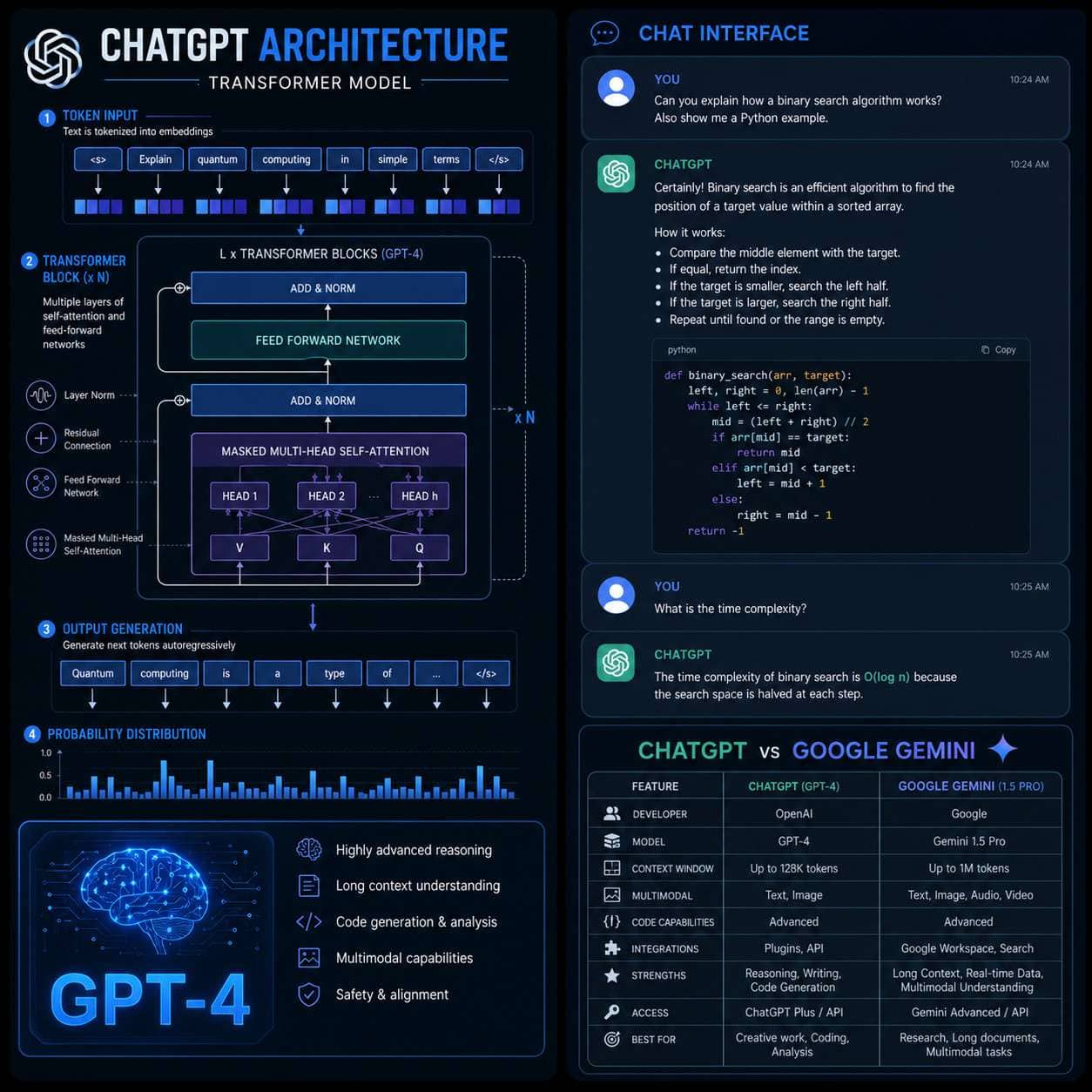
ChatGPT is a conversational AI assistant developed by OpenAI, first released publicly in November 2022. It generates text by predicting the next most likely token (word or word fragment) based on the input it receives, using a deep learning architecture called a transformer model.
Here is a simplified breakdown of how it works:
- Training: The model is trained on a large corpus of text from the internet, books, and other sources, learning grammar, facts, reasoning patterns, and writing styles.
- Fine-tuning with RLHF: Human trainers rank model responses, and that feedback is used to reinforce better, safer outputs.
- Inference: When you type a prompt, the model processes your input and generates a response token by token, in real time.
- Context window: ChatGPT holds a limited amount of conversation history (the “context window”) to maintain coherent dialogue.
What makes it different from older chatbots: Earlier chatbots used rigid decision trees or keyword matching. ChatGPT understands nuance, follows multi-step instructions, and can shift tone or style on request. For a broader look at how AI tools like this fit into the content creation landscape, see our comprehensive guide to AI-powered content generation tools.
ChatGPT vs. Google Gemini: Which AI Is Better
Neither is universally better. ChatGPT excels at creative writing, coding, and extended reasoning tasks. Google Gemini (formerly Bard) has a built-in advantage for real-time web search and deep integration with Google Workspace tools like Docs and Gmail.
| Feature | ChatGPT (GPT-4o) | Google Gemini |
|---|---|---|
| Real-time web access | Yes (Plus plan) | Yes (built-in) |
| Code generation | Excellent | Good |
| Google Workspace integration | Limited | Native |
| Image understanding | Yes | Yes |
| Free tier availability | Yes | Yes |
| Best for | Writing, coding, analysis | Research, Google tools |
Choose ChatGPT if you need strong creative writing, complex coding help, or detailed analytical tasks. Choose Gemini if you live inside Google’s ecosystem or need up-to-the-minute search results baked into every response. For a detailed head-to-head on AI research tools, our NotebookLM vs. Gemini comparison is worth reading alongside this guide.
How Much Does ChatGPT Plus Cost
As of 2026, ChatGPT Plus costs $20 per month. OpenAI also offers a ChatGPT Team plan (approximately $25–$30 per user/month, billed annually) and an Enterprise plan with custom pricing for large organizations.
What you get with Plus vs. free:
- Access to GPT-4o and other advanced models
- Faster response times during peak hours
- Priority access to new features (plugins, voice mode, image generation)
- Larger context window for longer documents
Is it worth it? For casual users who write a few prompts a week, the free tier is sufficient. For professionals, developers, or anyone relying on ChatGPT daily, the Plus plan pays for itself quickly in time saved.
Why Does ChatGPT Sometimes Give Wrong Information
ChatGPT “hallucinates” because it is a probability engine, not a fact database. It generates the most statistically likely continuation of your prompt, which can produce plausible-sounding but incorrect information, especially for niche topics, recent events, or specific statistics.
Common triggers for hallucinations:
- Asking about events after the model’s training cutoff date
- Requesting obscure citations or specific data points
- Prompts that are ambiguous or leading
- Topics where training data was sparse or contradictory
How to reduce hallucinations:
- Ask ChatGPT to cite its sources and then verify them independently.
- Use the web browsing feature (Plus plan) for current information.
- Break complex questions into smaller, specific sub-questions.
- Cross-check any factual claims with a primary source before using them.
What Are the Best Alternatives to ChatGPT
The strongest alternatives to ChatGPT in 2026 are Google Gemini, Anthropic’s Claude, and Meta’s Llama-based tools. Each serves slightly different needs.
- Claude (Anthropic): Known for longer context windows and a more cautious, safety-focused approach. Good for legal and sensitive document analysis.
- Google Gemini: Best for users already in the Google ecosystem and those needing live web data.
- Microsoft Copilot: Integrated into Microsoft 365, useful for Office document tasks.
- Perplexity AI: Designed specifically for research with cited, real-time web answers.
For a broader overview of the AI tool landscape, our guide to the most influential AI websites covers many of these platforms in depth.
Is ChatGPT Good for Students or Professionals
Yes, with important caveats. ChatGPT is genuinely useful for both groups, but the risks and best practices differ.
For students: ChatGPT can explain difficult concepts, summarize readings, help outline essays, and check grammar. The risk is academic dishonesty if students submit AI-generated work as their own. Most educational institutions now have clear policies on AI use, and students should follow them.
For professionals: Marketers, developers, consultants, and writers use ChatGPT to draft content, write code, analyze data, and brainstorm ideas. The key is treating outputs as a first draft, not a final product.
Common mistake: Trusting ChatGPT’s output without editing or fact-checking. The tool accelerates work; it does not replace judgment.
Can ChatGPT Help Me Write Code or Do My Homework
ChatGPT is one of the most capable free coding assistants available. It can write, debug, and explain code in dozens of languages including Python, JavaScript, SQL, and more.
What it does well:
- Writing boilerplate or repetitive code
- Debugging error messages when you paste them in
- Explaining what a block of code does, line by line
- Suggesting optimizations or alternative approaches
What it struggles with:
- Large, complex codebases it cannot see in full
- Highly specific library versions or niche frameworks
- Security-critical code (always review before deploying)
For developers who want to pair ChatGPT with a full coding environment, see our guide to Replit, the cloud-based IDE for modern developers. On homework: ChatGPT can help you understand a concept or check your work, but submitting its output as your own is academic dishonesty in most school policies.
What Are the Ethical Concerns With AI Like ChatGPT
The ethical concerns around ChatGPT are real and worth understanding before relying on the tool heavily. They fall into several categories.
- Bias: ChatGPT’s training data reflects human-produced text, which contains cultural, political, and demographic biases. Outputs can reflect those biases in subtle ways.
- Misinformation: The tool can generate convincing but false content at scale, which poses risks for news, health information, and public discourse.
- Academic integrity: Easy access to AI writing tools has complicated how schools assess student work.
- Job displacement: Roles in writing, customer support, and basic coding are already being affected by AI automation.
- Privacy: User prompts may be used to improve the model unless users opt out through OpenAI’s settings.
- Environmental cost: Training and running large AI models consumes significant energy.
None of these concerns make ChatGPT off-limits, but they do make responsible use a requirement, not an afterthought.
How Can Businesses Use ChatGPT to Improve Productivity
Businesses that integrate ChatGPT into their workflows report meaningful time savings on repetitive, text-heavy tasks. The clearest wins are in content creation, customer support drafts, internal documentation, and data summarization.
High-impact business use cases:
- Drafting email templates, proposals, and reports
- Summarizing long meeting transcripts or documents
- Generating first drafts for blog posts or social media content
- Writing and debugging internal scripts or automations
- Training new employees with AI-generated FAQs and guides
For teams looking to automate ChatGPT into larger workflows, our guide to ChatGPT automation and no-code workflow integration walks through practical setups. Pairing ChatGPT with tools like n8n or Make.com can multiply its value significantly. You can also explore AI-powered content optimization strategies to see how AI fits into a broader content strategy.

Is ChatGPT Safe to Use for Sensitive Information
No. You should not enter sensitive personal, financial, medical, or confidential business information into ChatGPT without understanding OpenAI’s data policies. By default, conversations may be reviewed by OpenAI staff and used to improve the model.
What to avoid entering:
- Full names combined with social security numbers, passport details, or financial account data
- Confidential client or patient information
- Proprietary business strategies or unreleased product details
- Passwords or API keys
Safer options: OpenAI offers a data opt-out setting in account preferences. Enterprise accounts come with stronger data privacy agreements. For teams handling regulated data (HIPAA, GDPR), consult your legal team before deploying ChatGPT in any workflow.
What Kind of Tasks Can ChatGPT Actually Help Me With
ChatGPT handles a wide range of everyday tasks well. Here is a practical breakdown by category:
Writing and editing:
- Drafting emails, cover letters, blog posts, and social media captions
- Proofreading and grammar correction
- Rewriting content in a different tone or reading level
Research and learning:
- Explaining complex topics in plain language
- Summarizing long articles or documents (paste the text in)
- Generating study guides or quiz questions
Coding and technical tasks:
- Writing scripts in Python, JavaScript, SQL, and others
- Explaining error messages and suggesting fixes
Creative work:
- Brainstorming ideas, names, or storylines
- Writing fiction, poetry, or scripts
Business and productivity:
- Creating templates, SOPs, and meeting agendas
- Analyzing pros and cons of a decision
How Is ChatGPT Different From Previous Chatbots
Traditional chatbots used scripted responses or simple keyword matching. ChatGPT understands context, follows complex instructions, maintains conversational memory within a session, and generates original text rather than retrieving pre-written answers.
Key differences at a glance:
| Capability | Old Chatbots | ChatGPT |
|---|---|---|
| Handles open-ended questions | No | Yes |
| Understands context across turns | No | Yes |
| Generates original content | No | Yes |
| Adapts tone and style | No | Yes |
| Requires scripted responses | Yes | No |
This shift from retrieval to generation is what makes ChatGPT feel qualitatively different. It is not just faster or smarter; it operates on a fundamentally different principle. For more on the broader category of AI tools this belongs to, explore the ChatGPT Archives on WebAIStack for ongoing coverage.
Frequently Asked Questions
What does GPT stand for in ChatGPT? GPT stands for Generative Pre-trained Transformer. It describes the model architecture (transformer), how it was prepared (pre-trained on large datasets), and what it does (generates text).
Is ChatGPT free to use? Yes. A free tier is available at chat.openai.com. It uses a capable base model but has usage limits during peak hours. ChatGPT Plus at $20/month removes most of those limits and adds advanced features.
Can ChatGPT access the internet? Yes, but only with the web browsing feature enabled, which is available on ChatGPT Plus. The base free model has a training cutoff and cannot retrieve live information.
Does ChatGPT remember previous conversations? By default, ChatGPT does not retain memory between separate sessions, though OpenAI has introduced a “Memory” feature that can be enabled in settings to carry context across conversations.
Who owns the content ChatGPT generates? According to OpenAI’s terms of service, users own the output they generate, subject to applicable law. However, AI-generated content may not be eligible for copyright protection in all jurisdictions.
Is ChatGPT the same as OpenAI? No. OpenAI is the company; ChatGPT is one of its products. OpenAI also develops the GPT model series, DALL-E for image generation, and Whisper for speech recognition, among others.
Can ChatGPT make phone calls or browse my files? Not by default. However, with plugins or integrations (available on Plus and Enterprise plans), ChatGPT can connect to external tools, files, and services.
What is the difference between GPT-4 and GPT-4o? GPT-4o (“o” for omni) is a faster, more efficient version of GPT-4 that handles text, images, and audio in a single model. It is generally quicker and more cost-effective than the original GPT-4.
How do I write better prompts for ChatGPT? Be specific. Include context, the desired format, the target audience, and any constraints. For example: “Write a 200-word product description for a standing desk targeting remote workers, in a friendly but professional tone.”
Is ChatGPT biased? ChatGPT can reflect biases present in its training data. OpenAI applies safety filters and fine-tuning to reduce harmful outputs, but the model is not bias-free. Critical review of outputs is always recommended.
Conclusion
ChatGPT Unveiled: A Comprehensive Guide to OpenAI’s Revolutionary AI Technology covers a lot of ground because the tool itself touches nearly every professional and personal context. The core takeaway is this: ChatGPT is genuinely useful, but it works best when you treat it as a capable collaborator rather than an infallible oracle.
Actionable next steps:
- Start with the free tier at chat.openai.com and test it on a real task you do weekly.
- Learn to write specific, context-rich prompts. Vague prompts produce vague answers.
- Always fact-check outputs before publishing or sharing them.
- Review OpenAI’s data privacy settings if you plan to use ChatGPT for work.
- If you want to automate ChatGPT into your business workflows, explore no-code tools like Make.com or n8n alongside it.
- Stay current. The AI landscape moves fast, and the tool you use in 2026 will likely look different by next year.
The best way to understand ChatGPT is to use it. Start small, stay skeptical, and build from there.
Useful Resources: ChatGPT by OpenAI & OpenAI research blog