Last updated: May 22, 2026
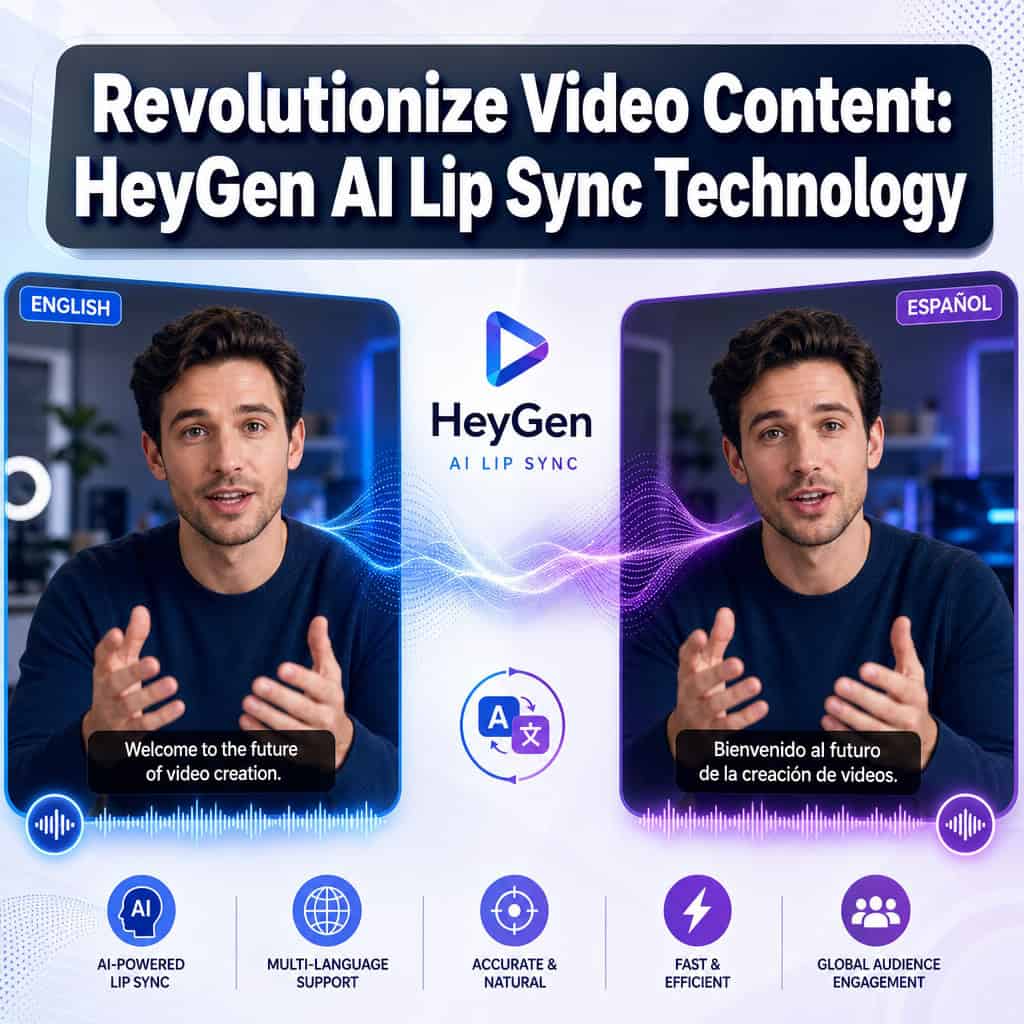
Quick Answer: HeyGen’s AI lip sync technology automatically maps spoken audio to matching facial movements frame by frame, allowing creators to translate and dub video content into 40+ languages while keeping lip movements visually accurate. It costs 5 credits per minute for full lip-sync video translation, works best with structured talking-head content, and requires no technical expertise beyond uploading a video [2][9].
Key Takeaways
- HeyGen’s lip sync analyzes phonetic audio features and remaps mouth shapes and facial movements to match translated speech [3]
- Full video translation with lip sync costs 5 credits per minute; audio-only dubbing (no lip sync) costs 2 credits per minute [9]
- The free plan includes 3 videos per month, up to 1 minute each, with trial access to lip-sync translation [6]
- HeyGen supports 40+ languages for video translation, including Spanish, Mandarin, Japanese, Hindi, and Arabic [2]
- The platform works best for structured, repeatable content: training videos, marketing demos, testimonials, and instructional material
- Avatar V, HeyGen’s latest model, needs only a 15-second recording to create a multi-angle digital twin [5]
- Audio dubbing is now unlimited and no longer consumes credits, a significant cost reduction for users who don’t need visual lip sync [9]
- AI lip sync struggles with fast-moving subjects, group conversations, and highly emotional performances
- No coding or video editing skills are required; the workflow is browser-based and drag-and-drop

A Spanish-speaking marketing director I worked with last year had a problem: her team produced excellent English-language product videos, but translating them for Latin American markets cost $3,000 per minute of professional dubbing. Then she tried HeyGen’s AI lip sync. The first translated video took 12 minutes to produce and cost a fraction of that budget. That single shift changed how her entire company approached global content. This is the kind of practical impact driving interest in how AI tools can revolutionize video content: a deep dive into HeyGen’s AI lip sync technology reveals why it’s become one of the most discussed tools in the AI-powered content generation space.
What Exactly Is HeyGen AI Lip Sync and How Does It Work?
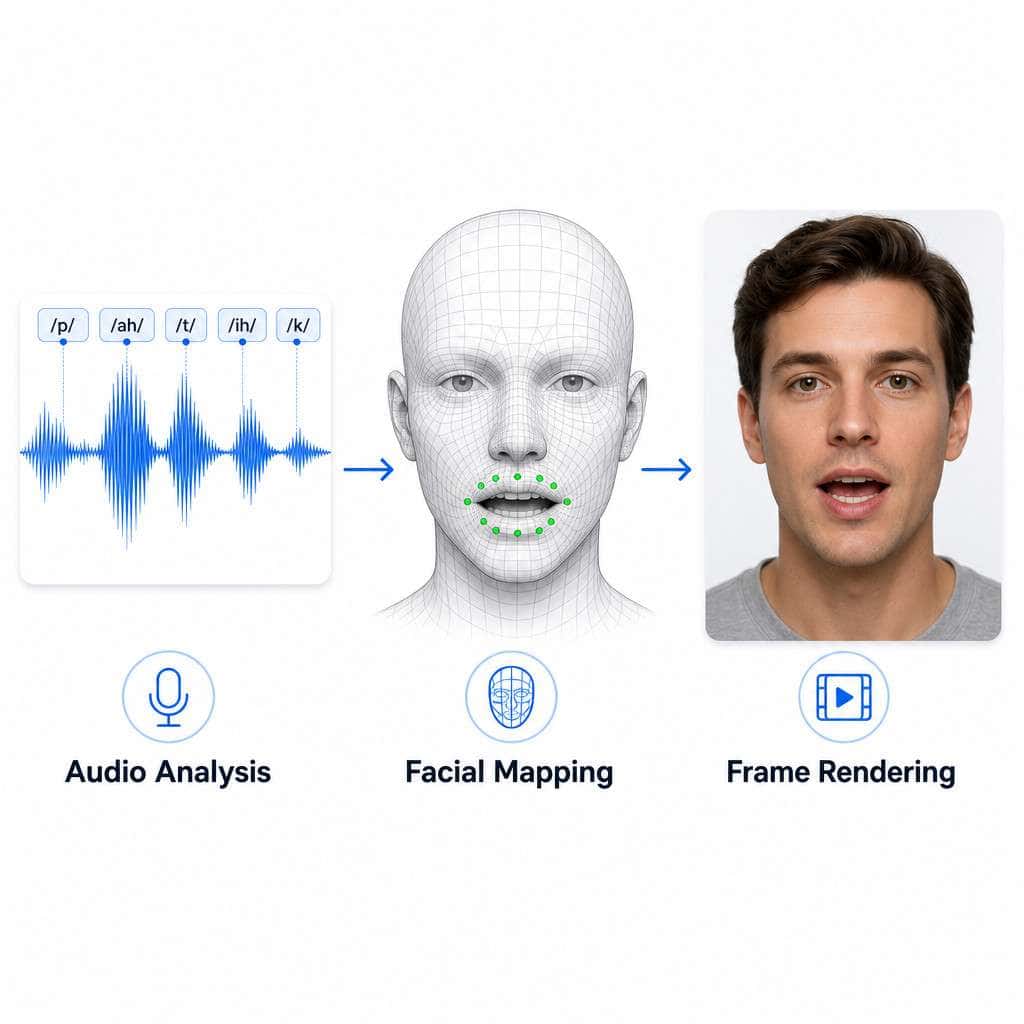
HeyGen’s AI lip sync is a feature that analyzes the audio track of a video, maps phonetic sounds to corresponding mouth shapes, and then re-renders the speaker’s facial movements frame by frame to match new audio, whether that’s a different language or a corrected script [3].
Here’s the technical pipeline in plain terms:
- Audio analysis: The system breaks down the audio into phonemes (the smallest units of speech sound)
- Facial landmark detection: It identifies key points on the speaker’s face, especially around the mouth, jaw, and cheeks
- Motion mapping: Each phoneme gets matched to a corresponding mouth position and facial muscle movement
- Frame-by-frame rendering: The system generates new video frames where the speaker’s face moves naturally with the new audio
- Blending and output: The modified face is composited back into the original video, preserving background, lighting, and body movement
The result looks like the original speaker is actually saying the new words. HeyGen describes this as an automation layer that emphasizes “realism and timing alignment” [3]. With the integration of Seedance 2.0, the platform now combines this lip-sync capability with broader cinematic video workflows and realistic digital twins.
Common mistake: People assume lip sync and dubbing are the same thing. They’re not. Audio dubbing replaces the voice track only. Lip sync also modifies the visual mouth movements to match. HeyGen offers both, and they’re priced differently [9].
How Much Does HeyGen Cost Compared to Other Video Translation Tools?
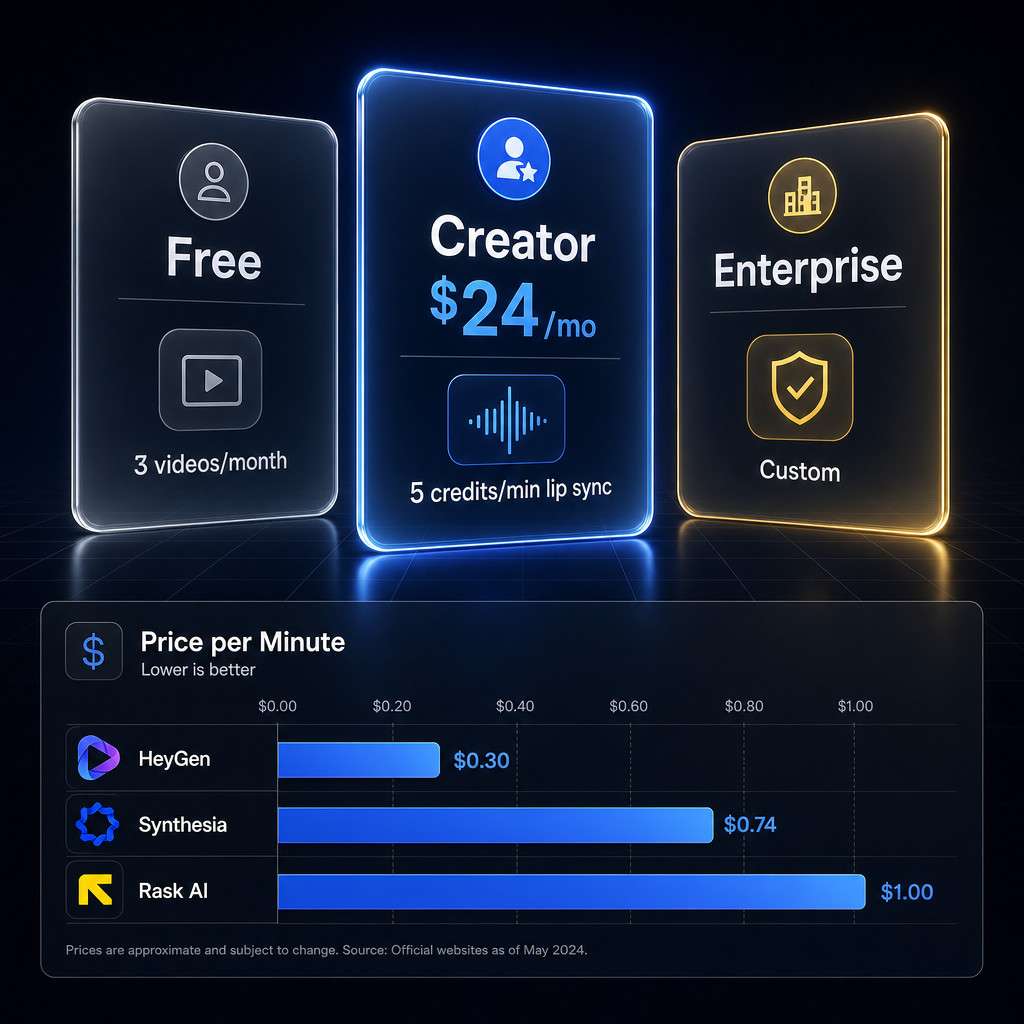
HeyGen’s pricing is credit-based. Full video translation with lip sync costs 5 credits per minute, while audio dubbing without lip sync costs 2 credits per minute. Audio dubbing alone is now unlimited and doesn’t consume credits on paid plans [9].
| Feature | HeyGen Free | HeyGen Creator ($24/mo) | HeyGen Business ($108/mo) |
|---|---|---|---|
| Videos per month | 3 | Varies by credits | Varies by credits |
| Max video length | 1 minute | Up to 20 min | Up to 20 min |
| Lip sync translation | Trial access | 5 credits/min | 5 credits/min |
| Audio dubbing | Trial access | Unlimited (free) | Unlimited (free) |
| Avatar access | Avatar IV (limited) | Avatar IV + V | Full suite |
Source: HeyGen pricing page [6]
How this compares to alternatives: Professional human dubbing typically runs $1,500 to $5,000 per finished minute depending on language and quality. Competitors like Synthesia and Rask AI offer similar AI dubbing features, but HeyGen’s combination of avatar creation, lip sync, and video translation in one platform makes direct price comparison tricky. Choose HeyGen if you need both avatar-based video creation and translation in one workflow. Choose a standalone tool like Rask AI if you only need dubbing for existing footage.
For creators looking to optimize their content workflows with AI, the unlimited audio dubbing alone can justify the subscription cost.
Can HeyGen Translate Videos Into Multiple Languages With Matching Lip Movements?
Yes. HeyGen supports video translation with matched lip movements into 40+ languages, including Spanish, Mandarin Chinese, Japanese, Korean, Hindi, Arabic, Portuguese, French, German, Italian, and many more [2].
The process works like this:
- Upload your source video (any language)
- Select your target language(s)
- Choose whether you want audio-only dubbing or full lip-sync translation
- HeyGen processes the video and delivers the translated version
You can translate a single video into multiple languages in one session. Each language version gets its own lip-synced output. The system preserves the original speaker’s voice characteristics (pitch, tone, cadence) while adapting pronunciation to the target language.
Edge case: Languages with significantly different speech rhythms, like Japanese (which often requires more syllables to express the same idea as English), can sometimes cause slight timing mismatches. The AI compensates by adjusting speech speed, but very long sentences may sound slightly rushed.
Is HeyGen Good for YouTube Creators or Just Enterprise Clients?
HeyGen works well for both YouTube creators and enterprise teams, but it’s strongest for structured, repeatable video communication rather than highly expressive or cinematic content [5].
For YouTube creators:
- Translate existing videos to reach international audiences
- Create multilingual versions of tutorials, reviews, and educational content
- Use AI avatars for channels that don’t require on-camera presence
- The free plan (3 videos/month, 1 minute each) is enough to test the workflow [6]
For enterprise clients:
- Scale training and onboarding videos across global offices
- Localize product demos and marketing materials
- Create consistent brand spokesperson avatars
- Avatar Memory feature maintains continuity across video series [5]
Choose HeyGen if you produce talking-head content, tutorials, or corporate communications. Look elsewhere if your content relies heavily on emotional range, physical comedy, or rapid visual storytelling. The technology excels at clear, direct speech patterns, which is exactly what most YouTube educational content and corporate video requires.
If you’re building a broader content strategy, our guide to AI-powered content generation tools covers how HeyGen fits alongside other platforms.
What Are the Common Mistakes People Make When Using AI Lip Sync Technology?
The biggest mistake is expecting AI lip sync to handle every type of video equally well. It doesn’t. Here are the most frequent errors I see:
- Using low-resolution source video: HeyGen needs clear facial detail to map landmarks accurately. Anything below 720p produces noticeably worse results
- Choosing videos with obstructed faces: Hands in front of the mouth, microphones covering the chin, or heavy facial hair can confuse the landmark detection
- Ignoring audio quality: Background noise, music, or overlapping speakers degrade the phoneme analysis. Clean, isolated speech tracks produce the best output
- Translating highly idiomatic content: Jokes, slang, and cultural references don’t translate well through any automated system. Script review before translation saves time
- Skipping the preview step: Always review the output before publishing. Occasional artifacts appear, especially during fast head movements or extreme facial expressions
- Assuming one take is final: Plan for minor manual adjustments. Even the best AI output benefits from a human quality check
Decision rule: If your source video has clear audio, a well-lit face visible from the nose to the chin, and a resolution of 1080p or higher, you’ll get good results on the first pass. If any of those elements are missing, fix them before uploading.
How Accurate Are HeyGen’s Lip Sync Translations Compared to Human Dubbing?
For structured content like training videos, product demos, and news-style presentations, HeyGen’s lip sync accuracy is close enough to human dubbing that most viewers won’t notice the difference. For emotionally complex content, whispered speech, or singing, human dubbing still wins clearly.
Independent reviewers in 2026 describe HeyGen as a “full-scale performance engine” that has moved well beyond basic lip-syncing [5]. Avatar V, the latest model, supports multi-angle stability and long-form performance, which reduces the uncanny valley effect that plagued earlier versions.
Where AI lip sync falls short:
- Subtle emotional micro-expressions (a slight smirk, tearful eyes while speaking)
- Rapid alternation between speakers in conversation
- Whispering, shouting, or singing
- Languages with very different facial movement patterns than the source
Where it matches or beats human dubbing:
- Speed (minutes vs. days or weeks)
- Cost (fraction of professional dubbing rates)
- Consistency across dozens of language versions
- Preserving the original speaker’s voice characteristics
Can I Use HeyGen for Professional Marketing Videos or Just Personal Projects?
HeyGen is built for professional use. The platform positions its lip sync and avatar technology specifically for training, instructional content, testimonials, and localization, all core marketing and corporate communication formats [3].
Many businesses use HeyGen for:
- Multilingual ad campaigns
- Localized landing page videos
- Customer testimonial translations
- Internal communications across global teams
- Product launch videos in multiple markets
The Business plan ($108/month) includes brand kits, priority processing, and team collaboration features designed for marketing teams [6]. For creators focused on social media marketing, HeyGen’s output integrates well with standard video distribution workflows.
What Video Quality Do I Need for HeyGen to Work Best?
For optimal lip sync results, upload video that meets these specifications:
- Resolution: 1080p minimum; 4K preferred
- Lighting: Even, front-facing light on the speaker’s face with minimal harsh shadows
- Framing: Speaker’s face clearly visible, ideally from mid-chest up
- Audio: Clean speech track with minimal background noise (separate audio tracks help)
- Movement: Minimal head rotation; slight natural movement is fine, but avoid rapid turns
- Duration: No strict maximum, but processing time increases with length
Quick test: If you can clearly see the speaker’s lips and teeth in every frame, the AI can too.
What Types of Video Content Work Worst With AI Lip Sync Technology?
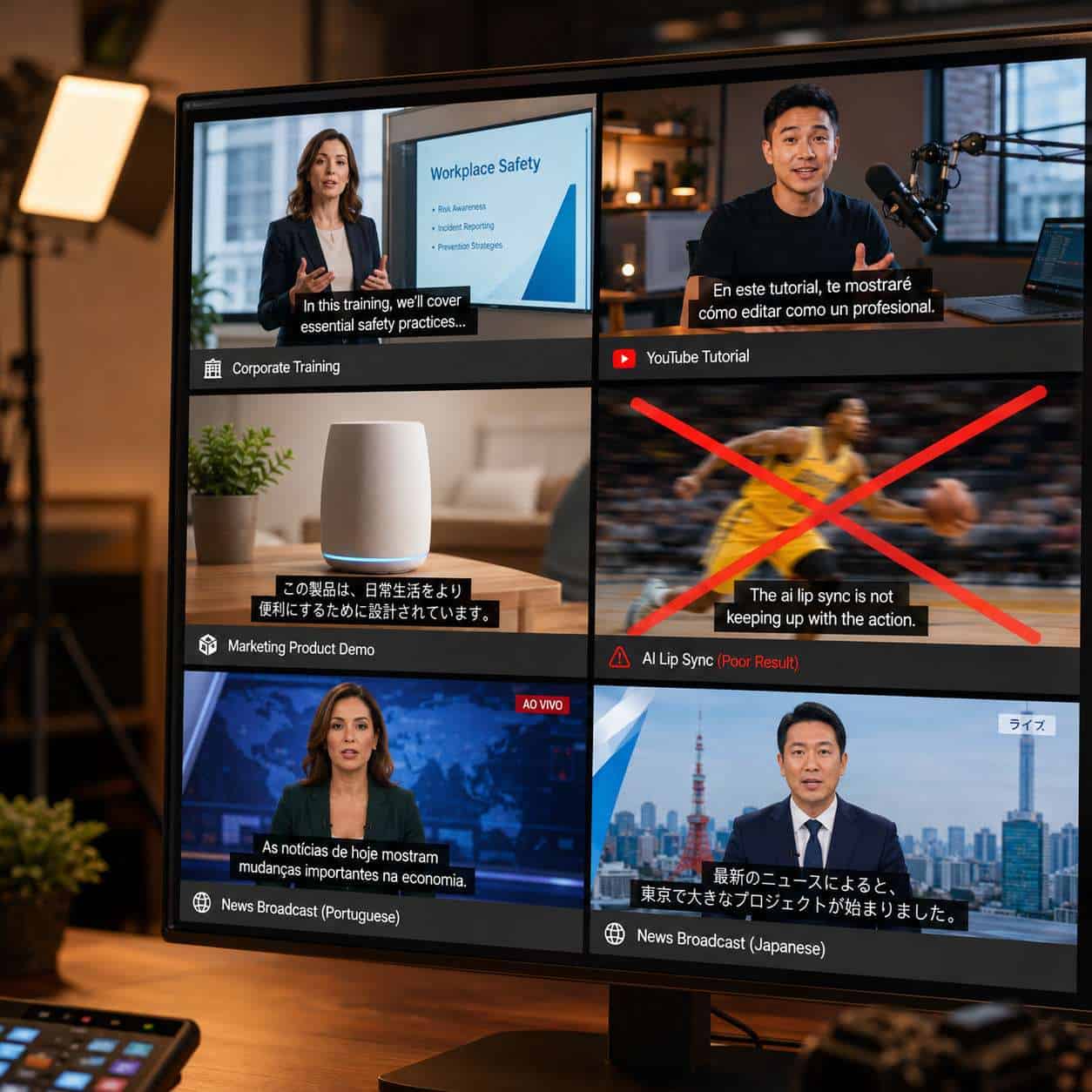
AI lip sync performs poorly with group conversations, fast-action content, heavily stylized footage, and emotionally intense performances [5].
Specific content types to avoid or approach with caution:
- Panel discussions: Multiple speakers talking over each other confuses speaker isolation
- Music videos: Singing requires different mouth mapping than speech
- Action sequences: Rapid camera movement and motion blur break facial tracking
- Animated content: Most AI lip sync is trained on real human faces, not cartoon characters
- Low-light or artistic footage: Heavy color grading, film grain, or intentional blur reduces landmark accuracy
Are There Any Free Alternatives to HeyGen for Video Lip Syncing?
Several free or freemium alternatives exist, but none match HeyGen’s full feature set in a single platform.
| Tool | Free Tier | Lip Sync Quality | Best For |
|---|---|---|---|
| HeyGen | 3 videos/month, 1 min each | High | All-in-one video + translation |
| Rask AI | Limited free trial | Medium-High | Dubbing-focused workflows |
| Wav2Lip (open source) | Fully free | Medium | Developers comfortable with Python |
| Kapwing | Limited free features | Basic | Simple social media clips |
Choose Wav2Lip if you have technical skills and want full control. Choose Rask AI if you only need dubbing without avatar creation. Choose HeyGen if you want the most polished output with minimal effort [2].
What Technical Skills Do I Need to Use HeyGen Effectively?
None beyond basic computer literacy. HeyGen runs entirely in the browser. You upload a video, select options from dropdown menus, and click a button. No coding, no video editing software, no command-line tools [2].
That said, these skills improve your results:
- Basic understanding of video resolution and aspect ratios
- Ability to record clean audio (even a quiet room and a decent microphone helps)
- Familiarity with your target audience’s language preferences
- Basic quality assurance (watching the output and catching artifacts)
For those building broader AI-powered workflows, HeyGen’s API is available on enterprise plans for integration with existing content pipelines.
Ethical Considerations and the Regulatory Landscape
AI lip sync raises real ethical questions. The same technology that enables a training video to reach 40 languages can also create deceptive deepfakes. In 2026, U.S. states are tightening enforcement around non-consensual deepfakes and requiring disclosure labels on manipulated political content [7].
Best practices for ethical use:
- Get explicit consent before modifying anyone’s likeness
- Label AI-modified content clearly, especially in public-facing materials
- Maintain records of original vs. modified versions
- Never use lip sync to fabricate statements someone didn’t make
HeyGen itself includes consent verification steps in its avatar creation workflow, and the broader industry is converging on standards around visible labeling and recordkeeping for modified likenesses [7].
Conclusion
HeyGen’s AI lip sync technology has matured from a novelty into a practical production tool. It works best for structured, talking-head content where clear speech and good lighting give the AI what it needs to produce convincing results. The pricing model (5 credits per minute for lip sync, unlimited audio dubbing on paid plans) makes it accessible for solo creators and cost-effective for enterprise teams translating at scale [9].
Your next steps:
- Test the free tier: Upload a 1-minute talking-head video and translate it into one language. Judge the quality yourself [6]
- Optimize your source material: Shoot in 1080p or higher, with clean audio and good facial lighting
- Start with your highest-value content: Translate your best-performing video first to measure audience response in new markets
- Review ethical guidelines: Make sure you have consent for any real person’s likeness and label AI-modified content appropriately
- Explore the broader AI content toolkit: See our comprehensive guide to AI content generation tools to understand how HeyGen fits into a complete workflow
The technology isn’t perfect for every use case, but for the right content types, it eliminates weeks of production time and thousands of dollars in dubbing costs. That’s a concrete, measurable advantage worth exploring.
FAQ
Q: How long does HeyGen take to process a lip-synced video? A: Processing time varies by video length and server load, but most 1-5 minute videos complete within 10-30 minutes. Longer videos or peak usage times may take longer.
Q: Does HeyGen preserve my original voice in translations? A: Yes. HeyGen clones the speaker’s voice characteristics (pitch, tone, cadence) and applies them to the translated speech, so it sounds like you speaking the new language [3].
Q: Can I use HeyGen on my phone? A: HeyGen is browser-based and works on mobile browsers, though the experience is optimized for desktop. Video uploads and previews are easier on larger screens.
Q: What happens if the lip sync looks off in certain frames? A: You can re-process the video or adjust the source material. Common fixes include improving lighting, reducing head movement, or cleaning up the audio track.
Q: Is HeyGen’s lip sync good enough for broadcast television? A: For news-style and instructional content, yes. For dramatic or highly emotional content, human dubbing still produces more natural results.
Q: Do I own the translated videos HeyGen produces? A: Yes. HeyGen’s terms grant you ownership of output created from your own content. Check the current terms of service for specifics on avatar-generated content.
Q: How many languages can I translate a single video into? A: HeyGen supports 40+ languages, and you can translate one source video into as many of those languages as you need [2].
Q: Does HeyGen work with pre-recorded videos or only live recordings? A: HeyGen works with pre-recorded video files. You upload an existing video and the system processes it. There’s no live/real-time lip sync feature for streaming.
Q: What’s the difference between Avatar IV and Avatar V? A: Avatar V is HeyGen’s latest model, requiring only a 15-second recording input and supporting multi-angle stability and long-form performance. Avatar IV is the previous generation, still available on lower-tier plans [5].
Q: Can I cancel my HeyGen subscription anytime? A: Yes. HeyGen operates on monthly or annual billing cycles, and you can cancel before the next billing period.
References
[2] Create AI Lip Sync Videos – https://www.heygen.com/tool/create-ai-lip-sync-videos [3] AI Lip Sync – https://www.heygen.com/blog/ai-lip-sync [5] HeyGen Review 2026: The Ultimate AI Video Suite for the Avatar Economy – https://www.weshop.ai/blog/heygen-review-2026-the-ultimate-ai-video-suite-for-the-avatar-economy/ [6] HeyGen Pricing – https://www.photonpay.com/hk/blog/article/heygen-pricing?lang=en [7] Ethics of AI Lip Sync – https://lipsync.com/blog/ethics-of-ai-lip-sync [9] HeyGen Premium Features Update – https://www.heygen.com/blog/heygen-premium-features-update