Last updated: June 9, 2026
Quick Answer: The ChatGPT API charges per token, where roughly 750 words equal 1,000 tokens. In 2026, GPT-3.5 Turbo costs a fraction of a cent per 1,000 tokens, while GPT-4o sits at a higher tier suited for complex tasks. Most small projects cost between $5 and $50 per month, though high-volume applications can scale into hundreds of dollars quickly without careful management.
Key Takeaways
- ChatGPT API pricing is token-based: you pay separately for input tokens (your prompt) and output tokens (the model’s response).
- GPT-3.5 Turbo is significantly cheaper than GPT-4o and is often sufficient for simple tasks like classification, summarization, or FAQ bots.
- New users receive free credits from OpenAI to test the API before committing to paid usage.
- Small startups can absolutely afford the API, but only if they manage prompt length and avoid unnecessary calls.
- The most common billing mistake is sending long system prompts with every single API call, which multiplies token costs fast.
- There are no hidden subscription fees, but rate limits and overage behavior can catch developers off guard.
- You can estimate monthly costs with a simple formula: (average tokens per request x number of requests x price per token).
- Projects with very high output requirements, like generating long-form documents at scale, are the least cost-effective use cases.
How Much Does the ChatGPT API Actually Cost Per Request
The cost per API request depends on the model you choose and how many tokens are exchanged. A single short request to GPT-3.5 Turbo, say a 50-word prompt with a 100-word response, might cost less than $0.001. A longer GPT-4o exchange with a detailed system prompt and a multi-paragraph response could cost 10 to 20 times more.
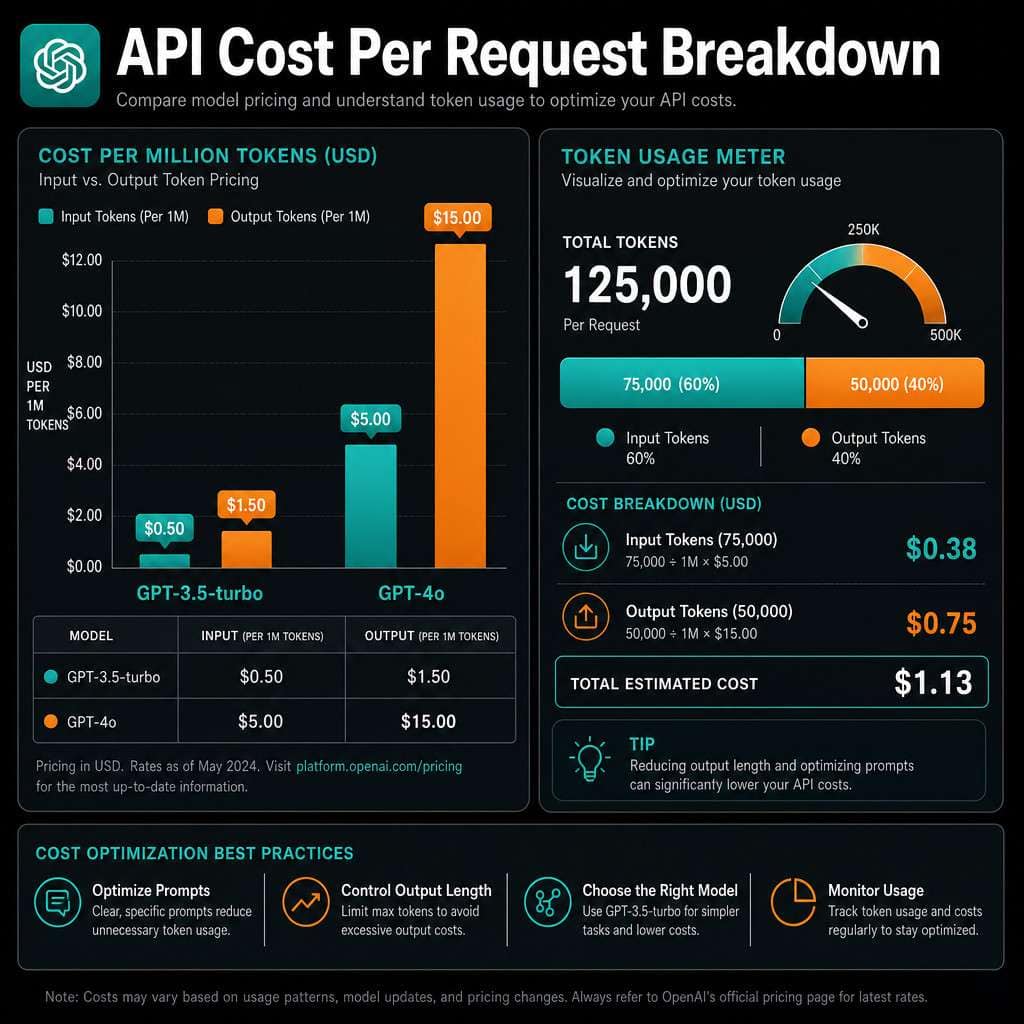
OpenAI prices models by cost per million tokens (as of 2026). Approximate figures based on OpenAI’s published pricing tiers:
| Model | Input (per 1M tokens) | Output (per 1M tokens) |
|---|---|---|
| GPT-3.5 Turbo | ~$0.50 | ~$1.50 |
| GPT-4o mini | ~$0.15 | ~$0.60 |
| GPT-4o | ~$5.00 | ~$15.00 |
Note: These figures reflect general pricing tiers available at the time of writing. Always check OpenAI’s official pricing page for the current rates before budgeting.
Common mistake: Many developers forget that output tokens are almost always priced higher than input tokens. A chatbot that generates long responses will cost more than one that returns short, structured answers.
Is the ChatGPT API Cheaper Than OpenAI’s Other Models
Yes, in most cases. OpenAI offers a range of models, and the ChatGPT-family models (especially GPT-3.5 Turbo and GPT-4o mini) are among the most affordable in their lineup. Older models like the original GPT-4 (8k and 32k context versions) were considerably more expensive before being phased out in favor of GPT-4o.
For developers building at scale, GPT-4o mini has become a popular choice in 2026 because it delivers strong performance at a fraction of GPT-4o’s cost. If your use case doesn’t require deep reasoning or nuanced creative writing, GPT-4o mini often delivers 80% of the quality at 20% of the price.
What Is the Difference Between GPT-3.5 and GPT-4 API Pricing
GPT-3.5 Turbo is roughly 10 to 30 times cheaper than GPT-4o, depending on the context window and task. The trade-off is capability. GPT-4o handles complex reasoning, ambiguous instructions, and nuanced language far better.
Choose GPT-3.5 Turbo if:
- Your task is straightforward (classification, simple Q&A, data extraction)
- You’re running high request volumes on a tight budget
- Response quality is less critical than speed and cost
Choose GPT-4o if:
- You need accurate reasoning, code generation, or nuanced writing
- Errors are costly (legal, medical, financial contexts)
- You’re building a premium product where quality justifies the price
For most startups I’ve worked with, starting on GPT-3.5 Turbo and upgrading selectively to GPT-4o for specific features is the smartest path. You can also explore ChatGPT automation workflows to reduce manual API calls.
Can Small Startups Afford to Use the ChatGPT API
Yes, small startups can absolutely afford the ChatGPT API, especially at early stages. A startup sending 10,000 short requests per month on GPT-3.5 Turbo might spend under $10 total. Even on GPT-4o mini, that same volume rarely exceeds $30 to $50.
The bigger risk isn’t the base cost but uncontrolled growth. A viral feature that suddenly drives 10x more traffic can push a $20/month bill to $200 overnight. Set hard spending limits in your OpenAI account dashboard from day one.
Practical budget tiers for startups:
- MVP / testing phase: $0 to $20/month (free credits cover most of this)
- Early product with real users: $20 to $100/month
- Growing product with 10k+ daily active users: $100 to $1,000/month depending on feature design
Are There Free Tiers or Credits for Testing the ChatGPT API
Yes. OpenAI provides free credits to new accounts, which is enough to run meaningful tests before spending a dollar. As of 2026, new accounts typically receive a limited credit grant valid for a short period after signup.
Beyond the initial credits, there is no ongoing free tier for the API (unlike some competitors). Once your credits expire or run out, you’ll need to add a payment method.
Edge case: If you’re building for research or academic purposes, OpenAI has occasionally offered researcher access programs. Check their official site for current availability.
How Do I Calculate My Potential Monthly ChatGPT API Expenses
Use this formula to estimate costs before you build:
Monthly cost = (average tokens per request) x (requests per month) x (price per token)
For example:
- Average request: 500 input tokens + 300 output tokens = 800 tokens total
- Monthly requests: 50,000
- Model: GPT-4o mini at $0.15 input / $0.60 output per million tokens
Calculation:
- Input cost: (500 / 1,000,000) x 0.15 x 50,000 = $3.75
- Output cost: (300 / 1,000,000) x 0.60 x 50,000 = $9.00
- Total: ~$12.75/month
This kind of pre-build math saves a lot of surprises. I’ve seen teams skip this step and end up with a $400 bill in their first week because they underestimated output length.
For teams using automation platforms alongside the API, see our guide on Make.com API workflow automation to understand how orchestration layers can add or reduce API call volume.
How Does Token Usage Impact My Overall API Costs
Token usage is the single biggest driver of your API bill. Every character in your prompt, system message, conversation history, and model response counts toward your token total.
Key factors that inflate token usage:
- Long system prompts sent with every request
- Including full conversation history in each API call (common in chatbots)
- Asking the model to “think step by step” without limiting response length
- Using large context windows when smaller ones would work
Decision rule: If your system prompt is over 200 tokens, consider whether every piece of it is necessary for every request. Trimming a 500-token system prompt to 150 tokens can cut your input costs by 70%.
For a broader look at how AI tools handle content generation costs, our comprehensive guide to AI-powered content generation tools covers related trade-offs.
What Are Common Mistakes Developers Make With API Billing
The most expensive mistake is not setting a spending limit. OpenAI allows you to set monthly hard caps, but they’re not enabled by default. Without a cap, a bug in your code that triggers infinite API calls can result in a very large bill.
Other frequent billing mistakes:
- Sending full chat history with every message instead of summarizing older context
- Not caching repeated prompts when the same question is asked frequently
- Using GPT-4o for tasks that GPT-4o mini handles just as well
- Ignoring the difference between input and output pricing when estimating costs
- Forgetting that embeddings and fine-tuning have separate pricing
What happens if you accidentally overuse the API? OpenAI will charge your card for overages up to your set limit, then stop requests. If no limit is set, charges continue until you manually stop them. Always set a hard limit and configure usage alerts in your account settings.
Which Companies Should Definitely Use the ChatGPT API
Companies that benefit most from the ChatGPT API are those with high-volume, text-based workflows where automation saves significant labor cost. The API makes strong financial sense when the cost per API call is less than the cost of a human doing the same task.
Strong use cases:
- Customer support automation (handling tier-1 tickets)
- Content moderation at scale
- Internal knowledge base Q&A tools
- Code review assistants for developer teams
- Data extraction from unstructured documents
Developers building these kinds of tools often pair the API with workflow automation platforms. Our guide on n8n automation workflows shows how to chain AI API calls with other business tools efficiently.
What Kind of Projects Are NOT Cost-Effective With This API
Projects where the API generates very long outputs at high volume are often the hardest to make cost-effective. For example, generating full 2,000-word articles for every user request at scale can get expensive fast.
Poor fits for the API (without careful design):
- Bulk document generation at high volume (cheaper alternatives like fine-tuned smaller models may work better)
- Real-time voice applications where latency matters more than language quality
- Use cases where 90% of queries are repetitive and could be handled by a lookup table or search index instead
Are There Any Hidden Fees in the OpenAI API Pricing Model
No hidden fees exist in the traditional sense, but there are costs that developers often miss. The API pricing page lists per-token costs clearly, but several adjacent charges can appear on your bill unexpectedly.
Costs that surprise developers:
- Fine-tuning: Training a custom model on your data has a separate per-token training cost, plus ongoing inference costs that are higher than base model rates.
- Embeddings: If you’re building a retrieval-augmented generation (RAG) system, embedding your documents costs extra.
- Image inputs: Sending images to vision-capable models costs more than text-only requests.
- Batch API discounts: OpenAI offers a Batch API with lower prices for non-real-time tasks. Not using it when you could is effectively an avoidable cost.
How Do I Optimize My API Calls to Reduce Expenses
Reducing API costs doesn’t require sacrificing quality. It requires smarter call design.

Top optimization strategies:
- Trim your system prompt. Audit it monthly. Remove instructions that don’t change model behavior.
- Use the right model for the task. Route simple requests to GPT-4o mini and complex ones to GPT-4o.
- Implement prompt caching. OpenAI supports cached prompt prefixes, which can cut costs on repeated system prompts.
- Summarize conversation history. Instead of sending 20 turns of chat history, summarize the first 15 turns into a short paragraph.
- Set max_tokens limits. Always define a maximum response length to prevent runaway outputs.
- Use the Batch API for non-urgent tasks. It typically offers a 50% discount on standard rates.
- Cache common responses. If 30% of your users ask the same question, store the answer and serve it without an API call.
For developers building automated pipelines, pairing these strategies with tools like n8n workflow automation can further reduce unnecessary API calls by adding conditional logic before requests are sent.
Also worth reading: our AI-powered content optimization guide covers how to structure AI-assisted workflows for better performance and lower overhead.
FAQ
Q: Does OpenAI charge for failed API requests? A: Generally, no. If a request fails before the model processes it, you are not charged. If the model begins generating and then errors out, partial token charges may apply.
Q: Can I use the ChatGPT API for free forever? A: No. After your initial free credits expire, all API usage requires a paid account. There is no permanent free tier for API access.
Q: Is the API cheaper if I pay more upfront? A: OpenAI does not currently offer volume prepay discounts for standard API access. However, the Batch API and certain enterprise agreements can reduce per-token costs.
Q: How do I know how many tokens my prompt uses?
A: Use OpenAI’s Tokenizer tool (available on their website) or the tiktoken Python library to count tokens before sending requests.
Q: What is the difference between the ChatGPT API and the ChatGPT Plus subscription? A: ChatGPT Plus ($20/month) gives you access to the ChatGPT web interface. The API is a separate product billed by token usage, used by developers to build applications.
Q: Can I switch models mid-project without changing my code?
A: Yes. You only need to change the model parameter in your API call. The request and response structure stays the same across GPT-3.5 Turbo, GPT-4o mini, and GPT-4o.
Q: Does context window size affect pricing? A: Yes. Larger context windows allow more tokens per request, which increases cost. Only use extended context windows when your use case genuinely requires them.
Q: Are there cheaper alternatives to the ChatGPT API? A: Yes. Anthropic’s Claude API, Google’s Gemini API, and open-source models hosted on platforms like Together AI or Groq can be cheaper for specific tasks. The best choice depends on your quality requirements and volume.
Conclusion
Decoding ChatGPT API pricing is less about memorizing rate cards and more about building cost-awareness into your development process from the start. The core principle is simple: tokens cost money, and every design decision you make either adds or removes tokens from your requests.
Here are your immediate next steps:
- Create an OpenAI account and claim your free credits to run real tests.
- Use the token calculator formula in this guide to estimate your monthly costs before writing a line of production code.
- Set a hard spending limit in your OpenAI dashboard today, not after your first bill.
- Start with GPT-4o mini or GPT-3.5 Turbo and only upgrade to GPT-4o where the quality difference genuinely matters to your users.
- Audit your system prompt and conversation history handling within your first month of production use.
The developers and businesses that get the most value from this API aren’t the ones with the biggest budgets. They’re the ones who treat token efficiency as a feature, not an afterthought.
Useful Resources: OpenAI API documentation