Last updated: June 9, 2026. In this guide, we cover ChatGPT Safety 7 Critical Security Insights for Users to help you understand how to stay protected while using AI tools.
Quick Answer: ChatGPT is generally safe for everyday use, but it carries real privacy and security risks that most users overlook. Your conversations may be stored and reviewed by OpenAI staff, sensitive data you share can be retained or used for model training, and bad actors can craft inputs to manipulate the AI’s outputs. Understanding these seven critical security insights helps you use ChatGPT productively without exposing yourself or your organization to unnecessary risk.
Key Takeaways
- ChatGPT conversations are not fully private by default; OpenAI may store and review them.
- Never share passwords, financial details, medical records, or proprietary business data with ChatGPT.
- You can disable chat history in your account settings to reduce data retention.
- Healthcare, legal, and financial industries face the highest compliance risks when using AI chatbots.
- OpenAI uses encryption and access controls, but no platform is immune to breaches.
- Prompt injection attacks are a real threat, especially when using ChatGPT-powered third-party tools.
- Children under 13 are not permitted to use ChatGPT, and parental oversight is advised for teens.
Is ChatGPT Really Safe to Use for Work?
ChatGPT is safe for many work tasks, but the answer depends heavily on what you share and which industry you work in. For general tasks like drafting emails, brainstorming ideas, or summarizing public information, the risk is low. The moment you paste in client names, internal financial data, or proprietary source code, the risk profile changes significantly.
In 2026, many enterprises have adopted internal AI policies that restrict which data employees can submit to external AI tools. If your company doesn’t have such a policy yet, treat ChatGPT the same way you’d treat a public forum: useful for general work, but not a place for confidential information.
Choose ChatGPT for work if: your tasks involve publicly available information, general writing, or brainstorming with no sensitive context attached.
Avoid ChatGPT for work if: your role involves client confidentiality agreements, regulated data (HIPAA, GDPR, SOX), or proprietary intellectual property.
For a broader look at how AI tools handle workplace data, the Security Archives at WebAiStack cover platform-specific risks across popular tools.
What Are the Biggest Privacy Risks with AI Chatbots?
The biggest privacy risks with AI chatbots like ChatGPT are data retention, third-party access, and unintentional disclosure. When you type something into ChatGPT, that text is transmitted to OpenAI’s servers, potentially stored, and may be reviewed by human trainers to improve the model.
Key risks to know:
- Data retention: Conversations can be stored for months unless you actively opt out.
- Training data use: OpenAI’s default settings may use your chats to improve future models (you can opt out in settings).
- Third-party integrations: When ChatGPT connects to plugins or external apps, your data may flow to those third parties as well.
- Accidental disclosure: Users often share more than they intend, especially when asking for help with personal or professional problems.
For comparison, Make.com’s security and data protection practices offer a useful benchmark for how automation platforms handle user data differently.
How Can Hackers Potentially Exploit ChatGPT?
Hackers can exploit ChatGPT through a technique called prompt injection, where malicious instructions are embedded in content the AI processes. This is most dangerous when ChatGPT is integrated into automated workflows or third-party applications.
Here’s how common attack vectors work:
- Prompt injection: A hacker embeds hidden instructions in a document or webpage that ChatGPT reads, causing it to output harmful or deceptive content.
- Jailbreaking: Users craft specific prompts designed to bypass ChatGPT’s safety filters and generate restricted content.
- Social engineering via AI: Attackers use ChatGPT to generate convincing phishing emails or fake customer service scripts at scale.
- Data exfiltration through plugins: Malicious plugins can intercept the data you share during a ChatGPT session.
The risk is especially high when ChatGPT is embedded in no-code automation tools. If you’re using ChatGPT as part of a workflow, review the comprehensive guide to ChatGPT automation and no-code integration to understand where vulnerabilities can appear.

Are My Personal Conversations with ChatGPT Confidential?
No, your conversations with ChatGPT are not fully confidential in the way a conversation with a lawyer or doctor would be. OpenAI’s privacy policy states that conversations may be reviewed by employees for safety and quality purposes.
What this means practically:
- OpenAI staff can access conversation logs under certain conditions.
- If you use the free or Plus tier, your chats may be used for model training unless you opt out.
- ChatGPT Enterprise and API users have stronger data privacy protections, including a commitment from OpenAI not to use their data for training by default.
Bottom line: If you need true confidentiality, either use the Enterprise tier with a data processing agreement, or simply don’t share the sensitive information at all.
What Kind of Data Does OpenAI Collect When I Use ChatGPT?
OpenAI collects several categories of data when you use ChatGPT: the content of your conversations, your account information, device and browser data, and usage patterns. This is standard for most SaaS platforms, but the sensitivity of AI conversations makes it worth understanding in detail.
| Data Type | What’s Collected | Can You Opt Out? |
|---|---|---|
| Conversation content | Full text of prompts and responses | Yes, via chat history toggle |
| Account info | Name, email, payment details | No (required for account) |
| Usage data | Session length, features used | Limited |
| Training data | Conversations used to improve models | Yes, in privacy settings |
To reduce data collection, go to Settings > Data Controls in your ChatGPT account and toggle off “Improve the model for everyone.”
Can ChatGPT Accidentally Leak Sensitive Information?
ChatGPT can expose sensitive information in two ways: by reproducing data you’ve previously shared in a session, and by generating outputs that inadvertently reveal patterns from its training data. The first risk is more immediate and controllable.
Within a single conversation, ChatGPT remembers everything you’ve typed. If you share a client’s name early in a session and later ask an unrelated question, the AI may reference that name in its response. This becomes a problem if you share the conversation or use a plugin that logs outputs.
The second risk, training data leakage, is less common but documented. Researchers have demonstrated that large language models can sometimes reproduce fragments of text they were trained on, including potentially sensitive content from public sources.
Practical rule: Treat each ChatGPT session like a whiteboard in a conference room. Anything you write on it could be seen by others if the room isn’t locked.
Which Industries Should Be Most Careful About AI Chatbot Security?
Healthcare, legal, and financial services face the highest risk when using AI chatbots like ChatGPT. These industries handle regulated data governed by laws such as HIPAA (health), attorney-client privilege (legal), and SEC/FINRA rules (finance). Sharing covered data with an external AI tool without a proper data processing agreement can trigger compliance violations.
Industries ranked by risk level:
- Healthcare – Patient data is protected under HIPAA; sharing PHI with ChatGPT without a Business Associate Agreement is non-compliant.
- Legal – Attorney-client privilege may be waived if confidential case details are shared with third-party AI tools.
- Financial services – Client financial data and trading strategies are subject to strict confidentiality rules.
- Education – Student data is protected under FERPA in the US; sharing student records with AI tools raises compliance questions.
- Government/Defense – Classified or sensitive government information should never be processed by commercial AI platforms.
How Do I Prevent ChatGPT from Storing My Private Conversations?
You can stop ChatGPT from storing your conversations by turning off chat history in your account settings. When chat history is disabled, OpenAI states that conversations are retained for 30 days for safety monitoring and then deleted, and they are not used for model training.
Step-by-step:
- Log into your ChatGPT account.
- Click your profile icon in the bottom-left corner.
- Go to Settings > Data Controls.
- Toggle off “Improve the model for everyone.”
- Toggle off “Chat history & training” if available on your plan.
For maximum privacy, consider using the ChatGPT API directly with your own application, which gives you more control over data handling. Enterprise users can negotiate data retention terms directly with OpenAI.
What Should I Never Share with an AI Chatbot?
Never share passwords, social security numbers, credit card details, medical diagnoses, legal case specifics, or proprietary source code with ChatGPT. These categories of information carry the highest risk if they are retained, reviewed, or exposed in a breach.
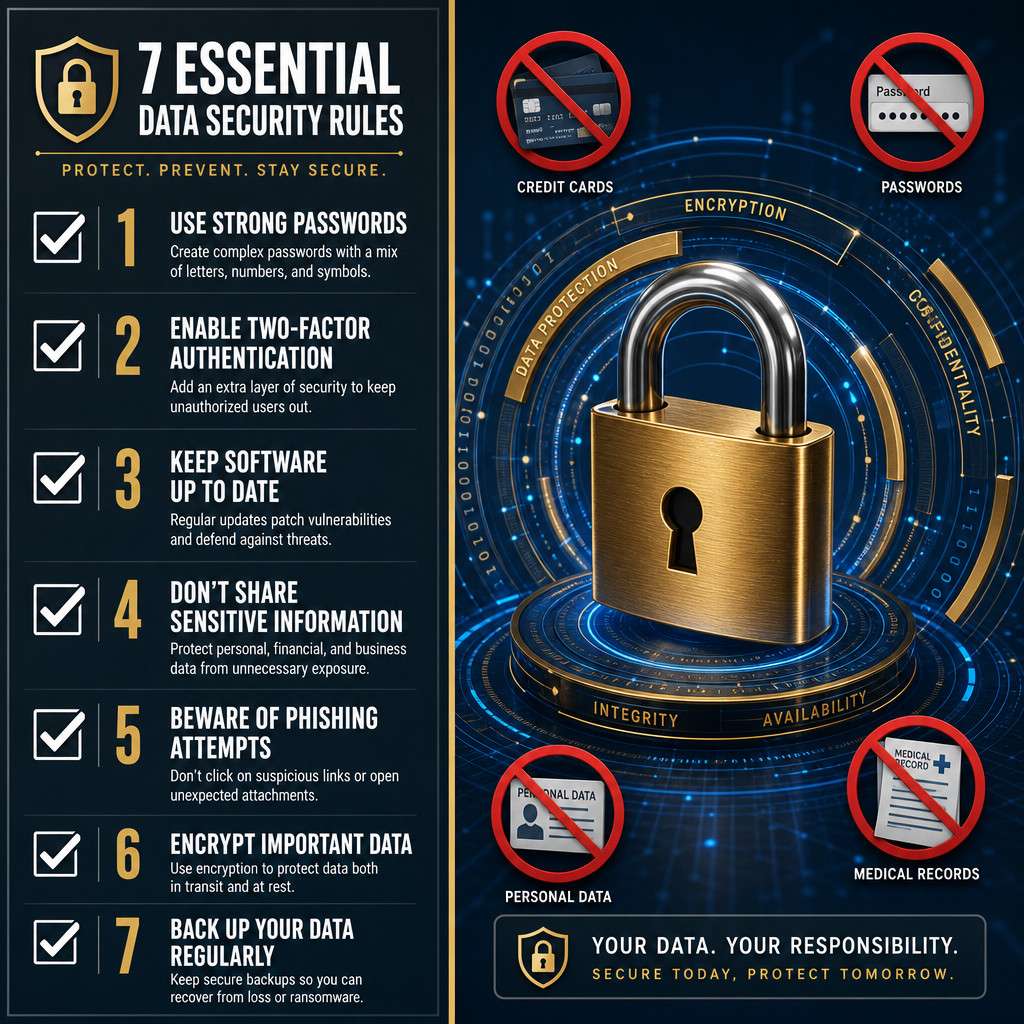
Hard no-share list:
- Login credentials of any kind
- Full financial account numbers
- Personal health information (yours or anyone else’s)
- Client or customer personal data
- Confidential business strategies or unreleased product details
- Legal documents under privilege
- Government-issued ID numbers
A useful mental test: ask yourself whether you’d be comfortable if this information appeared in a public news article. If not, don’t type it into ChatGPT.
For more on how AI platforms handle sensitive user data, the ChatGPT resource hub at WebAiStack covers platform updates and security developments regularly.
What Security Features Does ChatGPT Have That Other AI Tools Don’t?
ChatGPT has several security features that set it apart, including a dedicated safety team, a bug bounty program, and tiered data privacy options for enterprise customers. OpenAI also maintains a usage policy enforcement system that monitors for misuse at scale.
Notable security features:
- Content moderation: Built-in filters block harmful outputs across categories including violence, self-harm, and illegal activity.
- Enterprise data isolation: ChatGPT Enterprise offers data that is not used for training and is processed under stricter controls.
- Bug bounty program: OpenAI runs a public bug bounty program, incentivizing security researchers to find and report vulnerabilities.
- Two-factor authentication: Available for all accounts to prevent unauthorized access.
Compared to some newer AI chat platforms, ChatGPT’s safety infrastructure is more mature, though no system is perfect. If you’re evaluating other AI tools, the AI chat platform tag at WebAiStack provides comparative coverage.
Is It Safe for Kids to Use ChatGPT?
ChatGPT is not designed for children under 13, and OpenAI’s terms of service prohibit users under that age. For teenagers between 13 and 18, parental consent is required in many jurisdictions, and supervision is strongly recommended.
The risks for younger users include:
- Exposure to mature or inaccurate content despite content filters
- Sharing personal information without understanding the privacy implications
- Developing over-reliance on AI for schoolwork, which raises academic integrity concerns
If a teenager uses ChatGPT for educational purposes, the safest approach is to use it in a supervised setting, avoid sharing any personal details, and verify all AI-generated information against trusted sources.
Common Mistakes People Make with AI Chatbot Security
The most common mistake is treating ChatGPT like a private search engine. Users frequently paste in sensitive documents, client emails, or personal health questions without considering where that data goes.
Other frequent errors:
- Using work accounts for personal queries (or vice versa), mixing data contexts
- Not logging out on shared devices, leaving conversation history accessible
- Trusting AI outputs without verification, especially for legal or medical questions
- Ignoring plugin permissions, granting third-party tools broad access without reading their privacy policies
- Reusing prompts across projects that contain identifying information from previous clients
For anyone building AI-powered workflows, understanding AI coding safety practices is equally important, as security gaps often appear at the integration layer rather than the AI itself.
Conclusion
ChatGPT Safety Unveiled: 7 Critical Security Insights Every User Must Know comes down to one core principle: the tool is only as safe as the information you put into it. OpenAI has built meaningful safeguards, but no platform can fully protect data you’ve already shared.
Your action plan:
- Turn off chat history and model training in your account settings today.
- Create a personal “no-share list” of data categories you will never enter into any AI chatbot.
- If you work in a regulated industry, consult your compliance team before using ChatGPT for any work-related task.
- Review any plugins or third-party integrations connected to your ChatGPT account and revoke access to any you don’t actively use.
- Use ChatGPT Enterprise or the API if your organization needs stronger data privacy guarantees.
For a broader view of AI platform security across popular tools, explore the 10 AI websites every tech user should know and stay current with security developments as the AI landscape continues to evolve in 2026.
FAQ
Q: Does ChatGPT sell my data to third parties? OpenAI’s privacy policy states it does not sell personal data to third parties. However, data may be shared with service providers that help operate the platform.
Q: Can I delete my ChatGPT conversation history? Yes. Go to Settings > Data Controls and delete individual conversations or clear all history. Deleted conversations are removed from your account view, though OpenAI may retain them briefly for safety purposes.
Q: Is ChatGPT HIPAA compliant? Standard ChatGPT plans are not HIPAA compliant. OpenAI offers a Business Associate Agreement for certain enterprise arrangements, but you must confirm this directly with OpenAI before using it for any protected health information.
Q: What happens if I accidentally share sensitive information with ChatGPT? Delete the conversation immediately from your history. If the information is highly sensitive (such as financial account numbers), monitor those accounts for unusual activity and consider changing credentials if passwords were involved.
Q: Is ChatGPT safer than Google Bard or other AI chatbots? Each platform has different data policies. ChatGPT’s Enterprise tier offers strong data isolation. The “safest” option depends on your specific compliance requirements and how each platform’s data policy aligns with them.
Q: Can employers see what I type into ChatGPT? Your employer cannot directly access your ChatGPT conversations unless they’ve deployed a company-managed version of the tool. However, if you use a work device or network, IT monitoring tools may capture that activity.
Q: Does using ChatGPT in incognito mode protect my privacy? Incognito mode prevents your browser from saving local history, but it does not prevent OpenAI from receiving and storing your conversation on their servers.
Q: Is the paid ChatGPT Plus plan more private than the free plan? ChatGPT Plus offers the same default data settings as the free plan. The main privacy upgrade comes with ChatGPT Enterprise, which includes stronger data protections and no use of conversations for model training by default.
Useful Resources: ChatGPT by OpenAI & OpenAI research blog