Last updated: June 9, 2026
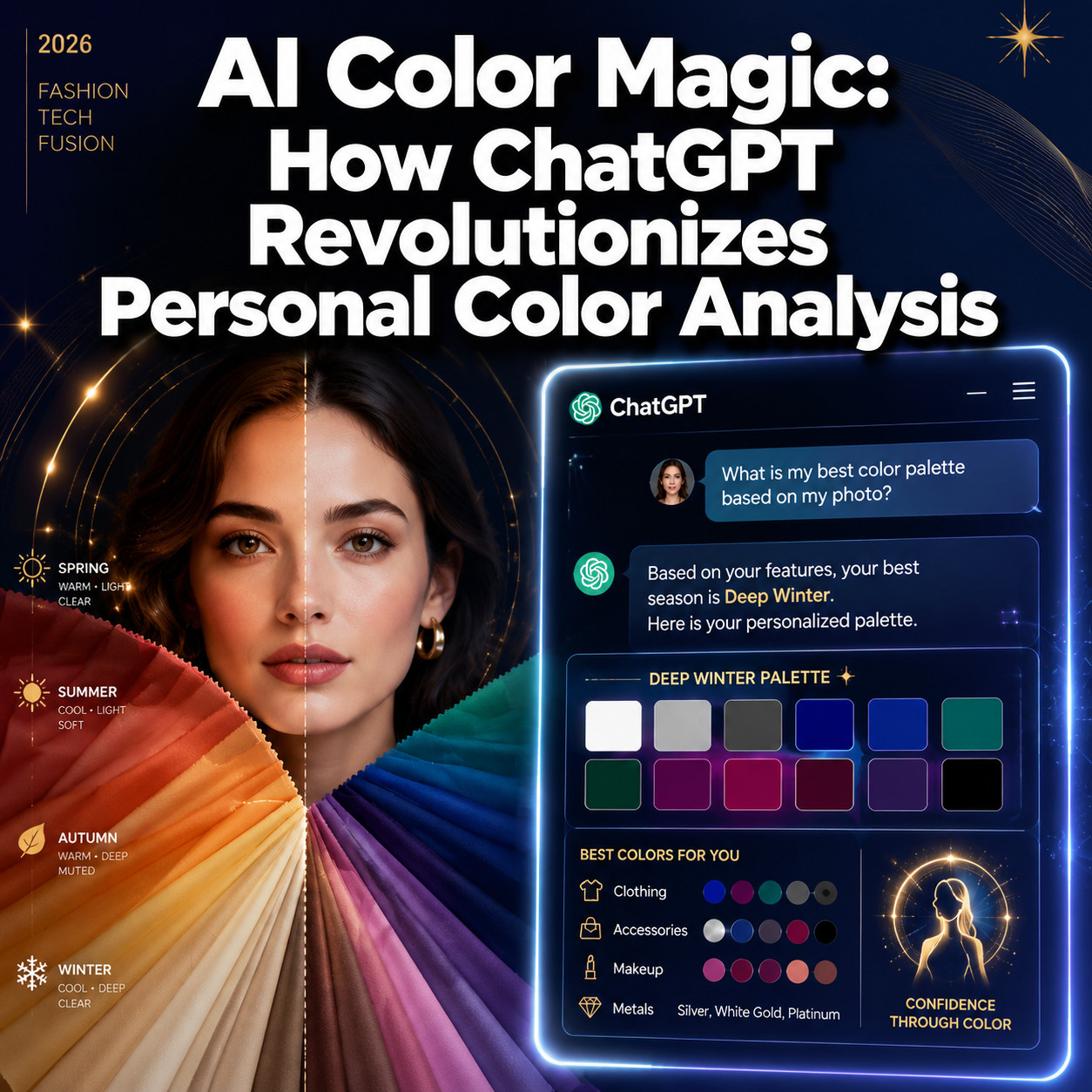
Quick Answer: AI color analysis uses artificial intelligence, including ChatGPT, to assess your skin tone, undertone, and natural coloring from photos or text descriptions, then recommends a personal color season and flattering palette. It costs little to nothing compared to a human consultant, works for most skin tones and ethnicities, and delivers results in minutes rather than weeks. Accuracy depends heavily on photo quality and how well you describe your features.
Key Takeaways
- AI Color Magic: How ChatGPT Revolutionizes Personal Color Analysis is real and accessible in 2026, offering free or low-cost alternatives to $150-$400 professional consultations.
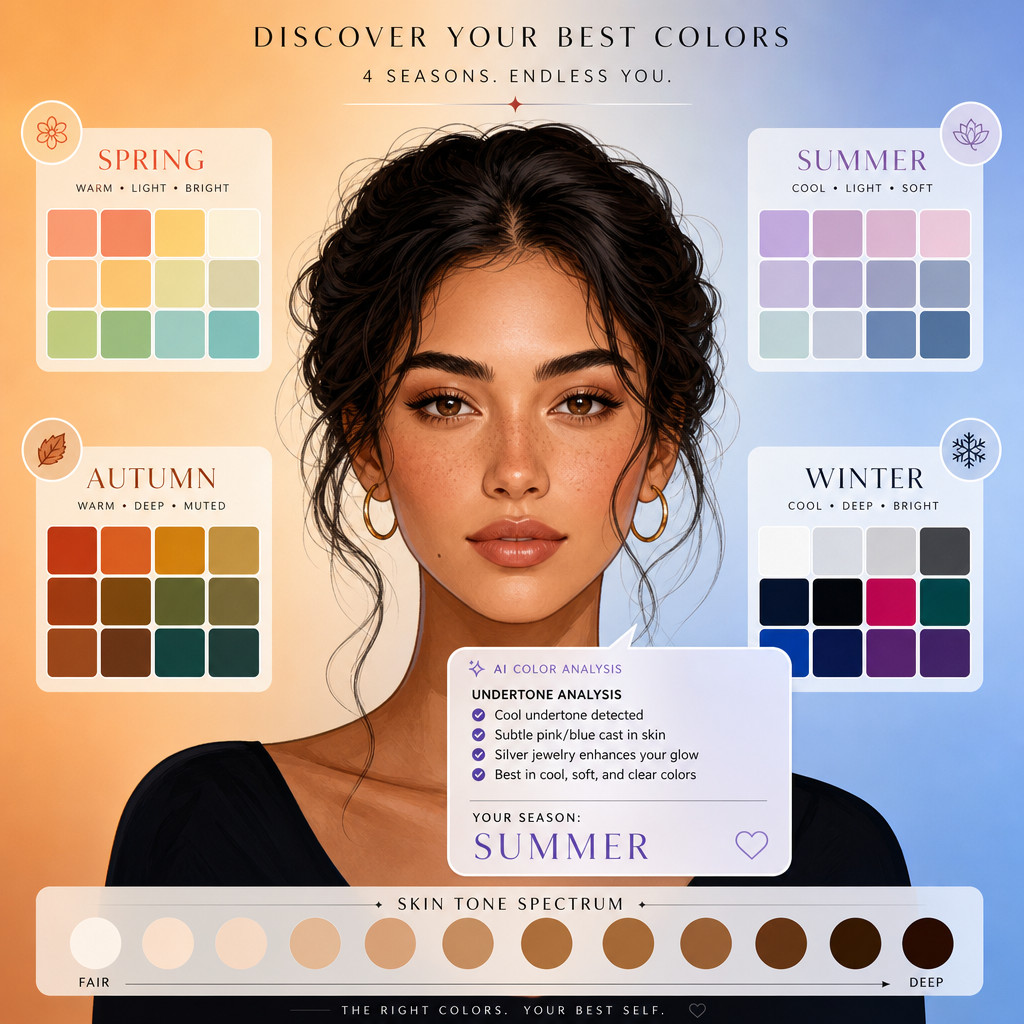
- ChatGPT can identify your color season (Spring, Summer, Autumn, Winter) and suggest flattering clothing, makeup, and accessory colors based on your input.
- Photo quality is the single biggest factor in result accuracy; natural daylight photos without filters produce the best outcomes.
- AI color tools struggle with highly nuanced undertone distinctions, especially for people with medium-to-deep or mixed-heritage skin tones.
- Common mistakes include using filtered selfies, ignoring undertone descriptions, and treating AI output as absolute rather than as a starting point.
- ChatGPT works well for professional wardrobe planning, not just casual fashion.
- Free alternatives include Color.io, Colorwise.me, and image-analysis features in apps like Canva.
- Always cross-reference AI recommendations with physical fabric draping tests for the most accurate results.
What Exactly Is AI Color Analysis and How Does It Work
AI color analysis is the process of using machine learning models to evaluate a person’s natural coloring and recommend a harmonious color palette. ChatGPT and similar tools do this by processing visual data from uploaded photos or by interpreting detailed text descriptions of hair, eye, and skin color.
The underlying method mirrors the traditional 12-season or 4-season color theory developed by color consultants over decades. When you submit a photo to ChatGPT (using the GPT-4o vision model), the AI reads pixel data for hue, saturation, and lightness across your skin, hair, and eyes. It then cross-references those values against known seasonal color profiles to suggest which palette makes you look most vibrant.
How the process works, step by step:
- You upload a clear, unfiltered photo or provide a detailed written description of your coloring.
- The AI identifies dominant undertones (warm, cool, or neutral) and overall contrast level (high, medium, low).
- It maps those characteristics to a color season or sub-season.
- It generates a palette of recommended colors for clothing, makeup, and accessories.
- It explains why certain colors work and which to avoid.
The key constraint: ChatGPT is a language model with vision capabilities, not a calibrated colorimeter. It interprets color contextually rather than measuring it with scientific precision.
Is ChatGPT Better Than Traditional Color Consultants
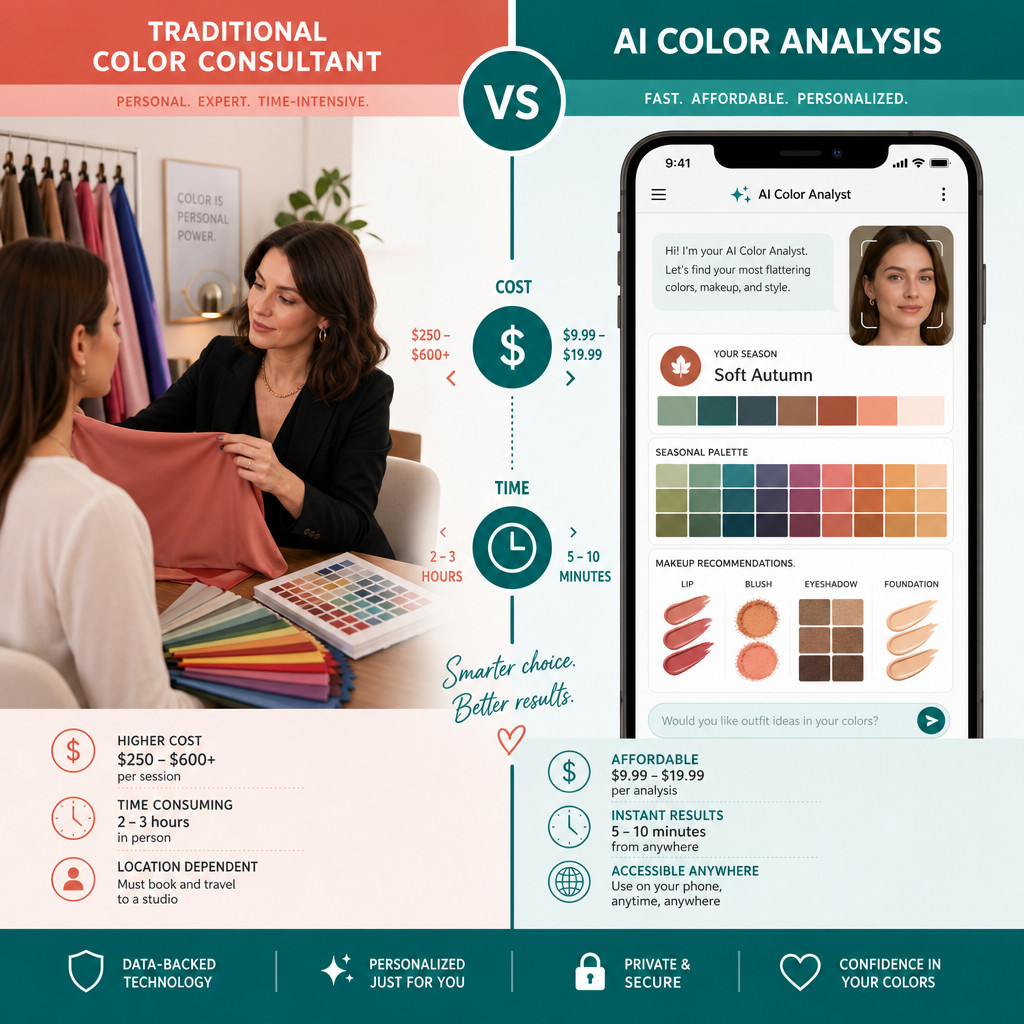
For most people, ChatGPT is a strong starting point but not a full replacement for a trained human consultant. A skilled color consultant uses physical fabric drapes under controlled lighting, which eliminates the variables that trip up AI systems.
That said, ChatGPT has real advantages:
- Speed: Results in minutes, not a scheduled appointment weeks away.
- Cost: Free to minimal cost versus $150-$400 for a professional session.
- Accessibility: Available 24/7 from anywhere.
- Iteration: You can ask follow-up questions, request specific palette adjustments, or explore sub-seasons immediately.
Where human consultants win:
- Physical draping under natural or controlled lighting is more accurate than photo analysis.
- Consultants can observe how your skin reacts in real time to different colors.
- Nuanced sub-season distinctions (Soft Summer vs. True Summer, for example) are harder for AI to nail consistently.
Decision rule: Use ChatGPT if you want a free, fast first assessment or if professional consultants aren’t available in your area. Book a human consultant if you’re making significant wardrobe investments or if AI results feel inconsistent with what you see in the mirror.
How Much Does an AI Color Consultation Cost Compared to a Human Stylist
AI color analysis through ChatGPT costs nothing beyond your existing subscription (ChatGPT Free or Plus, which runs $20/month as of 2026). Dedicated AI color apps range from free to roughly $10-$30 for a one-time detailed report.
Human personal color consultants typically charge:
| Service Type | Estimated Cost (USD) |
|---|---|
| In-person 4-season analysis | $150 – $250 |
| Full 12-season analysis | $250 – $400 |
| Virtual consultation (video) | $75 – $150 |
| AI app one-time report | $0 – $30 |
| ChatGPT (existing subscriber) | $0 additional |
The cost gap is significant. For someone exploring color theory for the first time, starting with AI makes clear financial sense. The tradeoff is precision, not quality of the underlying color theory.
Can ChatGPT Help Me Understand My Undertone and Color Season
Yes, ChatGPT can identify undertones and assign a color season with reasonable accuracy when given good input. Undertone identification (warm, cool, neutral) is the foundation of all color season work, and ChatGPT handles this well when photos are clear or descriptions are specific.
To get the most useful undertone analysis, tell ChatGPT:
- The color of your veins (blue-purple suggests cool, green suggests warm, both suggest neutral).
- Whether you tan or burn in the sun.
- Which metals look better on you: silver or gold.
- Your natural hair color and whether it has warm or cool tones.
- Your eye color and any flecks or rings you notice.
Once undertone is established, ChatGPT maps it to a season. For example, a warm undertone with low contrast and muted coloring typically points to Soft Autumn. A cool undertone with high contrast points toward True Winter.
For deeper exploration of how AI chat platforms handle complex analysis tasks, see the ChatGPT resource archive on WebAI Stack.
Are AI Color Recommendations Accurate for People with Mixed Ethnic Backgrounds
This is one of the most important limitations to understand. AI color analysis is less reliable for people with medium-to-deep skin tones or mixed ethnic backgrounds, primarily because most training data and color theory frameworks were built around lighter European skin tones.
ChatGPT can still provide useful guidance, but you should approach results with more skepticism and test recommendations physically before committing to a wardrobe overhaul.
Practical tips for better results if you have deeper or mixed-heritage skin:
- Describe your undertone in detail rather than relying solely on photo analysis.
- Ask ChatGPT to explain its reasoning so you can evaluate whether it makes sense.
- Focus on undertone (warm vs. cool) rather than season labels, which are less standardized for deeper complexions.
- Use the AI output as a shortlist to test, not a final verdict.
The color analysis field as a whole is evolving to be more inclusive, and AI tools are improving, but the gap remains real in 2026.
Why Do Some of My AI Color Recommendations Look Weird or Off
Off-target recommendations almost always trace back to one of three problems: poor photo quality, inaccurate self-description, or the AI misreading undertone due to lighting conditions in the image.
Most common causes of bad AI color results:
- Filtered or edited photos: Instagram filters shift hue and saturation, which misleads the AI entirely.
- Artificial or mixed lighting: Yellow indoor light makes cool skin look warm; blue-tinted office light does the opposite.
- Heavy makeup in the photo: Foundation and blush mask your natural skin tone.
- Vague descriptions: Saying “medium skin” without undertone details forces the AI to guess.
- Ignoring contrast level: High-contrast coloring (dark hair, light skin) and low-contrast coloring require very different palettes, and AI can miss this if the photo is small or low resolution.
Quick fix: Retake your photo outdoors in open shade (not direct sun), with no makeup, facing toward the light source. This single change resolves most accuracy problems.
How Do I Upload Photos for the Most Accurate AI Color Results
The best photo for AI color analysis is taken in natural daylight, in open shade, with no filters, no heavy makeup, and your natural hair visible. A plain white or light gray background helps the AI isolate your coloring without interference.
Step-by-step photo checklist:
- Go outside on an overcast day or stand near a window with indirect natural light.
- Remove or minimize makeup, especially foundation and blush.
- Wear a white or light gray top to neutralize clothing color interference.
- Use your phone’s standard camera with no beauty filters or auto-enhancements.
- Take the photo straight-on at face level, not from below or above.
- Include your hair in the frame if it’s your natural color.
- Take 2-3 shots and choose the one where your skin tone looks most true-to-life.
Upload this photo directly to ChatGPT (GPT-4o) and ask specifically: “Based on this photo, what is my skin undertone and which color season do you think I am? Please explain your reasoning.”
What Types of Clothing or Skin Tones Work Best with AI Color Analysis
AI color analysis works best for people with lighter skin tones and high contrast between their hair, eyes, and skin, because these features are easier for vision models to distinguish in photos. It also performs well when the person can articulate their undertone clearly in text.
Where AI color analysis performs well:
- Fair to medium skin tones with visible undertone cues.
- High-contrast coloring (dark hair and light eyes, or vice versa).
- People who already have some familiarity with warm vs. cool color theory.
- Wardrobe planning for solid-color garments rather than complex patterns.
Where it performs less reliably:
- Deep skin tones where undertone is subtle.
- People with neutral undertones who sit between warm and cool.
- Analyzing prints, textures, or multi-color garments.
- Recommending specific brand color codes (it can suggest a color category, not a precise Pantone match).
For those interested in how AI handles visual design and color systems more broadly, this guide to creating color styles in Figma offers useful context on how color logic works in digital tools.
Is AI Color Analysis Good for Professional Wardrobes or Just Casual Fashion
AI color analysis is genuinely useful for professional wardrobe planning, not just casual outfits. In fact, professional contexts may benefit more because the stakes are higher and the color palette tends to be more restrained and easier for AI to work with.
For a professional wardrobe, you can ask ChatGPT to:
- Recommend a core palette of 3-5 neutral colors for suits, blazers, and trousers.
- Suggest accent colors that work for your season in interview or presentation settings.
- Identify which neutrals (navy vs. charcoal, cream vs. bright white) are most flattering.
- Advise on whether warm or cool-toned metals work better for jewelry and accessories.
Professional dressing tends to rely on solid colors and classic cuts, which plays to AI’s strengths. The AI won’t tell you which specific brand to buy, but it can tell you what to look for.
For professionals exploring how AI tools can support broader workflow and creative decisions, the best AI graphic design tools for creative workflows article covers complementary tools worth knowing.
Which Free Tools Can Do AI Color Analysis Besides ChatGPT
Several free or freemium tools offer AI color analysis beyond ChatGPT. Each has different strengths.
| Tool | Best For | Cost |
|---|---|---|
| ChatGPT (GPT-4o) | Detailed conversational analysis | Free / $20/month Plus |
| Color.io | Quick season quiz with palette output | Free |
| Colorwise.me | Photo-based undertone detection | Free tier available |
| Canva (Magic Studio) | Visual palette building after analysis | Free tier available |
| Google Gemini | Conversational analysis similar to ChatGPT | Free |
For a comparison of how different AI platforms handle analytical tasks, the NotebookLM vs. Gemini showdown offers useful perspective on AI tool selection.
None of these free tools match the precision of a professional consultation, but they’re more than sufficient for building a working color palette to shop from.
What Limitations Should I Know Before Trusting AI Color Recommendations
AI color analysis has real limitations that matter before you act on the results. The most important: AI cannot see how a color interacts with your skin in real time, which is exactly what makes physical draping so powerful.
Key limitations to keep in mind:
- No real-time feedback: AI gives a static recommendation; it can’t adjust when you hold a fabric swatch to your face.
- Photo dependency: Results are only as good as the photo you provide.
- Undertone ambiguity: Neutral undertones are genuinely hard for AI to distinguish from warm or cool.
- Sub-season precision: Distinguishing between, say, True Spring and Light Spring requires nuance that AI often misses.
- Makeup and accessory specificity: AI can suggest color families but not specific product shades or formulas.
- Cultural and diversity gaps: Training data skews toward lighter skin tones, which affects reliability for deeper complexions.
Treat AI color recommendations as a well-informed hypothesis to test, not a definitive verdict to follow blindly.
How Precise Are AI Color Suggestions for Makeup and Accessories
For makeup and accessories, AI color analysis is useful for identifying the right color family but not precise enough to recommend specific shades. ChatGPT can tell you that a warm Autumn palette calls for terracotta blush and bronze eyeshadow, but it can’t reliably distinguish between two similar terracotta shades from different brands.
What AI does well for makeup:
- Recommending undertone-appropriate foundation categories (yellow-based vs. pink-based).
- Suggesting lip color families (berry, coral, nude-warm, nude-cool).
- Identifying which eyeshadow tones complement your eye color and season.
- Advising on blush tones (peach vs. rose vs. mauve).
What AI does less well:
- Recommending specific product shades by name or number.
- Accounting for how a product’s finish (matte vs. shimmer) affects color perception.
- Advising on contouring shades relative to your specific skin depth.
For accessories, AI handles metal tone recommendations (gold vs. silver vs. rose gold) reliably, and can suggest gemstone color families that complement your palette. Specific jewelry styles are outside its scope.
Common Mistakes People Make When Using AI for Color Analysis
The biggest mistake is uploading a filtered selfie and then dismissing the results as wrong when they’re actually just based on bad data. The second biggest is treating the AI’s first response as final rather than engaging in a back-and-forth conversation.
Mistakes to avoid:
- Using photos with Instagram or Snapchat filters applied.
- Wearing a brightly colored top that bleeds color onto your skin in the photo.
- Asking for color recommendations without first establishing your undertone.
- Accepting a season label without asking ChatGPT to explain its reasoning.
- Ignoring the “colors to avoid” list, which is often as useful as the recommended palette.
- Applying makeup color recommendations to your entire wardrobe without testing first.
Edge case: If you color your hair, always mention your natural hair color separately. AI may read your dyed hair color as part of your natural palette, which throws off the season assessment.
For those who want to get more from AI tools generally, mastering ChatGPT automation covers how to structure prompts for better, more consistent outputs.
FAQ
Can ChatGPT determine my color season from a photo alone? Yes, GPT-4o can analyze a photo and suggest a color season, but accuracy improves significantly when you also provide written context about your undertone, eye color, and natural hair color.
Do I need a paid ChatGPT subscription for color analysis? The free version of ChatGPT has limited photo upload capability. ChatGPT Plus ($20/month) gives full access to GPT-4o vision, which is needed for reliable photo-based color analysis.
How long does an AI color analysis session take? A basic session takes 5-10 minutes. A thorough analysis with follow-up questions about makeup, wardrobe, and accessories typically takes 20-30 minutes.
Is AI color analysis accurate for men? Yes. Color season theory applies equally to men and women. ChatGPT can recommend flattering shirt, suit, and tie colors based on the same undertone and contrast analysis.
Can I use AI color analysis if I have gray hair? Yes, but mention your natural hair color before it went gray, as gray hair changes your contrast level and can shift your apparent season. ChatGPT can account for this if you explain it.
What should I do if the AI gives me two different seasons in the same session? Ask it to compare the two options directly and explain what distinguishes them. Then describe which palette resonates more when you hold those colors near your face physically.
Does AI color analysis work for children? It can, though children’s coloring changes as they age. Use it as a general guide rather than a definitive palette, and revisit the analysis every few years.
Can AI recommend colors for specific occasions like weddings or job interviews? Yes. You can ask ChatGPT to filter your seasonal palette for specific contexts, such as “which colors from my Soft Summer palette work best for a formal interview?”
Is there a risk of AI reinforcing biased beauty standards through color analysis? This is a legitimate concern. AI color tools trained on limited datasets may implicitly favor certain aesthetics. Use AI as one input among several, and trust your own perception of what looks good on you.
How often should I redo my AI color analysis? Redo it if your hair color changes significantly, if you notice your skin tone shifting with age, or if current recommendations consistently feel off when you try them in real life.
Conclusion
AI Color Magic: How ChatGPT Revolutionizes Personal Color Analysis represents a genuine shift in how people access style guidance. What once required a $300 appointment and a specialist’s calendar is now available in a 10-minute chat session at no additional cost.
The technology works best as a starting point: use it to identify your undertone, get a season hypothesis, and build a working palette to test. Then validate those recommendations physically by holding fabric swatches or trying on garments in the recommended colors.
Actionable next steps:
- Take a clean, filter-free photo in natural daylight and upload it to ChatGPT with a detailed description of your undertone cues.
- Ask specifically for your color season, the reasoning behind it, and a palette of 8-10 recommended colors.
- Request a separate list of colors to avoid and why.
- Test 3-5 of the recommended colors physically before buying anything new.
- If results feel off, revisit the photo quality and description before dismissing the tool.
For those who want to explore more of what AI can do across creative and professional tasks, the AI category on WebAI Stack is a solid next resource.
The gap between AI and human consultants is real but narrowing. For most people in 2026, starting with AI color analysis is the smartest, most accessible first step toward a wardrobe that actually works for them.
Useful Resources: ChatGPT by OpenAI & OpenAI research blog