
Last updated: June 14, 2026. This article covers laude Desktop App The Ultimate Guide to AI Productivity to help you get the most out of your workflow.
Quick Answer: The Claude Desktop App is a native application from Anthropic available for Mac and Windows that brings Claude’s AI capabilities directly to your computer, without needing a browser tab. It’s free to download, with a free usage tier and paid plans starting at $20/month. As of 2026, it supports deep integrations with workplace tools, file editing, and automated routines that the web version does not offer.
Key Takeaways
- The Claude Desktop App is available for both Mac and Windows, including Windows on Arm devices
- A free tier exists; paid plans (Pro and Team) unlock higher usage limits and advanced features
- The desktop version offers features the web app does not, including file access via Cowork, an integrated terminal, and automated Routines
- Claude integrates with Slack, Canva, Figma, Box, and other workplace tools as of January 2026
- It is not a replacement for Microsoft Office, but it works well alongside those tools
- Security is solid for most professional use, though you should avoid pasting highly sensitive credentials or regulated data
- Common install issues are usually resolved by checking OS version compatibility or restarting the app
- Students and professionals both benefit, though heavy spreadsheet or design work still requires dedicated software
Is There a Free Desktop Version of Claude?
Yes, there is a free version of the Claude Desktop App. You can download it at no cost and use Claude within the app under Anthropic’s free usage limits. The free tier gives you access to Claude’s core conversational and writing abilities, though you’ll hit rate limits faster than on a paid plan.
If you need heavier daily use, the Claude Pro plan runs $20/month and the Team plan is priced for organizations. Both unlock higher message limits and priority access during peak hours.
Choose the free tier if you’re testing Claude for the first time or use it occasionally. Upgrade to Pro if you’re using it daily for writing, coding, or research tasks.
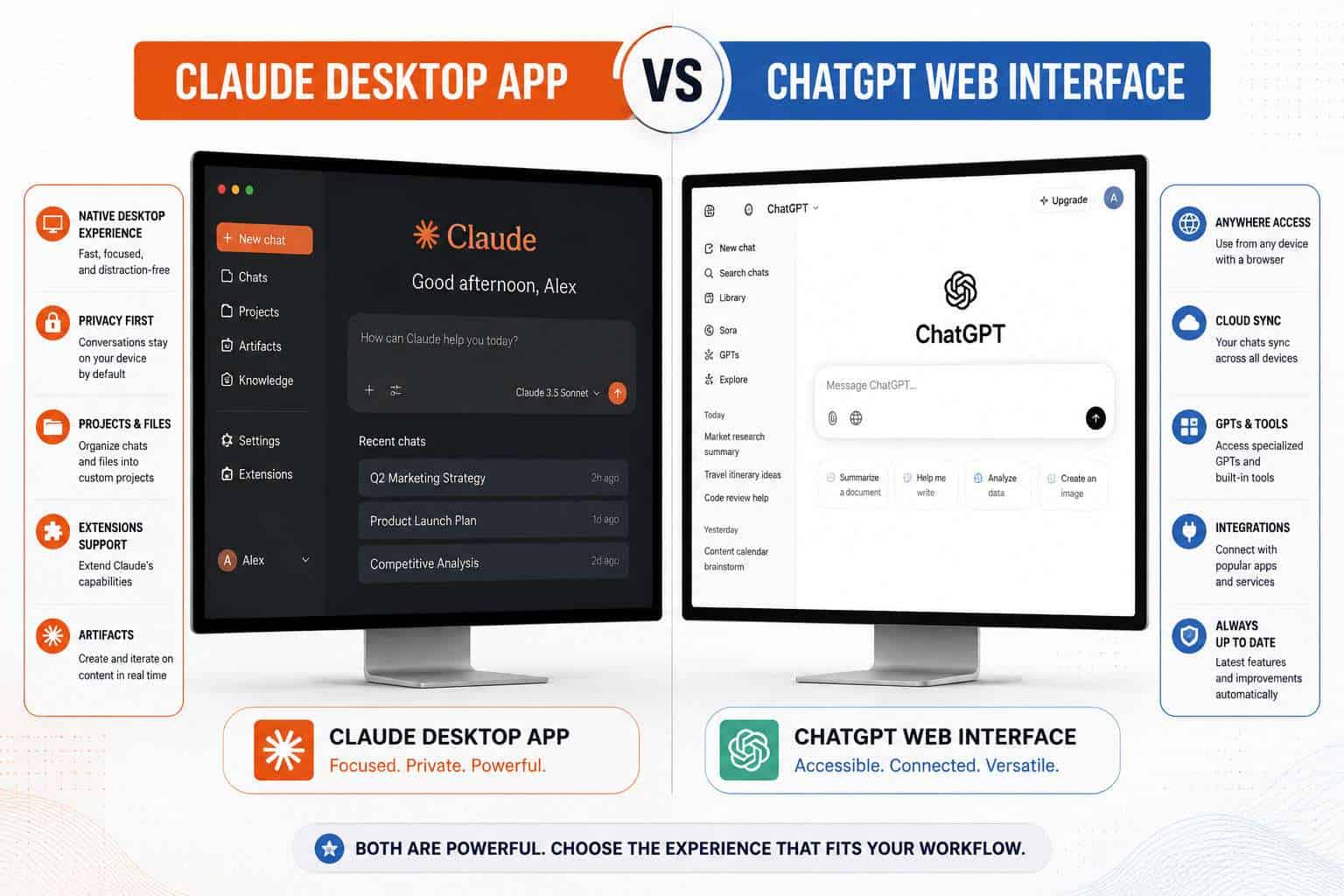
How Does the Claude Desktop App Compare to ChatGPT?
Claude and ChatGPT are the two most widely used AI assistants available as desktop apps in 2026. The honest answer is that they’re close in many areas, but they differ in meaningful ways depending on what you need.
| Feature | Claude Desktop App | ChatGPT Desktop App |
|---|---|---|
| Free tier | Yes | Yes |
| Native file access | Yes (via Cowork) | Limited |
| Integrated terminal | Yes (Claude Code) | No |
| Workplace integrations | Slack, Figma, Canva, Box | Plugins/GPTs |
| Automated routines | Yes (Routines feature) | No native equivalent |
| Windows on Arm support | Yes [5] | Yes |
| Long-context handling | Strong (200K tokens) | Strong (128K tokens) |
Claude tends to perform better on long documents and nuanced writing tasks. ChatGPT has a larger plugin ecosystem. If your work involves code, file editing, and workflow automation, Claude’s desktop app has a clear edge in 2026 due to features like the rebuilt Claude Code environment and Routines [1].
For a broader look at AI tools worth knowing, see this comprehensive guide to AI-powered content generation tools.
What Computers Can Run the Claude Desktop App?
The Claude Desktop App runs on Mac (macOS) and Windows. Anthropic also added Windows on Arm support, which means it works on newer Arm-based Windows devices without needing emulation [5].
Minimum requirements (general guidance):
- macOS: Monterey (12) or later recommended
- Windows: Windows 10 or Windows 11 (including Arm builds)
- RAM: 4GB minimum; 8GB or more for smooth performance with multiple sessions
- Internet connection required for all AI features
If you’re on Linux, the desktop app is not officially supported as of mid-2026. Your best option on Linux is the Claude web interface.
How Much Does the Claude Desktop App Cost?
The app itself is free to download. What you pay for is the usage plan tied to your Anthropic account.
- Free plan: Limited daily messages, access to Claude’s standard models
- Claude Pro: $20/month, higher limits, priority access, access to newer models
- Claude Team: $25–$30 per user/month (billed annually), adds admin controls and collaboration features
- Claude API: Usage-based pricing for developers building on top of Claude
There are no hidden fees for the desktop app download itself. The cost structure is the same whether you access Claude through the browser or the desktop app.
Can the Claude Desktop App Help Me With Work Tasks?
Absolutely, and this is where Claude’s desktop app stands out most clearly. In January 2026, Anthropic expanded Claude’s workplace integrations to include Slack, Canva, Figma, Box, and Clay [2]. This means you can send Slack messages, generate design assets, or pull files from cloud storage without leaving the Claude interface.
The Cowork tool, introduced in early 2026, lets you point Claude at specific folders on your computer. Claude can then read and edit files in those folders based on your instructions in the chat [3]. In March 2026, Claude also gained the ability to operate desktop applications directly, including opening apps, navigating browsers, and filling in spreadsheets, without needing your passwords [4].
Practical work tasks Claude handles well:
- Drafting and editing long documents or reports
- Summarizing meeting notes or research papers
- Writing and debugging code
- Generating first drafts of emails or proposals
- Analyzing data pasted into the chat
- Automating repetitive file-based tasks via Cowork
If you’re already using automation tools in your workflow, pairing Claude with platforms like n8n can extend its reach significantly. See this guide to n8n workflow automation strategies for ideas on combining AI with automation.
Is the Claude Desktop App Good for Students?
Claude is genuinely useful for students, particularly for research, writing assistance, and understanding complex topics. The long-context window means you can paste an entire academic paper and ask Claude to summarize or critique it.
Where it helps most:
- Explaining difficult concepts in plain language
- Proofreading and improving essay drafts
- Generating study outlines or flashcard content
- Helping with coding assignments (Python, JavaScript, etc.)
- Brainstorming thesis arguments or research angles
Where it falls short for students:
- It cannot access the internet in real time (unless using a connected tool)
- It may occasionally produce confident-sounding but incorrect factual claims, so always verify sources
- It’s not a substitute for original thinking or academic integrity
The free tier is usually sufficient for student use. If you’re doing intensive research or coding projects daily, Pro is worth considering.
What Features Are Different Between Web and Desktop Claude?
The web version of Claude and the desktop app share the same underlying AI model, but the desktop app has several features that the browser version does not.
Desktop-only or desktop-first features (as of 2026):
- Cowork: Grants Claude direct access to local folders for reading and editing files [3]
- Claude Code environment: A rebuilt sidebar for managing multiple coding sessions, with an integrated terminal, in-app file editor, and diff viewer for large code changes [1]
- Routines: Automated tasks that run without an active session, triggered by schedules, API calls, or GitHub events like new pull requests [1]
- Expanded preview pane: Supports HTML files and PDFs directly within the app [1]
- Drag-and-drop workspace layout: Customize your desktop layout in ways the browser doesn’t allow [1]
The web app is fine for casual use. If you’re doing serious work, development, or automation, the desktop app is the better choice.
Can the Claude Desktop App Replace Microsoft Office?
No, and it’s not designed to. Claude cannot replace Word, Excel, or PowerPoint as standalone applications. It has no native spreadsheet grid, no slide builder, and no document formatting tools comparable to Office.
What it can do is work alongside Office tools effectively. Claude can draft content you then paste into Word, write formulas you use in Excel, or outline presentations you build in PowerPoint. With the Cowork feature, it can even read and edit Office-compatible files saved in designated folders [3].
Think of Claude as a capable writing and thinking partner, not a document editor. If you’re looking for AI that integrates directly into Office, Microsoft’s Copilot is the more natural fit for that specific use case.
Is the Claude Desktop App Secure for Confidential Work?
For most professional tasks, the Claude Desktop App is reasonably secure. Anthropic applies standard encryption for data in transit, and the Cowork feature only accesses folders you explicitly designate [3].
However, a March 2026 study evaluating AI-assisted development tools, including Claude Desktop, found that some AI clients can be vulnerable to prompt injection attacks, where malicious content in files or inputs tries to redirect the AI’s behavior [6]. Anthropic has implemented guardrails, but no system is entirely immune.
Practical security guidelines:
- Do not paste API keys, passwords, or regulated personal data (such as HIPAA-covered health records) into Claude
- Only grant Cowork access to folders that don’t contain sensitive credentials
- For highly confidential legal or financial documents, check whether your organization’s data policies permit use of cloud-based AI tools
- Use the Team plan if your organization needs admin controls and usage visibility
For teams using Claude alongside other automation tools, security practices for those integrations matter too. See this comprehensive guide to Make.com security and data protection for relevant context.
Which Claude Desktop App Version Should I Download?
Download the version that matches your operating system from Anthropic’s official website (claude.ai). There is one app for Mac and one for Windows. Anthropic does not offer multiple “editions” of the desktop app, so version selection is straightforward.
- Mac users: Download the macOS build from claude.ai
- Windows users (standard): Download the Windows installer
- Windows on Arm users: The app natively supports Arm architecture, so the standard Windows download works [5]
Always download from claude.ai directly. Third-party sites offering “Claude Desktop” downloads are not official sources and carry risk.
Common Problems Installing the Claude Desktop App and How to Troubleshoot Them
Most installation issues fall into a small set of categories. Here’s what to check if the app won’t install or launch.
App won’t install:
- Confirm your OS version meets the minimum requirement (macOS 12+ or Windows 10/11)
- On Mac, check that your security settings allow apps from identified developers (System Settings > Privacy & Security)
- On Windows, run the installer as administrator
App installs but won’t launch:
- Restart your computer and try again
- Check for conflicting security software blocking the app
- Uninstall, redownload from claude.ai, and reinstall
App launches but won’t connect:
- Verify your internet connection
- Check Anthropic’s status page for outages
- Log out and log back into your Anthropic account
Cowork or file access not working:
- Recheck that you’ve explicitly granted folder access within the app’s settings
- Ensure the folder path has no special characters that might cause parsing issues
If you’re also running into issues with other AI or automation tools, this guide on troubleshooting Make.com connectivity issues covers similar diagnostic steps.
Claude Desktop App Limitations You Should Know About
No tool is perfect, and Claude’s desktop app has real limitations worth knowing before you rely on it heavily.
- No real-time internet access by default: Claude works from its training data unless connected to a tool that provides live search
- Rate limits on free and Pro plans: Heavy users will hit daily message caps
- No offline mode: The app requires an active internet connection at all times
- Linux not supported: Official support is Mac and Windows only
- Prompt injection risk: As noted in the March 2026 security research, files Claude reads could theoretically contain adversarial instructions [6]
- Not a database or file manager: Claude can read and edit files via Cowork, but it’s not a replacement for dedicated file management software
- Hallucination risk remains: Like all large language models, Claude can state incorrect information confidently. Always verify factual claims from external sources
For more context on how AI tools like Claude fit into broader productivity stacks, the 45 must-visit AI websites guide is a useful reference.

FAQ
Can I use the Claude Desktop App without an Anthropic account? No. You need a free Anthropic account to use the app. Sign up at claude.ai before downloading.
Does the Claude Desktop App work on iPad or mobile? The desktop app is for Mac and Windows only. For mobile, use the Claude iOS or Android app, or the mobile browser version.
Is Claude Desktop the same as Claude Code? Claude Code is a feature within the desktop app focused on software development. The desktop app is the broader application that includes Claude Code as one of its environments.
Can I run multiple Claude sessions at the same time? Yes. The April 2026 update introduced a sidebar for managing multiple sessions simultaneously, with filtering by status, project, or environment [1].
Does Claude Desktop App save my conversation history? Yes, conversation history is saved to your account and syncs across devices when you’re logged in.
Can I use Claude Desktop App for coding in Python or JavaScript? Yes. Claude handles Python, JavaScript, TypeScript, and most major languages well. The integrated terminal in Claude Code lets you run tests and builds without leaving the app [1].
What happens to my data when I use Cowork? Cowork only accesses folders you explicitly designate. Anthropic’s standard data handling policies apply. Review Anthropic’s privacy policy for specifics on how file content is processed.
Is there a Claude Desktop App for Chromebook? Not officially. Chromebooks can access Claude through the web browser at claude.ai.
Can Claude Desktop App automate tasks while I’m away from my computer? Yes, through the Routines feature. Routines can run scheduled tasks or respond to triggers like GitHub pull requests without an active session [1].
Does the Claude Desktop App support voice input? Voice input depends on your operating system’s dictation features. Claude itself does not have a native voice mode in the desktop app as of mid-2026.
Conclusion
The Claude Desktop App has grown from a simple browser alternative into a genuinely capable productivity environment in 2026. The combination of Cowork for file access, Claude Code for development, Routines for automation, and integrations with tools like Slack and Figma makes it one of the more complete AI desktop experiences available today.
Actionable next steps:
- Download the app from claude.ai and start with the free tier to test it against your actual workflow
- Set up Cowork by designating a specific project folder, then ask Claude to summarize or edit files in it
- If you code, open Claude Code and try managing a small project through the integrated terminal
- Explore Routines if you have repetitive tasks that could run on a schedule
- Check your organization’s data policy before using Claude with confidential documents
For those building broader AI-powered workflows, pairing Claude with automation platforms can multiply its value. Our guide to AI-powered content optimization and the Claude category archive are good starting points for going deeper.
References
[1] Anthropic Rebuilds Claude Code Desktop App – https://www.macrumors.com/2026/04/15/anthropic-rebuilds-claude-code-desktop-app/?utm_source=openai
[2] Anthropic Launches Interactive Claude Apps Including Slack And Other Workplace Tools – https://techcrunch.com/2026/01/26/anthropic-launches-interactive-claude-apps-including-slack-and-other-workplace-tools/?utm_source=openai
[3] Anthropic’s New Cowork Tool Offers Claude Code Without The Code – https://techcrunch.com/2026/01/12/anthropics-new-cowork-tool-offers-claude-code-without-the-code/?utm_source=openai
[4] Anthropic Claude Cowork Computer Use MacOS – https://news.800.works/news/2026-03-24/anthropic-claude-cowork-computer-use-macos/?utm_source=openai
[5] Anthropic Unveils Claude AI Desktop App With Windows On Arm Support – https://www.windowscentral.com/software-apps/anthropic-unveils-claude-ai-desktop-app-with-windows-on-arm-support-as-concerned-users-pressure-on-microsoft-over-a-botched-copilot-update?utm_source=openai
[6] Security Evaluation of AI-Assisted Development Tools (arxiv) – https://arxiv.org/abs/2603.21642?utm_source=openai