
Last updated: June 14, 2026
Quick Answer: The Claude Console is Anthropic’s web-based platform for interacting with Claude AI models, offering tools for prompt creation, API access, usage analytics, and integrations with third-party apps. As of 2026, Claude has reached 11 million daily users [9], making it one of the most widely adopted AI assistants available. Getting started requires a free account at claude.ai, and advanced API features are accessible through the Anthropic Console at console.anthropic.com.
Key Takeaways
- The Claude Console offers three main interfaces: browser chat, a desktop app, and a terminal for developers [6]
- In March 2026, Claude added interactive connectors for tools like Figma, Slack, Canva, and Asana [1]
- Anthropic upgraded the Console’s prompt generator in July 2024 using the Claude 3.5 Sonnet model [2]
- Claude supports multiple languages, not just English, making it useful for global teams
- Common beginner mistakes include vague prompts, ignoring context windows, and not using system prompts
- Claude is well-suited for coding, research, writing, and analysis but has clear limitations around real-time data
- Privacy considerations matter: avoid sharing sensitive personal or financial data in prompts
- Paid plans (Pro, Max, Team, Enterprise) unlock higher usage limits and priority access
What Exactly Is the Claude Console and How Do I Get Started
The Claude Console is Anthropic’s primary interface for interacting with Claude AI models, available both as a consumer chat product and as a developer-facing API management platform. For most users, “the Console” refers to claude.ai, the browser-based chat interface. For developers and businesses, it also refers to console.anthropic.com, where you manage API keys, monitor usage, and configure advanced settings.
To get started:
- Visit claude.ai and create a free account using an email address or Google login
- Choose your plan (Free, Pro, or higher tiers for teams)
- Start a new conversation by typing a prompt in the chat box
- For API access, go to console.anthropic.com, generate an API key, and follow the quickstart documentation [8]
Claude provides three primary interfaces to match different user needs [6]:
- Browser chat at claude.ai for general, everyday use
- Desktop application for enhanced features and offline convenience
- Terminal interface for developers building applications or running scripts
A detailed beginner’s guide published in May 2026 walks through account setup, prompt creation, and key settings in step-by-step fashion [3]. If you’re new to AI tools, the browser chat is the best starting point.
How Does Claude Compare to ChatGPT and Other AI Assistants
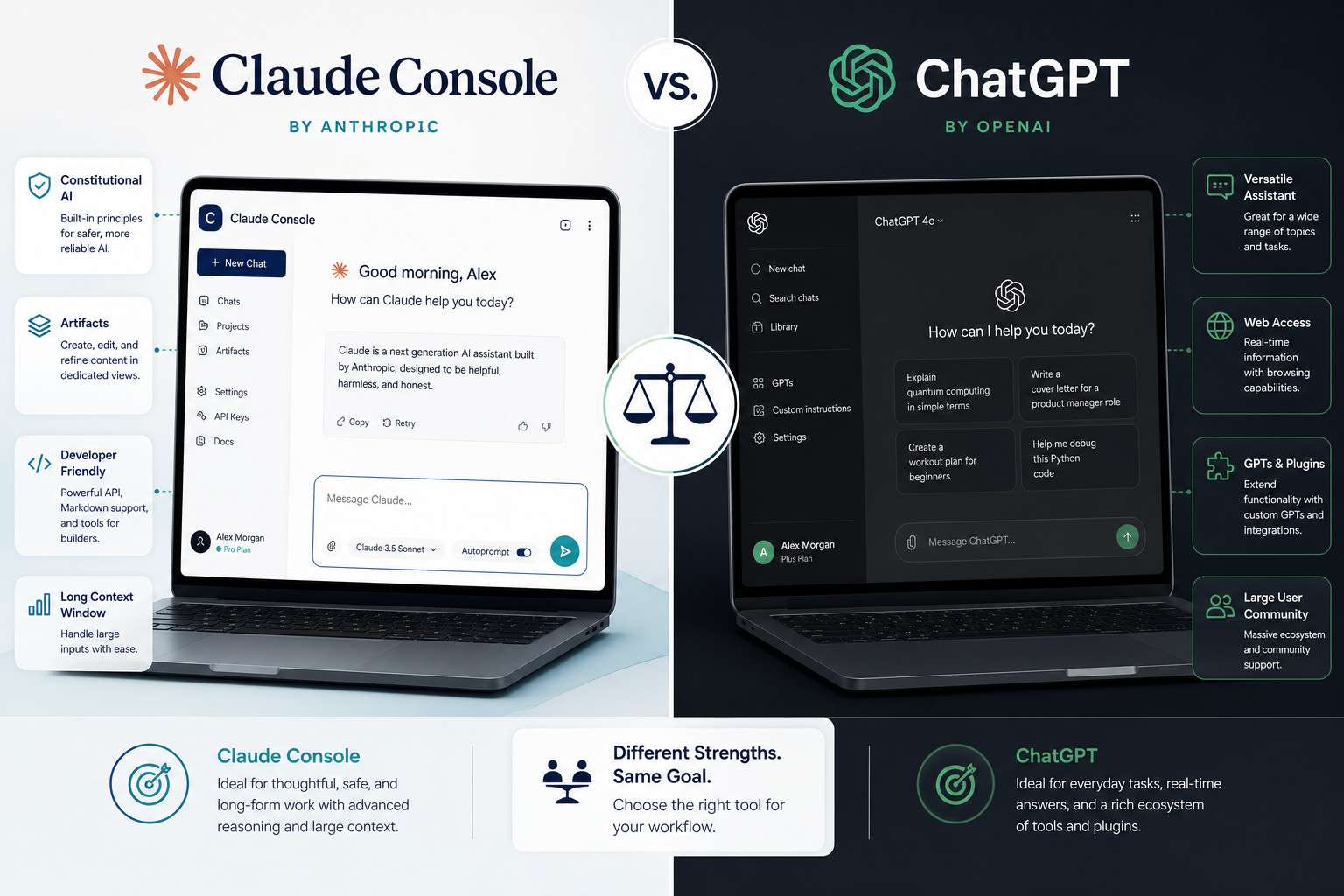
Claude and ChatGPT are both large language model (LLM) assistants, but they differ in tone, safety approach, and context handling. Claude is generally considered stronger for long-document analysis and nuanced writing, while ChatGPT (particularly GPT-4o) has a broader plugin ecosystem.
| Feature | Claude | ChatGPT |
|---|---|---|
| Context window | Up to 200K tokens (Claude 3) | Up to 128K tokens (GPT-4o) |
| Tone | More conversational, careful | More direct, occasionally terse |
| Code generation | Strong, especially with Claude Code [8] | Strong, with broad plugin support |
| Real-time web search | Limited (as of 2026) | Available via browsing tools |
| Interactive connectors | Figma, Slack, Canva, Asana, and more [1] | Plugins and GPT store |
| Daily active users | 11 million as of March 2026 [9] | Estimated higher, but Claude closing gap |
Choose Claude if you need deep document analysis, nuanced creative writing, or long-context tasks. Choose ChatGPT if you rely heavily on real-time web browsing or need specific third-party plugins not yet available in Claude.
For a broader look at how AI tools compare, see our comprehensive guide to AI-powered content generation tools.
How Much Does It Cost to Use Claude’s Advanced Features
Claude offers a tiered pricing structure. The free plan gives you access to the base Claude model with daily usage limits. Paid plans unlock faster responses, higher limits, and access to more powerful model versions.
Pricing tiers (as of 2026, approximate):
- Free: Limited daily messages, access to Claude 3 Haiku
- Pro ($20/month): Higher usage limits, priority access, Claude 3.5 Sonnet and Opus
- Max ($100+/month): Significantly higher limits for power users
- Team and Enterprise: Custom pricing, admin controls, SSO, and compliance features
For developers using the API, pricing is per token (input and output), billed through console.anthropic.com. The AWS integration also uses the standard Claude Console and adds features like cost breakdowns, rate limit visibility, and batch job management [4].
Common mistake: Many users sign up for the free tier, hit limits quickly, and assume Claude “doesn’t work well.” Upgrading to Pro resolves most performance complaints related to response speed and availability.
What Are Common Mistakes People Make When First Using Claude
Most beginner frustrations with Claude come from vague prompts, not from the model itself. Claude responds to what you give it, so the quality of your input directly shapes the quality of the output.
Top beginner mistakes:
- Being too vague: “Write me something about marketing” produces generic output. “Write a 300-word LinkedIn post for a B2B SaaS company targeting HR directors, focusing on onboarding automation” produces something usable.
- Ignoring system prompts: In the API console, system prompts let you set Claude’s role and behavior. Skipping this leads to inconsistent responses.
- Not iterating: Treating the first response as final. Claude works best in a back-and-forth conversation where you refine and redirect.
- Overloading a single prompt: Asking Claude to do ten things at once usually produces mediocre results on all ten. Break complex tasks into steps.
- Forgetting context limits: Even with a 200K token window, very long conversations can cause earlier context to lose weight. Summarize and restart for long projects.
Can Claude Help Me With Coding and Technical Tasks
Yes, Claude is one of the stronger AI assistants for coding tasks, particularly for explaining code, debugging, and writing structured scripts. Claude Code, Anthropic’s dedicated coding tool, integrates directly with your Claude account and supports Pro, Max, Team, Enterprise, and Console account types [8].
What Claude handles well in coding:
- Debugging Python, JavaScript, TypeScript, and other major languages
- Explaining complex code in plain language
- Writing boilerplate and repetitive code blocks
- Reviewing pull request logic (when you paste the diff)
- Helping with SQL queries and data transformation
For developers who also work with automation platforms, pairing Claude with tools like n8n or Make.com can extend its capabilities significantly. Our guide on mastering ChatGPT automation with no-code workflow integration covers similar patterns that apply to Claude API integrations.
Edge case: Claude does not execute code in real time unless you’re using a connected environment. It generates code, but you run it. For live execution environments, look at platforms like Replit alongside Claude. See our guide to Replit for developers for context.
Is Claude Good for Students and Researchers
Claude is well-suited for academic and research tasks, particularly for summarizing long papers, generating outlines, and explaining complex concepts. Its large context window means you can paste an entire research paper and ask Claude to identify key arguments, gaps, or counterpoints.
Practical uses for students:
- Summarizing dense academic texts into plain language
- Generating essay outlines from a thesis statement
- Explaining statistical concepts or research methodologies
- Proofreading and improving clarity in written work
- Brainstorming research questions
Important caveat: Claude should not be used to write academic work that you submit as your own, both for ethical reasons and because many institutions now use AI detection tools. Use it as a thinking partner, not a ghostwriter.
What Kinds of Tasks Is Claude Not Recommended For
Claude has real limitations that matter depending on your use case. Knowing them upfront saves frustration.
Tasks where Claude underperforms:
- Real-time information: Claude’s training has a knowledge cutoff, and it does not browse the web by default. Don’t rely on it for current stock prices, breaking news, or live sports scores.
- Highly regulated professional advice: Claude is not a licensed doctor, lawyer, or financial advisor. It can explain concepts, but it should not replace professional consultation.
- Image generation: Claude can analyze images (with multimodal models) but does not generate them. For that, use tools like Midjourney or DALL-E.
- Long autonomous tasks without oversight: Claude works best with human checkpoints. Fully autonomous multi-step tasks without review can produce compounding errors.
- Precise mathematical computation: Claude can reason through math problems, but for complex calculations, a dedicated tool or code interpreter is more reliable.
How Do I Troubleshoot If Claude Isn’t Understanding My Prompts
When Claude produces off-target responses, the fix is almost always in how the prompt is structured, not a technical error. Start by diagnosing whether the issue is clarity, context, or format.
Troubleshooting steps:
- Restate your goal explicitly: Begin with “Your task is to…” or “I need you to…”
- Add an example: Show Claude what a good output looks like. Few-shot prompting (giving one or two examples) dramatically improves accuracy.
- Specify format: Tell Claude if you want bullet points, a table, a numbered list, or prose.
- Break it into steps: Ask Claude to “first outline, then draft” rather than doing everything at once.
- Use the prompt generator: In the Anthropic Console, the built-in prompt generator (powered by Claude 3.5 Sonnet) can transform a rough task description into a well-structured prompt [2].
If Claude repeatedly misunderstands a specific type of request, check the support resources. Claude offers a support messenger integrated with Fin, an AI support bot, and human specialists are available depending on your plan [5].
Are There Any Privacy Concerns When Using Claude
Privacy is a legitimate concern with any AI platform. Anthropic’s data handling policies state that conversations may be used to improve models unless you opt out or use an Enterprise plan with stricter data controls.
Key privacy guidelines:
- Do not share full Social Security numbers, passwords, or financial account details in prompts
- Enterprise and Team plans offer stronger data privacy agreements and the ability to opt out of data training
- API usage through console.anthropic.com has different (generally stronger) privacy terms than the consumer chat product
- If you work in healthcare, legal, or finance, review Anthropic’s Business Associate Agreement (BAA) availability before using Claude for sensitive work
For a related perspective on platform security practices, our article on Make.com security and data protection covers similar considerations for AI-connected workflow tools.
What Are the Best Practices for Getting Accurate Responses
Mastering the Claude Console as a comprehensive guide to AI interaction starts with understanding that accuracy is a product of prompt design. Claude is not a search engine. It reasons through language, so the structure of your question shapes the structure of its answer.
Best practices:
- Set the role: “You are a senior marketing strategist…” gives Claude a frame of reference
- Provide context: Include relevant background, constraints, and audience information
- Ask Claude to think step by step: This reduces errors on logic-heavy tasks
- Request sources or caveats: Ask Claude to flag when it is uncertain rather than guess confidently
- Iterate, don’t restart: Refine within the same conversation to preserve context
For writers and content creators, pairing these practices with an understanding of AI-powered content optimization can significantly improve output quality. Our AI-powered content optimization guide covers how to take AI-generated drafts and refine them for real-world performance.
Can Claude Handle Multiple Languages or Just English
Claude handles multiple languages, not just English. It performs well in French, Spanish, German, Portuguese, Japanese, Chinese, and several other major languages, though English remains its strongest domain.
Practical notes on multilingual use:
- Prompts in non-English languages generally produce responses in the same language
- Translation tasks are reliable for major language pairs
- For less common languages, output quality may vary and should be reviewed by a native speaker
- Technical or domain-specific content in non-English languages may be less accurate than equivalent English prompts
How Do Professional Writers and Creators Use Claude Effectively

Professional writers use Claude as a drafting partner, editor, and research assistant rather than a replacement for their own voice. The most effective creators treat Claude as a first-draft engine and a sounding board, then apply their own judgment and style to the output.
Common workflows among professional creators:
- Outline first, draft second: Use Claude to generate a structured outline, then expand each section with your own expertise
- Repurposing content: Feed Claude a long-form article and ask it to generate social media posts, email summaries, or slide outlines
- Tone editing: Paste a draft and ask Claude to “make this more conversational” or “tighten this to 200 words”
- Research synthesis: Paste multiple sources and ask Claude to identify common themes or contradictions
- Interactive connectors for design: Since March 2026, Claude’s interactive connectors allow writers to work directly with Canva, Figma, and other creative tools without leaving the chat [1]
This is where mastering the Claude Console as a comprehensive guide to AI interaction pays off most. Writers who learn to prompt well consistently outperform those who treat Claude as a simple question-answering tool.
What Are the System Requirements to Use Claude Console
The Claude Console has minimal system requirements because it is primarily browser-based. Any modern device with a stable internet connection works.
Requirements:
- Browser: Chrome, Firefox, Safari, or Edge (latest two versions recommended)
- Internet: Stable broadband connection; Claude is not available offline in browser mode
- Desktop app: Available for macOS and Windows; check claude.ai/download for current OS version requirements
- API access: Any environment that can make HTTPS requests (Python, Node.js, curl, etc.) works with the Anthropic API [8]
- AWS integration: Standard AWS account with appropriate IAM permissions [4]
No GPU or specialized hardware is required on the user side. All processing happens on Anthropic’s servers.
Conclusion
Mastering the Claude Console as a comprehensive guide to AI interaction is less about memorizing features and more about developing a consistent practice of clear, context-rich prompting. Claude is a capable tool for coding, writing, research, and multilingual tasks, but its output quality scales directly with the quality of your input.
Actionable next steps:
- Create a free account at claude.ai and run five test prompts on tasks you actually need help with
- Upgrade to Pro if you hit daily limits or need access to more powerful models
- Explore the Anthropic Console at console.anthropic.com if you’re building an application or need API access
- Use the built-in prompt generator to improve your prompts before sending them
- Review Anthropic’s privacy and data policies before using Claude for sensitive professional work
- Connect Claude to tools you already use (Slack, Figma, Asana) through the interactive connectors added in March 2026
For deeper exploration of AI tools and automation workflows, browse our Claude resource archive and our AI API guide collection.
FAQ
What is the Claude Console? The Claude Console refers to both the consumer chat interface at claude.ai and the developer API management platform at console.anthropic.com. It is Anthropic’s primary tool for interacting with Claude AI models.
Is Claude free to use? Yes, Claude has a free tier with daily usage limits. Paid plans starting at approximately $20/month (Pro) unlock higher limits and access to more powerful model versions.
How do I access Claude’s API? Go to console.anthropic.com, create or log in to your account, generate an API key under the API Keys section, and follow the quickstart documentation to make your first API call [8].
Can Claude browse the internet? Not by default. Claude’s knowledge has a training cutoff, and it does not retrieve live web data unless connected to a specific tool or integration that enables web access.
Is Claude safe for business use? Yes, with caveats. Team and Enterprise plans offer stronger data privacy controls. Always review Anthropic’s data handling policies before using Claude for sensitive business or regulated industry work.
What languages does Claude support? Claude supports many major languages including English, Spanish, French, German, Portuguese, Japanese, and Chinese. English produces the most consistently accurate results.
How does Claude handle long documents? Claude 3 models support context windows up to 200,000 tokens, which is roughly 150,000 words. This makes it one of the strongest AI tools for analyzing long documents, contracts, or research papers.
What is the difference between Claude.ai and the Anthropic Console? Claude.ai is the consumer-facing chat product for everyday users. The Anthropic Console (console.anthropic.com) is the developer platform for API key management, usage analytics, and building applications on top of Claude.
Can I use Claude for coding projects? Yes. Claude handles debugging, code explanation, and script writing well across major languages. Claude Code, Anthropic’s dedicated coding tool, integrates directly with your account [8].
What interactive tools does Claude connect with? As of March 2026, Claude supports interactive connectors for Amplitude, Asana, Box, Canva, Clay, Figma, Hex, and Slack, allowing direct in-chat interaction with these platforms [1].
How do I get support if Claude isn’t working? Claude’s support system includes an AI-powered support bot (Fin) accessible via the support messenger. Human specialists are available depending on your plan tier [5].
Is Claude good for academic research? Claude is strong for summarizing papers, generating outlines, and explaining complex concepts. It should not be used to write work submitted as your own, but it is a legitimate research and study aid.
References
[1] Using Interactive Connectors In Claude – https://support.claude.com/en/articles/13454812-using-interactive-connectors-in-claude?utm_source=openai
[2] Anthropic Console Is The Hidden Powerhouse For AI And It Just Got A Lot Better – https://www.tomsguide.com/ai/anthropic-console-is-the-hidden-powerhouse-for-ai-and-it-just-got-a-lot-better?utm_source=openai
[3] Claude Console Beginners Guide 2026 – https://www.mayankdigitallabs.in/blog/claude-console-beginners-guide-2026?utm_source=openai
[4] Console – https://docs.aws.amazon.com/claude-platform/latest/userguide/console.html?utm_source=openai
[5] How To Get Support – https://support.claude.com/en/articles/9015913-how-to-get-support?utm_source=openai
[6] Claude Interfaces Explained – https://beginnersinai.org/claude-interfaces-explained/?utm_source=openai
[7] Mastering Claude AI: A Comprehensive Guide From Basics To Building Advanced AI Tools – https://magica.com/youtube-summarizer/mastering-claude-ai-a-comprehensive-guide-from-basics-to-building-advanced-ai-tools-P1yJcMV8o90?utm_source=openai
[8] Quickstart – https://code.claude.com/docs/en/quickstart?utm_source=openai
[9] How To Use Claude – https://www.baus.ai/learn/how-to-use-claude?utm_source=openai