
Last updated: June 14, 2026
Quick Answer: Claude AI, developed by Anthropic, helps online learners by providing on-demand explanations, personalized feedback, and Socratic-style questioning that builds genuine understanding rather than just supplying answers. It works across subjects from STEM to business, supports multiple learning styles, and is accessible to students from high school through professional development. Whether you’re enrolled in a formal course or self-studying, Claude can function as a patient, always-available study partner.
Key Takeaways
- Anthropic launched “Claude for Education” with a dedicated Learning Mode that asks students guiding questions instead of giving direct answers, supporting deeper critical thinking [2]
- Syracuse University deployed Claude to over 30,000 students and faculty, with measurable improvements in test scores and time savings for educators [1]
- Anthropic’s own education report found that STEM students, especially in Computer Science, are the earliest and heaviest adopters of Claude for coursework [6]
- Claude is available at no cost on the free tier, with Claude Pro at approximately $20/month for students who need higher usage limits
- Coursera, LinkedIn Learning, and CreativeLive all offer structured courses that teach learners how to use Claude effectively [3][4][8]
- Claude performs well across a wide range of subjects but is less reliable for highly specialized, rapidly changing, or deeply technical niche topics
- Privacy is a real consideration: avoid sharing personally identifiable information in Claude conversations, especially in institutional settings
- Claude handles multiple learning styles by adapting its explanations to analogies, step-by-step breakdowns, or conceptual overviews based on how you prompt it
What Exactly Can Claude AI Do to Help Me Learn Online
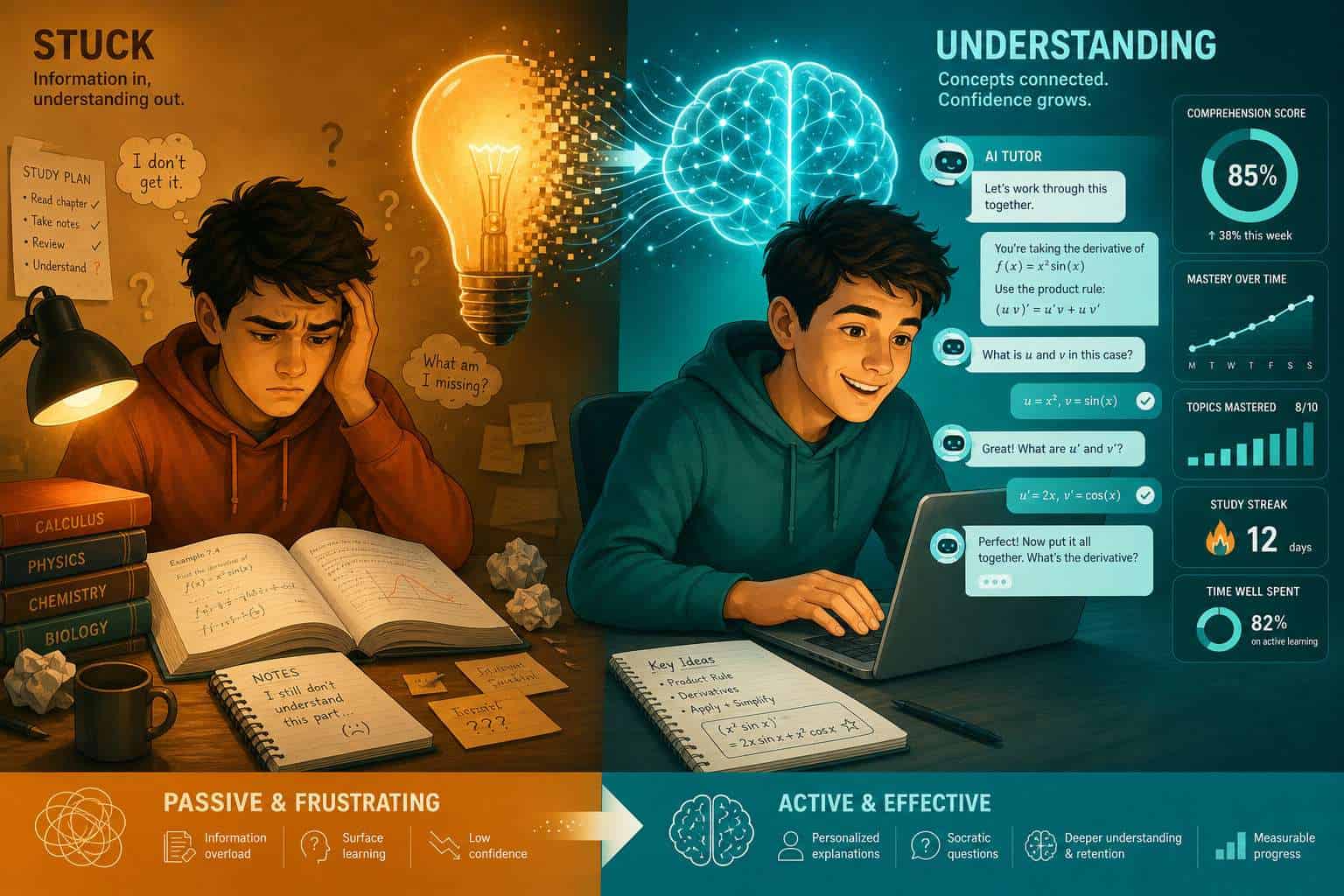
Claude can explain concepts, quiz you on material, summarize long readings, help you outline essays, debug code, and work through problem sets with you step by step. It acts as an on-demand tutor that never gets impatient and adjusts its explanations based on your follow-up questions.
Specifically, here is what Claude does well in a learning context:
- Concept explanation: Break down complex ideas into plain language with examples
- Socratic questioning: Ask you guiding questions that help you arrive at answers yourself (especially in Learning Mode) [7]
- Essay and writing feedback: Review drafts, suggest structure improvements, and flag unclear reasoning
- Code help: Explain errors, walk through logic, and suggest fixes across most major programming languages
- Study planning: Help you build a study schedule or prioritize topics before an exam
- Summarization: Condense long articles, textbook chapters, or lecture notes into key points
For learners exploring coding environments alongside Claude, the Replit vs Claude Code comparison offers useful context on how these tools complement each other.
How Is Claude Different from Other AI Learning Assistants
Claude stands out primarily because of its Learning Mode and its emphasis on reasoning transparency. Unlike many AI tools that default to giving direct answers, Claude for Education is designed to prompt students to think first [2].
Key differences from other AI assistants:
| Feature | Claude | Generic Chatbots |
|---|---|---|
| Learning Mode (Socratic) | Yes, built-in for education tier | Rarely available |
| Long context window | Up to 200K tokens | Typically much shorter |
| Refusal to fabricate | Strong safety training | Varies widely |
| Institutional deployment | Yes (universities, schools) | Limited |
| Explanation depth | High, with reasoning shown | Often surface-level |
Claude also tends to acknowledge uncertainty more openly than many competitors, which matters in educational settings where accuracy is critical.
How Much Does Claude Cost for Students and Educators
Claude’s free tier is available to anyone with an account at claude.ai and covers most casual learning needs. Claude Pro costs approximately $20 per month and removes most usage limits, which matters if you’re doing heavy daily study sessions.
For institutions, Anthropic’s Claude for Education program offers campus-wide licensing. Syracuse University, for example, gave access to over 30,000 students and faculty under an institutional arrangement [1]. Individual educators should contact Anthropic directly for pricing on team or institutional plans.
Choose the free tier if: You use Claude a few times per week for specific questions or short study sessions. Choose Claude Pro if: You’re in an intensive program, studying daily, or working through long documents regularly.
What Types of Online Courses Work Best with Claude
Claude works best alongside courses that involve reading, writing, problem-solving, or conceptual understanding. It is particularly effective for:
- Computer Science and programming courses (Anthropic’s own data shows CS students are the top adopters) [6]
- Business and entrepreneurship courses (CreativeLive offers dedicated Claude-based courses for entrepreneurs) [10]
- Writing and communication courses where feedback on drafts is valuable
- STEM subjects including math, biology, chemistry, and physics
- Language learning at an intermediate to advanced level
Structured courses on platforms like Coursera now include Claude directly in the curriculum. “AI Fundamentals with Claude” on Coursera gives learners a guided path for understanding AI concepts using the tool itself [3]. LinkedIn Learning’s “Claude Code: Designing Multi-Model AI Systems” targets developers building scalable AI pipelines [4].
For learners interested in AI-assisted development workflows, our overview of 25 AI websites that transform digital workflows covers complementary tools worth knowing.

Can Claude Help Me If I Struggle with Specific Learning Challenges
Yes, Claude can be especially useful for learners who struggle with traditional instruction formats. Because you can ask the same question multiple ways without judgment, it reduces the anxiety many learners feel about asking a human teacher to repeat an explanation.
Claude adapts to:
- Slow processing speed: You control the pace entirely; Claude waits for you
- Reading difficulties: Ask Claude to simplify text or read a passage back in plain language
- Math anxiety: Request step-by-step breakdowns with no steps skipped
- English as a second language: Claude handles multilingual queries and can explain concepts in simplified English
One important caveat: Claude is not a substitute for formal accommodations or specialized support services. Learners with diagnosed learning disabilities should use Claude as a supplement, not a replacement, for institutional support.
Is Claude Good for High School Students or Just College Level
Claude is appropriate for high school students and works well from roughly grade 9 upward. Younger students can use it too, but the quality of the interaction depends heavily on how well the student can frame their questions.
Anthropic’s Claude for Education initiative specifically targets colleges and universities [2], but the free version at claude.ai has no age restriction (users must be 13 or older under standard terms). High school students report using Claude for:
- AP exam preparation
- Essay drafting and revision
- Science lab report writing
- SAT/ACT reading comprehension practice
Common mistake: High school students often paste in an entire assignment and ask Claude to complete it. This produces output that may not match the student’s voice and bypasses the actual learning. A better approach is to ask Claude to explain the concept behind the assignment first, then work through it together.
What Are Common Mistakes People Make When Using AI for Learning
The biggest mistake is treating Claude as an answer machine rather than a thinking partner. When learners copy Claude’s output without engaging with it, they miss the actual learning.
Other frequent mistakes:
- Vague prompts: “Explain chemistry” gets a generic response. “Explain how covalent bonds differ from ionic bonds, using a water molecule as an example” gets something useful.
- Skipping verification: Claude can be wrong, especially on recent events or highly specialized topics. Always cross-check important facts with a textbook or credible source.
- Over-reliance: Using Claude for every question prevents you from building independent problem-solving skills.
- Sharing sensitive data: Never paste in personal information, student ID numbers, or private institutional data.
- Ignoring Learning Mode: If you’re using Claude for Education, switch on Learning Mode so Claude guides rather than just answers [7].
Can Claude Help Explain Complex Topics I Don’t Understand
Yes, and this is one of Claude’s strongest use cases. Claude can take a dense academic concept and restate it at whatever level of complexity you specify.
A practical approach: tell Claude your current understanding and where you’re stuck. For example: “I understand that photosynthesis converts sunlight to energy, but I don’t understand the electron transport chain. Can you explain it as if I’m a 10th grader?” This kind of targeted prompt produces far better explanations than a generic question.
Claude also handles analogies well. Asking it to “explain this using an analogy from everyday life” often produces the clearest explanations for abstract concepts.
Which Online Learning Platforms Integrate with Claude Right Now
As of 2026, direct integrations are still developing, but several platforms feature Claude prominently in their course catalogs:
- Coursera: “AI Fundamentals with Claude” and “AI Automation with Claude” [3]
- LinkedIn Learning: “Claude Code: Designing Multi-Model AI Systems” [4]
- CreativeLive: “AI for the Workplace with Claude” and “AI for Entrepreneurs & Business Startups” [8][10]
- VirtualTrainings: Live sessions on using Claude for marketing, branding, and business analytics [5]
Beyond course catalogs, Claude’s API allows developers to embed it into custom learning management systems. Institutions like Syracuse University have done this at scale [1]. For learners interested in how AI tools connect to broader automation workflows, the guide on n8n automation agents shows how Claude-style AI can fit into larger productivity systems.
How Does Claude Handle Different Learning Styles
Claude adapts to learning styles based on how you prompt it, not automatically. This means you need to tell Claude what kind of explanation works for you.
- Visual learners: Ask Claude to describe a concept as if drawing a diagram, or request a table or structured list
- Auditory/verbal learners: Ask for a conversational explanation or a narrative walkthrough
- Kinesthetic learners: Ask for step-by-step processes you can follow along with
- Reading/writing learners: Request detailed written explanations with clear paragraph structure
Claude does not yet generate actual images or audio natively in most interfaces, so truly visual or auditory learners may need to pair it with other tools.
What Subjects or Topics Is Claude Not Great at Explaining
Claude has real limitations. It is not the best tool for:
- Real-time or breaking information: Claude’s training has a knowledge cutoff, so recent events, new research, or updated regulations may be missing or outdated
- Highly specialized professional topics: Advanced medical diagnosis, cutting-edge physics research, or niche legal interpretations require domain experts
- Precise numerical calculations in complex chains: Claude can make arithmetic errors in multi-step problems; always verify with a calculator
- Creative arts critique: Claude can discuss technique but lacks subjective aesthetic judgment
- Hands-on skills: Anything requiring physical practice (lab techniques, musical instrument playing, surgery) cannot be learned through conversation alone
How Accurate Is Claude’s Information Compared to a Human Tutor
Claude is highly accurate on well-established topics covered in its training data, but it is not infallible. A human tutor has real-world experience, can read your body language, and stays current with the latest developments in their field. Claude does none of those things.
That said, for foundational coursework in most subjects, Claude’s accuracy is generally reliable. Anthropic invests heavily in reducing hallucinations and improving factual grounding. The key rule: treat Claude as a knowledgeable study partner, not a definitive authority. For anything high-stakes (medical, legal, financial decisions), always consult a qualified professional.
For a broader look at how AI tools compare across enterprise and educational contexts, the Google Vertex AI capabilities guide provides useful perspective on how different AI systems are positioned.
Are There Privacy Concerns with Using Claude for Online Learning
Yes, and they deserve serious attention. When you type into Claude, that conversation may be used to improve Anthropic’s models unless you opt out or use an enterprise plan with different data terms.
Practical privacy rules for learners:
- Do not paste in full assignment texts that contain your name, student ID, or institutional details
- Do not share other students’ work or private course materials
- Check whether your institution has a data processing agreement with Anthropic before using Claude for sensitive coursework
- Use Anthropic’s privacy settings to opt out of data training where available
Institutions deploying Claude at scale, like Syracuse University, typically negotiate data agreements that provide stronger protections than individual consumer accounts [1]. If you’re unsure about your institution’s policy, ask your IT department before using Claude for graded work.
For more on AI security considerations, the security resources at webaistack.com cover related topics worth reviewing.
Frequently Asked Questions
Is Claude free for students? Yes. The free tier at claude.ai is available to anyone and covers most study needs. Claude Pro at roughly $20/month is worth it for heavy daily use or long document analysis.
Can Claude write my essays for me? Technically yes, but doing so defeats the purpose of learning and may violate your institution’s academic integrity policy. Use Claude to get feedback on your drafts instead.
Does Claude work for coding courses? Yes, and it is one of Claude’s strongest use cases. It can explain errors, walk through logic, and suggest fixes across most major programming languages. See Claude Archives for more on Claude’s coding capabilities.
What is Claude’s Learning Mode? Learning Mode is a feature in Anthropic’s Claude for Education tier that makes Claude respond with guiding questions rather than direct answers, encouraging students to think through problems themselves [7].
Can high school students use Claude? Yes. Claude works well from roughly grade 9 upward. Younger students can use it, but they need to know how to ask specific questions to get useful responses.
Is Claude available in languages other than English? Yes. Claude handles multiple languages and has shown strong performance even in lower-resource languages. A 2025 study evaluated Claude’s translation performance across Mali’s 13 national languages with positive results.
How do I get the best explanations from Claude? Be specific about your current knowledge level and exactly where you’re confused. Tell Claude what kind of explanation you want (analogy, step-by-step, simplified language).
Can my school or university get Claude for all students? Yes. Anthropic’s Claude for Education program offers institutional licensing. Contact Anthropic directly or check their education page for current options [2].
Does Claude remember what I told it in a previous session? No. By default, Claude does not retain memory between separate conversations. Each new session starts fresh unless you use a memory-enabled tool or paste in prior context yourself.
Is it cheating to use Claude for schoolwork? That depends entirely on your institution’s policy. Using Claude to understand material is generally fine. Using it to complete graded work without disclosure may violate academic integrity rules. Check your course syllabus.
Conclusion
Unlocking learning potential through Claude AI is less about the technology itself and more about how deliberately you use it. The evidence from real deployments is encouraging: Syracuse University saw measurable academic gains across 30,000 users [1], and Anthropic’s Learning Mode is specifically designed to make students think rather than just copy answers [2][7].
Actionable next steps for learners:
- Start with the free tier at claude.ai and practice writing specific, targeted prompts about topics you’re currently studying
- If your institution offers Claude for Education, activate Learning Mode and use it for your next difficult assignment
- Browse structured courses on Coursera or LinkedIn Learning that teach Claude skills directly [3][4]
- Set a personal rule: always read and understand Claude’s explanation before using it, never paste it in as your own work
- Check your institution’s AI policy before using Claude for graded submissions
For anyone building skills in AI-assisted workflows beyond education, exploring tools like Replit for online coding alongside Claude creates a powerful self-directed learning environment.
The goal is not to let Claude do your learning for you. The goal is to use it as the most patient, available, and knowledgeable study partner you’ve ever had access to.
References
[1] Syracuse University Gave AI Access To 30,000 Students And Faculty Heres What They Learned – https://www.techlearning.com/technology/ai/syracuse-university-gave-ai-access-to-30-000-students-and-faculty-heres-what-they-learned
[2] Anthropic Launches An AI Chatbot Tier For Colleges And Universities – https://techcrunch.com/2025/04/02/anthropic-launches-an-ai-chatbot-tier-for-colleges-and-universities/
[3] AI For Everyone AI Fundamentals With Claude – https://www.coursera.org/learn/ai-for-everyone-ai-fundamentals-with-claude
[4] Claude Code Designing Multi Model AI Systems – https://www.linkedin.com/learning/claude-code-designing-multi-model-ai-systems
[5] VirtualTrainings Claude Business Session – https://www.virtualtrainings.com/virtual-class/-54854live
[6] Anthropic Education Report How University Students Use Claude – https://www.anthropic.com/news/anthropic-education-report-how-university-students-use-claude
[7] Anthropic Flips The Script On AI In Education Claude Learning Mode Makes Students Do The Thinking – https://venturebeat.com/ai/anthropic-flips-the-script-on-ai-in-education-claude-learning-mode-makes-students-do-the-thinking
[8] AI Workplace Claude Online – https://www.creativelive.com/classes/ai-workplace-claude-online
[9] Claude For Everyone BRIEF Framework Course – https://claudeforeveryone.com/
[10] AI For Entrepreneurs Business Startups Self Paced – https://www.creativelive.com/classes/ai-for-entrepreneurs-business-startups-self-paced