
Last updated: May 11, 2026
Quick Answer: Cursor AI is a VS Code-based intelligent IDE that uses AI agents to understand your entire codebase, perform multi-file edits, and automate debugging and refactoring. It surpassed $2B in annualized revenue by March 2026, making it the fastest-growing AI coding tool on the market and a clear signal that AI-assisted development has moved from novelty to necessity.
Key Takeaways
- Cursor AI builds on VS Code’s familiar interface but adds deep codebase understanding, agentic multi-file editing, and intelligent autocomplete with a reported 72% acceptance rate.
- The tool reached $2B annualized revenue in early 2026, doubling in just three months [8].
- SpaceX signed a deal with Cursor that includes a $60B acquisition option, signaling enterprise confidence [9].
- May 2026 updates introduced parallel agents via
/multitask, PR review features, and enterprise admin controls [1]. - Cursor outperforms GitHub Copilot on complex multi-file tasks but costs more ($20/mo vs $10/mo for Copilot).
- Claude Code scores higher on raw benchmarks (80.8% SWE-bench), but Cursor wins on daily usability and IDE integration.
- Opsera’s May 2026 partnership embeds Cursor’s autonomous agents directly into DevOps workflows [2].
- A critical Git RCE vulnerability was patched in version 2.5 (May 2026) before any in-the-wild exploitation [3].
What Is Cursor AI and Why Does It Matter in 2026?
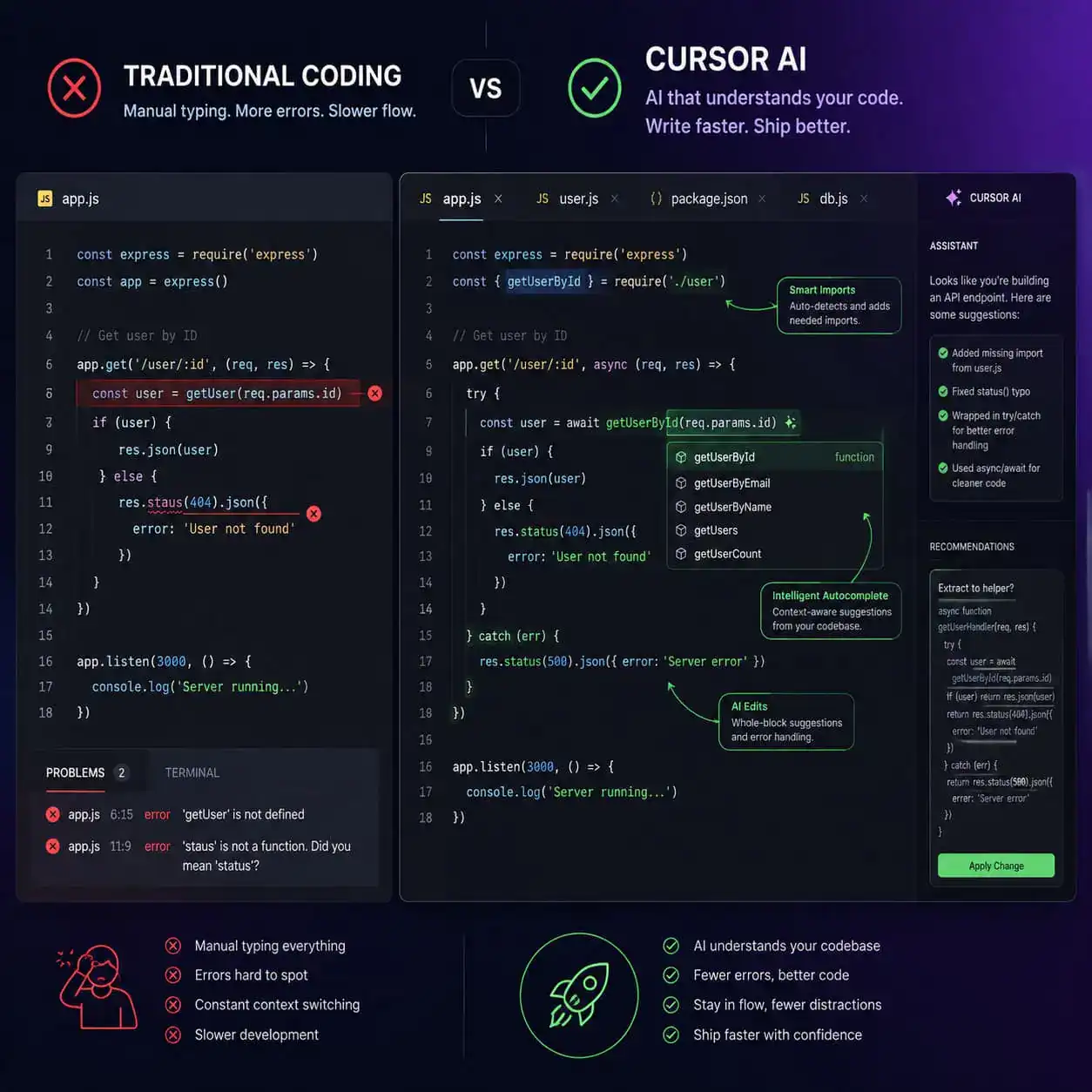
Cursor is a fork of Visual Studio Code that integrates AI directly into the editing experience rather than bolting it on as a plugin. It reads your entire project, understands file relationships, and suggests or executes changes across multiple files simultaneously.
Here’s why it matters now: the tool isn’t just autocompleting single lines. Its “Composer” mode and agent system can refactor entire modules, write tests, and fix bugs with minimal human input. According to TechCrunch, Cursor rolled out a new system specifically for agentic coding in March 2026, moving beyond simple suggestions into autonomous task execution [8].
Who it’s for:
- Professional developers who spend significant time on refactoring, debugging, or boilerplate code
- Teams building complex applications where context across files matters
- Developers already comfortable with VS Code who want AI without switching ecosystems
Who it’s not for:
- Complete beginners who haven’t learned programming fundamentals (AI can mask understanding gaps)
- Teams with strict air-gapped environments that can’t send code to cloud models
- Developers who only need simple inline suggestions (GitHub Copilot at $10/mo may suffice)
If you’re exploring how AI tools fit into broader web development workflows, our guide on AI-powered content generation tools covers the wider ecosystem.
How Is Cursor AI Revolutionizing Development in Practice?
Cursor changes daily coding in three concrete ways: intelligent autocomplete, agentic multi-file editing, and context-aware debugging.
Intelligent Autocomplete: Powered by Supermaven technology, Cursor’s autocomplete achieves a 72% acceptance rate according to NxCode’s March 2026 comparison. That means roughly 7 out of 10 suggestions are useful enough that developers accept them without modification.
Agentic Multi-File Editing: The Composer feature lets you describe a change in natural language, and Cursor’s agent modifies multiple files in a coordinated way. Need to rename a component and update every import? Describe it once.
Context-Aware Debugging: Cursor reads your project structure, understands dependencies, and can identify bugs that span multiple files. Fresh Consulting’s 2026 guide emphasizes this works best with disciplined prompting rather than treating it as autopilot.
Common mistake: Accepting all AI suggestions without review. Cursor amplifies productivity, but it can also amplify errors if you skip code review. Treat it as a very fast junior developer who needs supervision.

What Are the Latest Cursor AI Updates in May 2026?
The May 2026 release cycle brought several significant features that deepen Cursor’s agentic capabilities [1]:
- Parallel agents with
/multitask: You can now spawn async subagents that work on different parts of a task simultaneously. This speeds up complex refactoring jobs considerably. - New PR review experience: Cursor can now review pull requests directly within the IDE, providing AI-powered feedback before code reaches human reviewers.
- Improved prompt undo grouping: Undo now respects logical prompt boundaries rather than individual character changes.
- Better long-chat handling: Extended conversations with the AI no longer degrade in quality as context grows.
- Enterprise admin controls (May 7): Admins can restrict model access, set soft spend limits with alerts, and filter usage analytics by user or product.
- Bugbot improvements: Real-time self-improvement from PR feedback, MCP support, and what Cursor calls their highest bug resolution rate yet.
The Opsera partnership announced May 8, 2026 takes this further by embedding Cursor’s autonomous agents into full AI-SDLC (Software Development Lifecycle) workflows [2]. This means agentic coding isn’t just happening in the editor—it’s connecting to CI/CD pipelines, testing, and deployment.
For teams already using AI in their WordPress development, these agent capabilities pair well with AI plugins for WordPress automation.
How Does Cursor Compare to GitHub Copilot and Claude Code?
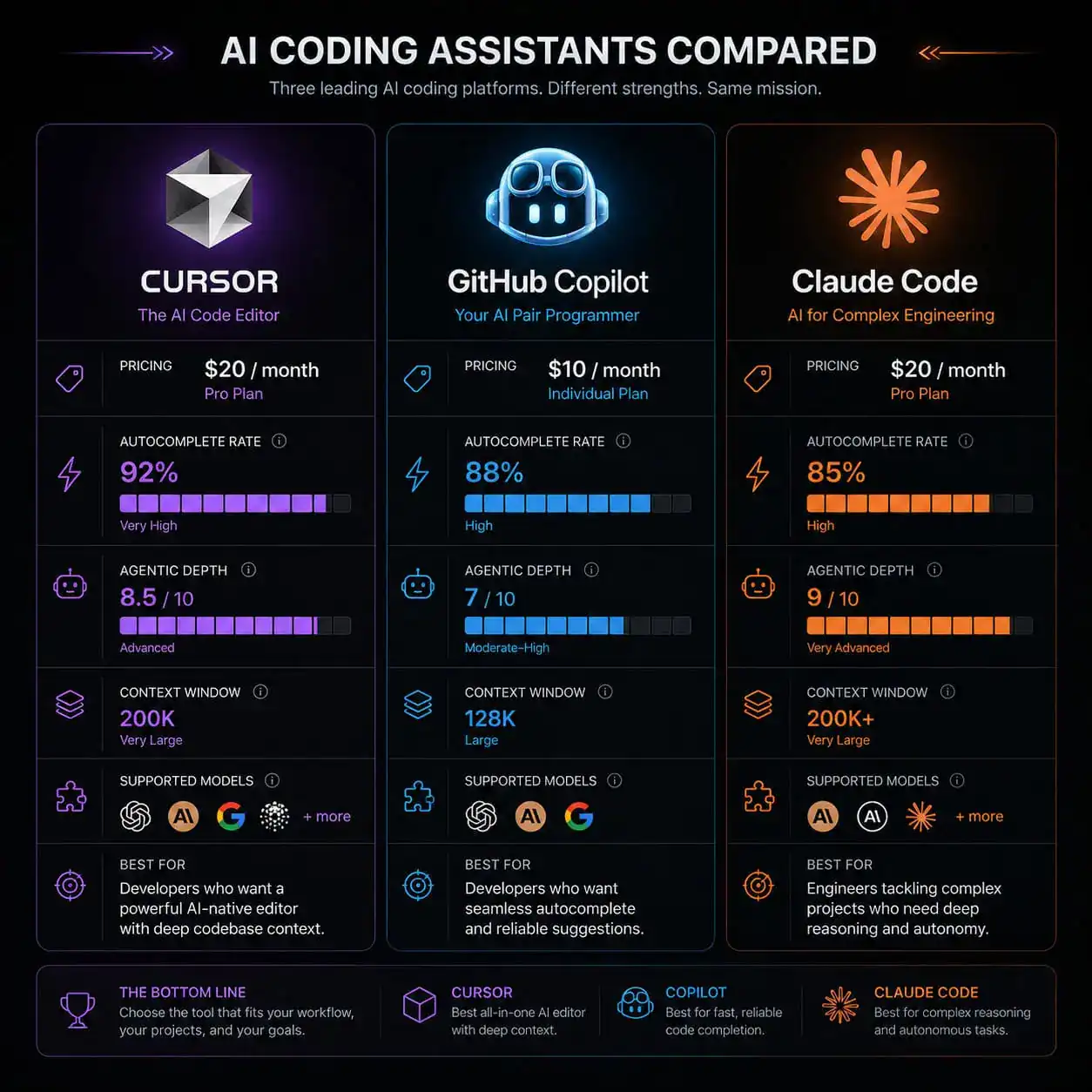
This is the question most developers ask before committing to a tool. Here’s a direct comparison based on 2026 benchmarks and pricing:
| Feature | Cursor | GitHub Copilot | Claude Code |
|---|---|---|---|
| Price | $20/mo (Pro) | $10/mo | $20/mo (via API) |
| Autocomplete acceptance | ~72% | ~60% (estimated) | N/A (no inline) |
| Multi-file editing | Excellent (Composer) | Limited | Strong (terminal-based) |
| SWE-bench score | Model-dependent | Lower | 80.8% (highest) |
| IDE | VS Code fork | Any IDE | Terminal/CLI |
| Agentic depth | High | Moderate | Very high |
| Enterprise features | Yes (new May 2026) | Yes (mature) | Limited |
Choose Cursor if: You want the best balance of daily usability, autocomplete speed, and multi-file agentic editing within a familiar VS Code environment.
Choose GitHub Copilot if: Budget matters, you use multiple IDEs (JetBrains, Neovim, etc.), and you primarily need inline suggestions rather than complex multi-file operations.
Choose Claude Code if: You’re a power user comfortable in the terminal who wants maximum autonomous coding capability and don’t mind a less visual interface.
Scrimba’s May 2026 analysis named Cursor the top AI coding assistant for “agentic depth and Composer multi-file edits,” but flagged credit-based pricing as a concern for heavy users.
What Does Cursor’s Enterprise Growth Signal?
Cursor’s business trajectory tells a story about where professional development is heading. TechCrunch reported the company surpassed $2B in annualized revenue by March 2026, doubling in just three months [8]. Then in April 2026, Fortune reported that SpaceX signed a deal with Cursor that includes an option to acquire the startup for $60B [6][9].
These numbers aren’t just impressive for a dev tool startup. They indicate that major engineering organizations view AI-assisted coding as critical infrastructure, not optional tooling.
The enterprise admin controls released in May 2026 reflect this shift. Organizations need usage analytics, spend limits, and model access restrictions before deploying AI coding tools at scale. Cursor now provides all three.
If you’re building development workflows that incorporate AI at multiple stages, you might also find value in AI-powered content optimization for the content side of your projects.
Is Cursor AI Safe to Use? Security Considerations
Security matters when your IDE sends code to cloud models. Two relevant developments from May 2026:
The Git RCE vulnerability (patched): Cursor version 2.5 addressed a critical vulnerability where malicious Git repositories could trigger arbitrary code execution via the AI agent [3]. No in-the-wild abuse was reported before the patch, but it highlights a real attack surface unique to AI coding tools.
Mitigation steps for teams:
- Keep Cursor updated (automatic updates are on by default)
- Don’t clone untrusted repositories without reviewing them first
- Use enterprise admin controls to restrict which models and features are available
- Review AI-generated code with the same rigor as human-written code
- Consider network-level monitoring for unexpected outbound connections
Edge case: If your organization handles sensitive IP or classified code, evaluate whether Cursor’s data handling policies meet your compliance requirements before deployment. The enterprise tier offers more control here.
For WordPress developers concerned about security in AI integrations, our guide on integrating AI-powered chatbots into WordPress covers related security considerations.
How Should You Get Started with Cursor AI?
Getting productive with Cursor takes about 30 minutes if you already use VS Code. Here’s a practical onboarding checklist:
Step-by-step setup:
- Download Cursor from cursor.com (it imports your VS Code settings automatically)
- Sign up for the free tier to test basic features, or start with Pro ($20/mo) for full agent access
- Open an existing project (Cursor needs codebase context to be useful)
- Try Tab autocomplete on a file you’re actively editing
- Open Composer (Cmd+K or Ctrl+K) and describe a multi-file change in natural language
- Use
/multitaskfor complex jobs that can be parallelized - Review all AI-generated changes before committing
Prompting tips that actually help:
- Be specific about scope: “Refactor the auth module to use JWT instead of sessions, update all route handlers that reference req.session”
- Reference file names: “In
src/components/Header.tsx, add a dark mode toggle that uses the existing theme context” - State constraints: “Don’t modify any test files” or “Keep backward compatibility with the v2 API”
If you’re working on design-to-code workflows alongside Cursor, our Figma to code plugins guide covers how to bridge that gap efficiently.
What Are the Limitations and Criticisms of Cursor?
No tool is perfect. Here are the legitimate concerns developers raise:
Pricing unpredictability: The credit-based system means heavy users can exceed their monthly allocation. Unlike Copilot’s flat $10/mo, Cursor’s costs can spike during intensive coding sessions.
Model dependency: Cursor’s quality depends on which underlying model it uses (GPT-4, Claude, etc.). When a model has a bad day or gets rate-limited, your experience degrades.
Over-reliance risk: Teams report junior developers accepting suggestions without understanding them, creating technical debt that surfaces later.
Internet requirement: Most features require cloud connectivity. Offline coding is limited to basic editing without AI assistance.
Decision rule: If your team’s monthly coding hours are predictable and moderate, Cursor Pro is cost-effective. If you have 50+ developers writing code 8 hours daily, model the credit usage before committing.
For teams exploring alternatives that don’t require coding at all, our roundup of no-coding website design platforms for 2026 offers a different approach.
Conclusion
Cursor AI has moved past the “interesting experiment” phase into genuine production infrastructure. With $2B in annualized revenue, SpaceX-level enterprise adoption, and May 2026 features like parallel agents and DevOps integration, it’s the most complete AI coding environment available today.
Your next steps:
- Try it free: Download Cursor and import your VS Code settings. Spend one day using it on a real project before judging.
- Start with autocomplete: Get comfortable with Tab suggestions before moving to Composer and agents.
- Set review discipline early: Establish a habit of reviewing AI changes before they hit your main branch.
- Monitor costs: Track your credit usage in the first month to predict ongoing expenses.
- Stay updated: Cursor ships weekly. The
/multitaskand PR review features from May 2026 represent a meaningful capability jump [1].
The developers getting the most value from Cursor aren’t those who hand over all coding to AI. They’re the ones who use it to eliminate tedious work while maintaining full understanding of their codebase. That’s the real shift happening in 2026—not replacement, but amplification.
For more on how AI is reshaping web development broadly, explore our AI category for the latest tools and strategies.
FAQ
How much does Cursor AI cost? Cursor offers a free tier with limited features, a Pro plan at $20/month with full agent access and higher credit limits, and an Enterprise tier with admin controls and custom pricing.
Can I use my existing VS Code extensions with Cursor? Yes. Cursor is a VS Code fork, so most extensions work without modification. Your settings, keybindings, and themes import automatically.
Does Cursor send my code to the cloud? Yes, for AI features. Code snippets are sent to model providers (OpenAI, Anthropic) for processing. Enterprise plans offer more control over data handling.
Is Cursor better than GitHub Copilot? For multi-file editing and agentic tasks, yes. For simple inline suggestions at a lower price across multiple IDEs, Copilot may be sufficient. It depends on your workflow complexity.
What programming languages does Cursor support? All languages supported by VS Code. AI quality is best for popular languages (Python, TypeScript, JavaScript, Go, Rust) because training data is richer.
Can Cursor AI write an entire application from scratch? It can scaffold significant portions, but production applications still need human architecture decisions, testing, and review. Think of it as a very fast pair programmer, not a replacement.
What is the /multitask command?
Introduced in May 2026, /multitask spawns parallel async subagents that work on different parts of a task simultaneously, speeding up complex multi-file operations [1].
Is Cursor safe after the Git vulnerability? Version 2.5 patched the critical Git RCE vulnerability before any in-the-wild exploitation was reported [3]. Keep Cursor updated and avoid cloning untrusted repositories.
Does Cursor work offline? Basic editing works offline, but all AI features (autocomplete, Composer, agents) require internet connectivity.
What’s the difference between Cursor’s Composer and regular chat? Chat answers questions and suggests code. Composer actually modifies your files directly across multiple locations, making it suited for refactoring and feature implementation.
References
[1] Changelog – https://cursor.com/changelog [2] May 8 2026 AI Updates From The Past Week Coder Agents Launch Snyk Claude Partnership Opsera Cursor Partnership And More – https://sdtimes.com/ai/may-8-2026-ai-updates-from-the-past-week-coder-agents-launch-snyk-claude-partnership-opsera-cursor-partnership-and-more/ [3] Cursor News May 2026 – https://blog.mean.ceo/cursor-news-may-2026/ [6] SpaceX Strikes 60 Billion Deal Cursor – https://fortune.com/2026/04/22/spacex-strikes-60-billion-deal-cursor/ [8] Cursor Is Rolling Out A New System For Agentic Coding – https://techcrunch.com/2026/03/05/cursor-is-rolling-out-a-new-system-for-agentic-coding/ [9] SpaceX Is Working With Cursor And Has An Option To Buy The Startup For 60 Billion – https://techcrunch.com/2026/04/21/spacex-is-working-with-cursor-and-has-an-option-to-buy-the-startup-for-60-billion/