Last updated: May 11, 2026
Quick Answer
Base44 handles user authentication automatically when you enable the “Require Login” toggle in your app settings. The platform supports Google, Apple, and email-based sign-in out of the box, with custom OAuth available on paid plans ($20/month and up). You don’t need to write any code—Base44’s AI generates the authentication layer alongside your app’s UI and backend [1][8].
Key Takeaways
- Base44 auto-generates authentication when you build apps from prompts, including login UI and session management [5][9]
- Enable “Require Login” with a single toggle to restrict app access to authenticated users [7]
- Google sign-in works by default; custom OAuth (for branded experiences) requires the Builder plan or higher [1]
- The free tier includes basic authentication; paid plans start at $20/month for advanced auth features [1]
- As of April 2026, users can connect third-party OAuth accounts personally, adding login flexibility
- Base44 wins on speed over Bubble or Adalo but offers less customization for login page branding [5][6]
- Custom SSO for niche providers (like Kakao) requires additional configuration beyond built-in toggles [2]
According to Gartner research cited by PCMag in March 2026, AI-powered app deployments are projected to reach 80% adoption in enterprises by the end of 2026, up from just 5% in 2023. A major reason? Platforms like Base44 have reduced authentication setup from days of coding to minutes of clicking. This guide on mastering Base44 app login covers everything you need to secure your no-code application—from initial setup to troubleshooting edge cases.
I’ve spent considerable time testing Base44’s authentication system, and the simplicity is genuinely impressive for anyone building apps without a development background. But there are limitations worth understanding before you commit.
How Does Base44 Authentication Work?
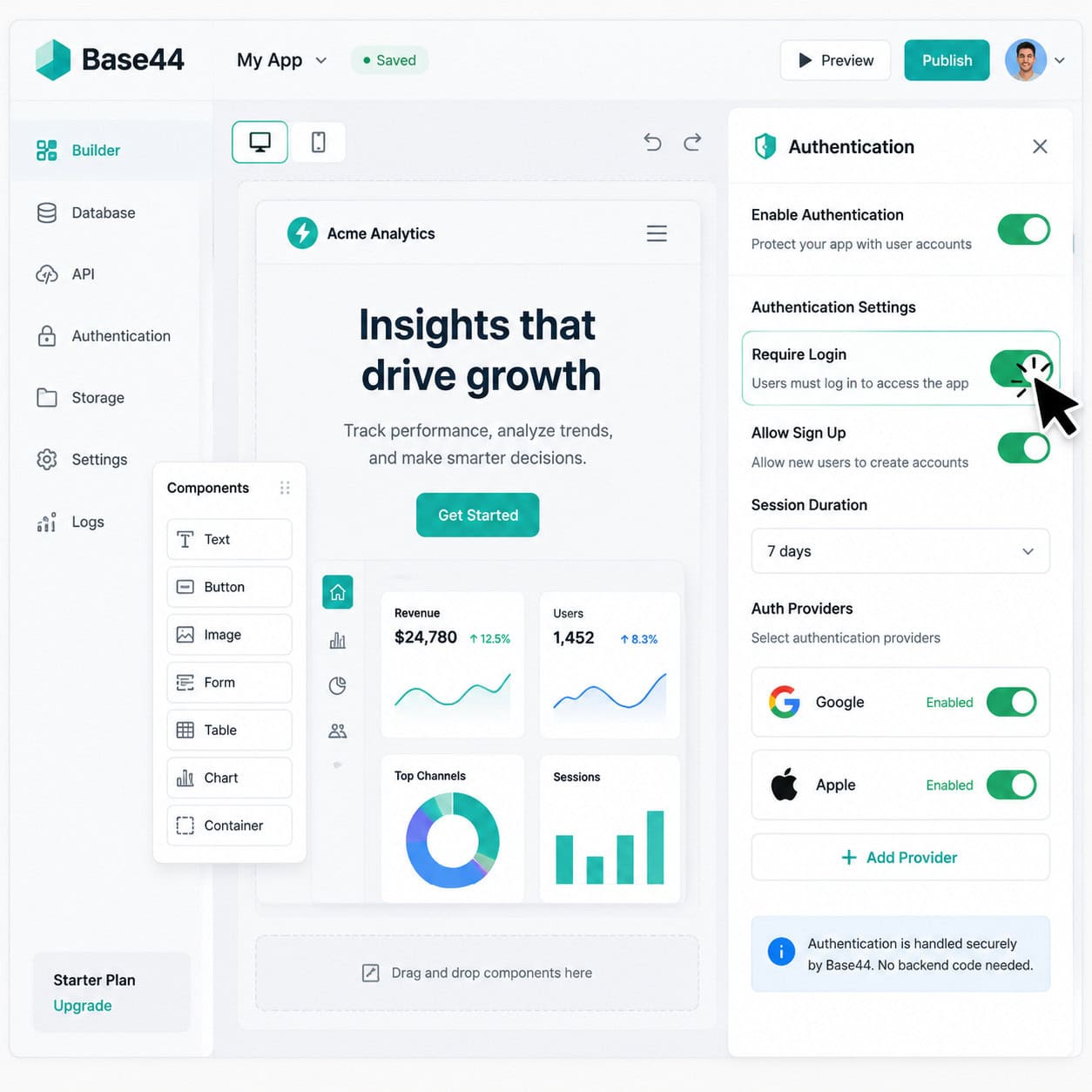
Base44 manages authentication at the platform level, meaning the security infrastructure isn’t something you build—it’s something you configure. When you create an app using Base44’s AI prompt system, the platform can automatically generate authentication components alongside your UI and database [9][5].
Here’s what happens under the hood:
- Session management is handled server-side by Base44’s infrastructure
- User credentials are stored securely (you never see raw passwords)
- OAuth tokens for Google/Apple are managed through Base44’s provider integrations
- Access control is enforced before any app content loads when “Require Login” is active
The key distinction: you’re configuring authentication, not building it. This is fundamentally different from platforms where you wire up auth manually. If you’re coming from a no-code website builder background, Base44’s approach will feel familiar—toggle-based settings rather than code-based implementation.
Choose Base44 auth if: you need working login in under 10 minutes and don’t require custom-branded login pages. Choose a coded solution if: you need full white-label control or niche identity providers.
How Do You Set Up Login in Base44 Step by Step?
Setting up authentication takes about 3-5 minutes. Here’s the exact process based on current Base44 documentation [8][7]:
Step-by-step setup:
- Open your Base44 project in the dashboard
- Navigate to Settings (gear icon in the left panel)
- Find the Authentication section
- Toggle “Require Login” to ON — this immediately gates your entire app behind a login screen
- Select providers — Google is enabled by default; toggle Apple or email/password as needed
- Test the login flow by previewing your app in a new incognito window
- Deploy — authentication carries over to your published app automatically
For custom OAuth (Builder plan required):
- Go to Settings > Authentication > Custom OAuth
- Enter your Google Cloud Console credentials (Client ID and Secret)
- Configure redirect URIs as specified in Base44’s docs
- Save and test with a non-owner account
Common mistake: Forgetting to test with a non-owner account. As the app creator, you’re always logged in. Open an incognito window or use a different browser to verify the login experience your users will see.
If you’re designing your app’s interface in Figma first, our guide on Figma UI/UX design principles covers how to plan login screens before building them in Base44.
What Authentication Providers Does Base44 Support?
Base44 supports three built-in authentication methods as of May 2026 [1]:
| Provider | Free Tier | Paid Plans | Custom Setup Required? |
|---|---|---|---|
| Google (default OAuth) | Yes | Yes | No |
| Apple Sign-In | Yes | Yes | No |
| Email/Password | Yes | Yes | No |
| Google (custom OAuth) | No | Builder+ ($20/mo) | Yes |
| Third-party OAuth (custom) | No | Builder+ | Yes |
Important limitation: If you need providers like GitHub, Microsoft, or regional options like Kakao or LINE, you’ll need custom OAuth configuration. Reddit users have confirmed that niche providers require manual setup beyond the built-in toggles [2].
The April 2026 changelog introduced a notable addition: app users can now connect third-party OAuth accounts personally. This means users aren’t limited to whatever the app owner configured—they can link additional accounts for a more flexible login experience.
How Does Base44 Compare to Other Authentication Options?
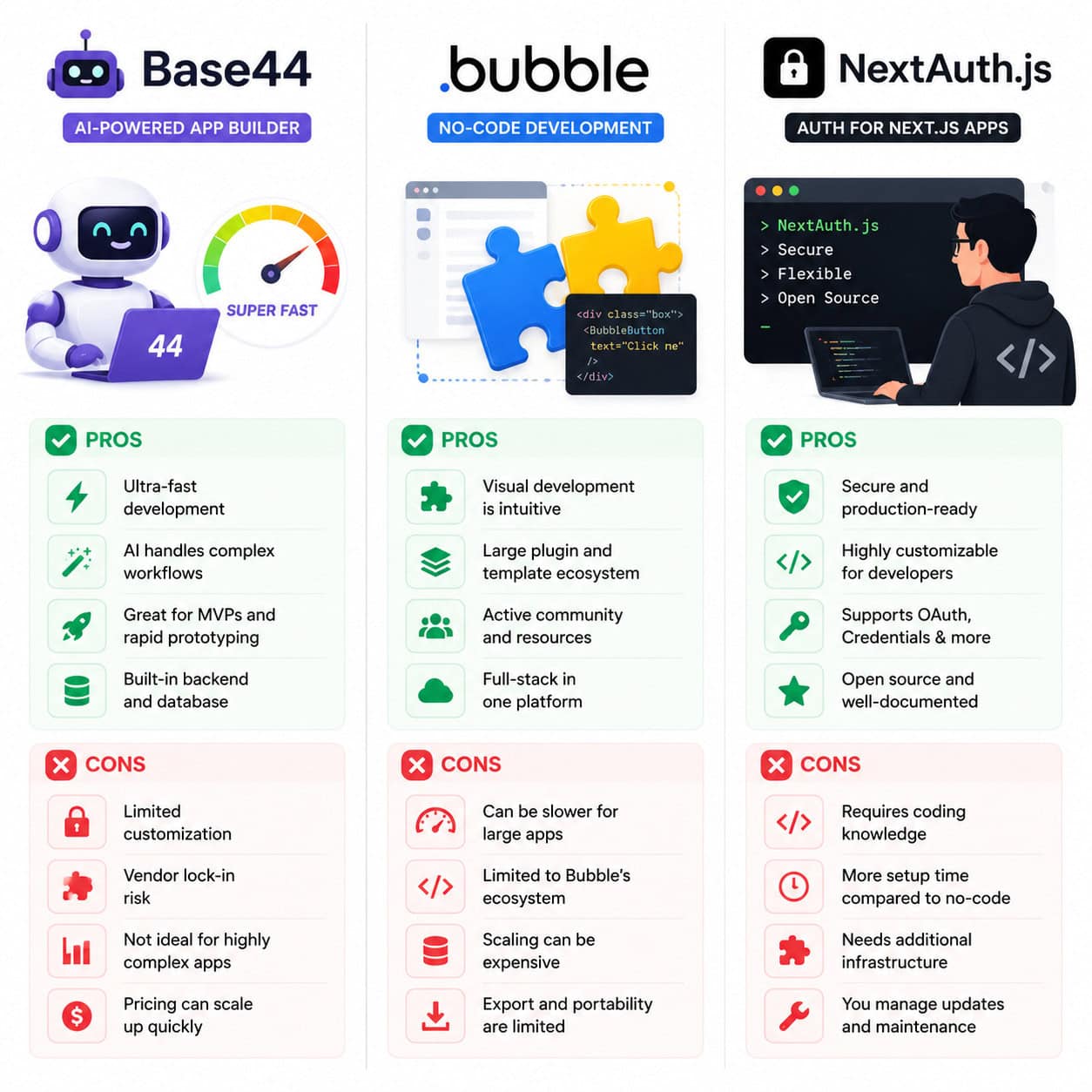
This is where context matters. Base44 isn’t competing with enterprise identity platforms—it’s competing with other ways a non-developer might add login to an app.
Base44 vs. Bubble
- Setup time: Base44 wins decisively (minutes vs. hours)
- Customization: Bubble allows fully custom login page designs and flows
- Backend control: Bubble gives you direct database access for user records
- Cost: Both start around $20/month for meaningful auth features
Base44 vs. Adalo
- AI generation: Base44 auto-creates auth from prompts; Adalo requires manual component placement
- Provider support: Similar built-in options
- White-labeling: Adalo offers more login page branding control
Base44 vs. NextAuth.js (coded)
- Skill required: Base44 needs zero coding; NextAuth.js requires JavaScript/TypeScript knowledge
- Flexibility: NextAuth.js offers unlimited customization (custom flows, any provider, any database)
- Time to production: Base44 in minutes; NextAuth.js typically hours to days
- Maintenance: Base44 handles updates; NextAuth.js requires manual dependency management
Decision rule: Use Base44 if you’re building a prototype or internal tool where speed matters more than brand consistency. Use a coded solution if authentication is a core differentiator of your product [5][1].
For teams working across design and development tools, understanding how to convert designs from Figma to production can help bridge the gap between custom-designed login pages and no-code implementation.
Can You Customize the Base44 Login Page?
This is currently Base44’s biggest limitation for authentication. As of May 2026, full custom auth page branding isn’t available in the way many users want [6][5].
What you can customize:
- Which providers appear on the login screen
- Whether login is required or optional
- Custom OAuth credentials for branded Google sign-in (removes “base44.com” from the OAuth consent screen)
What you can’t customize (yet):
- Login page layout or design
- Custom CSS on the authentication screen
- Adding your own logo prominently to the sign-in flow
- Redirect behavior after login (limited options)
Reddit discussions show this is a frequently requested feature [6]. The workaround for now: use custom OAuth on the Builder plan so at least the Google consent screen shows your app name rather than Base44’s.
If branding your login experience is critical, consider designing it in a tool like Canva for mockups—our guide on creating professional designs in Canva covers the visual planning process—then evaluate whether Base44’s current options meet your minimum requirements.
What Are Common Base44 Login Issues and How Do You Fix Them?
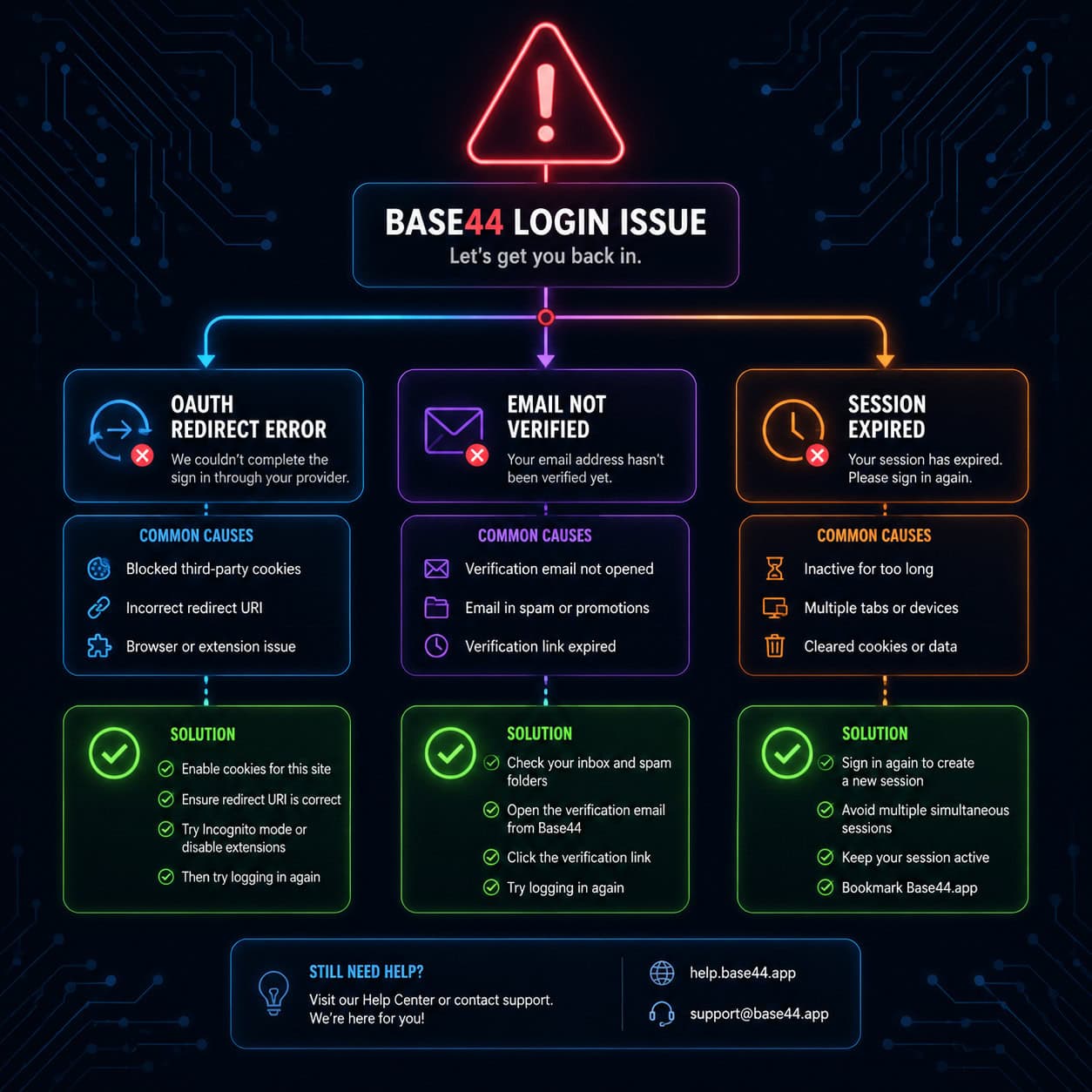
Based on community reports and documentation, here are the most frequent authentication problems [2][8]:
OAuth redirect errors
Cause: Mismatched redirect URIs in custom OAuth setup. Fix: Ensure the redirect URI in your Google Cloud Console exactly matches what Base44 specifies in Settings > Authentication. No trailing slashes, no http vs. https mismatches.
“Login required” blocking public pages
Cause: The “Require Login” toggle gates the entire app—there’s no per-page control yet. Fix: If you need some pages public and others private, you’ll need to restructure as two separate Base44 apps or wait for per-page access control (a commonly requested feature).
Users can’t sign in with email
Cause: Email provider not toggled on, or user hasn’t verified their email address. Fix: Check Settings > Authentication to confirm email/password is enabled. Ask the user to check spam for a verification email.
Session expiration issues
Cause: Base44 manages session length automatically; some users report unexpected logouts. Fix: This is platform-managed. If it’s frequent, report through Base44’s support. Clearing browser cookies and re-authenticating usually resolves one-off issues.
Custom OAuth showing “base44.com” instead of app name
Cause: Using default OAuth instead of custom OAuth credentials. Fix: Upgrade to Builder plan ($20/month), create your own Google OAuth credentials, and enter them in Base44’s custom OAuth settings [1].
Who Should Use Base44 for Authentication?
Base44’s authentication system is ideal for specific use cases and less suitable for others.
Best fit:
- Solo founders building MVPs or prototypes quickly
- Internal tools where only team members need access
- Non-developers who need login functionality without hiring a developer
- Apps where authentication is a utility, not a brand touchpoint
Not ideal for:
- Consumer-facing apps where login page branding matters
- Apps requiring complex role-based access control (RBAC)
- Products needing hybrid public/private page structures
- Teams requiring niche identity providers without custom OAuth setup
Gaincafe ranked Base44 as the easiest platform for intuitive authentication among AI builders like Replit or Draftbit, though competitors allow hybrid public/private pages more readily [1].
For those building AI-powered websites without code, Base44’s auth simplicity is a genuine advantage during the prototyping phase. You can always migrate to a more customizable solution once you validate your product.
What Does Base44 Authentication Cost?
Authentication is included on all Base44 plans, including the free tier [1]. Here’s how pricing affects auth features:
| Plan | Monthly Cost | Auth Features |
|---|---|---|
| Free | $0 | Basic login (Google, Apple, email), “Require Login” toggle |
| Builder | $20/month | Custom OAuth, branded consent screens, more AI credits for auth iterations |
| Pro | Higher tier | All Builder features + priority support |
The free tier is genuinely functional for testing and small projects. You only need to upgrade when you want custom OAuth credentials or when you’ve exhausted free AI credits for iterating on your app [1][2].
If you’re also optimizing your web presence alongside your Base44 app, our SEO optimization guide covers strategies that complement your authenticated app with public-facing content.
Conclusion
Mastering Base44 app login comes down to understanding what the platform handles automatically and where its current boundaries are. For quick, functional authentication on no-code apps, Base44 is among the fastest options available in 2026. Enable “Require Login,” pick your providers, and you’re done in minutes.
Your next steps:
- Start with the free tier to test authentication on a prototype
- Use incognito mode to verify the actual user login experience
- Upgrade to Builder ($20/month) only if you need custom OAuth branding
- Monitor Base44’s changelog for per-page access control and custom login page features
- Consider your long-term needs—if full branding control is essential, plan a migration path early
The platform’s strength is speed. Its weakness is customization. Know which matters more for your specific project, and you’ll make the right choice.
FAQ
Q: Is Base44 authentication secure? A: Yes. Base44 manages authentication at the platform level with industry-standard OAuth protocols. You don’t handle credentials directly, which reduces security risks from implementation errors [1][9].
Q: Can I use Base44 login on a mobile app? A: Base44 apps are web-based and responsive. The login flow works on mobile browsers. There’s also an Android app available on Google Play [3].
Q: Does Base44 support two-factor authentication (2FA)? A: Not as a configurable option for app builders as of May 2026. Google and Apple sign-in inherit whatever 2FA the user has on those accounts.
Q: Can I see who logged into my Base44 app? A: Yes. Base44 stores user records that you can access through your app’s database, showing who signed up and when [8].
Q: Is it possible to have some pages public and others require login? A: Not currently. The “Require Login” toggle applies to the entire app. This is a frequently requested feature in the community [2][6].
Q: Can I export user data from Base44? A: User data stored in Base44’s database can be accessed through the platform. Check current export options in your project settings, as this may vary by plan.
Q: How do I remove the Base44 branding from the login screen? A: Use custom OAuth on the Builder plan ($20/month) to replace Base44’s default OAuth credentials with your own. Full login page customization isn’t available yet [6][1].
Q: What happens if Base44 goes down—can users still log in? A: No. Since authentication is platform-managed, any Base44 outage affects login. This is a trade-off of managed platforms versus self-hosted solutions.
Q: Can I integrate Base44 auth with external databases? A: Base44’s authentication is self-contained. For external integrations, you’d need to use Base44’s API capabilities or consider a hybrid approach with coded solutions.
References
[1] base44 – https://base44.com [2] Does Base44 Actually Work – https://www.reddit.com/r/Base44/comments/1luld15/does_base44_actually_work/ [3] Details – https://play.google.com/store/apps/details?id=com.base44.android&hl=en_US [5] Base44 Review – https://www.zite.com/blog/base44-review [6] Base44 Branded Sign In Sign Up Page – https://www.reddit.com/r/Base44/comments/1rti994/base44_branded_sign_in_sign_up_page/ [7] Watch – https://www.youtube.com/watch?v=Q_ESIA7Cv5o [8] Quick Start Guide – https://docs.base44.com/Getting-Started/Quick-start-guide [9] What Is Base44 – https://base44.com/blog/what-is-base44