Last updated: May 22, 2026
Quick Answer: HeyGen is an AI video platform that turns scripts into polished avatar-led videos without a camera or studio. Reddit communities broadly agree it leads in avatar realism and lip-sync quality for business use cases, but users frequently flag its pricing at scale and its narrow focus on talking-head formats as key drawbacks. This article synthesizes real Reddit discussions, product updates, and expert reviews to give you an honest, practical breakdown.
Key Takeaways
- HeyGen converts text scripts into professional-looking videos using AI-generated avatars and voice cloning, requiring zero filming equipment.
- Reddit users consistently praise avatar realism and multilingual lip-sync (175+ languages) but criticize pricing for high-volume creators [7].
- The Video Agent feature, launched in early 2026, lets users go from a short prompt to a complete video with minimal manual editing [4][5].
- HeyGen is best suited for business explainers, training videos, and marketing content — not for cinematic or general-purpose creative video.
- Free alternatives exist (Canva AI, CapCut) but none match HeyGen’s avatar fidelity, according to multiple Reddit threads.
- Privacy concerns around face and voice data are a recurring topic in Reddit discussions, especially for commercial use.
- No technical skills are required to start, though API and CLI tools are available for developers and automation workflows [5].
What Exactly Is HeyGen and How Does It Work?
HeyGen is an AI video generation platform that creates talking-head videos from text scripts using digital avatars. You type or paste a script, choose (or create) an avatar, select a voice, and HeyGen renders a video where the avatar speaks your words with synchronized lip movements.
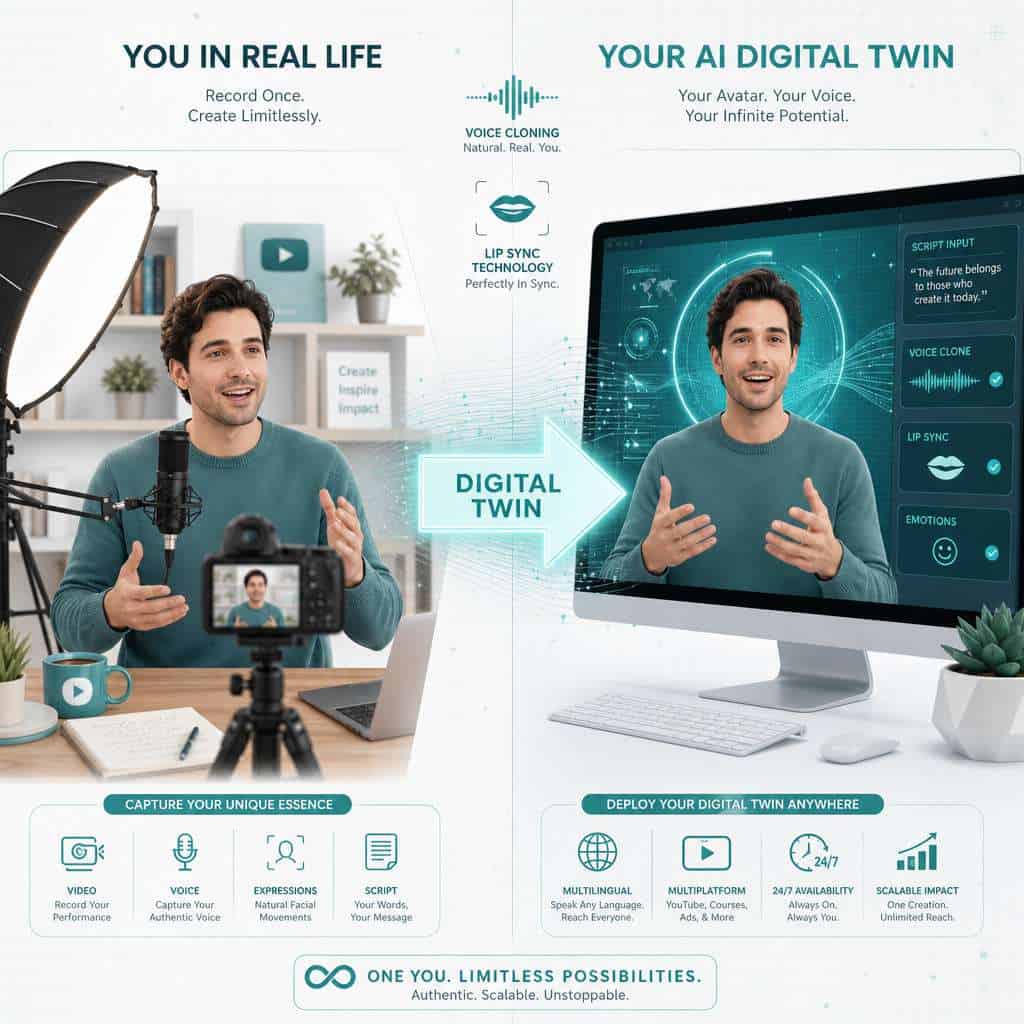
The core workflow breaks down like this:
- Choose an avatar — Pick from HeyGen’s stock library or create a custom “digital twin” by recording a short video of yourself [6].
- Write or paste a script — Or let HeyGen’s AI generate one from a prompt.
- Select voice and language — Over 175 languages are supported with natural-sounding AI voices [7].
- Customize layout — Add branding, backgrounds, text overlays, and B-roll.
- Render and export — Output in up to 4K resolution [2].
Since early 2026, HeyGen has added a Video Agent that acts as a central orchestrator. You give it a brief, and it picks the avatar, voice, script structure, and layout automatically, then outputs the video or structured JSON for automation [4][5]. The April 2026 update alone shipped 15 launches in 30 days, including a CLI tool that wraps the v3 API for developer workflows [5].
For a broader look at how AI tools are reshaping content creation, see our comprehensive guide to AI-powered content generation tools.
How Much Does HeyGen Cost Compared to Other AI Video Tools?
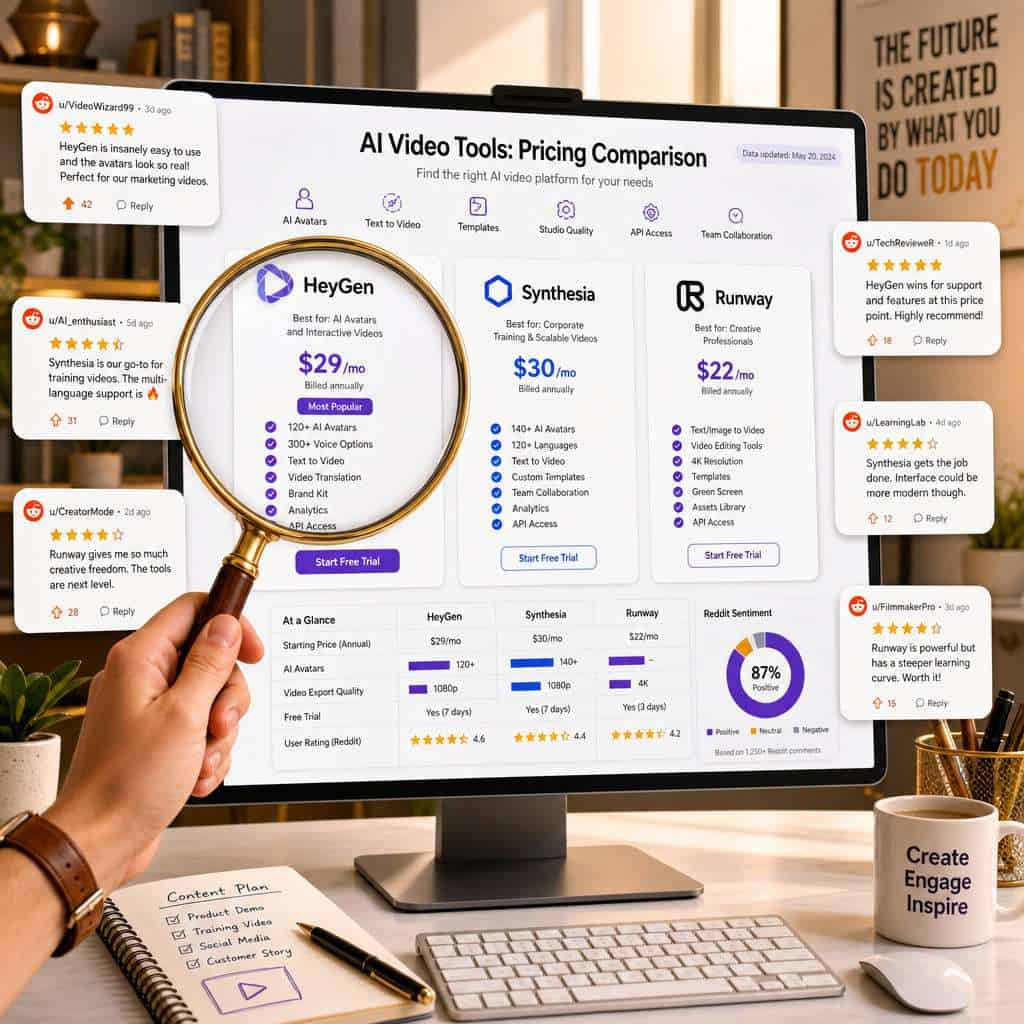
HeyGen’s pricing is one of the most debated topics on Reddit. The platform offers a free tier with limited credits, a Creator plan starting around $24/month, and Business/Enterprise tiers that scale up significantly. Competing tools like Synthesia charge similar or higher rates for enterprise features, while newer entrants like FluxNote advertise plans as low as $9.99/month.
Here’s how the major players compare in 2026:
| Feature | HeyGen | Synthesia | Runway | FluxNote |
|---|---|---|---|---|
| Starting price | ~$24/mo | ~$29/mo | ~$15/mo | ~$9.99/mo |
| Focus | Avatar videos | Enterprise training | Creative/generative | Avatar videos |
| Custom avatars | Yes (digital twin) | Yes (enterprise) | No | Limited |
| Languages | 175+ | 140+ | N/A | 40+ |
| Video Agent/AI automation | Yes [5] | Limited | No | No |
| 4K output | Yes [2] | Yes | Yes | No |
Reddit users in r/AI_Agents and r/generativeAI frequently note that HeyGen becomes “genuinely expensive” when you need high volumes of video [9]. The per-minute credit system means a team producing dozens of videos monthly can see costs climb fast. Choose HeyGen if avatar quality and multilingual support matter more than raw volume. Choose Runway if you need creative, non-avatar generative video on a tighter budget.
Is HeyGen Good for Business Marketing or Just Personal Use?
HeyGen is primarily built for business use. Its strongest features — brand systems, reusable avatars, team collaboration, and API access — are designed for marketing teams, L&D departments, and agencies producing consistent branded content [2].
That said, solo creators and personal users can benefit too, especially for:
- YouTube explainer channels
- Course creators who want a consistent on-screen presence without filming
- Social media content at scale (the iOS app now supports one-tap social video editing)
The March 2026 “Brand Systems” update specifically targeted business users, making it faster to create on-brand video templates and maintain visual consistency across dozens of outputs [1][2]. If you’re exploring AI tools for your marketing workflow, our guide on AI-powered content optimization covers how these tools fit into a broader strategy.
Common mistake: Some personal users sign up expecting a general-purpose video editor. HeyGen is not that — it’s a talking-head video factory. If you need motion graphics, transitions, or cinematic effects, you’ll need a different tool or a complementary editor.
What Are the Most Common Complaints About HeyGen on Reddit?
Reddit users are vocal about HeyGen’s shortcomings. The three most frequent complaints across r/generativeAI, r/AI_Agents, and related subreddits are:
- Pricing at scale — Credit-based billing frustrates teams that need high output. Multiple threads describe costs spiraling past $100/month for active use.
- Narrow use case — HeyGen excels at avatar-led talking-head videos but struggles with anything outside that format. Users wanting B-roll-heavy content, animations, or narrative storytelling find it limiting.
- Occasional uncanny valley — While avatar realism is HeyGen’s standout strength, some users report that certain expressions, head movements, or hand gestures still look slightly off, especially at lower resolution settings.
“HeyGen is the best at what it does, but what it does is pretty specific. If you need a talking head, it’s incredible. If you need anything else, look elsewhere.” — paraphrased from a May 2026 r/generativeAI thread
Other recurring gripes include render times during peak hours, limited free-tier credits (often not enough to evaluate the product properly), and the learning curve around the API for non-developers.
Can HeyGen Really Create Videos That Look Professional?
Yes, for its target format. Multiple independent reviews in 2026 describe HeyGen as “the most technically impressive AI avatar video platform available,” specifically for lip-sync accuracy and avatar realism [7]. CheckThat.ai’s user-review aggregation confirms that lip-sync quality is HeyGen’s standout strength.
The 4K output option, combined with Brand Systems for consistent colors, fonts, and logos, means the final product can pass for a professionally produced corporate video [2]. A January 2026 YouTube review demonstrated creating a digital twin, then producing multiple videos in different outfits and settings without additional recording [6].
Edge case: Professional quality drops when you push the tool beyond its comfort zone. Complex scenes with multiple avatars interacting, or avatars performing physical actions beyond talking and basic gestures, still look artificial.
What Kind of Videos Can You Actually Make with HeyGen?
HeyGen is designed for avatar-led content. The main video types include:
- Product explainers and demos — A digital presenter walks through features
- Training and onboarding videos — Consistent instructor across dozens of modules
- Marketing and ad content — Localized versions in 175+ languages [7]
- Social media clips — Short-form content for LinkedIn, Instagram, TikTok
- Internal communications — CEO updates, policy announcements
- Video translations — Dub existing videos with lip-synced translations
You cannot currently use HeyGen to make narrative films, music videos, or heavily animated content. Tools like Runway and Pika are better suited for open-ended creative generation [9].
For teams also working on visual design assets alongside video, our guide to AI graphic design tools covers complementary platforms.
Are There Free Alternatives to HeyGen That Work Just as Well?
No free tool matches HeyGen’s avatar quality in 2026, but several offer partial overlap:
- Canva AI — Basic talking-head features with Canva’s design ecosystem. Good for simple social clips. See our Canva AI design assistant guide for more.
- CapCut — Free video editing with some AI avatar features, though avatar realism is noticeably lower.
- D-ID — Free tier available, focused on photo-to-video animation. Less polished than HeyGen.
- Synthesia — Not free, but offers a limited trial. Closest competitor in avatar quality for enterprise use.
Decision rule: If you need fewer than 2-3 videos per month and don’t require custom avatars, a free tool may suffice. If you’re producing regular branded content, HeyGen’s paid plans deliver meaningfully better results.
What Technical Skills Do I Need to Use HeyGen Effectively?
None for basic use. HeyGen’s UI is designed so that someone with no video editing experience can produce a finished video in under 15 minutes. You type a script, pick an avatar, and click render.
For advanced use, the skill requirements increase:
- API integration — Requires basic programming knowledge (Python, JavaScript). The v3 API and new CLI tool let developers automate video production at scale [5].
- Video Agent prompting — Writing effective briefs for the AI agent benefits from understanding what makes a good video script.
- Brand Systems setup — Configuring templates, color palettes, and logo placements requires some design awareness [2].
If you’re building automated workflows, Reddit’s r/AI_Agents community discusses using HeyGen’s Video Agent API as infrastructure rather than a standalone tool — connecting it to CRMs, content calendars, and publishing pipelines.
How Accurate Are HeyGen’s AI-Generated Avatars and Voices?

HeyGen’s avatars and voices are among the most realistic available in 2026. DigitalApplied’s AI video marketing stack analysis ranks HeyGen as the leader in “avatar realism and video translation, offering the most natural-looking digital presenters and seamless lip-sync dubbing” [7].
Specific accuracy notes from Reddit and reviews:
- Lip sync — Generally excellent in English; slightly less precise in tonal languages like Mandarin, though still ahead of competitors.
- Facial expressions — Natural for standard conversational delivery. Exaggerated emotions (surprise, anger) can look forced.
- Voice cloning — Users report their digital twin’s voice is “close but not identical,” with occasional flat intonation on complex sentences.
- Digital twin fidelity — The initial recording quality matters enormously. A well-lit, high-resolution source video produces dramatically better results [6].
Is HeyGen Safe to Use for Commercial Projects?
Yes, HeyGen’s paid plans include commercial usage rights for videos created with stock avatars and voices. Custom digital twins require that the person whose likeness is used has given consent, and HeyGen’s terms require this verification.
For teams producing client-facing content, the Brand Systems feature ensures outputs stay on-brand and consistent [2]. The API and structured JSON output also make it easier to integrate HeyGen into approved content pipelines.
Common mistake: Using the free tier for commercial content. Free-tier outputs may carry watermarks and have restricted licensing. Always verify your plan’s commercial terms before publishing.
What Types of Businesses or Creators Should Avoid Using HeyGen?
HeyGen isn’t the right fit for everyone. Consider alternatives if:
- You need cinematic or narrative video — HeyGen doesn’t do scene generation, camera movement, or complex visual storytelling.
- Your brand relies on authentic human presence — Some audiences (especially in wellness, coaching, or luxury markets) may react negatively to AI-generated presenters.
- You’re on a very tight budget with high volume needs — The credit system can become expensive. A simpler tool or even basic screen recording may be more cost-effective.
- You need real-time video — HeyGen produces pre-rendered content, not live avatars for video calls (though interactive avatar features are in development).
For businesses building websites alongside their video content, our AI website creator guide covers no-code options that pair well with AI video workflows.
What Are the Privacy Concerns with AI Video Generation Tools Like HeyGen?
Privacy is a legitimate concern. When you create a digital twin on HeyGen, you upload video and audio of yourself, which the platform processes and stores. Key considerations:
- Biometric data — Your face and voice are biometric identifiers. HeyGen’s privacy policy covers how this data is stored and used, but Reddit users recommend reading it carefully.
- Deepfake risk — Any platform that creates realistic AI avatars carries inherent deepfake risk. HeyGen requires consent verification for custom avatars, but enforcement depends on the platform’s moderation.
- Data residency — Some enterprise users on Reddit express concern about where avatar data is stored, particularly for EU-based teams subject to GDPR.
- Third-party API access — If you use HeyGen through its API in automated workflows, ensure your data handling complies with your own privacy policies.
Practical advice: If privacy is a top concern, use HeyGen’s stock avatars instead of creating a digital twin. You get most of the platform’s benefits without uploading personal biometric data.
For more on how AI tools handle data in content workflows, explore our AI-powered content generation tools guide.
FAQ
Q: Can I use HeyGen for free? A: Yes, HeyGen offers a free tier with limited credits. It’s enough to test the platform but typically not sufficient for ongoing production.
Q: How long does it take to render a HeyGen video? A: Most videos under 5 minutes render in 5-15 minutes. Longer videos or 4K output can take longer, especially during peak usage hours.
Q: Does HeyGen work in languages other than English? A: Yes. HeyGen supports over 175 languages with lip-synced translations, making it one of the most multilingual AI video platforms available [7].
Q: Can I create a digital twin of someone else? A: HeyGen requires consent verification. You need the person’s permission and must go through their identity verification process.
Q: Is HeyGen better than Synthesia? A: HeyGen leads in avatar realism and multilingual lip-sync. Synthesia is stronger in enterprise training workflows and compliance features. The best choice depends on your use case [7].
Q: Do I need to install software to use HeyGen? A: No. HeyGen runs in the browser. There’s also an iOS app for mobile editing and a CLI tool for developers [5].
Q: Can HeyGen videos be used on YouTube without issues? A: Yes, paid-plan videos can be published on YouTube. Some creators disclose AI-generated content to maintain audience trust, and YouTube’s 2026 policies require disclosure of synthetic media.
Q: What happens to my data if I cancel my HeyGen subscription? A: Check HeyGen’s current data retention policy. Reddit users recommend downloading all generated videos before canceling, as access to rendered content may be restricted.
Q: How does the Video Agent differ from the standard editor? A: The Video Agent takes a short text brief and automatically selects avatar, voice, script structure, and layout. The standard editor gives you manual control over each element [4][5].
Q: Are HeyGen’s stock avatars diverse? A: Yes, the library includes avatars of various ages, ethnicities, and presentation styles. Custom avatars offer the most control over appearance.
Conclusion
HeyGen has carved out a clear position in the AI video space: it’s the best tool available in 2026 for producing realistic, avatar-led talking-head videos at scale. Reddit communities broadly confirm this, while also flagging real limitations around pricing, narrow use cases, and privacy considerations.
Your next steps:
- Try the free tier to see if HeyGen’s avatar quality meets your standards before committing to a paid plan.
- Define your use case first — if you need talking-head explainers, training videos, or multilingual marketing content, HeyGen is likely your best option. If you need creative or cinematic video, look at Runway or Pika instead.
- Test the Video Agent for faster production — it’s the feature Reddit power users are most excited about in 2026 [5].
- Read the privacy policy before uploading any personal video for digital twin creation.
- Start with stock avatars if you’re evaluating the platform for a team, then graduate to custom avatars once you’ve confirmed the ROI.
The AI video generation space is moving fast, and HeyGen’s 15-launches-in-30-days pace shows no signs of slowing. Whether it’s the right tool for you depends entirely on what you’re building — and now you have the Reddit community’s collective experience to help you decide.
References
[1] Blog – https://www.heygen.com/blog [2] HeyGen March 2026 Release – https://www.heygen.com/blog/heygen-march-2026-release [4] Monthly Product Update Introducing The New Video Agent 2026-02-12 – https://community.heygen.com/public/videos/monthly-product-update-introducing-the-new-video-agent-2026-02-12 [5] HeyGen April 2026 Release – https://www.heygen.com/blog/heygen-april-2026-release [6] HeyGen Review 2026 – YouTube – https://www.youtube.com/watch?v=3dyBdG21S60&vl=en-US [7] AI Video Marketing Automation Tools 2026 – https://www.digitalapplied.com/blog/ai-video-marketing-automation-tools-2026 [9] The 7 Best AI Video Platforms – Reddit – https://www.reddit.com/r/generativeAI/comments/1qhdj3f/the_7_best_ai_video_platforms_to_start_your_yt/