
Last updated: June 14, 2026
Quick Answer: Claude Cowork and Claude Code are both built on Anthropic’s Claude AI, but they serve fundamentally different users. Claude Cowork is designed for non-technical teams who want AI-assisted collaboration and project management without writing a single line of code. Claude Code is a command-line tool built for software developers who need deep, agentic coding assistance inside their development environment. Choosing between them depends almost entirely on your role and workflow.
Key Takeaways
- Claude Cowork targets business teams, project managers, and non-technical users; Claude Code targets software engineers and developers
- Both tools run on the same underlying Claude model, so raw intelligence is comparable between them
- Claude Cowork launched in early 2026 as Anthropic’s answer to making Claude Code accessible without requiring technical knowledge [4]
- Claude Code operates via command line and integrates directly into developer workflows, including GitHub and CI/CD pipelines [3]
- Claude Cowork is better for team collaboration, document generation, and project coordination
- Claude Code excels at writing, reviewing, and debugging code autonomously across large codebases
- Pricing differs: Claude Code is available through Claude Pro and API plans; Claude Cowork has its own tier structure [6]
- Neither tool is a clear universal winner in this Claude Cowork vs Claude Code: A Comprehensive AI Productivity Showdown — the right choice depends on your specific use case
- Small business owners without technical staff will almost always get more value from Claude Cowork
- Data privacy handling is similar for both, governed by Anthropic’s core policies, but enterprise controls vary by plan
What Exactly Are Claude Cowork and Claude Code?
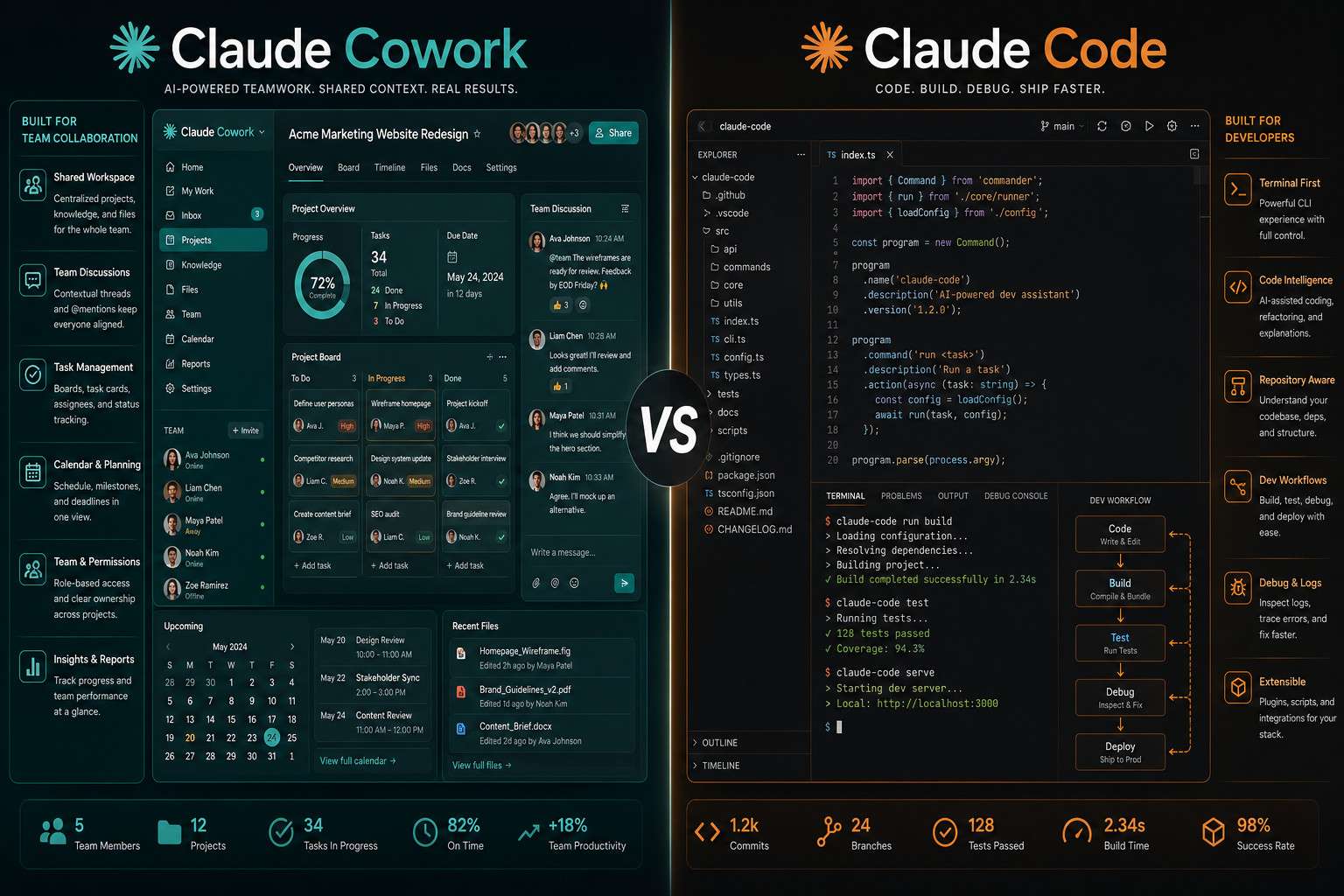
Claude Cowork and Claude Code are two distinct product interfaces built on top of Anthropic’s Claude AI model. Think of them as the same engine installed in two very different vehicles — one built for the highway, one for city streets.
Claude Code is a command-line interface (CLI) tool that lets developers give Claude direct, agentic control over their codebase. It can read files, write code, run tests, and interact with version control systems without constant hand-holding. It was designed for engineers who want AI deeply embedded in their development workflow [3].
Claude Cowork launched in January 2026 as Anthropic’s attempt to bring that same power to non-developers. It offers a visual, collaborative workspace where teams can assign tasks to Claude, manage projects, generate documents, and coordinate work — all without touching a terminal [4]. As TechCrunch described it at launch, Cowork is essentially “Claude Code without the code” [4].
Key distinctions at a glance:
| Feature | Claude Cowork | Claude Code |
|---|---|---|
| Primary interface | Visual web UI | Command-line (CLI) |
| Target user | Business teams, PMs | Software developers |
| Core strength | Collaboration, docs, project flow | Code writing, debugging, refactoring |
| Technical skill required | Low | Medium to high |
| Agentic capabilities | Task delegation, workflow | Full codebase manipulation |
What Are the Key Differences Between Claude Cowork and Claude Code?
The core difference is context of use, not intelligence. Both tools access the same Claude model, so the AI’s reasoning ability is essentially equal. What differs is how you interact with it and what tasks each interface is optimized for [1].
Claude Code is built for precision and depth in software work. It can autonomously navigate large repositories, propose multi-file edits, and run shell commands. For developers, this is a significant productivity multiplier — similar in spirit to other AI code assistant tools but with notably stronger agentic behavior.
Claude Cowork, by contrast, is built for breadth across business workflows. It handles document drafting, meeting summaries, task assignment, and cross-team coordination. It’s closer to a smart project management layer than a coding tool [6].
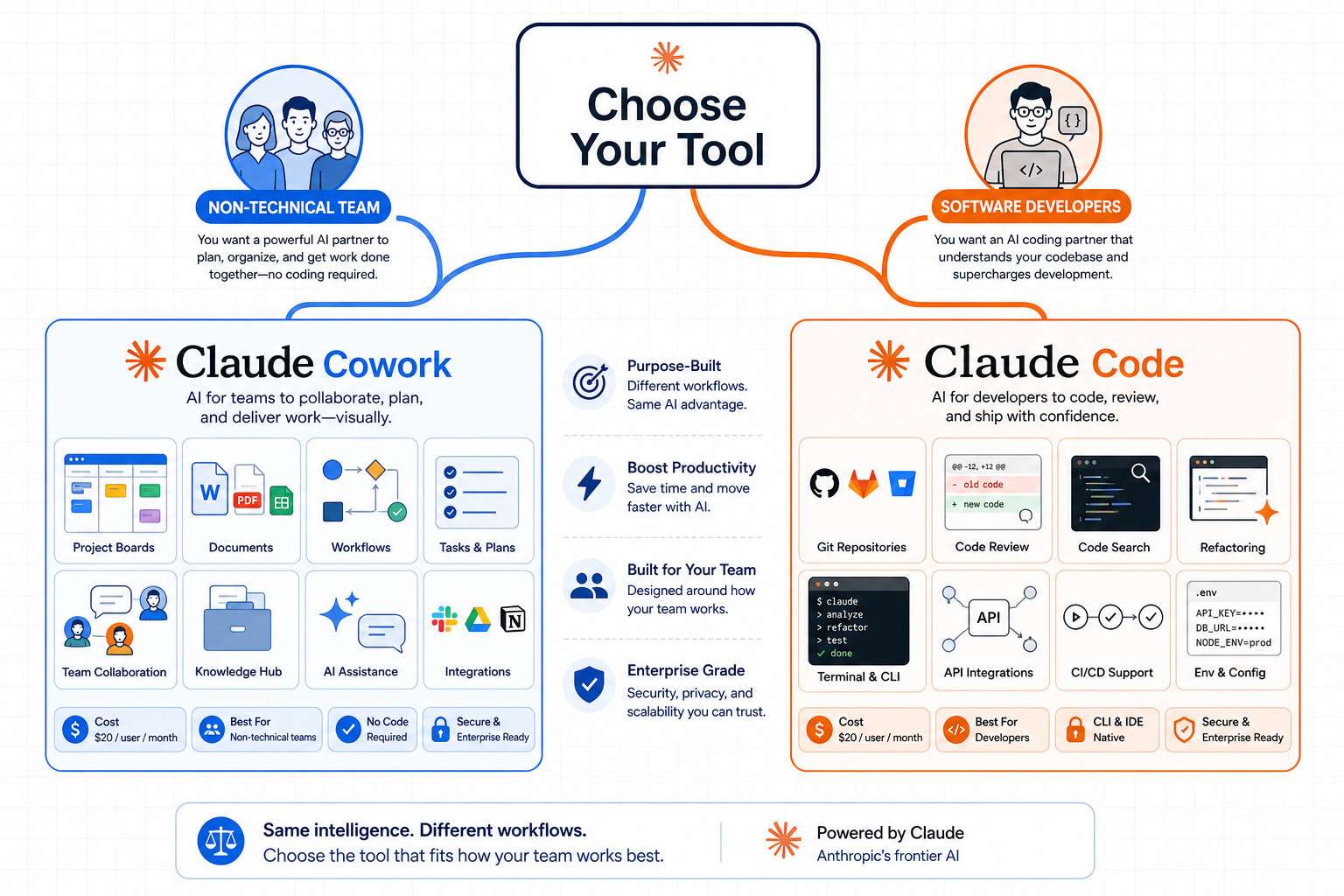
Choose Claude Code if:
- You write or review code daily
- You need AI to autonomously handle multi-step development tasks
- You work with GitHub, CI/CD pipelines, or complex codebases
Choose Claude Cowork if:
- Your team produces documents, reports, or business deliverables
- You manage projects and need AI to help coordinate work
- You want AI assistance without any technical setup
Which One Is Better for Team Collaboration?
Claude Cowork is the stronger choice for team collaboration. It was built specifically for shared workspaces, multi-user task delegation, and coordinated output across departments [4].
Claude Code, while powerful, is fundamentally a single-developer tool. Teams of engineers can each use it individually, but it doesn’t offer native shared workspaces or project boards in the way Cowork does. For software teams that want collaborative code review and AI assistance, pairing Claude Code with tools like GitHub works better than expecting it to handle team coordination natively [3].
Claude Cowork’s collaboration features include:
- Shared project workspaces where multiple team members can assign tasks to Claude
- Document co-creation with AI-generated drafts that the team can refine together
- Workflow automation for recurring business processes
- Integration with common productivity tools [6]
How Much Do Claude Cowork and Claude Code Cost?
Pricing for both tools sits within Anthropic’s broader plan structure, though the specifics differ [6].
Claude Code is accessible through the Claude Pro plan (approximately $20/month as of mid-2026) and through API usage billed by token volume. Heavy developer use — especially agentic tasks that run many API calls — can push costs higher through the API route.
Claude Cowork launched with its own pricing tier aimed at business teams, with per-seat pricing for team plans. Enterprise pricing is available for larger organizations needing advanced admin controls and higher usage limits [6].
Common mistake: Many users assume Claude Code is cheaper because it’s a CLI tool. In practice, agentic coding sessions consume significant tokens, so API costs can accumulate quickly for active developers. Budget for actual usage patterns, not just the base subscription.
For a broader look at how AI tools are priced and compared, the NotebookLM vs Gemini comparison offers useful context on evaluating AI tool value.
Can I Use These Tools If I’m a Small Business Owner?
Yes, and for most small business owners without a technical background, Claude Cowork is the better starting point. It requires no coding knowledge, no CLI setup, and no developer experience [4].
A small business owner can use Claude Cowork to draft proposals, summarize client communications, manage project timelines, and generate marketing content — all from a visual interface. The learning curve is comparable to learning a new project management app.
Claude Code, on the other hand, requires comfort with the command line and at least a basic understanding of software development concepts. A non-technical small business owner would struggle to extract value from it without developer support.
Edge case: If you’re a solo founder who is also your own developer, Claude Code can be a significant time-saver. Many indie developers and technical founders use it to accelerate product development. For a comparison of similar developer-focused AI tools, see Replit vs Claude Code.
Which Tool Is Best for Software Development Teams?
Claude Code is the clear winner for software development teams. It integrates directly into developer workflows, supports autonomous multi-step coding tasks, and works inside the environments developers already use [3].
That said, software teams often benefit from using both tools in tandem. Developers use Claude Code for the actual coding work, while project managers and product owners use Claude Cowork to coordinate sprints, draft specs, and manage stakeholder communication [1].
Software development use cases where Claude Code excels:
- Writing boilerplate and scaffolding new features
- Refactoring legacy code across multiple files
- Debugging with full codebase context
- Generating and running tests autonomously
For teams exploring related AI coding platforms, Claude Code competes closely with tools like Bolt AI and Replit’s AI features.
Is Claude Code Good for Non-Technical Teams?
Claude Code is not well-suited for non-technical teams. Its command-line interface assumes familiarity with terminals, file systems, and basic developer concepts. Without that foundation, the tool is difficult to set up and even harder to use effectively [4].
Non-technical teams attempting to use Claude Code will likely spend more time troubleshooting the environment than actually benefiting from the AI. This is precisely why Anthropic built Claude Cowork — to serve the large portion of their user base that wanted Claude’s capabilities without the developer prerequisites [4].
If your team is non-technical but wants to explore AI-assisted workflows, Claude Cowork is the right entry point. For teams interested in no-code AI workflows more broadly, the No-Code tools archive covers a range of relevant options.
Can Claude Cowork Help With Project Management?
Claude Cowork was explicitly designed with project management use cases in mind. It can help teams organize tasks, generate project documentation, summarize progress, and coordinate work across multiple contributors [6].
Specific project management capabilities include:
- Creating and assigning tasks within shared workspaces
- Drafting project briefs, status reports, and meeting notes
- Breaking large goals into actionable subtasks with AI assistance
- Generating timelines and identifying potential bottlenecks
It’s not a full replacement for dedicated project management software like Asana or Jira, but it adds a strong AI layer on top of those workflows. For teams already using automation tools, pairing Claude Cowork with workflow automation platforms can extend its reach significantly — see this guide on n8n workflow automation strategies for ideas.
What Are the Limitations of Claude Cowork and Claude Code?
Both tools have meaningful constraints that users should understand before committing.
Claude Code limitations:
- Requires technical setup and command-line familiarity
- Agentic tasks can be costly in API token usage
- Works best in structured codebases; messy legacy code can confuse it
- No built-in team collaboration features [3]
Claude Cowork limitations:
- Less powerful for deep technical tasks compared to Claude Code
- Still maturing as a product (launched early 2026, so some features are in active development) [4]
- Integration library is narrower than established project management tools
- May not satisfy power users who want granular AI control [7]
Common mistake: Teams choose Claude Code because it sounds more powerful, then abandon it when they realize the setup complexity outweighs the benefit for their non-technical workflows. Match the tool to the actual user, not the aspirational one.
How Do Claude Cowork and Claude Code Handle Data Privacy?
Both tools operate under Anthropic’s core privacy and data policies, which means user data is not used to train Claude models by default on paid plans [5]. Enterprise plans for both tools offer additional controls, including data retention settings and compliance features for regulated industries.
Key privacy considerations:
- API usage through Claude Code gives developers more control over what data is sent to the model
- Claude Cowork, as a hosted product, processes data through Anthropic’s servers — review their data processing agreements for sensitive business information
- Enterprise tiers for both tools offer stronger data isolation and admin controls [6]
For teams with strict compliance requirements, reviewing Anthropic’s enterprise data agreements before deploying either tool in production is essential. This is especially relevant for industries like healthcare, legal, and finance.
What Kind of Integrations Do Claude Cowork and Claude Code Support?
Claude Code integrates primarily with developer toolchains: GitHub, shell environments, code editors, and CI/CD systems. Its integration model is flexible because it operates at the command line, meaning it can interact with almost any tool accessible via terminal [3].
Claude Cowork supports integrations with business productivity tools, though its integration library is still expanding as of mid-2026. Current and announced integrations include common document and communication platforms [6].
For teams that rely heavily on custom integrations and automation, combining either Claude tool with a dedicated automation platform can fill gaps. The comprehensive guide to AI-powered content generation tools covers how AI tools like these fit into broader content and workflow stacks.
Which Tool Is Easier to Learn and Use?
Claude Cowork is significantly easier to learn. Its visual interface is accessible to anyone comfortable with standard web applications, and most users can become productive within hours of signing up [4].
Claude Code has a steeper learning curve. Users need to install it, configure their environment, and understand how to structure prompts for agentic coding tasks. Developers familiar with CLI tools will adapt quickly; non-developers will find it challenging [3].
Learning curve estimate:
- Claude Cowork: 1-3 hours to basic proficiency for most users
- Claude Code: 1-3 days for developers; significantly longer for non-technical users
What Are Common Mistakes People Make When Choosing Between These Tools?
The biggest mistake in this Claude Cowork vs Claude Code: A Comprehensive AI Productivity Showdown is choosing based on name recognition or perceived prestige rather than actual workflow fit.
Other frequent mistakes:
- Assuming Claude Code is always more powerful. For non-coding tasks, Claude Cowork’s interface actually surfaces Claude’s capabilities more effectively for business users.
- Underestimating API costs for Claude Code. Agentic sessions can run many thousands of tokens per task. Budget accordingly.
- Expecting Claude Cowork to replace dedicated project management software. It augments those tools; it doesn’t replace them.
- Ignoring the team’s technical baseline. A tool your team won’t use is worthless regardless of its capabilities.
- Not testing both before committing. Anthropic offers trial access — use it to validate the fit before purchasing team seats.
For teams evaluating multiple AI tools simultaneously, the Claude Archives on webaistack.com is a useful resource for ongoing coverage of Claude product updates.
Conclusion
The Claude Cowork vs Claude Code: A Comprehensive AI Productivity Showdown ultimately comes down to one question: who is doing the work, and what kind of work is it?
If your team writes code for a living, Claude Code is the stronger investment. It gives developers a genuinely capable AI partner that can handle complex, multi-step coding tasks autonomously. If your team manages projects, creates business documents, or coordinates cross-functional work without a technical background, Claude Cowork is the better fit — and the easier path to real productivity gains.
Actionable next steps:
- Identify the primary users and their technical skill level before purchasing
- Start with a trial of the tool that matches your team’s actual workflow
- For development teams, test Claude Code on a real but low-stakes codebase first to calibrate its capabilities and costs
- For business teams, map out three to five recurring tasks you’d want Claude Cowork to handle, then evaluate whether it handles them well during the trial
- Consider using both tools in larger organizations where technical and non-technical teams need to collaborate
The same AI brain powers both tools. Your job is simply to pick the right interface for the work you actually do.
FAQ
What is the main difference between Claude Cowork and Claude Code? Claude Cowork is a visual collaboration tool for non-technical business teams; Claude Code is a command-line coding tool for software developers. Both use the same Claude AI model but serve entirely different workflows.
Can I use Claude Cowork for software development? Not effectively. Claude Cowork lacks the deep code integration and developer toolchain support that Claude Code provides. For software development, Claude Code is the appropriate tool.
Is Claude Code free? Claude Code is accessible through Claude Pro (approximately $20/month) and via API with pay-per-token pricing. Heavy agentic use through the API can add significant costs beyond the base subscription.
Which tool is better for a marketing team? Claude Cowork. Marketing teams benefit from its document generation, content drafting, and project coordination features without needing any technical setup.
Can Claude Cowork replace a project manager? No, but it can make a project manager significantly more productive. It handles drafting, summarizing, and task organization, but human judgment and stakeholder management remain essential.
How does Claude Code compare to GitHub Copilot? Claude Code is more agentic — it can take multi-step actions across a codebase autonomously, not just suggest completions. GitHub Copilot is primarily an inline code suggestion tool. They serve overlapping but distinct use cases.
Is my data safe with Claude Cowork and Claude Code? Both tools operate under Anthropic’s privacy policies. On paid plans, user data is not used for model training by default. Enterprise plans offer additional data controls and compliance features.
Can a non-developer set up Claude Code? It’s possible but not recommended. Claude Code requires command-line setup and developer environment configuration. Non-developers will likely find the setup frustrating and the tool difficult to use effectively.
Which tool launched first? Claude Code came first. Claude Cowork launched in January 2026 as Anthropic’s effort to make similar capabilities accessible to non-technical users.
Do I need to choose one or the other? Not necessarily. Larger organizations often use both: developers use Claude Code for engineering work, while business teams use Claude Cowork for coordination and documentation.
References
[1] Claude Cowork Vs Claude Code – https://automatonagency.com/insights/claude-cowork-vs-claude-code [2] Mcplato Vs Claude Code Cowork – https://mcplato.com/en/blog/mcplato-vs-claude-code-cowork/ [3] Claude Cowork Vs Claude Code – https://www.lowcode.agency/blog/claude-cowork-vs-claude-code [4] Anthropics New Cowork Tool Offers Claude Code Without The Code – https://techcrunch.com/2026/01/12/anthropics-new-cowork-tool-offers-claude-code-without-the-code/ [5] Claude Claude Code Cowork Guide – https://ai.zenken.co.jp/en/post/claude-claude-code-cowork-guide/ [6] Claude Cowork Review 2026 Features Pricing Vs Claude Code – https://www.linos.ai/technology/claude-cowork-review-2026-features-pricing-vs-claude-code/ [7] Claude Cowork Vs Claude Code – https://lilys.ai/it/notes/claude-cowork-20260210/claude-cowork-vs-claude-code