
Last updated: May 11, 2026
Quick Answer
Cursor AI is a VS Code-based code editor with built-in AI capabilities that can save developers an estimated 90 minutes per day on routine coding tasks. Its standout features in 2026 include Agent Mode with up to 8 parallel subagents, Supermaven autocomplete with multi-line predictions, and new additions like Design Mode and PR review tools. At $20/month for the Pro plan, it’s positioned as a high-ROI tool for developers who code more than four hours daily.
Key Takeaways
- Agent Mode (Composer) now supports up to 8 parallel agents with 20x scaled reinforcement learning and 60% latency reduction [7]
- Supermaven autocomplete provides multi-line, context-aware code predictions with automatic imports [7]
- New
/multitaskcommand (May 2026) enables async subagents directly in the editor [1][2] - PR review experience includes inline threads, focused commits view, and built-in actions like splitting changes [2]
- Enterprise controls now cover model access, spend limits, and per-user usage analytics [2]
- Bugbot self-improves from PR feedback in real time, with the highest bug resolution rate to date [2]
- A Git RCE vulnerability was patched in version 2.5 around May 2, 2026, with no known in-the-wild exploitation [3]
- Pricing: Free tier available; Pro at $20/month; Business and Enterprise tiers for teams [4]
- Top alternatives: Windsurf ($15/mo), GitHub Copilot ($10-39/mo), Claude Code ($20-200/mo), Cline (free BYOK) [7]
- Enterprise adoption now accounts for 60% of Cursor’s revenue, up from 13.6% previously
What Is Cursor AI and Why Should You Care About It in 2026?
Cursor AI is a code editor built on top of VS Code that integrates AI assistance directly into every part of the development process. It’s not a plugin or extension; it’s a standalone editor where AI is a first-class citizen.
Here’s why it matters right now: SpaceX recently struck a deal with Cursor’s parent company Anysphere that includes an option to acquire the startup for $60 billion [6][9]. That kind of valuation signals serious enterprise confidence. And the numbers back it up: Cursor has shifted from a developer-first indie tool to one where 60% of revenue now comes from enterprise clients.
For individual developers, the value proposition is simpler. Cursor understands your entire codebase, not just the file you’re editing. It can refactor across multiple files, generate tests, debug issues, and even review pull requests. If you’re spending time on AI-powered content and workflow automation, the same principles of AI-assisted productivity apply directly to code.
Choose Cursor if: You code 4+ hours daily, work across multiple files regularly, and want AI that understands project context rather than just individual lines.
Skip it if: You’re a casual coder who only edits config files occasionally, or you’re committed to a JetBrains IDE with no interest in switching.
How Does Cursor AI’s Agent Mode Revolutionize Your Coding Workflow?
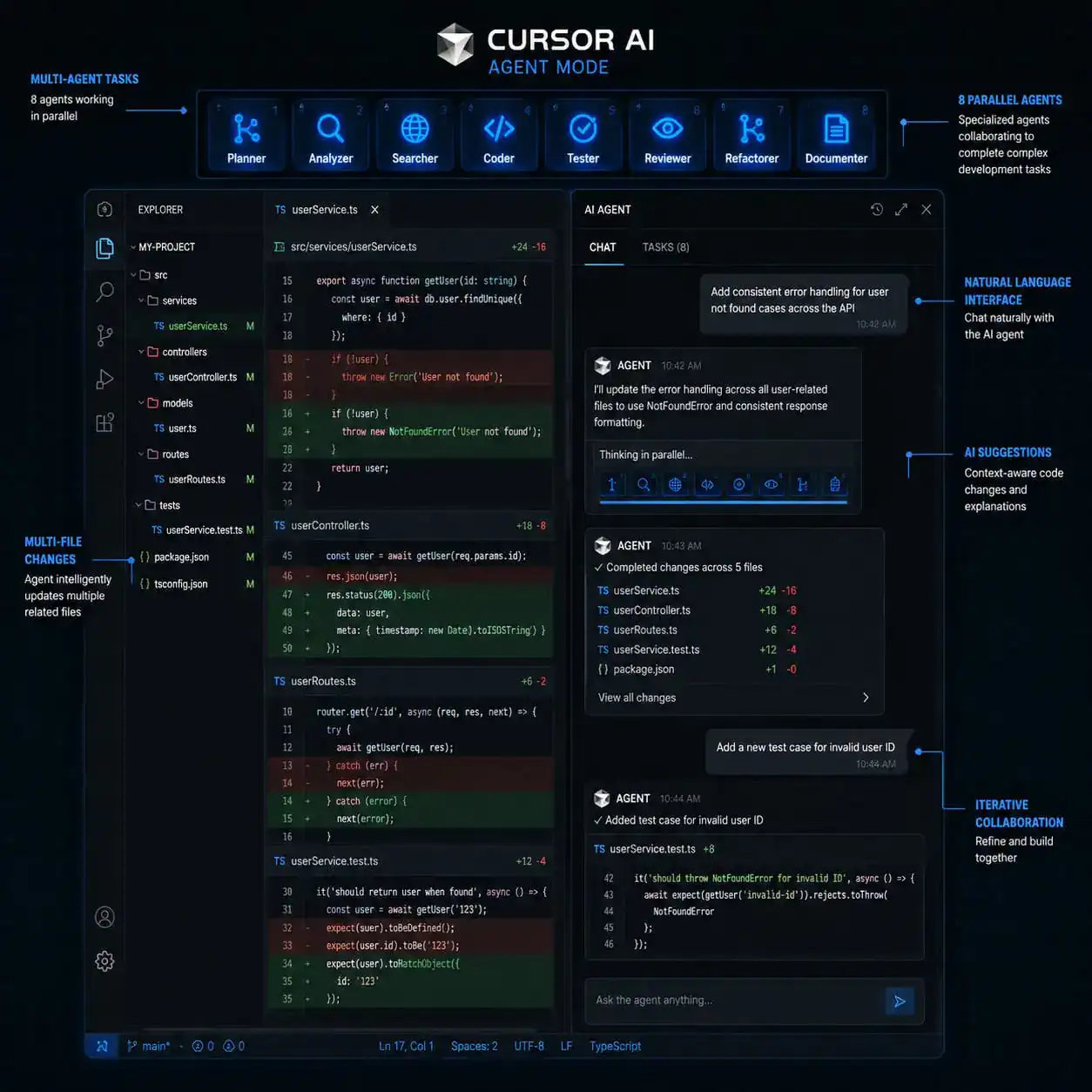
Agent Mode (formerly called Composer) is Cursor’s most powerful feature, and the May 2026 updates made it significantly better. It functions as an autonomous coding agent that can plan, execute, and iterate on multi-step tasks across your entire project.
Here’s what Agent Mode can do in 2026:
- Run up to 8 parallel agents simultaneously, each handling different subtasks [7]
- Edit multiple files in a single operation with full project context
- Execute terminal commands to install dependencies, run tests, or build projects
- Self-summarize long conversations to maintain context without degrading performance [7]
- Use the new
/multitaskcommand to spawn async subagents directly in the editor [1][2]
The /multitask feature, released on May 4, 2026, is particularly useful. Instead of waiting for one agent task to finish before starting another, you can kick off several in parallel. For example, you could have one agent writing unit tests while another refactors a utility module and a third updates documentation.
Common mistake: Giving Agent Mode vague instructions like “make this better.” Be specific: “Refactor the authentication middleware in auth.ts to use JWT tokens instead of session cookies, and update all route handlers that depend on it.” The more precise your prompt, the better the output.
Developers on Reddit and G2 have rated Cursor between 4.6 and 4.8 out of 5, with many describing Composer refactors as turning “nightmares into joy.” If you’re interested in how AI tools are changing broader development workflows, our guide on AI-powered content optimization covers similar principles.
What’s New in Cursor’s May 2026 Updates?
The May 2026 release cycle brought several meaningful additions beyond /multitask. Here’s a breakdown:
| Feature | What It Does | Who Benefits |
|---|---|---|
/multitask | Async subagents in editor | Developers handling complex, multi-part tasks |
| PR Review | Inline threads, focused commits, split PR actions | Teams doing code review |
| Design Mode | Visual design collaboration within the editor | Frontend developers, designer-developer teams |
| Improved prompt undo | Better grouping of undo operations | Everyone (quality-of-life fix) |
| Long-chat handling | More stable performance in extended sessions | Power users with complex prompts |
| MCP connections | More predictable Model Context Protocol behavior | Developers using custom tool integrations |
| Enterprise analytics | Usage filtering by user, product (Bugbot, Security Review) | Engineering managers, admins |
Sources: [1][2]
Bugbot also received notable upgrades. It now learns from PR feedback in real time, supports MCP, and has its highest bug resolution rate yet [2]. If your team uses automated bug detection, Bugbot’s Autofix enhancements mean fewer manual interventions.
Edge case to watch: A Git remote code execution vulnerability was discovered in Cursor’s AI agent that could be exploited through malicious Git repositories. It was patched in version 2.5 around May 2, 2026, with no reports of in-the-wild abuse [3]. Make sure you’re running the latest version.
How Does Supermaven Autocomplete Compare to GitHub Copilot?
Supermaven, Cursor’s built-in autocomplete engine, is consistently described as faster and more context-aware than GitHub Copilot’s inline suggestions. NxCode’s 2026 review calls it “telepathic” [7], and that’s not far off.
What makes Supermaven different:
- Multi-line predictions: It doesn’t just complete the current line. It predicts entire blocks based on what you’re likely writing next.
- Project-wide context: Supermaven indexes your codebase, so suggestions reflect your actual patterns, naming conventions, and architecture.
- Automatic imports: When it suggests code that requires a new import, it adds the import statement automatically.
- 60% latency reduction compared to earlier versions [7]
GitHub Copilot, by comparison, works well for single-line completions and is deeply integrated with GitHub’s ecosystem (issues, PRs, Actions). If your workflow is GitHub-centric, Copilot at $10-39/month still makes sense.
Decision rule: Choose Cursor + Supermaven if you want deep codebase awareness and multi-file editing. Choose Copilot if you live in GitHub and want tight integration with your existing tools. For teams exploring no-code and low-code alternatives, the AI-assisted approach in Cursor bridges the gap between full coding and visual builders.
How Much Does Cursor AI Cost, and Is It Worth the Investment?
Cursor offers tiered pricing designed to scale from individual hobbyists to large enterprises:
- Free (Hobby): Limited AI completions, basic features, good for trying it out
- Pro ($20/month): Unlimited completions, Agent Mode, priority model access
- Business ($40/user/month): Team features, admin controls, centralized billing
- Enterprise (custom pricing): SSO, audit logs, advanced analytics, dedicated support
Source: [4]
Is Pro worth it? For developers coding more than 4 hours daily, the math works out clearly. If Cursor saves even 30 minutes per day (conservative, given reports of 90-minute savings), that’s roughly 10 hours per month. At $20/month, you’re paying $2/hour for recovered productivity.
Watch out for credit overages. Cursor’s Pro plan includes a set number of “fast” model requests. Heavy users can burn through these, especially when using Agent Mode extensively. Cursor has added alerts to mitigate surprise charges [4], but it’s worth monitoring your usage in the first month.
For teams already using WordPress AI plugins or AI design tools, adding Cursor to the stack creates a consistent AI-assisted workflow from design to deployment.
How Does Cursor Stack Up Against Windsurf, Claude Code, and Other Alternatives?
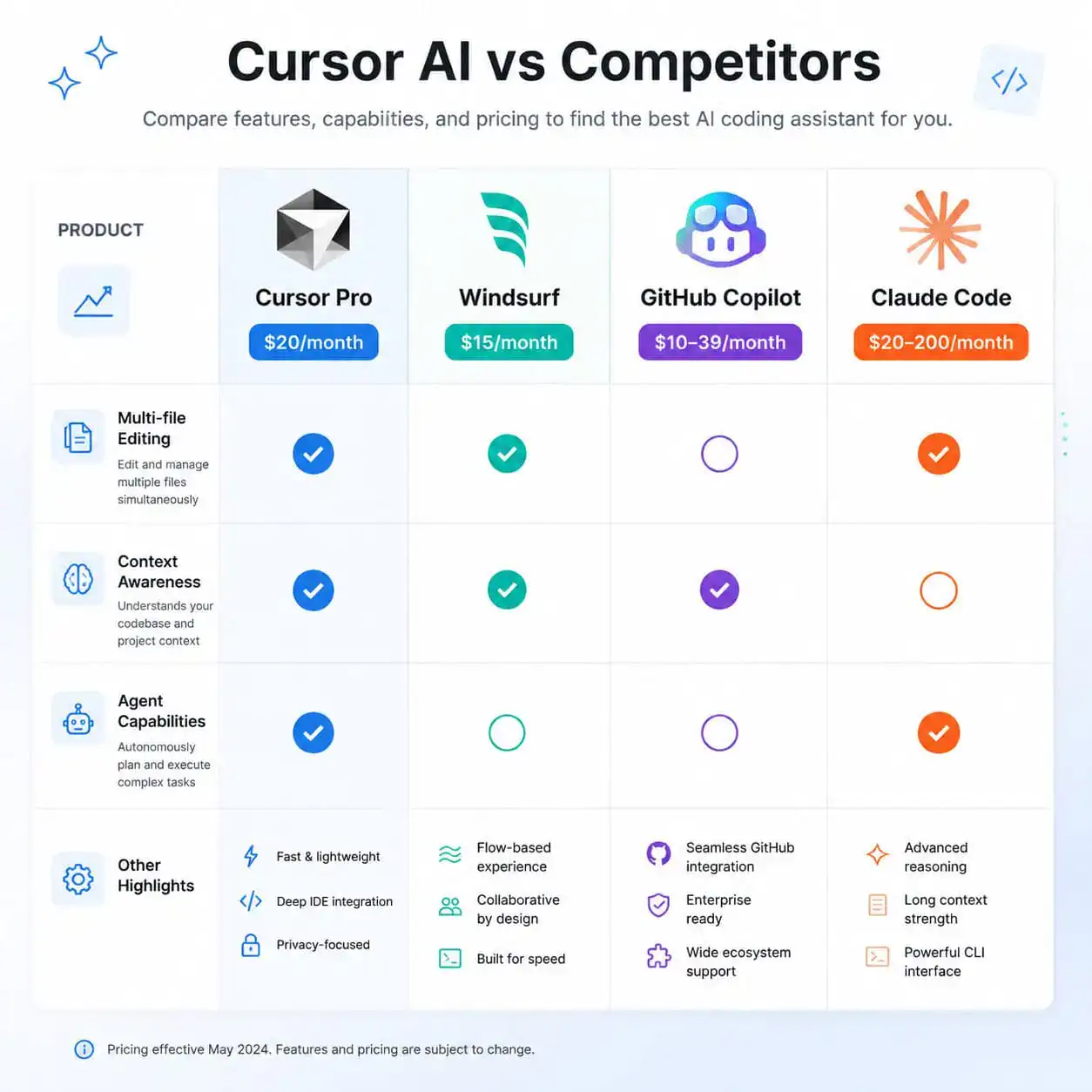
The AI coding editor market is crowded in 2026. Here’s how the main options compare:
| Tool | Price | Best For | Key Strength |
|---|---|---|---|
| Cursor Pro | $20/mo | Full-stack developers, multi-file projects | Deep codebase context, Agent Mode |
| Windsurf | $15/mo | Developers switching from Cursor on a budget | Cascade agents, Supercomplete, VS Code-based |
| GitHub Copilot | $10-39/mo | GitHub-heavy workflows | Tight GitHub integration, inline suggestions |
| Claude Code | $20-200/mo | Large codebases, complex reasoning | 1M token context, step-by-step plans |
| Cline | Free (BYOK) | Budget-conscious developers with API keys | Open source, bring your own model |
Source: [7]
Windsurf is the closest direct competitor and the easiest switch from Cursor since it’s also VS Code-based. Its Cascade agent system handles multi-file awareness similarly, and at $5/month less, it’s worth evaluating.
Claude Code excels when you need to reason about very large codebases. Its 1M token context window means it can hold more of your project in memory at once, which matters for monorepos or legacy systems.
Common mistake: Assuming all AI coding tools are interchangeable. They’re not. The quality of context awareness, the speed of completions, and the reliability of multi-file edits vary significantly. Try at least two before committing.
How Do You Get Started with Cursor AI?
Setting up Cursor takes about 10 minutes. Here’s the process:

Step-by-step setup checklist
- Download Cursor from cursor.com (available for macOS, Windows, Linux)
- Import VS Code settings during setup (extensions, keybindings, themes transfer automatically)
- Sign up for an account (free tier works for initial testing)
- Open your project and let Cursor index your codebase (this takes 1-5 minutes depending on size)
- Try Tab completion first: start typing and accept Supermaven’s suggestions with Tab
- Open Agent Mode with Cmd/Ctrl+I and give it a specific task
- Use
/multitaskfor parallel operations once you’re comfortable with single-agent tasks [1] - Configure MCP connections if you use custom tools or APIs [2]
Pro tip: Start with small, well-defined tasks in Agent Mode before asking it to refactor entire modules. This helps you calibrate how specific your prompts need to be.
If you’re coming from a design background and want to understand how code editors fit into the broader workflow, our Figma to code plugins guide explains the design-to-development pipeline that Cursor’s new Design Mode is targeting [2].
For those building WordPress sites, Cursor pairs well with custom theme development workflows where AI-assisted coding can speed up template creation and plugin customization.
What Are the Risks and Limitations of Using Cursor AI?
No tool is perfect. Here are the real downsides:
Security concerns: The Git RCE vulnerability patched in May 2026 [3] is a reminder that AI-powered tools expand your attack surface. Always run the latest version and be cautious when cloning unfamiliar repositories.
Credit system frustrations: Heavy Agent Mode usage can exhaust your monthly fast-request allocation quickly. Monitor your usage dashboard and set up spending alerts [4].
Over-reliance risk: Cursor is excellent at generating code, but it can produce subtly incorrect logic that passes a quick visual review. Always run tests on AI-generated code.
Learning curve for Agent Mode: Getting good results from multi-agent tasks requires clear, structured prompts. Vague instructions produce vague results.
Vendor lock-in: While Cursor is VS Code-based, its AI features don’t transfer if you switch editors. Your muscle memory and workflows become tied to the platform.
Conclusion
Cursor AI in 2026 is a mature, capable coding tool that genuinely changes how developers work. The May 2026 updates, particularly /multitask, improved PR reviews, and Bugbot enhancements, push it further ahead of where it was even three months ago [1][2].
Here’s what to do next:
- Download the free version and spend a week using Tab completion on a real project
- Upgrade to Pro if you find yourself relying on the AI suggestions daily
- Learn Agent Mode by starting with specific, single-file tasks before scaling to multi-file operations
- Compare with Windsurf or Copilot if budget or ecosystem fit matters to your team
- Stay updated on security patches, especially if you work with external repositories [3]
The $20/month Pro plan pays for itself quickly for active developers. But don’t take my word for it: the free tier gives you enough runway to decide for yourself.
FAQ
Is Cursor AI free to use? Yes, Cursor offers a free Hobby tier with limited AI completions. The Pro plan at $20/month unlocks unlimited completions and full Agent Mode access [4].
Can I import my VS Code extensions into Cursor? Yes. Cursor is built on VS Code, so your extensions, keybindings, themes, and settings transfer during the initial setup process [10].
How does Cursor AI handle code privacy? Cursor offers a Privacy Mode where your code is not stored on their servers. Enterprise plans include additional controls like SSO and audit logs [2].
Is Cursor better than GitHub Copilot? For multi-file editing and deep codebase context, Cursor generally outperforms Copilot. For GitHub-integrated workflows and simpler inline completions, Copilot remains strong [7].
What programming languages does Cursor support? Cursor supports all languages that VS Code supports, including Python, JavaScript, TypeScript, Go, Rust, Java, C++, and many more [10].
Was there a security issue with Cursor in 2026? Yes. A Git remote code execution vulnerability was discovered and patched in version 2.5 around May 2, 2026. No in-the-wild exploitation was reported [3].
What is the /multitask command?
Released May 4, 2026, /multitask lets you spawn multiple async subagents in the editor to handle parallel coding tasks simultaneously [1][2].
How much can Cursor AI actually save me per day? Developer surveys report savings of approximately 90 minutes per day on routine tasks like boilerplate code, refactoring, and debugging.
What is Bugbot in Cursor? Bugbot is Cursor’s automated bug detection tool that reviews PRs, identifies issues, and can auto-fix certain bugs. It now self-improves from PR feedback [2].
Should I switch from Windsurf to Cursor? Switch if you need stronger Agent Mode capabilities and don’t mind the $5/month price difference. Stay with Windsurf if it meets your needs at a lower cost [7].
References
[1] Changelog – https://cursor.com/changelog [2] Cursor – https://releasebot.io/updates/cursor [3] Cursor News May 2026 – https://blog.mean.ceo/cursor-news-may-2026/ [4] What Happened To Cursor Pricing 2026 Guide 5 Cost Cutting Tips – https://www.finout.io/blog/what-happened-to-cursor-pricing-2026-guide-5-cost-cutting-tips [6] Spacex Strikes 60 Billion Deal Cursor – https://fortune.com/2026/04/22/spacex-strikes-60-billion-deal-cursor/ [7] Cursor Ai Review 2026 Features Pricing Worth It – https://www.nxcode.io/resources/news/cursor-ai-review-2026-features-pricing-worth-it [9] Spacex Is Working With Cursor And Has An Option To Buy The Startup For 60 Billion – https://techcrunch.com/2026/04/21/spacex-is-working-with-cursor-and-has-an-option-to-buy-the-startup-for-60-billion/ [10] How To Use Cursor Ai 2026 Beginner To Pro Guide – https://www.ai.cc/blogs/how-to-use-cursor-ai-2026-beginner-to-pro-guide/